Aging NAS hardware and the fear of moving to the cloud
In many small and medium-sized enterprises, file servers (NAS) remain the single largest bottleneck hindering digital transformation.
- Five to ten years have passed since purchase, and failure could happen at any moment
- Backups are not maintained, or recovery steps are undocumented
- VPNs are chronically congested due to remote work demand
- Physical expansion work is required every time storage capacity runs out
While moving to cloud storage (such as Google Drive, OneDrive, or Box) is an option, many companies hesitate because the file server workflow changes, internal line-of-business applications reference files via UNC paths, or the sheer volume of files creates migration anxiety.
Announced by AWS in April 2026, Amazon S3 Files has the potential to fundamentally alter this landscape.
What is Amazon S3 Files?
Making S3 accessible as a filesystem
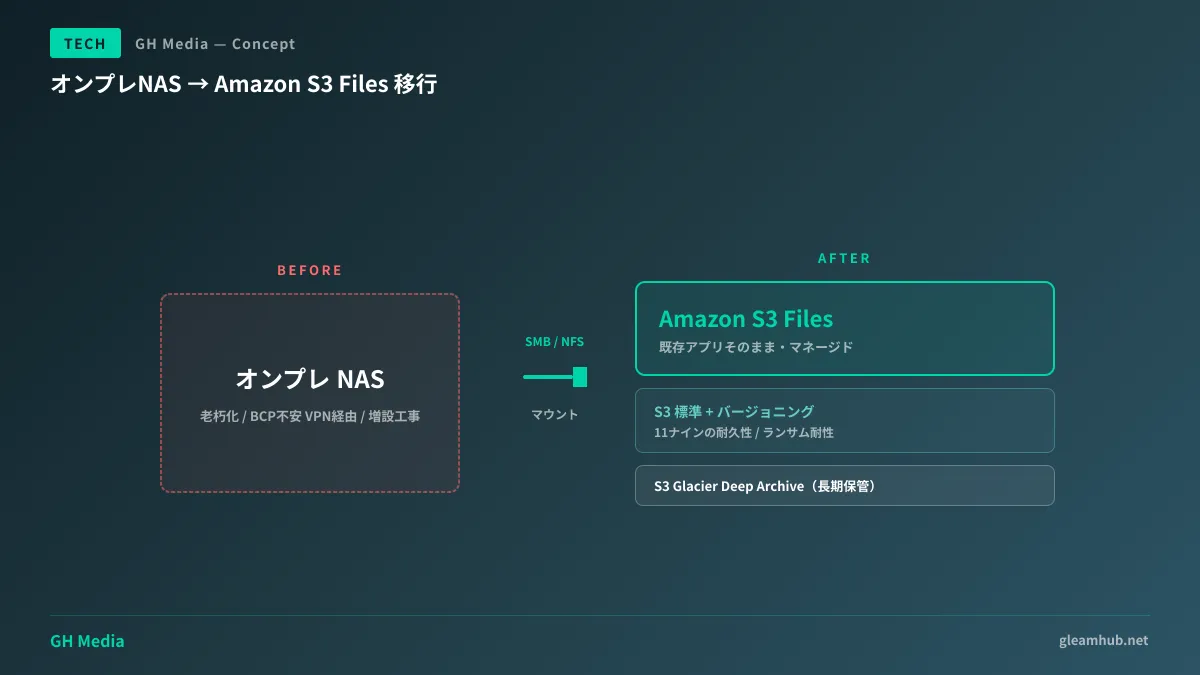
Amazon S3 Files is a new capability that lets you mount existing S3 buckets as filesystems (via NFS or SMB). While third-party tools such as s3fs have existed previously, the critical difference is that this is provided as an official, fully managed AWS service.
| Item | Conventional S3 | Amazon S3 Files |
|---|---|---|
| Access method | API(SDK/CLI) | NFS / SMB mount |
| Application compatibility | Dedicated client required | Runs existing Windows and Linux applications without changes |
| Management | Bucket permissions | POSIX-style file permissions |
| Pricing | S3 standard + API request charges | S3 standard + mount fees |
| Use case | Backup and distribution | File server replacement |
In short, Windows network drives and line-of-business application file server paths can be pointed directly to S3 with zero code modifications.
Buzz across Publickey and Hacker News
This feature generated extensive discussion both in Japan and internationally between April 7 and 8, 2026. Featured on both Publickey and Hacker News, it represents an announcement that has earned solid validation across the engineering community.
What it means for SMEs
1. Massive reduction in NAS replacement hurdles
Historically, migrating from NAS to the cloud required the following steps.
- Rewriting paths in line-of-business applications
- Operational training for employees
- Redesigning permissions frameworks
- Planning the migration of historical file archives
With Amazon S3 Files, you can present storage as existing UNC paths via SMB mounts. This makes a hybrid migration practical: minimizing application refactoring costs while housing the backend in scalable S3 storage.
2. Automated backups and BCP resilience
S3 provides an inherent durability of 99.999999999% (eleven nines). By combining versioning, cross-region replication, and Object Lock (WORM), you can assemble a ransomware-resilient backup strategy using native features alone.
While ransomware defenses on Google Drive are discussed in AI Ransomware Detection in Google Drive, S3 Files provides a robust defense operating at a lower, infrastructure-centric layer.
3. Clear visibility into cost structures
Traditional NAS relied on opaque depreciation models based on upfront purchase and running hardware until failure, whereas S3 Files operates on monthly pay-as-you-go billing. Which department uses how much storage becomes transparent, establishing a clean foundation for governance.
Core migration design patterns
Pattern A: Phased replacement
A method where existing NAS appliances remain in place while transitioning to S3 Files by department or project. This carries low risk and is the easiest approach for SMEs to adopt.
- Create new shared directories directly on S3 Files
- Migrate active projects sequentially
- Automatically tier archived files to S3 Glacier Deep Archive
- Decommission the legacy NAS over a 6 to 12-month period
Pattern B: Single cutover
A strategy where all NAS data is bulk-copied to S3 Files over a weekend, switching mount targets on Monday morning. While fast, prior connectivity validation is essential.
Pattern C: Hybrid (cached)
A design deploying AWS Storage Gateway on-premise, keeping frequently accessed files in local cache while maintaining long-term storage in S3 Files. This works reliably even for regional offices with unstable network connections.
Key considerations during implementation
1. Network transfer costs and latency
S3 Files can generate unexpected data transfer charges if workloads involve massive volumes of read/write operations. Estimate network bandwidth and access patterns in advance, and evaluate caching architectures if needed.
2. Permissions migration
Directly transferring granular Windows NTFS ACLs to S3 Files can be challenging in certain scenarios. We recommend taking this opportunity to simplify and redefine permission structures.
3. Employee onboarding
Although everyday user interactions remain largely unchanged, behavior during network disconnects and offline editing may differ from traditional NAS setups. Be sure to prepare internal Q&A documentation.
4. Exit strategy (avoiding vendor lock-in)
The more operations consolidate into S3, the deeper AWS lock-in becomes. Maintain peace of mind by regularly validating procedures for exporting data to alternative storage. For supply-chain-level risks, please also refer to Supply Chain Attacks 2026.
Cost estimate (example: 30 employees, 5 TB of data)
| Item | Estimated monthly cost |
|---|---|
| S3 Standard storage (5 TB) | Approx. 15,000 JPY |
| S3 Files mount charges | Approx. 10,000 JPY |
| Data transfer (internal office use) | Approx. 5,000 JPY |
| Backup (cross-region) | Approx. 5,000 JPY |
| Total | Approx. 35,000 JPY / month |
When accounting for NAS replacement capital expenditures (1 to 3 million JPY), maintenance contracts, electricity, and BCP implementation, many organizations can recover their investment in 3 to 5 years.
Conclusion
Amazon S3 Files can serve as a pragmatic answer to the aging NAS dilemma for SMEs.
- What changes: Existing applications continue operating as-is via SMB/NFS mounts
- What you gain: BCP resilience, cost visibility, and scalability
- Migration design: Phased replacement / single cutover / hybrid
- Key considerations: Transfer costs, permission redesign, and lock-in mitigation
For broader cloud migrations of websites and enterprise applications, see SME DX Success Stories; for paired configurations with Google Workspace, refer to the Google Workspace Initial Setup Guide.
At GleamHub, we provide hands-on partnership to assist SMEs with cloud storage migration design, business application adaptation, and permissions restructuring. If you are struggling with legacy NAS migrations, please feel free to reach out.
References