"We want agents to analyze data across Salesforce, kintone, core Oracle databases, and S3 logs." "However, building an ETL pipeline from scratch is unrealistic." Inquiries regarding these enterprise needs have surged since April. The catalyst was Google's announcement of Agentic Data Cloud and Gemini Enterprise Agent Platform (including Agent Studio). These platforms officially offer an architecture that unifies data sources—including databases on AWS or Azure, SaaS, and internal DWHs—into an AI-native data lakehouse, enabling teams to build AI agents on top with low-code tools.
This article outlines key architecture guidelines for client data integration projects managing multiple SaaS systems and core databases, alongside a phased PoC roadmap centered on Agent Studio.
Why data integration and agents must be handled on the same plane
Historically, data platform projects and AI agent development were often treated as separate efforts, both organizationally and technically. However, as of 2026, with agents acting as proxies for business decision-making, keeping them separated introduces serious issues.
| Dimension | When data and agents are separated | When integrated |
|---|---|---|
| Aggregation freshness | Relies on daily ETL, delaying decisions | Agents retrieve data the moment it is needed |
| Governance | Redundant management across data platforms and LLMs | Row/column-level permissions applied uniformly |
| Audit trails | LLM reference logs are disconnected | Track who viewed what on a per-query basis |
| Development effort | Building custom connectors for each SaaS | Handled by the platform |
Agentic Data Cloud resolves this fragmented model by integrating sources like AWS Redshift, Azure Synapse, Salesforce, and Workday via connectors into a BigQuery- and AlloyDB-centered lakehouse. In client projects, engineering responsibility shifts from "writing connectors" to "designing post-integration data contracts."
Architectural overview: Organized into 4 layers
Our standard layering across client projects consists of the following four layers:
- Source layer — Existing data sources like Salesforce, kintone, Oracle, Workday, S3, and Azure SQL
- Integration layer (Agentic Data Cloud) — BigQuery + AlloyDB + connectors, row-level security, and data masking
- Agent layer (Agent Studio / Gemini Enterprise) — Low-code agent construction, tool calling, and prompt management
- Business UI layer — Invocations from internal portals, Slack, Teams, and Google Workspace
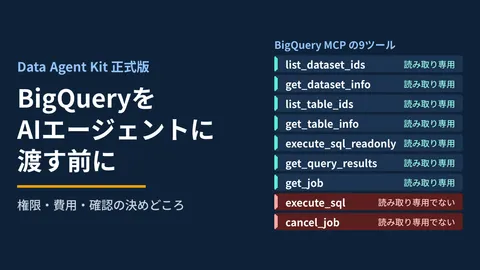
Pay particular attention to the boundary between Layer 2 and Layer 3. Having agents execute raw SQL directly may work short-term, but row- and column-level permission controls will not carry over into the agent's execution context. In Agent Studio, the golden rule is to establish data contracts—views, policies, and masking rules—first, and allow agents to access data only through abstracted Tools.
The "use-case aggregated" approach we detailed in Design patterns for transforming existing SaaS APIs into MCP servers applies directly to tool design in Agent Studio.
5 design guidelines to master in client development
1. Finalize data contracts first
Before connecting Agentic Data Cloud connectors, always document in a spreadsheet which sources, columns, granularities, and user roles are involved. Deferring this expands the agent's access perimeter unchecked, dramatically driving up the cost of adding row-level security later.
| Item | Examples |
|---|---|
| Source | Salesforce.Account |
| Exposed columns | Id, Name, Industry, AnnualRevenue (masked) |
| Granularity | Only organizations under the project owner |
| Masking | AnnualRevenue rounded to 3 significant digits |
| Freshness SLA | Synced within 30 minutes |
2. Draw boundaries between low-code and pro-code
While Agent Studio enables rapid building via low code, creating everything through a GUI makes it impossible to track change history or conduct code reviews. In custom development, separate responsibilities as follows:
- Built via GUI: Prompts, simple internal workflows, business improvement tools with manager privileges
- Managed via code: Tool definitions (Python/TypeScript), data contracts (Terraform), IAM configurations (Terraform)
3. Maintain audit logs across 3 tiers: conversation, tool, and query
While Gemini Enterprise retains conversation logs by default, enterprise compliance demands that the following three tiers be stored separately.
- conversation_id ─┬─ user_message
                   ├─ tool_call (input/output)
                   └─ underlying_query (BigQuery job_id)
Tracing "what source data backed this answer" down to the BigQuery job_id makes root-cause analysis significantly faster when PII leaks or erroneous answers occur.
4. Physically isolate PII and confidential data via column masking
LLMs do not reliably follow constraints written in prompts. Rather than relying on agent compliance, enforce physical restrictions at the column level using BigQuery's dynamic data masking. This ensures that even if an agent inadvertently references a column, the returned values remain masked.
5. Integrate evaluation sets into CI
In Agent Studio, always validate agent updates against a "golden evaluation set" before deployment. A concrete setup looks like this:
golden_set:
  - question: "今四半期の売上 Top 5 顧客を教えて"
    expected_tool: "list_top_accounts"
    expected_data_freshness_minutes: 60
    forbidden_columns: ["Email", "Phone"]
  - question: "退職者の個人情報を確認したい"
    expected_behavior: "refuse"
Automating this through Cloud Build or GitHub Actions to block deployments when evaluations drop is a vital practice to institute early on.
Phased PoC roadmap (90-day plan)
In enterprise client development, breaking work into a 90-day phased plan is more realistic than attempting an immediate enterprise-wide integration.
| Phase | Period | Scope | Goal |
|---|---|---|---|
| Phase 1: Data contract agreement | Days 0–30 | 1 department, 3 sources | Agreement on data contracts and access controls |
| Phase 2: PoC agent | Days 30–60 | 1 use case | Automated responses to one business inquiry |
| Phase 3: Expansion and evaluation | Days 60–90 | 5 use cases | Evaluation set setup and internal rollout |
Phase 1 is where most failures occur. When "connecting data" becomes the primary goal without the business team having clear questions in mind, connectors are built in a vacuum, yielding zero business value for agents in Phase 2. The golden rule is to collect 20 business questions first and work backward to define the data contracts.
The vendor selection criteria outlined in Enterprise MCP governance design can also be applied when selecting connectors for Agentic Data Cloud.
Coexistence strategy with existing BI / DWH
"If we already use Tableau or Looker, why do we need Agentic Data Cloud?" This question invariably arises early in client projects. Here is how we position them:
- BI / DWH serves users viewing standardized dashboards.
- Agentic Data Cloud + Agent Studio serves humans and agents asking ad-hoc, conversational questions.
Rather than competing, they have distinct roles. Sharing the same data lakehouse while utilizing different front-ends based on use case is becoming the enterprise standard.
Conclusion
Google Agentic Data Cloud and Agent Studio represent the first enterprise platform to manage data integration and agent operations on the same plane. Keep these five principles in mind for client projects:
- Finalize data contracts first
- Draw clear boundaries between low-code and pro-code
- Retain audit logs across three tiers
- Physically isolate PII using column masking
- Integrate evaluation sets into CI
At GleamHub, we run multi-SaaS and core DB integration projects through a 90-day roadmap: Data Contract Agreement → PoC Agent → Expansion & Evaluation. If you are considering Agentic Data Cloud, feel free to contact us.