Many managers have likely paused at the final consent screen when on the verge of adopting an external service integration. A tool that supposedly only needs read access ends up requesting permissions that bundle write and delete access as well. You only use a fraction of its features, yet you must hand over everything. Consent, or abandon adoption. There is no middle ground.
A mechanism that creates middle ground within this binary choice is now available on Cloudflare. Viewed from the standpoint of outsourcing integrations or AI agents, this is a technical matter, but it is equally a matter of whether you can add a single line to your acceptance criteria when ordering.
Splitting permissions into "required" and "optional"
On August 20, 2026, Cloudflare added a feature to OAuth client settings that allows requested permissions (scopes) to be categorized into required and optional. By default, as before, all configured permissions are treated as required.
Permissions designated as optional can be unchecked by users on the consent screen. Because they are selected by default, proceeding as is grants everything, but users who wish to opt out can do so. As before, unchecking a permission designated as required prevents authorization itself from proceeding.
MCP servers and AI agents have been specifically cited as the background behind this mechanism. Because agents cannot determine "what they will do next" until runtime, they tend to initially request the sum of everything they might possibly do. Consequently, granting permissions that are never actually used becomes normalized—giving delete permissions to an agent known to only perform reads. The goal this time is to allow users to trim down these permissions.
Required practices on the implementation side are changing
For those providing optional permissions, one condition applies. The policy outlined in Cloudflare's guidance is clear: gracefully degrade features rather than fail outright.
An application denied write permission should disable that feature and indicate, "This action cannot be performed because this permission is missing," rather than letting the user perform the operation only to return a 403. That is because, from a user's perspective, a 403 can only be interpreted as "broken."
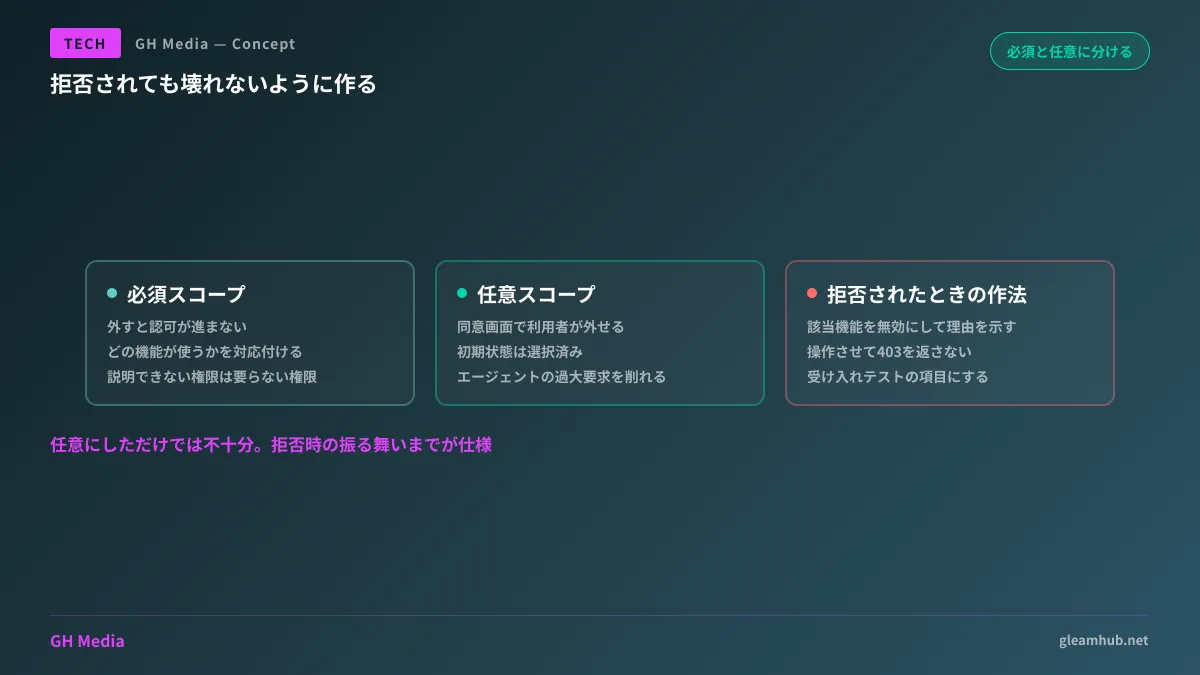
This is the critical point for clients ordering development. The mere existence of a feature that makes permissions optional does not guarantee implementation quality. If you simply make them optional without building out behavior for when they are denied, users will uncheck permissions on the consent screen only to encounter errors on subsequent screens. This actually worsens the user experience.
What to include in acceptance criteria
When outsourcing integration between internal systems and external services or commissioning internal AI agents, there are items that pay off later if included in specifications and acceptance criteria.
A list of required permissions and the reason each is mandatory. Have them provide this mapped to which feature uses which permission, rather than just stating "because it's needed." Permissions that cannot be mapped are, in most cases, unneeded permissions.
Behavior when optional permissions are denied. Include what becomes unavailable when denied and how that is displayed on screen as items in acceptance testing. Without this, the implementation side will only test assuming all permissions are granted.
Handling when additional permissions are required. When adding features after launch, new permissions may become necessary. Decide in advance whether to prompt users for re-consent or add them as optional.
This mindset is an extension of key checkpoints for accepting external service integrations. Where teams previously checked "whether permissions are properly acquired," the clearest way to view this shift is that a new axis has been added: "does it avoid breaking even when permissions are missing?"
Deploying MCP servers internally
If you are considering an architecture that accesses internal data via AI agents, this directly applies to you.
Permissions granted to agents have the inherent nature of being difficult to narrow down to the bare minimum needed at runtime, because what they will do cannot be known in advance. For that reason, it is meaningful to carve out parts at design time where you can firmly decide "we will not grant write access for this use case." If an agent is limited strictly to research, summarization, and search, it can function on read permissions alone.
Deciding whether to separate clients by use case at the stage of designing how to structure authentication on the MCP server side results in a much cleaner architecture than trying to restrict permissions later. Consolidating all use cases into a single client inevitably turns the set of permissions into the lowest common denominator of all maximums.
Around the same time, Cloudflare's own developer tools were updated so that command-line tools and MCP servers interacting with their API allow users to select requested permissions. The same philosophy is being applied to the provider's own tooling.
What to do next
Among the external service integrations currently used in your company, pick one that has been granted write or delete permissions and verify whether those operations are actually used. If not, those are permissions that can be trimmed.
For integrations or agents you commission going forward, add one question when reviewing specifications: "What happens on screen if a user denies this permission?" If an answer is not prepared, that part has not been designed yet.
GleamHub provides consultations on development, AI, and automation covering permission design for integrating internal systems with external services, authorization architecture for AI agents including MCP servers, and structuring acceptance criteria. Because the optimal setup varies depending on your data and user scope, please reach out via Inquiries for tailored guidance.