When an employee departs, IT teams follow an established procedure: suspend email, revoke shared drive access, and retrieve company-issued devices. Most companies have documented SOPs up to this point.
Yet one element stays untouched: the integration account that person created five years ago to link the core ERP system with accounting software. It does not appear in HR offboarding checklists. There is no record of who owns it. And because disabling it would bring operations to a halt, nobody dares touch it.
These machine accounts are known as Non-Human Identities (NHIs). They encompass service accounts, API keys, OAuth applications authorized for external tools, automated deployment tokens, and, more recently, credentials handed over to AI agents.
Why they consistently slip through inventory audits
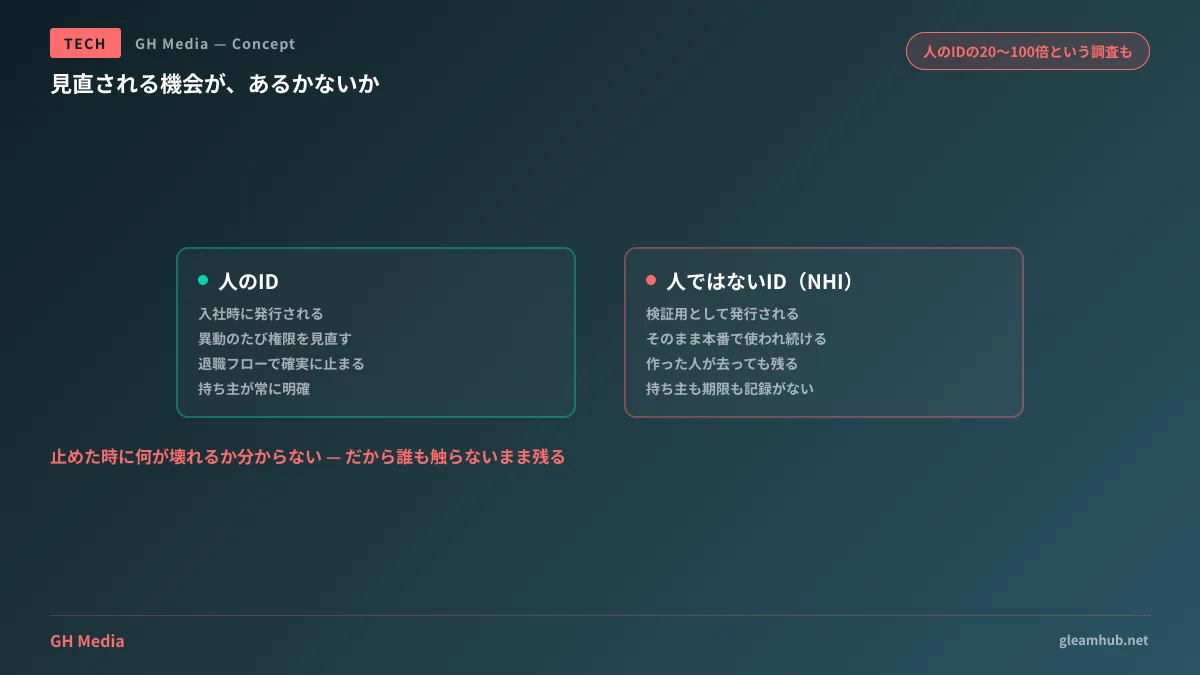
Human identities have clear owners. They are provisioned upon hiring, adjusted upon departmental transfer, and deactivated upon resignation. Accountability is unambiguous.
NHIs have no such lifecycle. The reasons they fall through the cracks generally boil down to three patterns:
- They were intended to be "temporary" at creation. Keys issued for sandbox testing end up powering production indefinitely
- The creators depart. Omitted from handover documentation, subsequent staff are unaware of their very existence
- Nobody knows what will break if they are disabled. Lacking visibility, teams opt to leave suspicious identities alone rather than risk downtime
Then comes the sheer volume. NHIs drastically outnumber human identities, with surveys estimating ratios anywhere from 20 times to over 100 times higher. The breadth of this range itself illustrates that nobody truly has a handle on reality (Non-Human Identity Risks and Security Countermeasures — gihyo.jp).
Ratios in the dozens align with practical intuition. Even in a 30-person company, counting cloud service accounts, SaaS-to-SaaS integration keys, CI/CD tokens, and monitoring tool read permissions will easily reach hundreds of credentials.
Abandoned identities serve as real-world breach vectors
This is not a hypothetical risk. Reports document state-sponsored threat groups exploiting stale, unmanaged OAuth applications to escalate privileges from non-production tenants to production environments, exfiltrating sensitive corporate email correspondence and documentation.
The critical architectural takeaway is that attackers bypassed perimeter defenses not by defeating advanced controls, but by targeting unmonitored legacy integrations. Enforcing multi-factor authentication across every human employee does nothing to protect machine identities.
OWASP systematizes this threat landscape in its Non-Human Identities Top 10 (OWASP Non-Human Identities Top 10 — 2025). The top entries apply directly even to small and medium-sized businesses.
| Item | How it manifests in SMBs |
|---|---|
| Improper Offboarding (NHI1) | Deprecated integration accounts remain active indefinitely |
| Secret Leakage (NHI2) | API keys stored in plaintext within config files or shared drives |
| Third-Party NHI Vulnerabilities (NHI3) | Broad permissions granted to external tools that subsequently get compromised |
| Excessive Privileges (NHI5) | Administrator roles provisioned when read-only access sufficed |
| Long-Lived Secrets (NHI7) | Keys provisioned five years ago remain valid without expiration |
Having offboarding top the list reflects the operational reality of this domain: failures to revoke access cause far more incidents than sophisticated attack vectors.
What clients can verify
Without an internal engineering team, this issue can seem too specialized to tackle. Yet even from a client standpoint, there are distinct milestones where verification is straightforward.
At project handover. Confirm whether deliverables include an inventory of external services and identities utilized by the system. If absent, request one. What services are connected, and what is the purpose of each credential? Entering production without this list guarantees a mountain of mystery accounts years later. Acceptance criteria scopes are outlined in Receiving Deliverables for Commissioned Systems.
When executing maintenance contracts. Verify whether credential reviews are included in the agreement. Contracts merely stating "vulnerability remediation" typically cover only publicly disclosed CVEs; identity audits are not included. Key clauses to specify in maintenance agreements are summarized in What Clients Must Check in System Maintenance and Operations Contracts.
When vendor personnel change. Personnel changes on vendor teams often happen without visibility to clients. This serves as an opportune moment to review expiration dates for credentials powering build environments and automated deployments, a perspective detailed in Are Your Vendor's Build Pipelines Still Running on Long-Lived Tokens?
Revoking everything en masse is guaranteed to fail
Auditing will surface a large volume of unknown identities. Deciding to "shut down everything unrecognized" will immediately break business operations the next morning. Furthermore, identifying which specific decommissioned credential caused the outage can take days.
A realistic, pragmatic progression looks like this:
- Build an inventory. Do not judge whether to deactivate yet. Simply document every existing credential
- Check last used dates. Use cloud provider audit logs to extract credentials unused in the past 90 days
- Downgrade permissions on unused accounts first. Opting for privilege reduction over immediate deletion ensures changes can be rolled back if issues arise
- Monitor for several weeks, then disable if no issues occur. Do not delete outright even at this stage
- Establish issuance rules for new credentials. Require an assigned "owner" and an "expiration date" for every new key
Skipping step 5 turns auditing into a one-off exercise that reverts to chaos a year later. Moving toward setups that eliminate long-lived keys altogether is another viable route, explored in How Many Service Account Keys Have You Distributed? For considerations when granting credentials to AI agents, see Before Handing Credentials to AI Agents.
Start by counting just one thing
Trying to grasp everything simultaneously leads to paralysis. Start by counting just one metric: how many third-party integrations have been granted access across your corporate cloud environments and SaaS platforms.
Opening the "Connected Apps" or "Authorized Access" panel in your admin dashboard will give you this number in minutes. If you spot vendor names you cannot even identify, that is your starting point. Not recognizing a tool means it has gone completely unmonitored for that entire span.
Whether determining what to include in project handover documentation or auditing legacy integrations in existing systems, GleamHub supports clients through our development, AI, and automation consultations. Because optimal configurations vary based on requirements, we provide customized estimates. Please reach out via Inquiries.
Sources
- Non-Human Identity Risks and Security Countermeasures: Preventing Breaches via Cloud, CI/CD, and AI Agents — gihyo.jp
- OWASP Top 10 Non-Human Identities Risks - 2025 — OWASP
- OWASP Non-Human Identities Top 10 — OWASP Foundation
- NHI Risks and Countermeasures Through the Lens of OWASP Top 10 Non-Human Identity Risks — NEC Security Blog
- CSA: Non-Human Identity and AI Security State of the Union