When maintaining business systems built with Django, you need to decide with every security release whether a given fix is relevant to you. Not every fix applies to your own systems, but to say with confidence that one does not apply, you need to know which features make you affected.
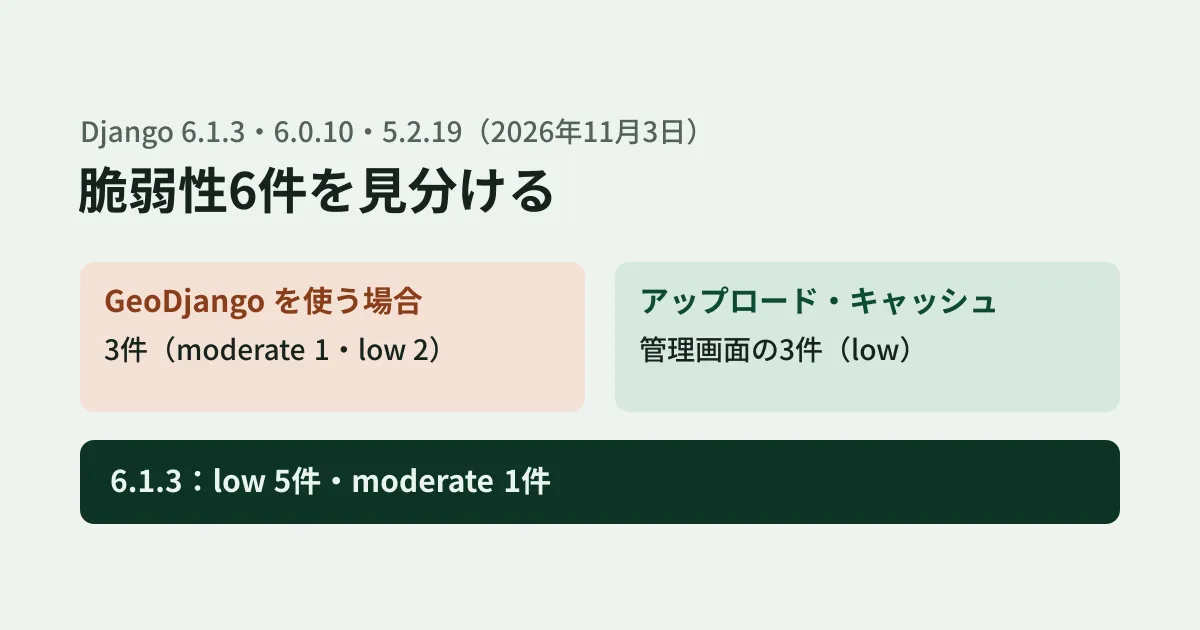
Django 6.1.3, released on November 3, 2026, fixed six vulnerabilities. In this article, we use the original text of Django's official announcement and release notes to lay out which features each of the six relates to, and show the results of reproducing one of them, the cache issue, locally.
Released versions and number of fixes
Fixed versions were released for three branches on the same day (all published on PyPI between 15:21 and 15:22 UTC on November 3).
- 6.1.3: five "low" and one "moderate", along with fixes for bugs in 6.1.2 and support for Python 3.15
- 6.0.10: five "low" and one "moderate"
- 5.2.19: four "low" and one "moderate" (the admin password hash issue is not included)
The severity ratings follow the criteria in Django's security policy. The policy rates remote code execution and SQL injection as "High"; XSS, CSRF and authentication flaws as "Moderate"; and denial of service, exposure of sensitive data and issues requiring unusual configurations, among others, as "Low". There are no "High" issues this time. The next release on the 6.1 branch (6.1.4) is stated to be scheduled for December 1.
The official announcement lists main, 6.1, 6.0 and 5.2 as the affected supported branches. According to the download page, the branches that receive security fixes are 6.1, 6.0 and 5.2 LTS, and 4.2 LTS reached end of support on April 7, 2026. Systems on 4.2 or earlier will not get fixed versions, so you first need to consider migrating to a supported branch.
Which features each of the six issues relates to
| CVE | Related feature | Description (summary of the original) |
|---|---|---|
| CVE-2026-108147(low) | MultiPartParser (accepting file uploads) | Chunked transfers of Content-Transfer-Encoding: base64 could be read entirely into memory regardless of FILE_UPLOAD_MAX_MEMORY_SIZE |
| CVE-2026-113593(low) | Cache middleware, cache_page | Requests that "omit" a header listed in Vary and requests that "send it empty" get the same cache key, so a response for one could be returned for the other |
| CVE-2026-113733(low) | Admin site, custom user models | Under certain conditions, the full password hash was shown to admins with view-only permission (not included in 5.2.19) |
| CVE-2026-111211(low) | GeoDjango's GeometryField | Invalid values were written to logs with newlines and control characters left as is |
| CVE-2026-111362(moderate) | GeoDjango (GeoJSON crs) | If an external URL is written in a GeoJSON coordinate reference system, GDAL fetches it, which could cause outbound requests from the server or file reads |
| CVE-2026-114582(low) | GeoDjango's SpatialReference and others | String input is passed to GDAL, which could cause URL fetches or file reads |
The bottom three do not apply unless you use GeoDjango (django.contrib.gis). The top three involve file uploads, caching and the admin site. These are the features to check first for use in your business systems.
If you use GeoDjango, upgrading the version is not the end of it. The SpatialReference fix blocks network and file access with GDAL 3.9 or later, and the original states "Full protection requires GDAL 3.9 or later". With this fix, file paths and URLs are no longer accepted as input to SpatialReference, and references starting with DICT: are rejected regardless of the GDAL version. Note that any processing that uses these as input will stop working after the update. A new system check, gis.W001, warns if GDAL is older than 3.9. The release notes also recommend using integer SRIDs for untrusted input and, for strings, checking them against allowed values. Note that DataSource and LayerMapping, used to load GeoJSON, continue to accept external references, as they are meant for loading trusted data.
Reproducing the Vary cache issue locally
The cache issue matters when you cache pages whose content differs between members and the general public by varying on a header. We ran the same script on both 6.1.2 and 6.1.3. We ran it once in a Linux test environment on November 10 and once on an editorial team PC (macOS) on November 11, with the same results both times (Python 3.13, in-memory cache, requests made with RequestFactory; the header name and values are fictitious).
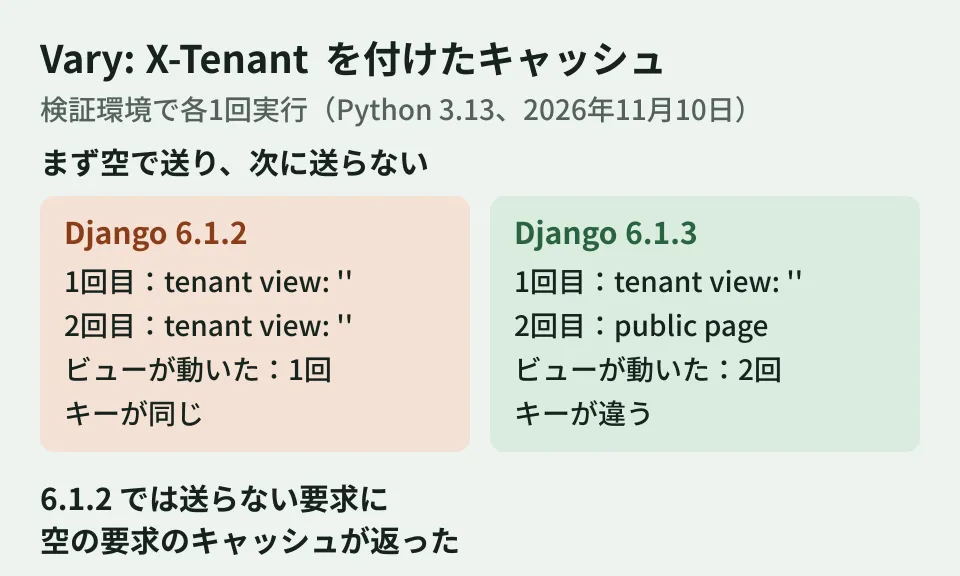
The view has cache_page applied and adds Vary: X-Tenant to the response. It returns "public page" for requests that do not send X-Tenant, and "tenant view: value" for requests that do. We first sent X-Tenant empty, then made a request without it.
| 6.1.2 | 6.1.3 | |
|---|---|---|
| 1st request (sent empty) | tenant view: '' | tenant view: '' |
| 2nd request (not sent) | tenant view: '' (cached from the 1st request) | public page |
| Number of times the view actually ran | 1 | 2 |
| Whether the two requests have the same cache key | Same | Different |
On 6.1.2, the request that did not send the header received the cache created for the request that sent it empty. On 6.1.3, the two were distinguished, and the view ran for each. The script and output are kept in this article's production records.
In real systems, this difference can become a problem when authentication information is received in a custom header that is listed in Vary for caching. The original also says that after the update, existing cache entries for requests that did not send the header will no longer match and will be rebuilt on the next request. Expect that load may rise right after the update by the amount needed to rebuild the cache.
How to proceed with the update (editorial proposal)
From here on are the editorial team's suggestions.
- Check which branch you are on. Use
python -m django --versionto see whether it is 6.1, 6.0 or 5.2 - Using the table above, identify whether you use the related features.
MultiPartParseris used for accepting ordinary file uploads. For caching, look forMIDDLEWAREinsettings.pyand for howcache_pageis used - If you use GeoDjango, also check the GDAL version. After upgrading, run
python manage.py checkand see whethergis.W001appears - Upgrade to 6.1.3, 6.0.10 or 5.2.19, pass the tests in a test environment and then deploy to production
We covered a mechanism for not pulling in dependency updates too soon after release in our article on pip dependency cooldowns. Deciding at the same time how to treat updates you want to pull in quickly, such as security releases, speeds up your decisions. Problems in your own implementation that framework updates alone will not catch can be checked with the assessment covered in our article on vulnerability assessments.
Scope of verification
On November 10, 2026, we checked
docs/releases/6.1.3.txt,6.0.10.txt,5.2.19.txtand6.1.4.txtin django/django, the severity criteria indocs/internals/security.txt, the commits on the stable/6.1.x branch (fixes and version bumps) and the publication times on PyPI (desk research). For the cache issue, we installed Django 6.1.2 and 6.1.3 separately and ran the same script (hands-on testing; once each in a Linux test environment on November 10 and on an editorial team PC [macOS, Python 3.13.16] on November 11). On November 11, 2026, we checked the security announcement on djangoproject.com (November 3) and the supported branches on the download page, and confirmed on PyPI that no version newer than 6.1.3 had been released. We did not reproduce the three GeoDjango issues, the upload issue or the admin site issue.
GleamHub's development, AI and automation consultations can help with maintaining business systems built with Django and with planning how to respond to security releases. What to check depends on your system's architecture, so please reach out through our contact form.
References
- Django security releases issued: 6.1.3, 6.0.10, and 5.2.19(Django Weblog、2026-11-03)
- Django — Download(Supported Versions)
- django/django — docs/releases/6.1.3.txt
- django/django — docs/releases/6.0.10.txt
- django/django — docs/releases/5.2.19.txt
- django/django — docs/internals/security.txt(Security severity levels)
- Django — PyPI