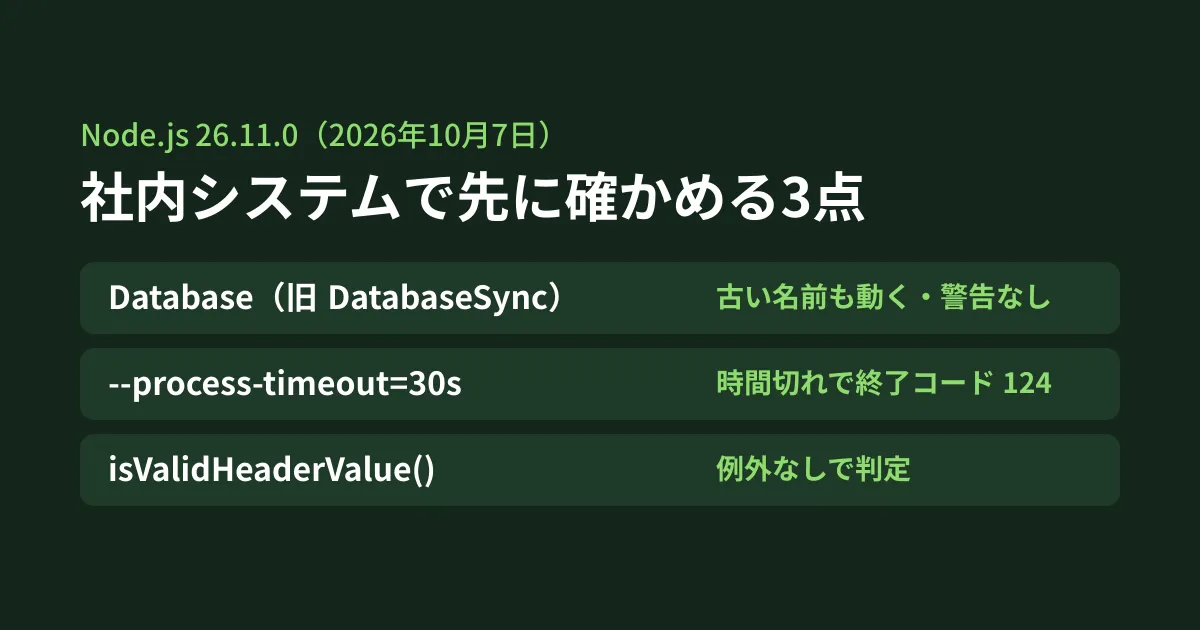
If you run internal aggregation batches or admin screens on Node.js, you can usually decide to apply minor version updates on the assumption that they do not break compatibility. However, the highlights of Node.js 26.11.0 (October 7, 2026) include a line that may affect existing code: "sqlite: rename DatabaseSync and StatementSync". The same release also adds --process-timeout, which is useful in situations such as a nightly batch that never finishes and is still running in the morning.
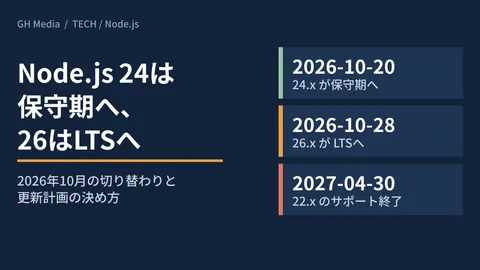
The 26.x line is scheduled to move to LTS on October 28 (per the official schedule.json), so this is when teams start considering it as an upgrade target. Together with the results of running 24.21.0, 26.10.0 and 26.11.0 locally, we summarize what to look at first for maintenance. Support periods and upgrade planning are covered in our article on Node.js 24 entering maintenance and 26 becoming LTS, so here we focus on what is in 26.11.
What landed in 26.11.0 and 26.11.1
Of the 16 items in the "Notable Changes" for 26.11.0, the ones likely to matter for maintaining business systems are as follows.
| Change | Details | Running the same code on 26.10.0 or earlier |
|---|---|---|
| node:sqlite rename | DatabaseSync to Database, StatementSync to Statement. The old names remain as aliases | The new names do not exist |
--process-timeout | Once the specified time has passed since startup, it prints the status and exits with exit code 124 | Fails to start with bad option |
http.isValidHeaderName() / isValidHeaderValue() | Returns a boolean indicating whether a header name or value is valid | The function does not exist |
Buffer.stringLength() | Returns the length of a byte sequence as a string without converting it | The function does not exist |
process.ref() / unref() | From experimental to stable | The call also worked on 26.10.0 |
| Alpine Linux | Support tier changed from Experimental to Tier 2 | ― |
For Alpine Linux, the table in BUILDING.md now lists x64 musl environments with "kernel >= 6.12, musl >= 1.2.5" (for example, Alpine 3.22) as Tier 2 (the 26.10.0 table listed them as Experimental). Containers use the host's kernel, so if you run on Alpine images, check the host version as well (behavior on Alpine has not been verified).
The changes in 26.11.1, released the same day, are only three reverts related to the documentation build, and the tests below gave the same results as 26.11.0.
The node:sqlite rename: the old name works, with no warning
The 26.11.0 documentation describes DatabaseSync as "a deprecated alias for Database, kept for backward compatibility." The deprecation codes are DEP0210 (DatabaseSync) and DEP0211 (StatementSync), and their type is "Documentation-only," meaning they are deprecated only in the documentation.
Here are the results of actually running it (Ubuntu 24.04, official linux-x64 binary).
# 26.10.0
exports: DatabaseSync,Session,StatementSync,backup,constants,default
db.constructor.name: DatabaseSync

# 26.11.0
exports: Database,DatabaseSync,Session,Statement,StatementSync,backup,constants,default
same class: true Statement same: true
db.constructor.name: Database
instanceof Database: true instanceof DatabaseSync: true
Existing code written with DatabaseSync ran as is on 26.11.0, and no warning appeared even with --pending-deprecation. Because Database and DatabaseSync are the same class, instanceof checks pass with either name.
What changed is the class name
One behavior did change. Even when created with new DatabaseSync(...), constructor.name changed from "DatabaseSync" to "Database". Places that print the class name in logs or error messages, places that check it with constructor.name === 'DatabaseSync', and test snapshots that include the class name will produce different results when you upgrade to 26.11.
Rewriting to the new name breaks startup on older versions
Conversely, if you rewrite to Database to match the documentation, the code will not run on 26.10.0 or earlier, or on 24.x.
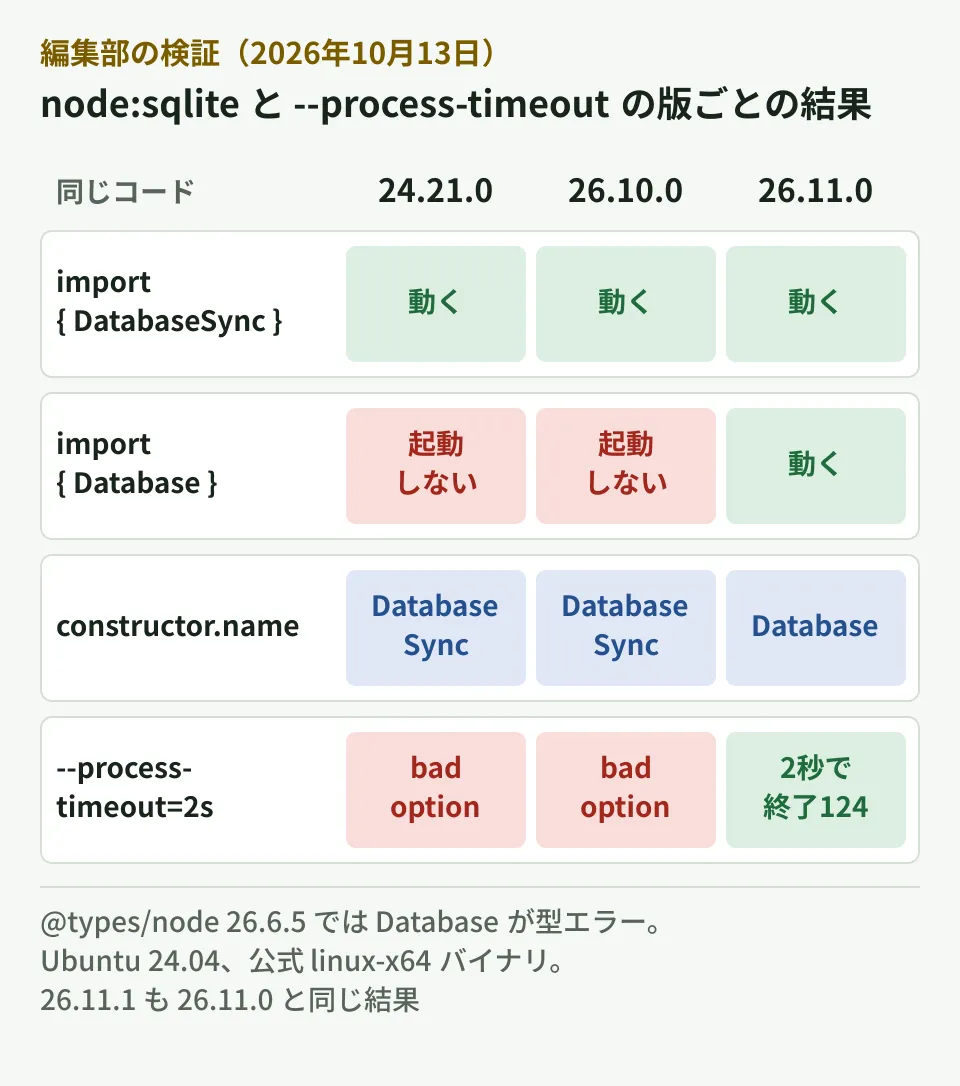
With ES modules, import { Database } from 'node:sqlite' failed to start on 24.21.0 and 26.10.0 with a SyntaxError saying "does not provide an export named 'Database'." With CommonJS require, the new Database() line results in TypeError: Database is not a constructor.
In TypeScript, the latest type definitions at the time of testing, @types/node 26.6.5 (published to npm on October 9, 2026), did not include Database, and tsc returned "has no exported member 'Database'." The same type definitions also do not yet include isValidHeaderName or Buffer.stringLength.
It is quite possible to have a setup where development machines run 26.11 while CI or production stays on 24.x. In the editorial team's view, the safe approach is to keep using DatabaseSync until every environment that runs the code is on 26.11 or later and the type definitions have caught up. If you really want to use the new name first, you can write code that works on both versions as follows (verified on 24.21.0, 26.10.0 and 26.11.0).
import * as sqlite from 'node:sqlite';
const Database = sqlite.Database ?? sqlite.DatabaseSync;
const db = new Database('jobs.db');
Note that the stability of node:sqlite is still "1.2 - Release candidate" in the 26.11.0 documentation. For data corruption issues when embedding SQLite, our article on the SQLite WAL bug is also a useful reference.
--process-timeout: stop batches that never finish and record why
Imagine a nightly aggregation or a sync with an external service that never finishes because of a connection or timer someone forgot to close. --process-timeout terminates a process that is still running after the specified time has passed since startup.
The exit code is 124, the same as timeout(1), and before exiting it writes the state of the main thread and the resources keeping the event loop alive to standard error (according to the documentation). Here is the result of testing it with a script that left an HTTP server and a timer running.
$ node --process-timeout=2s hang.mjs
listening 33757
(node:5172) Process timed out after 2s (--process-timeout). Exiting with code 124.
Main thread was not executing JavaScript.
Resources keeping the event loop alive:
    TCPServerWrap (listening on 0.0.0.0:33757, fd 21)
    Timeout (next due in 79ms)
$ echo $?
124
In the case of an infinite loop, it printed the stack trace of the function that was stuck. The fact that the reason it did not finish is left in the logs is the difference from running kill from outside.
Within the scope of our testing, here is what you should know before building it into operations.
- A unit is required. The release notes heading says
--process-timeout=N, but--process-timeout=3failed to start with "Expected a positive integer followed by a unit (ms, s, m or h), e.g. 30s." Write it as30s,5mor1h process.on('exit')is not called. The documentation also says "without emitting the'beforeExit'and'exit'events," and in practice theexithandler did not run. If you put cleanup on exit there, you need another approach- It cannot be set in
NODE_OPTIONS. Write it directly on the command line. It also cannot be used together with--inspect("either --process-timeout or --inspect can be used, not both") - It fails to start on 26.10.0 or earlier. 24.21.0 and 26.10.0 ended with
bad option: --process-timeout=2sand exit code 9 (row 4 of the previous figure). If you put it in a cron entry or a systemd unit, first confirm that the Node.js version that runs it is 26.11 or later
The documentation also says that it cannot be combined with node --run and that --report-on-process-timeout can produce a diagnostic report (not verified). Time limits for each place where processing can run are also covered in our article on Lambda's 90-minute limit and where to run batches.
Validate headers before writing them
http.isValidHeaderName() and http.isValidHeaderValue() return true / false to indicate whether a header name and value are valid. The same check was already possible with http.validateHeaderValue(), but that throws an exception when the value is invalid.
A likely case in business systems is putting a Japanese file name directly into Content-Disposition for a CSV download. On both 26.10.0 and 26.11.0, res.setHeader() failed with ERR_INVALID_CHAR.
raw     validateHeaderValue: ERR_INVALID_CHAR  isValidHeaderValue: false
rfc5987 validateHeaderValue: ok                isValidHeaderValue: true
setHeader(raw) -> 500 ERR_INVALID_CHAR
raw is filename="請求書_2026年10月.csv", and rfc5987 is filename*=UTF-8'' followed by the name converted with encodeURIComponent(). These results are the same as on 26.10.0; the new functions let you write logic that checks a value before writing it and switches to a different value, without exceptions. A Japanese value (tested with the name Yamada written in Japanese characters) was also false with httpValidation: 'relaxed'.
Checks before upgrading to 26.11 (the editorial team's summary)
- Use
grep -rn "DatabaseSync\|StatementSync"to find every place that usesnode:sqlite, and check for checks, logs or snapshots that rely onconstructor.name - Rewrite to the new names (
Database/Statement) only after the versions on CI, production and batch servers and@types/nodeare all up to date - If you use
--process-timeout, write it directly with a unit in the startup command, such as in cron, and review any cleanup that relies on theexitevent - Where you put file names or user input into headers, either check them in advance with
isValidHeaderValue()or convert them to thefilename*=UTF-8''format
Decide when to roll it out to production on the assumption that it will be on or after October 28, when the 26.x line moves to LTS, following the steps in our article on 24 entering maintenance and 26 becoming LTS.
Scope of verification
On October 13, 2026, we checked the Node.js 26.11.0 release page, CHANGELOG_V26.md, the documentation at tag v26.11.0 (sqlite, deprecations, cli, process, http, buffer, BUILDING.md) and schedule.json (desk research). We ran the official 24.21.0, 26.10.0, 26.11.0 and 26.11.1 binaries on Ubuntu 24.04 (x64), and type-checked
@types/node26.6.5 with TypeScript 5.8.2 (hands-on testing). We did not check behavior on Alpine,--report-on-process-timeout, Windows or macOS. On October 16, 2026, we also checked the CHANGELOGs for 26.12.0 and 24.22.0, released on October 14. 24.22.0 does not include thenode:sqliterename or--process-timeout.
For updates and maintenance of business systems running on Node.js, please contact us via Consulting on development, AI, and automation.
References
- Node.js 26.11.0 (Current)
- nodejs/node — doc/changelogs/CHANGELOG_V26.md
- nodejs/node — doc/api/sqlite.md(v26.11.0)
- nodejs/node — doc/api/deprecations.md(DEP0210・DEP0211)
- nodejs/node — doc/api/cli.md(—process-timeout)
- nodejs/node — doc/api/http.md(isValidHeaderName・isValidHeaderValue)
- nodejs/node — BUILDING.md(v26.11.0)
- nodejs/Release — schedule.json