What is reCAPTCHA?
reCAPTCHA is a security system provided by Google used to prevent automated access and spam on websites. It distinguishes humans from bots by prompting users to identify images or text.
In the latest version, user behavior patterns are analyzed, and verification is completed with just a click. By implementing reCAPTCHA, website operators can prevent unauthorized access and bolster security. Furthermore, data collected through reCAPTCHA helps improve machine learning systems.
What is SSGForm?
SSGForm is a form library that can be used with Static Site Generation (SSG) frameworks such as Next.js and Gatsby. By using SSGForm, you can easily add form functionality to static websites.
Its main features include:
- Simple API
SSGForm provides a straightforward API to easily handle form creation and submissions. - Validation
Set validation rules on form input values and display error messages. - Serverless
SSGForm supports form submissions in serverless environments, integrating smoothly with platforms like AWS Lambda and Netlify. - Customizable
Customize form styles and layouts, as well as actions following form submissions. - Real-time validation
Validate inputs in real time as users fill out the form, delivering immediate feedback. - Multi-framework support
SSGForm supports major static site generation frameworks like Next.js and Gatsby.
Using SSGForm reduces development effort when adding form functionality to static sites, allowing you to implement forms simply and efficiently.
Configuring reCAPTCHA is simple!
How to build a site in Astro using SSGForm and configure reCAPTCHA
- Get the reCAPTCHA site key and secret key
- Go to the Google reCAPTCHA website.
- Register a new reCAPTCHA to obtain your site key and secret key.
- Configure the secret key in SSGForm.
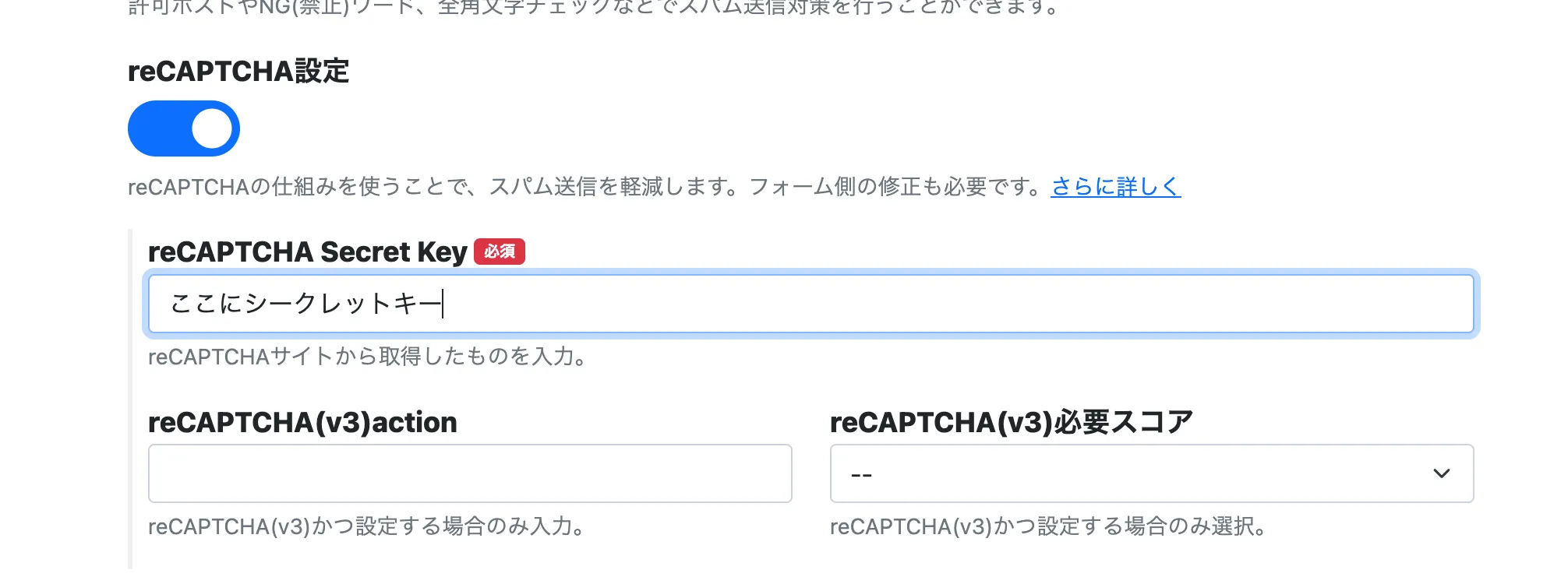
- Enable reCAPTCHA settings and enter the secret key.
- You can leave other fields blank.
- Add reCAPTCHA to the form's HTML.
- Open the HTML file of the form where you want to display reCAPTCHA.
- Add the
g-recaptchaclass and data attributes to the submit button as follows:
<button class="g-recaptcha" data-sitekey="あなたのサイトキー" data-callback='onSubmit' data-action='submit>送信</button> - Load the reCAPTCHA script.
- Add the following script inside the
<head>tag or an appropriate location in the form's HTML file:
<script src="https://www.google.com/recaptcha/api.js" async defer></script>; - Add the following script inside the
- Define the onSubmit function.
- Add a script like the following near the form. When building with Astro, be sure to include is:inline.
<script is:inline> function onSubmit(token) { document.getElementById("form").submit(); } </script> - Build and verify the site.
- Run the
npm run buildcommand to build the site. - Open the built site in a browser to ensure reCAPTCHA functions correctly on the form.
- Run the
Important precautions
- To use reCAPTCHA, the site must be served over HTTPS.
- It might not function properly in local environments.
- Setup instructions can vary depending on the reCAPTCHA version, so please refer to the official documentation as well.
With this method, you can properly configure reCAPTCHA on a site built with Astro and SSGForm.