"We missed a plugin update and got hacked," "The site is so slow that our bounce rate won't drop"—these headaches are all too common when running WordPress. In fact, in IPA's "Top 10 Information Security Threats 2026," "Attacks exploiting system vulnerabilities" continues to rank high in the organizational category, and attacks targeting WordPress sites become more sophisticated each year.
Migrating to a headless CMS is attracting widespread attention as a way to solve this issue fundamentally. Decoupling the frontend from the backend significantly accelerates page speed while minimizing security risks. In this article, we provide a step-by-step guide for SMB web managers and business owners on how to migrate from WordPress to a headless CMS, focusing particularly on the Japanese platform microCMS.
What is a headless CMS? Understanding the differences with WordPress
How traditional WordPress works
Traditional WordPress uses a monolithic architecture where content management (backend) and presentation (frontend) are bundled together. Every time a page is requested, PHP executes, querying the database to dynamically generate HTML. While convenient, this architecture presents several challenges:
| Challenge | Details |
|---|---|
| Page speed | High server load caused by PHP execution and DB queries on every request |
| Security | Attacks often begin within hours after a plugin vulnerability is publicized |
| Maintenance costs | Ongoing need for core updates, plugin management, and regular backups |
| Extensibility | Heavily constrained by themes, limiting design flexibility |
How a headless CMS works
A headless CMS is a CMS without a "head" (frontend). It provides only content management features, while presentation is handled by a separate frontend consuming its APIs.
【従来のWordPress】
ブラウザ → WordPress(PHP + DB)→ HTML生成 → 表示

【ヘッドレスCMS】
ブラウザ → 静的HTML(CDN配信)→ 表示
           ↕ API
         ヘッドレスCMS(コンテンツ管理のみ)
Because all HTML is pre-rendered at build time (SSG: Static Site Generation), server processing at page load time drops to zero. This is the cornerstone of boosted speed and reinforced security.
Three major risks of running WordPress and what migration solves
Risk 1: Unauthorized access via plugin vulnerabilities
Because WordPress commands the world's largest CMS market share, it is a primary target for attackers. Whenever a vulnerability is found in a plugin, bots automatically scan the web for sites using it, unleashing waves of automated attacks. Similar issues arise regarding security risks when running WordPress in subdirectories.
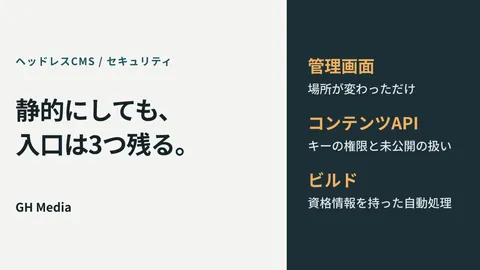
Switching to a headless CMS leaves only static files on the frontend, making direct access to databases or PHP fundamentally impossible. The attack surface itself disappears.
Risk 2: Poorer SEO and UX due to slow page speeds
Google research shows that bounce rates jump dramatically when a page takes longer than three seconds to load. Because WordPress renders pages dynamically, speeds fluctuate wildly based on server specifications and installed plugins.
Switching to a headless CMS with CDN delivery serves static files from edge servers worldwide, ensuring fast page rendering for users both domestically and internationally.
Risk 3: Ongoing maintenance costs
WordPress demands continuous updates for its core, themes, and plugins. It is not uncommon for companies to spend tens of thousands of yen monthly just to apply security patches.
Headless CMSs are predominantly SaaS-based (cloud-hosted), meaning the provider manages infrastructure maintenance and security updates. This eliminates the burden of in-house server maintenance.
Choosing a destination: Why microCMS is ideal for SMBs
There are many domestic and international headless CMS options available. For small and medium-sized businesses, microCMS is an especially compelling choice.
| Item | WordPress | microCMS | Contentful |
|---|---|---|---|
| Provider | Open source | Japan (microCMS Inc.) | United States |
| Admin interface | Japanese language support | Full Japanese support | Primarily English |
| API usability | REST API / WPGraphQL | REST API / GraphQL | REST API / GraphQL |
| Pricing (Base) | Server costs only | Free plan available | Free tier available (with stricter limits) |
| Support | Community | Comprehensive chat support | Primarily English |
| Image CDN | Requires separate setup | Built-in imgix | Available |
Because microCMS is built in Japan with a complete Japanese dashboard and responsive chat support, SMBs with limited technical staff can operate it with confidence. Furthermore, imgix-powered image CDN functionality is built in by default, enabling image optimization and delivery acceleration at no extra cost.
Four steps to migrate from WordPress to microCMS
Step 1: Content inventory and API schema design
First, take inventory of the content currently managed in WordPress:
- Review post types (articles, static pages, custom post types, etc.)
- Identify custom fields (fields added via ACF or similar plugins)
- Organize taxonomies (categories and tags)
Based on this inventory, design your API schema in microCMS. For instance, a blog post schema would include fields such as the following:
{
  "title": "テキストフィールド",
  "body": "リッチエディタ",
  "category": "コンテンツ参照(カテゴリーAPI)",
  "thumbnail": "画像",
  "publishedAt": "日時",
  "tags": "テキストフィールド(複数値)"
}
Step 2: Exporting content from WordPress
To migrate WordPress content to microCMS, take advantage of the WP REST API.
# WordPress REST APIでコンテンツ取得(例)
curl https://your-site.com/wp-json/wp/v2/posts?per_page=100
Write a script to transform the retrieved JSON into microCMS import format, then use microCMS's content import feature to migrate posts in bulk. Upload media files directly to the microCMS media library.
Step 3: Building the frontend
Astro or Next.js are popular choices for the frontend. Following Astro × microCMS Setup Procedures, the standard pattern is pre-rendering static HTML via SSG.
// Astroでmicroで CMS からコンテンツ取得する例
import { createClient } from 'microcms-js-sdk';

const client = createClient({
  serviceDomain: 'your-service',
  apiKey: import.meta.env.MICROCMS_API_KEY,
});

export async function getStaticPaths() {
  const posts = await client.getList({ endpoint: 'blog' });
  return posts.contents.map((post) => ({
    params: { slug: post.id },
    props: { post },
  }));
}
Host the frontend on Vercel, Netlify, or CDNs like Google Cloud Storage. This achieves global CDN distribution, guaranteeing fast page loads regardless of visitor location.
Step 4: DNS cutover and legacy site cleanup
Once frontend verification is complete, switch traffic to production:
- Perform comprehensive verification in a staging environment
- Verify permalinks between the old WordPress site and new URLs match
- Configure 301 redirects if any URLs changed
- Switch DNS records (after lowering TTL values in advance)
- Back up the legacy WordPress instance and restrict its public access
Key considerations during migration
Replacing plugin functionality
WordPress handles SEO, forms, and sitemaps via plugins; in a headless architecture, these must be implemented on the frontend. Key alternatives include:
| WordPress plugin | Headless alternative |
|---|---|
| Yoast SEO | astro-seo / next-seo / manual meta tags |
| Contact Form 7 | Formspree / HubSpot Forms / Netlify Forms |
| XML Sitemap | Framework built-in or automated generation script |
| Google Analytics | Direct GTM script embedding |
Content publishing workflow for non-engineers
While editors write and edit articles directly in the microCMS dashboard, configuring webhooks allows content updates to automatically trigger site rebuilds and deployments. This gives non-technical staff an intuitive publishing workflow virtually identical to WordPress.
コンテンツ編集 → microCMS Webhook → ビルドトリガー → CDNデプロイSummary: Three transformations achieved with a headless CMS migration
Migrating from WordPress to a headless CMS is not just a technology swap; it fundamentally improves website operational health.
- Fundamental security overhaul: Decoupling the frontend from the backend physically removes points of vulnerability
- Dramatic speed improvements: Static files served via CDN improve Core Web Vitals scores and support SEO
- Reduced maintenance overhead: Leaving infrastructure to SaaS eliminates tedious manual updates
Many fear that the technical bar is too high, but for SMBs, a division-of-labor approach—outsourcing initial setup to a web development agency while managing daily content in-house—is very practical. If you have concerns about your site's security or speed, consider migrating to a headless CMS.
If you would like tailored advice on strengthening website security or improving site speed based on your specific situation, please feel free to reach out to GleamHub.
Free consultation here → Contact form
Reference links