Introduction
With 10 years of engineering experience under my belt, I currently work full-stack across Next.js, Nuxt, and NestJS, as well as PHP and Python. In February 2026, I adopted Claude Code across the board for a WordPress child theme migration project. To cut straight to the conclusion, "it was simply amazing."
In particular, Claude Code worked wonders on issues where "human oversight is almost inevitable," such as battles with parent theme CSS specificity, managing multiple breakpoints for responsive design, and regression bugs popping up with every fix.
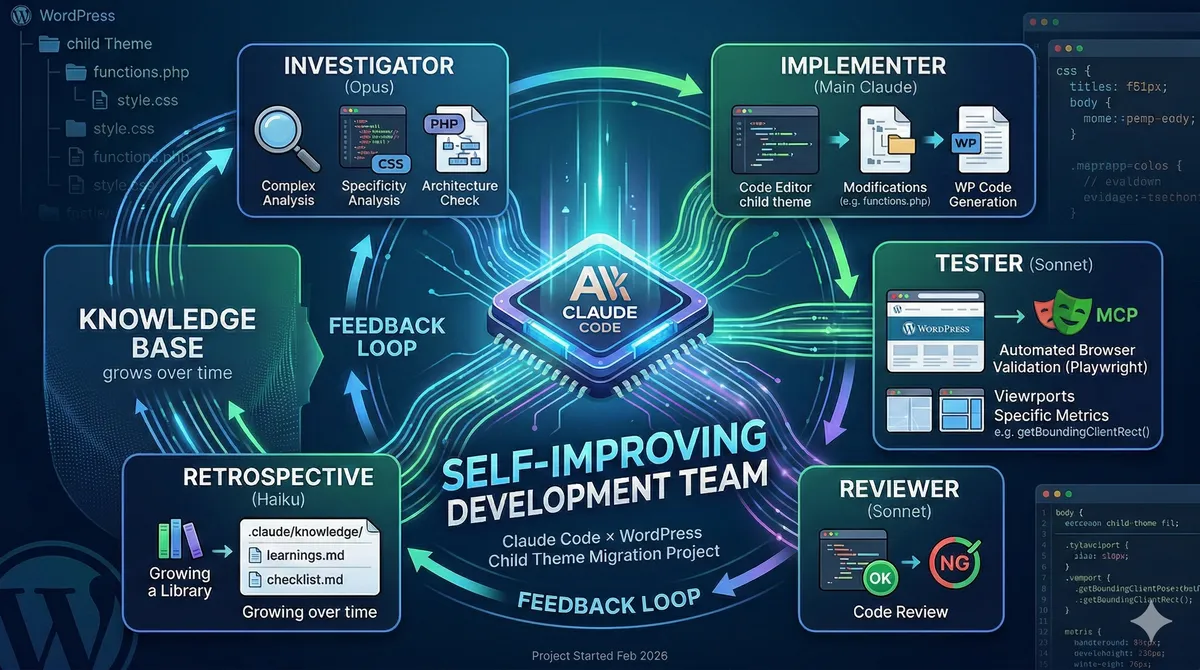
In this article, I explain with actual code and configurations how I designed Claude Code configuration files (CLAUDE.md, agent definitions, knowledge management) and established a system where five specialized agents autonomously learn while driving development.
Project background
What we were building
Child theme development for an HR-related WordPress media site. We extended a commercial parent theme (referred to as ThemeX below) to implement a custom layout system, banner management, category weighting, and more.
The tech stack was intentionally kept simple:
- WordPress 6.3.7 / PHP 8.2 / MySQL 8.0
- No build tools (no webpack or Gulp)
- Plain CSS without preprocessors, cache-busted via
filemtime() - JS using Vanilla JS + jQuery
Why Claude Code was necessary
Battles with parent theme ThemeX's CSS specificity, managing multiple breakpoints for responsive design, and regression bugs with every fix. These issues inherently trapped us in endless loops of "investigate → fix → test → catch an oversight and start over," making human oversights practically unavoidable for a single engineer.
Timeline of Claude Code adoption
2/16  CLAUDE.md 初版をリポジトリに追加(86行のシンプルな構成)
2/24  5フェーズ開発フロー体制を確立、エージェント定義ファイルを作成
2/25  テスト班エージェント追加、ナレッジファイル自動蓄積が稼働開始
2/26  振り返り班エージェント追加、自己改善ループが完成
In just 10 days from initial adoption, a development system where five specialized agents collaborate was fully up and running.
Configuration architecture: Two-tier CLAUDE.md
At the core of customizing Claude Code lies CLAUDE.md. In this project, we configured a two-tier setup: Global (shared across all projects) and Project-specific.
Global CLAUDE.md (~/.claude/CLAUDE.md)
Basic rules applied across all projects. This is where you define your own "development style."
# グローバルルール

## 基本方針

- 全出力を日本語で行う(コードコメント、ドキュメント、コミットメッセージ含む)

## コミット

- 件名のみ: `type: 件名` の1行のみ。本文・箇条書き・トレーラーは一切含めない
- Co-Authored-By は含めない

## 作業フロー

- 3ファイル以上に影響する変更は、実装前に計画を提示してユーザーの承認を得ること
- 同じアプローチで2回失敗した場合は、別のアプローチを検討するか、ユーザーに相談

## スキル作成の提案

- 3ステップ以上 + 月1回以上再発 + 50%以上時間削減 → スキル化を提案
The key point is that it explicitly overrides Claude Code's default behaviors. For example, Claude Code attaches Co-Authored-By trailers by default, but explicitly specifying "do not include" preserves your own commit style.
Project CLAUDE.md (repository root)
Consolidates project-specific information. This serves as Claude Code's "brain."
## テーマアーキテクチャ

### CSS読み込みアーキテクチャ

- 全ページ共通: global.css → header.css, footer.css, parts.css, pagination.css, mobile-overrides.css
- トップページ: + home.css
- 記事詳細: + single.css
- アーカイブ系: + category.css

### テンプレートタイプシステム

投稿には `_custom_template_type` メタフィールド(informational, transactional, feature)があり、
対応するレイアウトファイルが描画される。

### 親テーマの主な上書き

- parent_posts_loop() — 投稿一覧レイアウト
- redirect_canonical フィルター無効化(CDNプロキシ互換性のため)
By writing an architecture overview here, Claude can begin work already understanding the structure before even reading the code. This drastically cuts down exploratory time spent asking, "Where is this CSS loaded?"
5-phase development flow: Division of labor among specialized agents
The most prominent feature of this project is defining a flow where five specialized agents take turns driving tasks in CLAUDE.md.
調査班(Opus) → ユーザー承認 → 実装班(メイン) → テスト班(Sonnet) → レビュー班(Sonnet) → 振り返り班(Haiku)Why divide labor?
When a single AI is tasked with everything—"investigate, fix, test, and review"—it tends to have a problem: it goes easy on evaluating code it wrote itself. By separating testing and review into distinct agents, we achieve objective verification free from implementation bias.
Designing each agent
Agent definitions are placed as Markdown files in .claude/agents/.
Investigation agent (investigator.md) — Opus
# 調査・設計班 (Investigator)

## 設定

- **model**: `claude-opus-4-6`(複数ファイルの横断的分析・設計判断が必要なため)

## 初動: 過去の知見を確認

調査を開始する前に、以下のファイルを Read で読み込み、過去の知見を確認すること:

1. `.claude/knowledge/checklist.md` — 「調査・設計班」セクションのチェック項目を確認
2. `.claude/knowledge/learnings.md` — 今回のタスクに関連する過去の発見パターンがないか確認

## 制約

- コードの読み取りと調査のみ行う。ファイルの編集・作成は行わない
Key point: The investigation agent uses Opus. Performing deep cross-file analysis—such as realizing that "the parent theme's clearfix becomes a flex item, throwing off space-between"—requires the smartest model available. Furthermore, editing files is explicitly prohibited. Separating investigation from implementation prevents code changes without prior approval on the direction.
Implementation agent (implementer.md) — Handled by main Claude
# 実装班 (Implementer)

## 初動

`.claude/knowledge/checklist.md` の「実装班」セクションを確認

## 実装原則

- 既存パターンへの追従(新しいパターンやライブラリは導入しない)
- 最小限の変更(周辺コードのリファクタリングは行わない)
- 調査班の方針から大きく逸脱しない。疑問がある場合は実装せず報告
The implementation agent is not a subagent; the main Claude handles it directly. This is because it requires access to all tools (file editing, Bash execution, etc.).
Testing agent (tester.md) — Sonnet
# テスト班 (Tester)

## 設定

- **model**: `claude-sonnet-4-6`

## 検証パターン

- レイアウト検証: getBoundingClientRect() で複数ビューポート幅を一括検証
- 表示検証: getComputedStyle() でスタイル適用確認
- 回帰検証: 変更対象外ページの抜き打ちチェック

## 制約

- ファイル編集は行わない。修正方法の提案も行わない(事実のみ報告)
Crucial design decision: The testing agent is restricted to "reporting facts only." Once it starts proposing fixes like "This is broken; to fix it, do...", the boundary between testing and implementation responsibilities blurs. The testing agent reports strictly on "what is broken and how," leaving the decision of whether to fix it to a human.
Retrospective agent (retrospective.md) — Haiku
# レトロスペクティブ班 (Retrospective)

## 設定

- **model**: `claude-haiku-4-5`(定型フォーマットへのファイル追記のみで十分なため)
- **mode**: `acceptEdits`(ナレッジファイルの書き込みを自動承認)
The retrospective agent uses Haiku (the fastest, most cost-effective model). Its job is simply to "append insights gained from the current development cycle in the specified format," requiring no complex reasoning. Running it in acceptEdits mode bypasses permission checks for writing files, allowing it to run completely autonomously.
Model selection strategy
| Agent | Model | Rationale |
|---|---|---|
| Investigation agent | Opus (highest performance) | Cross-file analysis and reasoning about CSS specificity require advanced intelligence |
| Implementation agent | Main Claude | Cannot be offloaded to a subagent due to requiring full tool access |
| Testing agent | Sonnet (balanced) | Browser verification with Playwright requires judgment, but not to the extent of Opus |
| Review agent | Sonnet | Code review demands a certain level of judgment |
| Retrospective agent | Haiku (lightest) | Only appends to standardized templates; lowest cost |
By assigning models according to task complexity, we optimize costs while preserving quality.
A self-improving dev team: Knowledge management system
What delivered the greatest impact in this project was the self-improvement loop powered by the .claude/knowledge/ directory.
How it works
開発サイクル完了
  ↓
振り返り班が自動起動
  ↓
learnings.md に「今回の知見」を追記
checklist.md に「次回チェックすべき項目」を追記
  ↓
次の開発サイクル開始
  ↓
調査班が learnings.md と checklist.md を読み込み
  ↓
過去の失敗パターンを踏まえた調査・設計
Examples of accumulated knowledge
A snippet of real insights accumulated in learnings.md:
## 2026-02-24: サイドバーレイアウト統一

### 発見パターン

- 親テーマの clearfix `#main-wrap::after` は、display: flex に切り替えた際に
  見えない3番目の flex item として機能し、justify-content: space-between の空間分配を狂わせる
- 親テーマの `#sidebar { float: right }` は ID セレクタのため、
  子テーマのクラスセレクタでは !important なしに上書きできない

### 失敗と学び

- サイドバーの padding 調整で新着記事側を変更 → ユーザーに却下された。
  正しくは「ランキングを新着記事に合わせる」方向だった
This is an actual record of pitfalls encountered during development. In subsequent cycles, the investigation agent reads these insights before beginning work, so we avoid repeating the same mistakes.
Examples of checklists
checklist.md is segmented into sections per team:
## 調査・設計班

- [ ] clearfix疑似要素(`::after { clear: both }`)が flex item になっていないか確認
- [ ] ブレークポイント別のギャップ幅・サイドバー幅のマップを作成すること
- [ ] CSS の `cssRules` を走査して specificity 競合を事前に検出

## 実装班

- [ ] ID セレクタの上書きには `!important` が必要
- [ ] hover 状態には `.parent:hover .child` の具体的なセレクタを使用
- [ ] CSS 短縮記法を使う場合は値マップをコメントで記載

## テスト班

- [ ] 隣接帯域の境界値(1024px/1025px、1200px/1201px 等)を必ず検証
- [ ] flex 疑似要素(clearfix)が各レイアウトで無効化されているか確認
This checklist grows with every development cycle. Starting with 0 items on day one, it grew to over 30 check items in two weeks.
Preventing bloat
Unchecked accumulation of insights turns into noise. We baked rules to prevent this directly into the agent definitions:
## 肥大化防止

- ナレッジ50件超 → 古いエントリを要約セクションに圧縮
- チェックリスト15項目超/チーム → 低頻度マーク付与、ユーザーに整理を提案
Automated browser verification with Playwright MCP
The testing agent uses the Playwright MCP plugin to verify rendered states in a real browser.
// テスト班が実行する検証コードの例
// 複数ビューポート幅で getBoundingClientRect() を一括計測
const viewports = [1440, 1200, 1024, 768, 425];
for (const width of viewports) {
  await page.setViewportSize({ width, height: 900 });
  const sidebar = await page.evaluate(() => {
    const el = document.querySelector('#sidebar');
    return el ? el.getBoundingClientRect() : null;
  });
  console.log(`${width}px: sidebar right = ${sidebar?.right}`);
}
Instead of relying on "it looks fine by eye," we can verify layout accuracy using pixel-precise measurements. This is indispensable for fixes spanning multiple responsive breakpoints.
Permission management: Principle of least privilege
In settings.local.json, tool usage permissions are managed using an allowlist approach:
{
  "permissions": {
    "allow": [
      "mcp__plugin_playwright_playwright__browser_navigate",
      "mcp__plugin_playwright_playwright__browser_resize",
      "mcp__plugin_playwright_playwright__browser_take_screenshot",
      "mcp__plugin_playwright_playwright__browser_evaluate",
      "mcp__plugin_playwright_playwright__browser_close",
      "mcp__figma__get_design_context",
      "mcp__figma__get_screenshot"
    ]
  }
}
Pre-approving Playwright and Figma MCP tools eliminates the friction of the testing agent asking "Can I use this tool?" on every execution.
Feedback loop: Automatically learning from failures
We also defined feedback loops in CLAUDE.md:
テストで FAIL → 実装班に戻って修正
レビューで重要度「高」 → 調査班に戻って再調査を提案
Through this, issues identified in testing are fed back into implementation, and architectural issues uncovered during review restart the cycle from investigation. Furthermore, because the retrospective agent records learnings upon cycle completion, the same issues are prevented in the next cycle.
                    ┌─── FAIL ───────────────┐
                    │                         ↓
調査班 → 承認 → 実装班 → テスト班 → レビュー班 → 振り返り班
  ↑                                    │
  └──── 重要度「高」 ──────────────────┘
                                               │
                                               ↓
                                    learnings.md / checklist.md 更新
                                               │
                                               ↓
                                    次のサイクルの調査班が参照 ←──┘
Changes before and after adoption
Quality of commit messages
Before adoption (December 2025):
chore: docker環境作成
feat: ファイルのアップロード上限引き上げ
After adoption (February 2026):
fix: カテゴリページのclearfix疑似要素がflex itemになり右余白が広がる問題を修正
fix: 記事詳細1201-1439px帯域のサイドバー右余白欠落を中間MQで修正
Commit messages evolved from "what was done" to "what was happening, why, and how it was fixed."
Development speed
On February 25, 2026, 52 commits were completed in a single day. On tasks involving a succession of granular responsive fixes, this was the direct result of rapidly cycling through: investigation agent pinpoints the problem → implementation agent fixes it → testing agent verifies across multiple viewports at once.
Quality
As knowledge accumulates, the recurrence rate of the same mistakes drops. While the "clearfix becoming a flex item issue" took an hour the first time, it was immediately caught at the investigation stage once registered in the checklist.
Advice for those adopting Claude Code
1. CLAUDE.md is the project's "brain"
Documenting the project architecture, directory structure, and coding standards in CLAUDE.md enables Claude to start working "already knowing the context." This is especially impactful for projects with legacy code or complex dependencies.
2. Dividing labor across agents solves the "lenience toward self" problem
When one AI handles everything, it becomes lenient toward the code it wrote. Simply separating testing and review into distinct agents dramatically improves verification objectivity.
3. Tailor models to task complexity
There is no need to use Opus for everything. Haiku for routine tasks, Sonnet for verifications requiring judgment, and Opus for deep analysis. Selecting the right model for the right task is the key to cost optimization.
4. Automated knowledge accumulation is the ultimate differentiator
On day one, Claude knows nothing, but as the retrospective agent continually accumulates insights, you achieve a development environment that gets smarter the more you use it. This is a unique value of Claude Code that simple chat AIs cannot provide.
5. Start small and iterate
It started as a simple 86-line CLAUDE.md. Agent definitions and checklists were added as needed along the way. Do not try to build the perfect configuration from day one; nurturing it as you develop is the realistic approach.
Conclusion
The true value of Claude Code does not lie in one-off Q&A, but in accumulating project-specific knowledge, guaranteeing quality through specialized division of labor, and building a "self-improving dev team" that automatically learns from failure.
Configuration files can be written in Markdown. No specialized programming is needed. All that is required is the architectural mindset to structure your own development flow.
Claude Code was simply amazing.
The configuration files introduced in this article are based on hands-on practice in a WordPress child theme development project. Please customize agent structures and checklist contents to fit your specific project needs.
Working toward operational efficiency powered by AI
At GleamHub Inc., we offer extensive support ranging from development process optimization powered by AI as described in this article, to onboarding AI tools like Claude Code and GitHub Copilot, designing development workflows, and building WordPress websites.
If you are wondering how to incorporate AI into your development environment or looking to streamline your existing development flows, please feel free to reach out to us.
Contact us here → GleamHub Inc. Contact