Teams that write their repository instructions in AGENTS.md to suit Codex and other AI coding tools will want to know whether the same instructions apply to Claude Code. If you hand repositories to an outside development firm, you will also want to confirm that your conventions get through regardless of which tool they use. In fact, when both AGENTS.md and CLAUDE.md exist, Claude Code does not read AGENTS.md by default.
We set the loading conditions in the official documentation side by side with the results of four combinations tested in Claude Code 2.1.284 on September 29, 2026, and cover how to check and how to consolidate your instructions into one file.
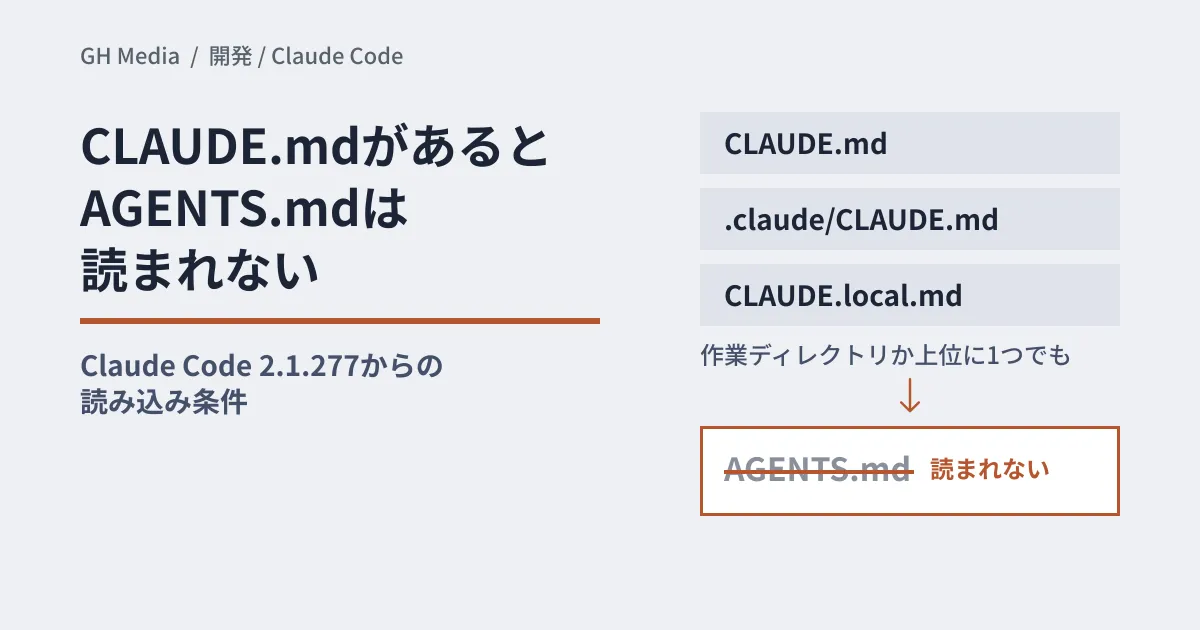
AGENTS.md is read only when there is no CLAUDE.md
According to the CHANGELOG, 2.1.277 (published on npm on September 18, 2026) added support for "reading AGENTS.md instead in projects without CLAUDE.md." In 2.1.281 (published September 23), this was extended to sessions via Amazon Bedrock, Google Vertex AI, Microsoft Foundry and LLM gateways, and to sessions with telemetry disabled. The official documentation also says that before v2.1.281, such sessions read only CLAUDE.md.
The decision is based on files in the working directory and the directories above it.
- Counted (if present, read instead of AGENTS.md):
CLAUDE.md,.claude/CLAUDE.md,CLAUDE.local.md - Not counted (read alongside AGENTS.md): each user's
~/.claude/CLAUDE.md, the organization's managed CLAUDE.md, files in.claude/rules/
AGENTS.md is still read if you have a personal CLAUDE.md in your home directory, but it is not read if there is even one CLAUDE.md in the repository or a parent directory.
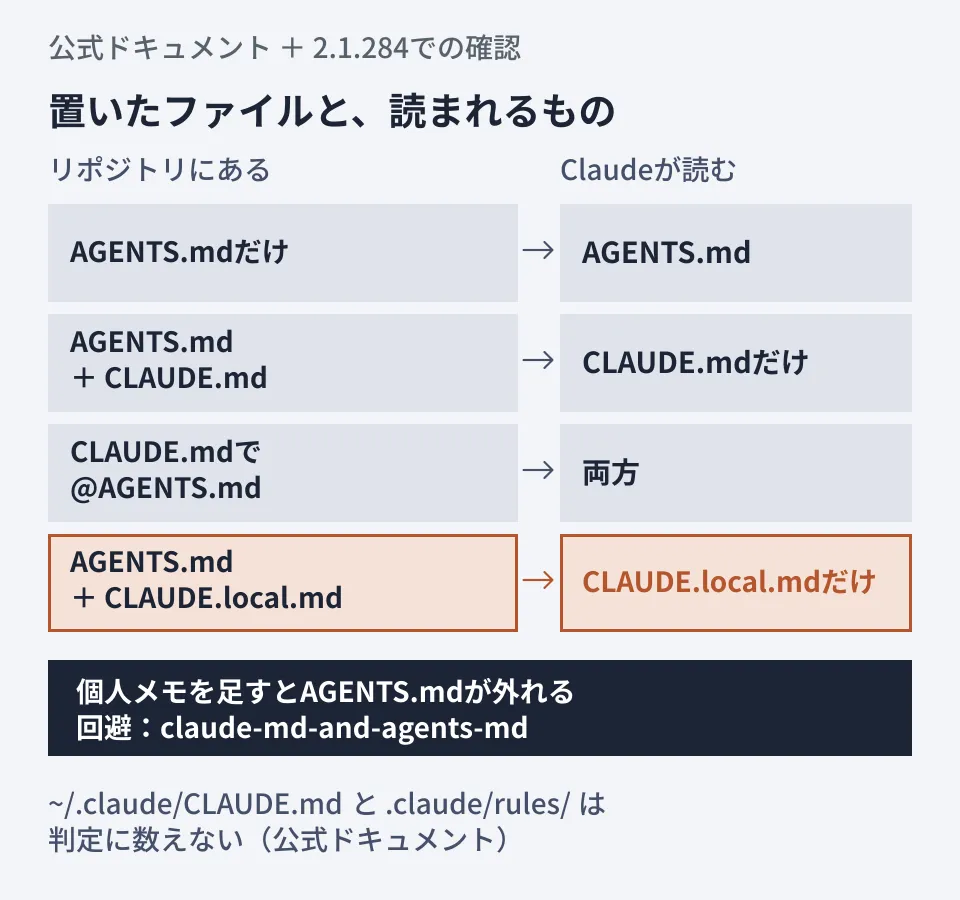
The top three rows match the table in the official documentation. The one that is easy to miss is the bottom row: the personal CLAUDE.local.md also counts, so AGENTS.md drops out as soon as you add it.
When the conditions are met, every AGENTS.md and .claude/AGENTS.md in the working directory and above is read at session start, and @path imports inside them are expanded. On the other hand, AGENTS.local.md, AGENTS.override.md and the contents of the .agents/ directory are not read. Instructions written there for other tools do not reach Claude Code. If you disable the built-in agents-md plugin with /plugin, it also reads only CLAUDE.md.
We tested four combinations
On September 29, 2026, we launched Claude Code 2.1.284 on Linux in non-interactive mode (claude -p) and tried each case once in a directory where we had run git init. AGENTS.md contained the passphrase "KUMQUAT-41" and a test command, npm run verify, written only there; CLAUDE.md contained a different passphrase, "PERSIMMON-9."
- AGENTS.md only: the passphrase was
KUMQUAT-41. AGENTS.md was read. - AGENTS.md + CLAUDE.md (no import): the passphrase was
PERSIMMON-9and the test command wasNONE. AGENTS.md was not read. - CLAUDE.md imports
@AGENTS.mdat the top: the test command wasnpm run verifyand the passphrase wasPERSIMMON-9. Claude noted the conflict and explained that it went with CLAUDE.md as the Claude-specific instructions. - AGENTS.md + CLAUDE.local.md (personal notes only): the test command was
NONE. As the official documentation states, AGENTS.md was no longer read.
That CLAUDE.md won out in case 3 is a single observation, not specified behavior. We could not find anything in the official documentation that defines precedence when the files conflict.
The CLAUDE.local.md pitfall and "Project instructions"
On a team that treats AGENTS.md as the source of truth, if someone creates CLAUDE.local.md for personal notes, only that person's Claude Code stops reading AGENTS.md. Because the file is not committed, other members cannot see the cause.
For this case, the official documentation advises setting Project instructions in /config to claude-md-and-agents-md. There are four values.
| Value | What Claude reads |
|---|---|
claude-md-or-agents-md (default) | CLAUDE.md. AGENTS.md only when there is neither CLAUDE.md nor CLAUDE.local.md |
claude-md-and-agents-md | Both. In each directory, CLAUDE.md files first, then AGENTS.md. Not read twice if already loaded via an import or symbolic link |
claude-md | CLAUDE.md only |
managed-only | At startup, only the organization's managed CLAUDE.md and auto memory. AGENTS.md is excluded too |
In a settings file, write it under agents-md@builtin in pluginConfigs, as in "options": { "instructionFiles": "claude-md-and-agents-md" }. However, it takes effect only in ~/.claude/settings.json, files passed with --settings, and managed settings; it is ignored in project and local settings files. You cannot commit it to the repository to distribute it to everyone.
Checking which file is in effect
- Use
claude --versionto confirm you are on 2.1.277 or later. In Bedrock or telemetry-disabled environments, 2.1.281 or later is required. - Starting from the directory you launch in and moving upward, look for
CLAUDE.md,.claude/CLAUDE.mdandCLAUDE.local.md. Files in parent directories count too. - The official documentation says that in interactive mode, a line such as
no CLAUDE.md found; AGENTS.md loaded: ...appears in the conversation (we did not confirm this message in our tests). - Use
claude -pto ask about a fact written only in AGENTS.md. If you pick a string that does not appear in any other file, you can tell from whether it can answer.
Keeping a single source of truth (editorial team's suggestion)
For repositories used with multiple tools, or repositories handed to outside parties, we suggest putting the body of your conventions in AGENTS.md and keeping CLAUDE.md in the following form. This is the form the official documentation shows as the way to "share a single file with other tools."
@AGENTS.md

## Claude Code
Use plan mode for changes under `src/billing/`.
According to the official documentation, with any Project instructions value, importing never causes AGENTS.md to be read twice, and it works even in sessions that cannot read AGENTS.md directly. The advantage is that it depends less on the recipient's personal settings or version. We covered how to divide roles among the files in Dividing roles among AGENTS.md, SKILL.md and DESIGN.md.
Deciding the following points as well makes drift less likely.
- Don't duplicate conventions in CLAUDE.md. If the two places disagree, there is no guarantee which one wins.
- Clean up earlier workarounds. The official documentation advises removing SessionStart hooks that output AGENTS.md, since they cause it to be loaded twice, and replacing CLAUDE.md files that say "read AGENTS.md" in prose with an import.
- If you have Windows users, prefer import over symbolic links. Creating links requires admin rights or Developer Mode, and depending on Git settings, they may be checked out as one-line text files.
Before handing a repository to an outside party, it is efficient to check the instruction files and what gets sent in one pass, together with The AI coding tool that sent the whole .git history.
On September 29, 2026, we opened and checked the AGENTS.md section of the Claude Code Docs page "How Claude remembers your project," the Claude Code CHANGELOG (2.1.277 and 2.1.281), and the npm registry's publication dates directly, and tried four file setups once each with
claude -pin Claude Code 2.1.284. We did not test the interactive-mode message, the/configscreen, changing settings viapluginConfigs, sessions via Bedrock, Vertex AI, Foundry or LLM gateways, AGENTS.md in subdirectories, or Windows environments.
For development setups and automation design using AI coding tools, please consult GleamHub.