What is Claude Code? — The centerpiece of AI coding in 2026
Developed by Anthropic, Claude Code is an AI coding agent that runs in your terminal. It autonomously understands codebases, edits files, executes commands, and manages Git operations, dramatically boosting developer productivity.
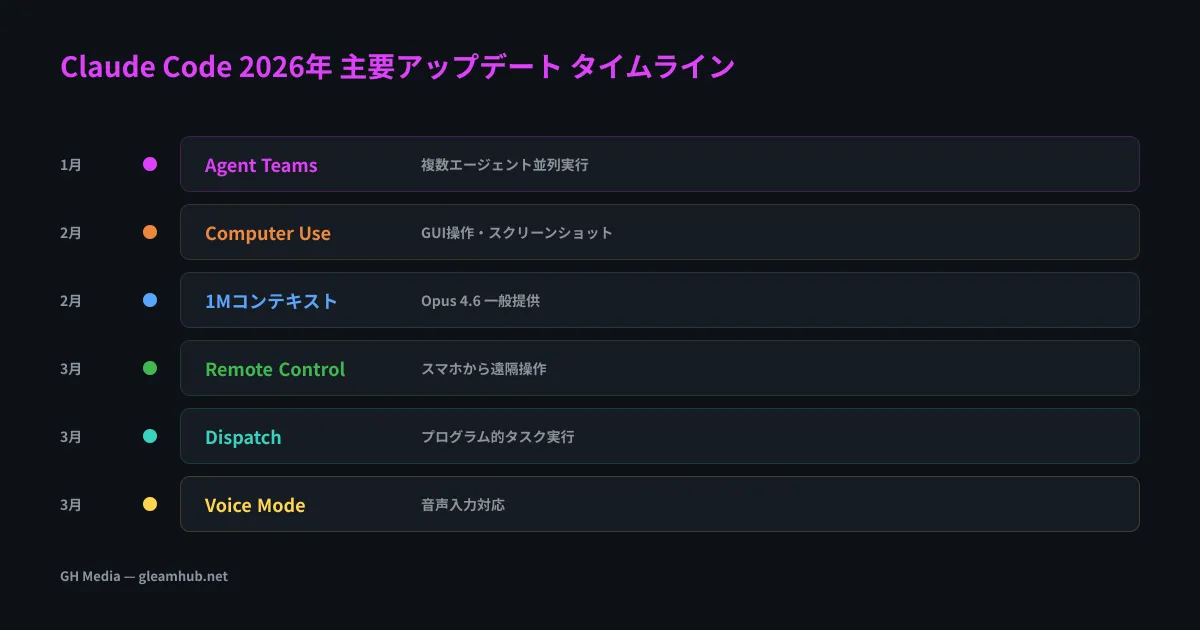
Updates since entering 2026 have been particularly striking, transitioning from an "AI that answers questions in chat" into an "autonomous development agent you can use from anywhere." This article provides a comprehensive overview of the major new features introduced in Q1–Q2 2026.
Agent Teams — the era of multiple Claudes developing in parallel
The feature that brought the greatest impact in 2026 is Agent Teams.
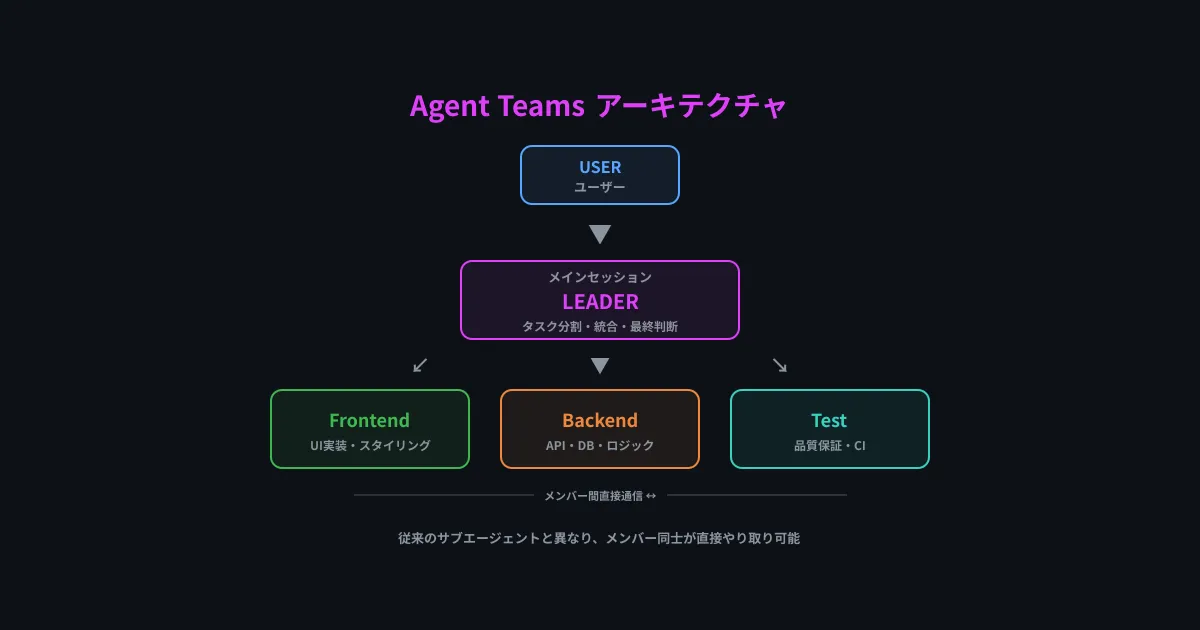
With Agent Teams, a single Claude session acts as the "team lead," operating multiple "team member" instances simultaneously. Key differences from conventional subagents are as follows:
| Item | Conventional subagents | Agent Teams |
|---|---|---|
| Inter-member communication | Via team lead only | Members can communicate directly with each other |
| User intervention | Direct instructions to lead | Direct instructions to individual members supported |
| Task management | Implicit | Explicitly managed via task lists |
| Display mode | Single | In-process / split-pane |
In practical application, you can run agents dedicated to frontend, backend, and testing in parallel, advancing large-scale refactoring simultaneously.
GleamHub also builds AI-driven development workflows leveraging Agent Teams, detailed in "Claude Code Case Study: Building an AI-Driven Development Workflow."
Note: Because Agent Teams is currently an experimental feature, you must enable
CLAUDE_CODE_EXPERIMENTAL_AGENT_TEAMSin settings. We recommend thorough testing before integrating it into production deployment pipelines.
Remote Control — controlling Claude Code from your smartphone
Remote Control is a feature that lets you access an active local Claude Code session from other devices such as smartphones or tablets.
Usage is straightforward.
- Launch Claude Code in the terminal
- Enabling Remote Control displays the session URL
- Press the spacebar to display the QR code
- Scan with the Claude mobile app to connect
This makes workflows like "running a heavy build task on your PC while checking progress and sending additional instructions from your smartphone on the go" a reality.
Dispatch — Launching Claude Code programmatically
While Remote Control offers "interactive remote operation," Dispatch provides "programmatic task execution."
With Dispatch, when you submit a task from your smartphone, Claude Code on your desktop automatically processes it. Because it functions like a one-off job queue, it proves powerful in scenarios like the following:
- Requesting a PR review from your phone during your commute
- Automatically sending a fix task when a CI failure is detected
- Scheduling daily code quality checks
The biggest difference between Dispatch and Remote Control is that Dispatch maintains a single continuous conversation between your phone and desktop. Context and history carry over seamlessly across devices.
Voice Mode — Issuing coding instructions by voice
Voice Mode launches via the /voice command and allows voice input using a push-to-talk system activated by holding down the spacebar.
It supports 20 languages, including Japanese, allowing natural instructions such as "Write tests for this function" or "Fix the type errors." Because it uses push-to-talk rather than always listening, it prevents unintended audio capture.
Enabling hands-free coding opens up new development styles, such as brainstorming designs at a whiteboard while dictating implementation instructions.
1-million-token context — Understanding massive codebases in their entirety
In Claude Opus 4.6, a 1-million-token (approx. 750,000 characters) context window became generally available. This enables capabilities such as:
- Implementing features by loading hundreds of pages of specifications all at once
- Analyzing across a codebase of over 30,000 lines
- Reasoning consistently through refactoring that spans hundreds of files
It scored 80.8% on SWE-bench (Software Engineering Benchmark), demonstrating top-tier performance among AI coding tools.
Computer Use — AI agents that operate GUIs too
With Computer Use, Claude Code can now interact directly with graphical interfaces. It can capture screenshots, analyze screen contents, and operate the mouse and keyboard.
Expanding its scope of operations—previously confined to the CLI (command line)—to browser-based testing and GUI tool manipulation delivers more comprehensive automation.
Other notable updates
Auto Mode
A mode that executes repetitive tasks automatically without ongoing prompts. It autonomously monitors PRs, fixes CI failures, and responds to review comments in the cloud.
/loop command
A command that lets you schedule recurring task execution. By specifying an interval and a command like /loop 5m /foo, you can automate polling-style monitoring tasks.
Channels (research preview)
A feature that pushes messages to active Claude Code sessions from external platforms such as Telegram and Discord. It enhances asynchronous team collaboration. For more details on the underlying MCP protocol powering Channels, see "Complete MCP Guide: The New Standard Protocol Connecting AI and External Tools."
Desktop app enhancements
- Server Preview: Automatically launches dev servers within the desktop app for live previews
- Local Code Review: Detailed review capabilities on a per-PR basis
- PR Monitoring & Automated Processing: End-to-end automation from PR creation to fixes
Claude Code vs. competing tools — The 2026 landscape
Let's compare Claude Code with other AI coding tools.
| Features | Claude Code | GitHub Copilot | Cursor |
|---|---|---|---|
| Context length | 1 million tokens | Limited | Limited |
| Agent features | Agent Teams (parallel) | Copilot Workspace | Background Agent |
| GUI operation | Computer Use support | ✕ | ✕ |
| Remote operation | Remote Control / Dispatch | ✕ | ✕ |
| Voice input | Voice Mode | ✕ | ✕ |
| SWE-bench | 80.8% | — | — |
| Pricing | Pro from $20/month | From $10/month | From $20/month |
Among practicing engineers, the combination of "routine editing in Cursor + complex tasks in Claude Code" is becoming the standard stack in 2026. For a detailed comparison of both tools, please see "Claude Code vs. Cursor: An In-Depth Comparison."
Summary — Claude Code evolves from an "AI pair programmer" into an "AI development team"
In 2026, Claude Code has transcended the realm of simple code completion tools, acquiring capabilities as an autonomous development agent team.
Here is a summary of the most notable highlights:
- Parallel multi-agent development enabled by Agent Teams
- Cross-device development experiences realized through Remote Control / Dispatch
- Hands-free coding instructions with Voice Mode
- Batch processing of massive codebases with a 1-million-token context
- Automation extended to GUI operations via Computer Use
The evolution of AI coding tools is sure to accelerate going forward. GH Media will continue bringing you the latest trends.
Reference links: