On April 17, 2026, Anthropic released its AI design tool Claude Design as a research preview. Powered by Claude Opus 4.7, this browser-based product generates prototypes, slide decks, pitch decks, and landing pages directly from text prompts. Its announcement sent ripples through the design software market, causing Figma's stock price to drop by roughly 7% on launch day.
For basic usage and an introductory overview of Claude Design, please refer to our Claude Design Complete Guide. This article is tailored for engineers and PMs who already incorporate Claude Code into their implementation workflows, focusing on automated design system learning, inline comment editing, custom dynamic sliders, and how to seamlessly pass generated prototypes to Claude Code via Handoff Bundles.
What is Claude Design? Anthropic Labs introduces a conversational design tool
Claude Design is the first full-fledged GUI tool from Anthropic Labs, Anthropic's experimental product division. While Claude.ai has primarily been a chat-based experience, Claude Design adopts a two-pane layout where a Canvas (a live preview and editing workspace) is permanently displayed alongside the chat. By allowing users to prompt and iteratively review results in real time, the concept of "designing with words" is naturally integrated into the actual workflow.
What you can build
According to official documentation and Anthropic's release blog post, the following deliverables are officially supported as of today:
| Type | Example use cases |
|---|---|
| Interactive prototypes | Clickable screen transitions, button behaviors, and form inputs |
| Wireframes / mockups | App screen layouts and functional flow sketches |
| Pitch decks | Investor and internal company presentations |
| Landing pages | Self-contained single-page marketing sites |
| One-pagers | Product overview PDFs and executive summary sheets |
| Social media assets | Social preview images (OGP), thumbnails, and social ad creatives |
| Code-driven prototypes | Working implementations incorporating audio, video, shaders, 3D, and embedded AI |
The final category, "code-driven prototypes," is particularly distinctive: it outputs working code implementations rather than just static mockups. This is the biggest differentiator compared to Figma or Canva.
Required plans
| Plan | Claude Design |
|---|---|
| Free | × |
| Pro ($20/month) | ✅ |
| Max | ✅ |
| Team | ✅ |
| Enterprise | ✅ (Requires administrator enablement) |
A Pro plan or higher is required, but existing Claude Pro subscribers can use it at no additional cost.
Hands-on walkthrough: From signup to your first project
No separate signup required: Simply log in with Claude Pro or Max
There is no separate signup or waitlist for Claude Design. If you already have an active Claude Pro, Max, or Team plan, you can start immediately by visiting claude.ai/design while logged in (Enterprise plans require administrator activation).
Although it carries a "Research Preview" status at the time of writing, it is immediately accessible to paid users without artificial feature restrictions.
Initial dashboard: Three tabs and four project types
Opening claude.ai/design after logging in presents a dashboard featuring three top tabs (Designs / Examples / Design systems), a new project creation panel on the left, and a Recent / Your designs gallery on the right.
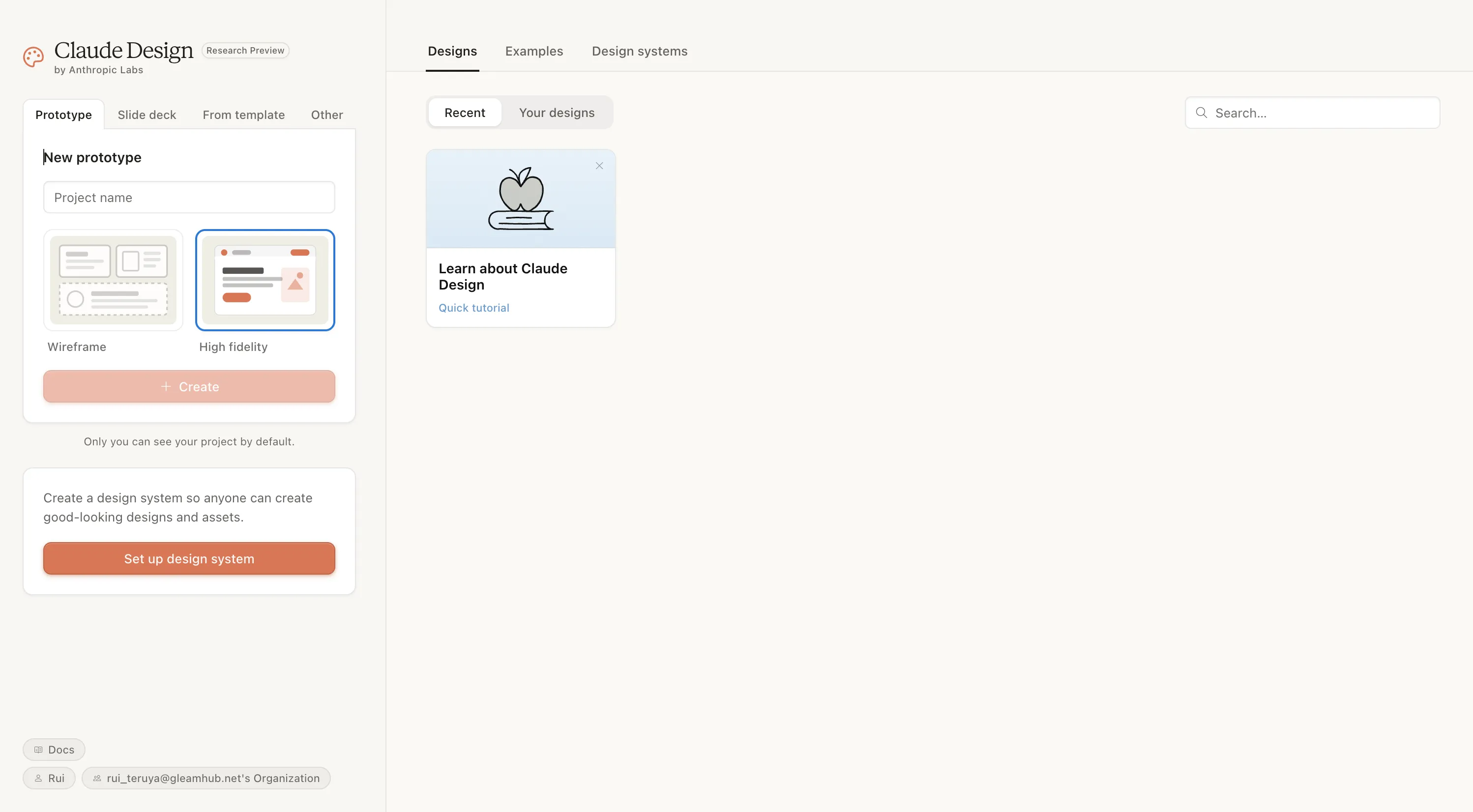
Here is what each tab does:
| Tab | Role |
|---|---|
| Designs | Your project list (toggle between Recent and Your designs) |
| Examples | Official sample and community gallery; helpful for prompt inspiration |
| Design systems | Management dashboard for registered design systems |
The left panel allows you to choose from four project types:
| Type | Application |
|---|---|
| Prototype | Web prototypes including app screens, landing pages, and mockups |
| Slide deck | Slide presentations and pitch decks |
| From template | Start by cloning an existing template |
| Other | One-pagers, social media graphics, and assets outside the top three categories |
Wireframe vs. high fidelity
Selecting Prototype gives you a choice between Wireframe (line-art based) and High fidelity (near-final look and feel). The default is High fidelity.
- Wireframe: Ideal for early structure and layout planning; keeps things simple by omitting color and custom typography
- High fidelity: Polished, stakeholder-ready designs simulating finished products
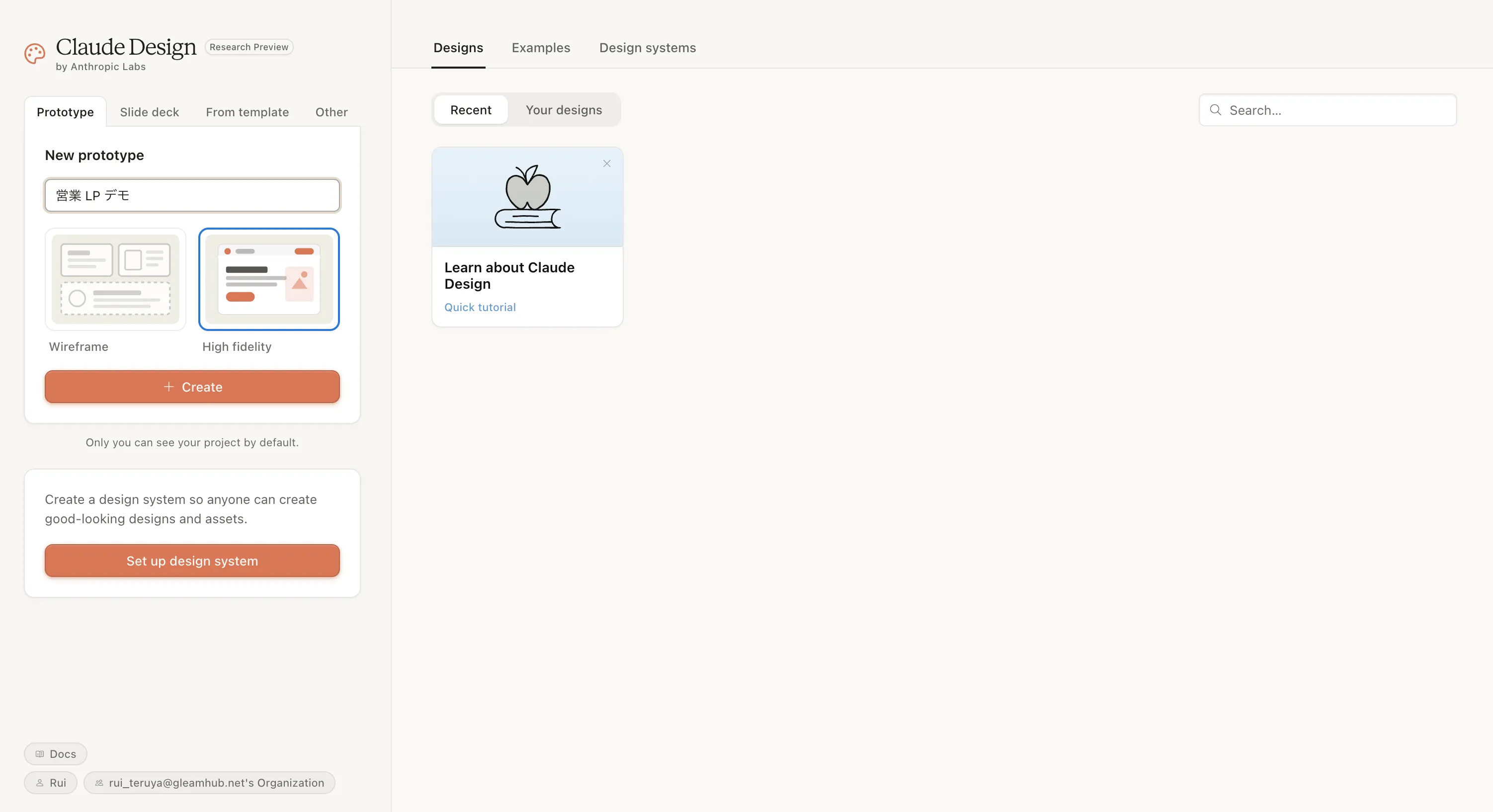
The standard rule of thumb is Wireframe for internal ideation and High fidelity for client deliverables. Enter a project name and click "Create" to enter the split-pane workspace. You can skip "Set up design system" at the bottom left for now and proceed straight to Create.
Split-pane workspace: Chat + Canvas
The active workspace features a two-pane layout with Chat on the left and Canvas (a live preview of generated assets) on the right. Once you submit prompts and assets, Claude Opus 4.7 renders an initial draft, and the export menu covers multiple formats as well as direct handoff to Claude Code.
| Area | Role |
|---|---|
| Left pane (Chat) | Prompt input, revision requests, and context uploads (images, DOCX, PPTX, codebase ZIPs) |
| Right pane (Canvas) | Live preview of generated UI and slides; click elements to add inline comments |
| Top bar | Project name, version history, sharing, and export |
| Top-right side panel | Custom sliders, layers, and style guides |
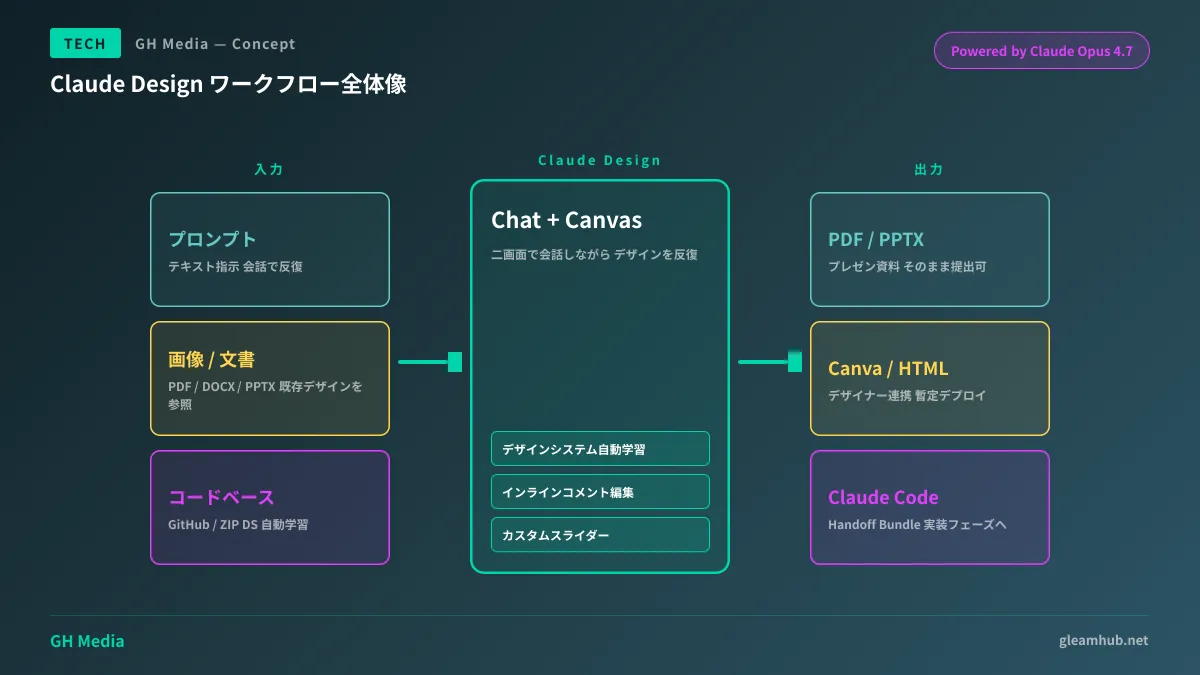
Creating your first project (hands-on example)
We tested it with a simple prompt: "Create a sales landing page for an SMB SaaS product. Include a value proposition hero section at the top, three feature cards, three pricing tiers, and a final CTA." Within 30 seconds, Claude rendered a complete initial LP draft on the canvas, complete with the product name "Kanade," the hero tagline "All your fragmented tasks, brought together on a single screen.," Inter Tight + Noto Sans JP typography, and a CTA button labeled "Start 14-Day Free Trial."
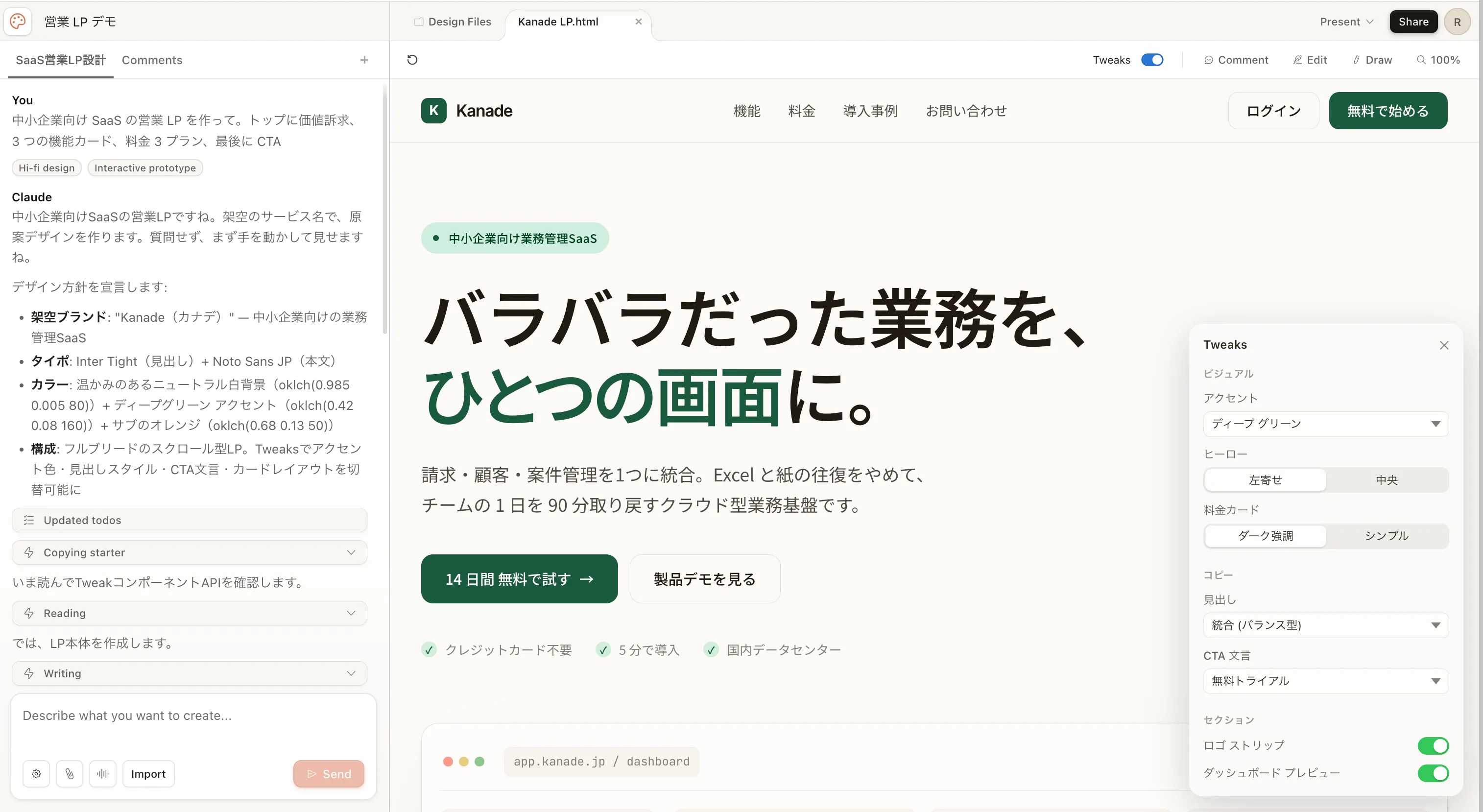
The left chat pane lists design tokens chosen by Claude (product name, typography, colors, layout composition) in bullet points, while the right pane displays the finished preview. On the far-right "Tweaks" panel, dynamic sliders are automatically generated—such as アクセント, ヒーロー, 料金カード, CTA文言, and セクション—allowing you to adjust color palettes and layouts in real time simply by dragging (detailed below).
From here, you enter an iterative loop:
- Click buttons or headings on the canvas to make local edits via inline comments
- Instruct global adjustments in the chat, such as "Standardize font to Noto Sans JP" or "Shift palette to navy base tones"
- Fine-tune parameters using Tweaks sliders
- Export once satisfied: PDF, PPTX, Canva, internal URL, or Handoff Bundle to Claude Code
With this workflow, you can go from prompt to a sales-ready LP mockup in just 10 to 15 minutes. Compared to recycling Figma templates, the productivity leap comes from having company-specific context reflected on the very first pass.
Three standout features
1. Automated design system learning
Upload your codebase (via GitHub repository) or design assets (Figma exports, style guide PDFs, etc.) during onboarding, and Claude will automatically extract colors, typography, and components into a unified design system. Subsequent generations adhere to this system, ensuring that brand tone never wavers.
You can also maintain multiple design systems side by side, making it easy to support multi-brand enterprises or switch between internal and client-facing styling.
2. Inline comment editing
Clicking any element on the canvas (such as a button, card, or heading) lets you leave targeted feedback right on the spot. The screenshot below shows adding a comment to a CTA button saying "Make button stand out more." The comment field includes a "Send to Claude" button that dispatches a localized revision prompt affecting only that element.
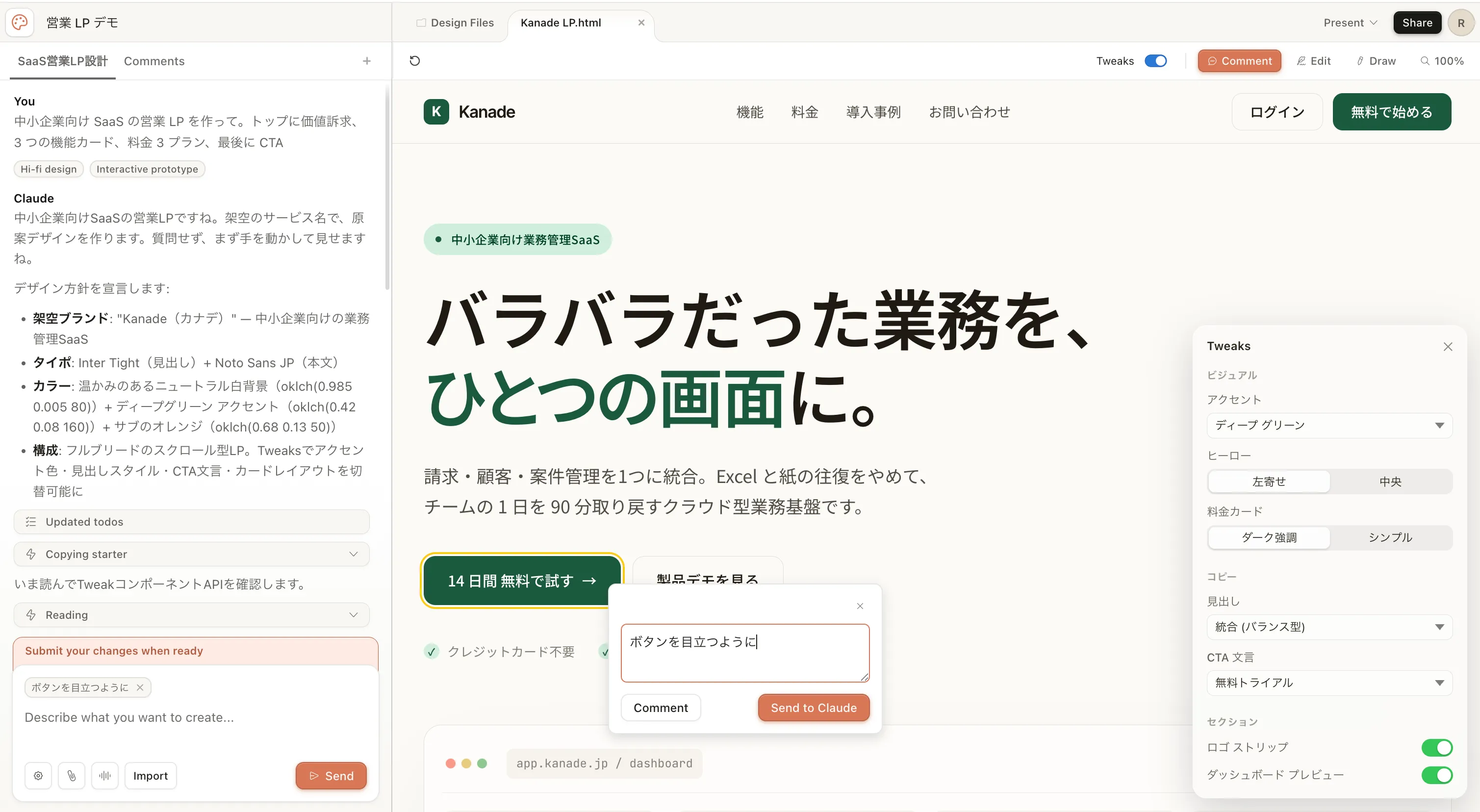
The advantage is being able to request localized tweaks—such as "Add image placeholder here" or "Increase padding"—without cluttering the main chat stream.
However, official docs note: "If inline comments fail to persist, please paste them directly into the chat." Some preview instability remains, so it is safest to keep records of critical revision instructions in the chat as well.
3. Custom dynamic sliders
When you make subjective requests in the chat like "Adjust the warmth of the colors," Claude dynamically generates slider controls on the fly and adds them to the right-hand 'Tweaks' panel. In the earlier project walkthrough, dynamic sliders like アクセント, ヒーロー, 料金カード, CTA文言, and セクション were already generated alongside the initial draft.
Dragging these sliders updates color palettes and spacing in real time, making "adjusting subjective preferences that are hard to describe in words" remarkably straightforward. Manipulating nuanced requests like "make it feel slightly calmer" via physical sliders rather than numeric values is virtually unique among design tools, embodying the true potential of an AI-native interface. It has the potential to fundamentally transform design review workflows.
Claude Code integration: Handoff Bundle
For teams like GleamHub that place Claude Code at the center of their implementation workflows, this is where Claude Design delivers its greatest value. Clicking the Share button in the top-right corner reveals the following dropdown menu:
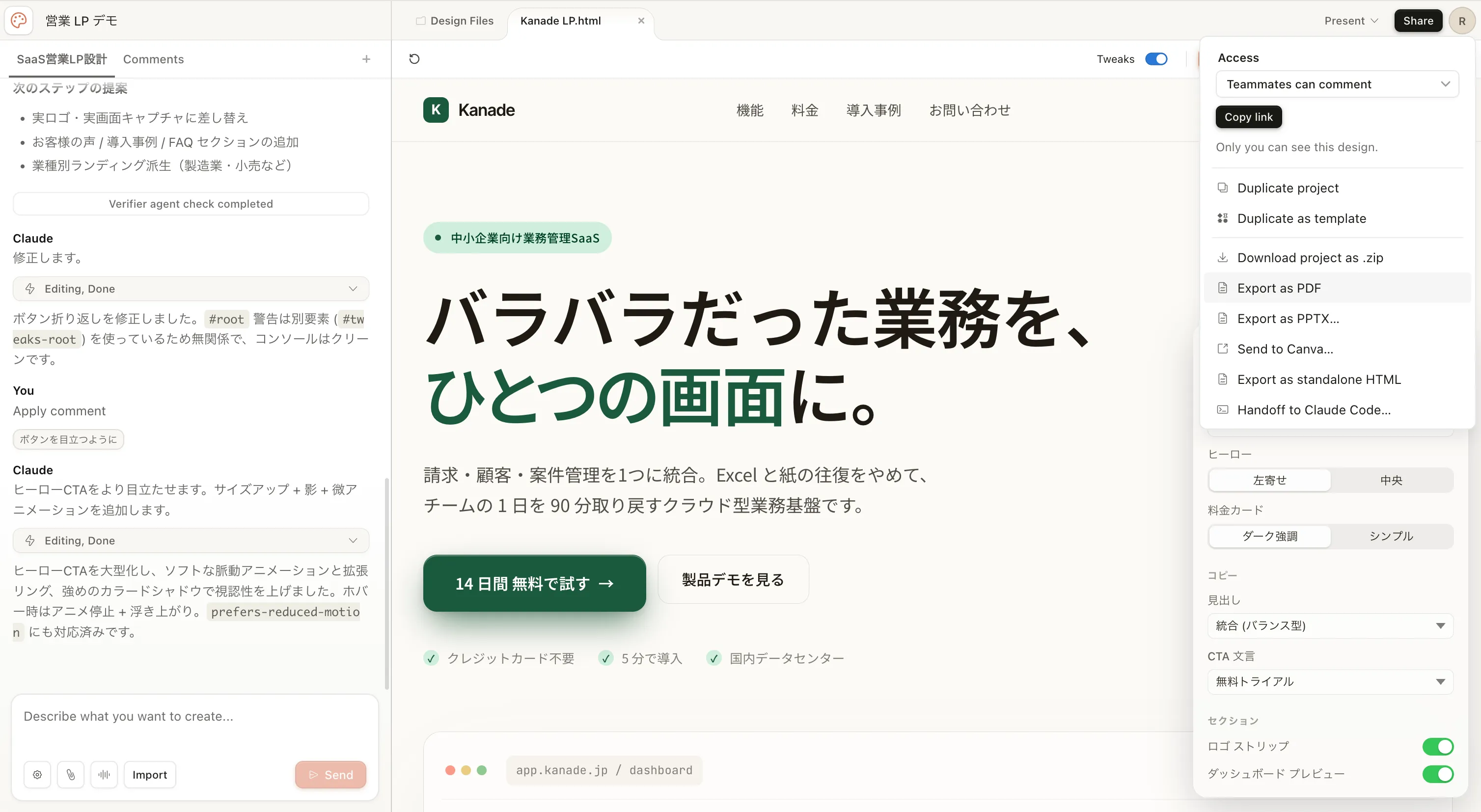
Selecting "Handoff to Claude Code…" at the bottom generates a Handoff Bundle containing:
- Complete bundle of HTML, CSS, and image assets
- Framework component boilerplate (React, Vue, Svelte, etc.)
- Design tokens JSON (colors, typography, spacing)
- Handoff instruction prompts for Claude Code (e.g., "Implement this LP using Astro, adhering to existing Tailwind configuration")
Simply launch Claude Code in your terminal and drag the bundle into it to start implementing immediately. Friction between design and engineering drops to near zero; combined with the latest capabilities of Claude Code, it turns the ideal of PMs building prototypes that immediately enter implementation into a practical reality.
The same dropdown also includes Export as PDF / PPTX / Send to Canva / Export as standalone HTML, which is invaluable when pausing before implementation to share assets with other teams. Toggling Teammates can comment on at the top generates an internal URL, smoothly bridging the path from "review to handoff."
Exporting and sharing
| Format | Primary use case |
|---|---|
| Internal URL | Internal organizational review and stakeholder feedback |
| Folder (ZIP) | Bulk asset download |
| Canva | Handoff to designers |
| Print materials and external proposals | |
| PPTX | Client presentation submissions |
| Standalone HTML | Temporary prototype deployments |
| Claude Code Bundle | Handoff to the implementation phase |
Remarkably for an AI generation tool, exported PDFs and PPTX presentations preserve typography and margins accurately, maintaining production-ready quality.
Pros, cons, and competitive comparison
Ideal use cases
- Prioritizing 0-to-1 speed: Moving from initial idea to working mockup in 10 minutes
- Teams without dedicated designers: Enabling engineers and PMs to elevate mockups to professional quality
- Pitch deck creation: Rapidly drafting investor slides that balance logical narrative with visual appeal
- Aligning with existing design systems: Ingesting codebases to produce brand-compliant screens at scale
Cases where it falls short
- Pixel-perfect micro-adjustments: Fine-grained numeric positioning at Figma's level is not yet its strong suit
- Video and motion-heavy production: Cannot replace After Effects or Lottie
- CMYK prepress file preparation: Desktop publishing (DTP) is out of scope (Adobe and Canva remain better suited)
In line with our perspective in Why You Might Want to Avoid No-Code / Low-Code, the practical strategy is to treat Claude Design as a "tool for rapid drafting," delegating final polish to human craft or Claude Code.
Competitive comparison
| Tool | Strengths | Weaknesses | Key differences with Claude Design |
|---|---|---|---|
| Figma | Professional pixel precision, collaborative editing | Slow 0-to-1 drafting; AI remains merely assistive | Claude Design delivers interactive assets through pure conversation |
| Canva | Abundant templates; strong for social asset creation | Limited flexibility; no code output | Claude Design handles code-driven, interactive prototypes |
| Vercel v0 | Specialized in React and Tailwind output | Shallow design system integration | Claude Design provides official Design-to-Claude Code handoff |
| Galileo AI | Rapid UI mockup generation | Export limited to Figma | Claude Design supports PDF, PPTX, and Canva exports |
As discussed in our Claude Code vs. Cursor comparison, Claude Design's decisive advantage lies in "completing the workflow entirely within the Anthropic ecosystem." It fills the missing link in an end-to-end Anthropic strategy spanning design, implementation, and deployment.
Pricing plans and getting started
| Plan | Monthly price (USD) | Claude Design |
|---|---|---|
| Free | $0 | × |
| Pro | $20 | ✅ |
| Max(5x) | $100 | ✅ |
| Max(20x) | $200 | ✅ |
| Team | $30/user | ✅ |
| Enterprise | Contact sales | ✅ (Admin configuration) |
Existing Pro subscribers can start using it at no additional cost. Visit claude.ai/design, create a new project, enter a prompt, and get started right away. For team-wide adoption, upgrading to the Team plan ($30/user/month) enables shared design systems and multi-user project editing.
Conclusion
Claude Design is not just an "AI image generator"; it is architected as an end-to-end production infrastructure connecting prompt → design → implementation within the Anthropic ecosystem. As reflected by Figma's stock drop, market dynamics in design tooling are undeniably shifting.
From the perspective of SMBs and custom development teams:
- 0-to-1 speed for client proposals: Cuts mockup preparation that once took a full day down to 30 minutes
- Internal and sales collateral: Delivers clean PPTX exports ready for immediate presentation
- Implementation handoff: Seamless integration with Claude Code removes friction between design and coding
Across these three dimensions, it has reached production-ready maturity. Since Pro plan subscribers can test it today, we recommend starting a pilot project and having it ingest your company's design system.