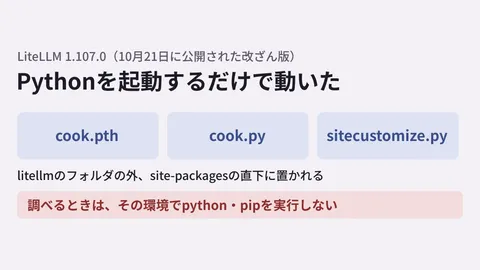
In May 2026, Publickey published Is "npm install" Essentially Arbitrary Code Execution? New Approaches to Development Environments in Light of Supply Chain Attacks on Trivy and axios, widely sharing a renewed warning that "the era of casually running npm install is over." With an intrusion into Trivy distribution packages and a malicious version release on axios npm occurring around the same time, the center of gravity in security investment is shifting from "how we use OSS" to "how we ingest OSS."
To address this premise in custom development, the starting point is to "completely isolate the environment executing npm install from production." In this article, we outline operational rules and a DevSecOps design that separates the three tiers of developer workstations, CI, and production builds.
What does "npm install is arbitrary code execution" mean?
The execution of npm install leaves room to run arbitrary shell commands via script fields in dependency packages. This is by design, and when exploited, a developer's workstation can be compromised in an instant.
| Trigger | What gets executed | Risk |
|---|---|---|
preinstall / postinstall | Scripts bundled in npm packages | Credential harvesting, external exfiltration |
prepare / prepublishOnly | Processes before and after package publication | Replacement of build artifacts |
| Native module builds | Compiling C/C++ code | Injection into executables |
| Post-download of binaries | Binaries downloaded independently by OSS | Execution of fake binaries |
What is particularly problematic is that "this can happen across an entire dependency tree of hundreds to thousands of packages." Even if you directly depend on only 30 packages, including transitive dependencies means granting arbitrary code execution rights on your machine to over 2,000 packages.
This motivates reexamining the "why couldn't it be prevented?" question behind the Axios and LiteLLM incidents covered in 2026 Supply Chain Attack Summary from the perspective of permission design at installation time.
The three-layer isolation architecture to standardize in custom development
Here are the three layers of environment isolation that should be standardized in custom development projects.
[Layer 1: 開発者端末(Mac/Windows)]
  ├ 直接の npm install は禁止
  ├ Devcontainer / GitHub Codespaces 内でのみ実行
  └ シークレット・本番アクセス権を持たない

[Layer 2: CI / Build 環境(GitHub Actions / Cloud Build)]
  ├ 1 ジョブ 1 コンテナで使い捨て
  ├ ネットワークは npm registry / proxy のみ許可
  ├ シークレットは最小権限の OIDC 経由
  └ ビルド成果物は署名 + ハッシュ記録

[Layer 3: 本番ランタイム(GCP / AWS / Cloudflare)]
  ├ npm install は実行しない
  ├ ビルド成果物のみをデプロイ
  └ Outbound 通信は許可リストのみ
The key is a design where "Layer 1 and Layer 3 do not share the same secrets." We physically guarantee an architecture where no matter how compromised a developer workstation becomes, it cannot reach production. This theme should be considered as two sides of the same coin alongside the "never store secrets in Git" design covered in Audit of Secrets in Custom Development: Lessons from the Money Forward GitHub Incident.
Concrete measures for Layer 1: Making developer workstations "safe to soil"
When running npm install on developer workstations, it is essential to run it in "an isolated environment that can be discarded at any time." The following three patterns are realistic options.
| Variant | Architecture | Advantages | Important precautions |
|---|---|---|---|
| Devcontainer (VS Code) | Local Docker | Snappy operation, usable offline | Requires standardization of Docker configurations |
| GitHub Codespaces | Cloud containers | Runs even on low-spec machines, easy disposal | Monthly costs, requires internet connection |
| Cloud Workstations (GCP) | VMs on GCP | Withstands large repositories | Initial costs and operational overhead |
For small-to-medium custom development, a hybrid of Devcontainer and Codespaces offers a realistic balance. Operate with a two-tier approach: spin up quickly using Codespaces during new setups, and transition down to Devcontainers once operations stabilize.
Concrete measures for Layer 2: Network control and signing in CI
When running npm install on CI, the strongest defense is to restrict connections to external registries.
- Set up Verdaccio or JFrog Artifactory as an internal proxy, allowing only internally approved packages through
- Block everything except
registry.npmjs.orgusing a network allowlist - Make
npm ci --ignore-scriptsthe default, and allow scripts execution only when explicitly permitted - Always run
npm audit signaturesafternpm installto verify signatures - Generate an SBOM (Software Bill of Materials) in CycloneDX format and store it in the repository
In particular, making --ignore-scripts the default is an initiative with high impact relative to its implementation cost, allowing you to block intrusions via postinstall all at once. Packages that require scripts should be managed through individual allowlists for each project.
Concrete measures for Layer 3: Never install in production
As an ironclad rule, never execute npm install at all in production runtimes. For serverless infrastructure like Cloud Run, Lambda, and Cloudflare Workers, deploy artifacts generated in CI directly. This ensures that:
- Production image size is reduced by more than half (dev dependencies are eliminated)
- Startup time is shortened (no dependency resolution)
- New vulnerable packages cannot slip into production (immutable)
Having CI sign immutable artifacts and verifying them with Sigstore / Cosign before production deployment is currently the best practice in custom development. This theme should be designed together with the "intrusion detection during deployment" discussed in Deployment Safety Learned from GitHub eBPF Utilization.
Five common pitfalls
Finally, here are pitfalls to avoid when structuring DevSecOps in custom development.
Pitfall 1: Breaking Layer 1 under the banner of "developer convenience"
Cases frequently arise where Devcontainer practices become a mere formality due to complaints that "development slows down without direct local install." Operational measures are needed, such as dedicating one day of onboarding for new members to ensure they become thoroughly accustomed to Devcontainer workflows.
Pitfall 2: Generating SBOMs without utilizing them
Even if you generate CycloneDX, it is meaningless without a mechanism to search past SBOMs when new vulnerabilities emerge. Set up centralized management plus automated alerts using tools like Dependency-Track.
Pitfall 3: Cache poisoning in internal proxies
There are cases where previously compromised versions remain in Verdaccio or Artifactory caches during operation. Establish a process to regenerate caches on a monthly basis.
Pitfall 4: Failing to update lockfiles
If package-lock.json is left untouched for six months without updates, it remains pinned to known vulnerabilities. Incorporate monthly Renovate / Dependabot reviews.
Pitfall 5: Overlooking client proprietary packages
Private npm packages published internally by clients can serve as a channel through which compromises on the client side enter the contractor's CI directly. Incorporate bidirectional SBOM exchanges into contracts.
Summary: Turning npm install from a prayer into an engineered design
Executing npm install is an act of "lending your machine to code written by 2,000 strangers." When handling custom development, you cannot turn a blind eye to this reality. Whether you can shift the four-part setup—Devcontainers, internal proxies, SBOMs, and signature verification—from a discussion of "whether to do it" to "how deeply to implement it" will define the quality of custom development moving forward.
For consultations such as "we are concerned about the supply chain resilience of past projects" or "we want to build DevSecOps into a new project from the start," we provide individual estimates after learning about your existing CI setup and repository size. Please feel free to reach out via our contact form.