The CI build failed with the error message "binary not found." It runs fine locally. Nobody touched package.json, and dependency versions are locked down. Checking back through the logs, the only thing that changed was the version of npm itself.
In npm 12, install scripts from third-party packages (lifecycle scripts such as postinstall) no longer run by default. The 16-year-old assumption that things "just work once installed" has been flipped.
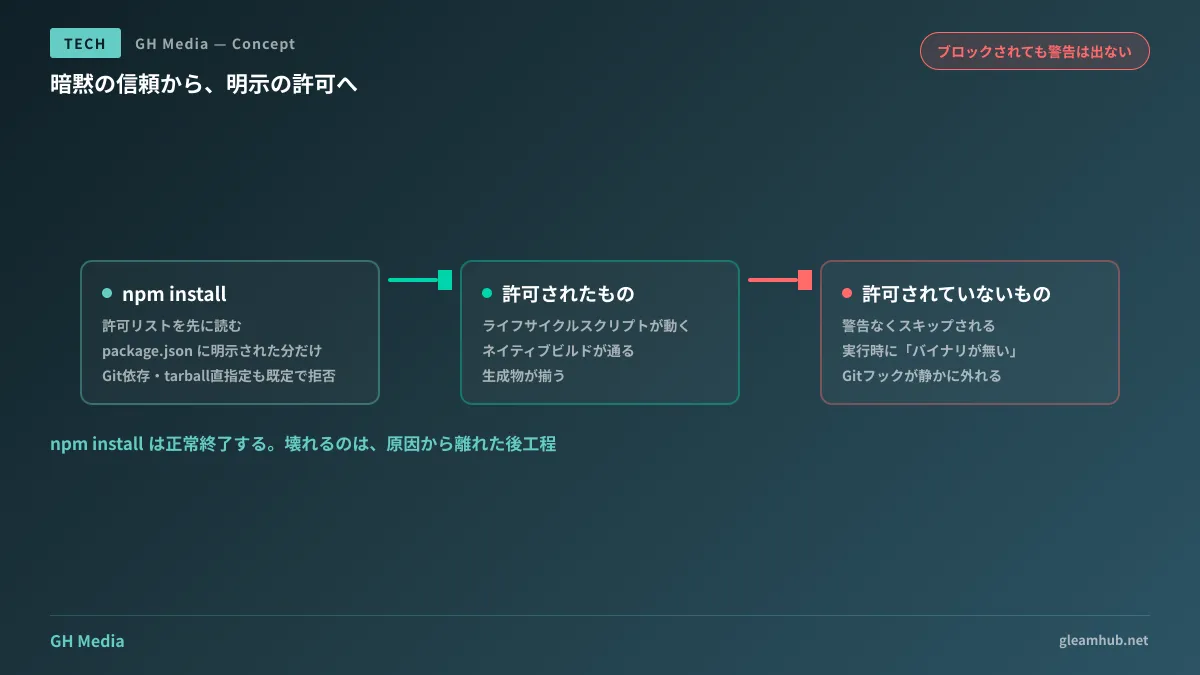
From implicit trust to explicit permission
Previously, npm install executed lifecycle scripts for packages in the dependency tree without warning. In modern dependency trees containing hundreds of packages, this meant that hundreds of third parties could execute arbitrary code on your machine and in CI. In fact, many of the npm supply chain attacks in recent years have leveraged this exact vector.
In npm 12, the default behavior has been inverted. npm install first checks the explicit allowlist in the project's package.json and only executes scripts for packages listed there. Packages not on the list are not executed.
At the same forward step, non-registry dependencies have also been blocked by default.
| Target | Traditional | Default in npm 12 |
|---|---|---|
| Lifecycle scripts | Execute all | Execute only those on the allowlist |
Git dependencies (--allow-git) | Allowed | none (denied) |
Direct HTTPS tarball URLs (--allow-remote) | Allowed | none (denied) |
There is a concrete reason why Git dependencies were blocked. Through .npmrc introduced by a Git dependency repository, a path existed to replace the Git executable itself, even if --ignore-scripts was specified. Because this was a vulnerability that could not be plugged simply by stopping scripts, dependency sources themselves are now denied by default.
The biggest trap: no errors are shown
The real problem during migration is not the fact that scripts stop running. It is that you are not notified when they stop. Scripts for packages not on the allowlist are silently skipped rather than halting execution with a warning.
npm install exits successfully. node_modules is created as well. The problem only surfaces in downstream steps.
- Packages that fetch or build native binaries — Image processing, browser automation, build tools, ORM client generators, etc. Installation succeeds, but execution crashes with "binary missing"
- Tools that install Git hooks — Because hooks are never configured, linting and testing on commit quietly stop running. Nothing breaks outright; your defenses simply drop
- Packages that generate config files or type definitions — The build proceeds without the generated assets, causing type errors far away from the root cause
Because symptoms appear far from their source in all of these cases, it takes time to trace the issue back to the npm version. In organizations where npm versions differ between CI and local environments, this manifests as "it only fails on CI" or "it only works on one specific person's machine."
Build your allowlist before upgrading
In terms of procedure, the right approach is not to upgrade to npm 12 and fix broken parts afterward, but to finish building your allowlist before upgrading. The npm 11 series provides preparatory commands specifically for this migration.
- Using current npm 11 (11.16 or later), enumerate packages in the dependency tree that have lifecycle scripts
- Inspect each enumerated package one by one to verify why the script is necessary. Allow native builds or essential generation steps; disallow anything where the reason cannot be explained
- Write only the packages you have decided to allow into the
package.jsonallowlist and commit the changes - In that state, upgrade to npm 12 and run a full build and test suite starting from a clean install
- If any Git or direct tarball dependencies remain, migrate them to registry sources (including internal registries) or explicitly allow them
If you skip step 2 and put everything on the allowlist, the value of this change is completely lost. While it takes time, auditing who is executing arbitrary code in your dependency tree at least once is the core purpose of this feature.
On the CI side, please pin the npm version in your job definitions. The same issue will recur whenever the runner's default version gets bumped. We cover inspection items for CI and build credentials in Auditing npm and GitHub Actions credentials, and release workflows in Phased npm releases and human approval.
For clients commissioning development, allowlists make readable documentation
This change actually provides practical utility for parties commissioning custom software development.
Previously, there was virtually no way to verify which third-party code a system trusted. Even with thousands of lines of packages listed in package-lock.json, there was no way to tell which of them executed arbitrary code in your environment.
From npm 12 onward, the allowlist serves directly as the list of third parties this project has permitted to execute code during installation. At most, it spans a few dozen lines. It is short enough to review, and any additions are immediately obvious in diffs.
Therefore, ask your development partners to include the following two items in deliverables and handover materials:
- A one-line explanation for each package on the allowlist detailing why permission is needed
- The approval process for adding items to the allowlist (who decides)
When dependencies can be added freely, the list will quietly grow over the course of operations. In Cascading infection by npm worms and incident response, we analyzed how past npm worm attacks spread. It is safe to assume that your attack surface expands proportionally with every addition.
What to do next
Count how many dependencies in your local project have lifecycle scripts. In most projects, the number will be an order of magnitude higher than expected. That count is the exact number of third parties you have unconditionally allowed to execute code up to now.
After that, confirm whether the npm version is pinned in your CI. If it is not pinned, it will update automatically before migration preparations are complete.
If you need help auditing dependencies or evaluating an npm 12 migration for an existing system, GleamHub offers consultations for development, AI, and automation. Because workload varies depending on the size and structure of your dependency tree, we provide individual estimates. Please reach out via Contact Us.
Sources
- npm 12 Released: Install Scripts Off by Default as Registry Moves to Explicit Trust — InfoQ
- npm v12 Shifts Security from Implicit to Explicit Trust — JFrog
- Preparing for npm v12: install scripts and non-registry sources become opt-in — GitHub Community Discussion #198547
- npm 12 Disables Install Scripts by Default to Reduce Supply Chain Risk — The Hacker News