"Our development team started using Claude Code and productivity went up, but before we knew it, everyone was subscribing individually, and the company had no grasp of the costs or the contents of the data being entered."—We have increasingly heard such concerns from IT teams at companies where AI coding tools have spread across the frontline. Because individuals can easily adopt them, they spread without the company knowing. This dynamic is not unique to Claude Code; it is common to convenient AI tools in general.
We previously addressed the dangers of leaving teams in an unmanaged state where "nobody knows who is using which AI" in Governance Design for Shadow AI, but a mechanism directly tackling this problem has finally arrived: Anthropic's release of the "Claude apps gateway (for Amazon Bedrock / Google Cloud)." This serves as the foundation for enterprises to distribute Claude Code under organizational governance. In this article, we outline how IT teams and engineering leaders can leverage it to establish company-wide rollouts.
Why "convenient but untracked" is dangerous
Leaving the frontline to use AI coding tools individually leads to three compounding problems.
- Invisible costs: You do not know who is using how much, only finding out the total when the invoice arrives. You cannot apply spending limits either.
- Inability to manage entered content: Source code and internal information may be passed to external services without the company's knowledge.
- Inability to keep up with employee onboarding and offboarding: When everyone uses personal credentials, you cannot centrally revoke access when an employee leaves.
Because the convenience is real, "do not use it" is not the solution. What is needed is a state where the company maintains control over costs, data, and access while preserving that convenience. While establishing rules on how far AI can be used builds on Establishing AI usage rules for SMBs, this adds a mechanism to enforce those rules through technology.
What Claude apps gateway changes
This gateway transforms the situation where individual developers authenticated separately into a model that consolidates and controls the company's entry point. There are three key points to grasp.
| Conventional (Individual adoption) | Via gateway |
|---|---|
| Each person maintains individual credentials | Centralized authentication via corporate single sign-on |
| Cannot set spending caps | Daily/weekly/monthly limits per organization, group, and user |
| Unknown who used how much | Usage status can be tracked on the company side |
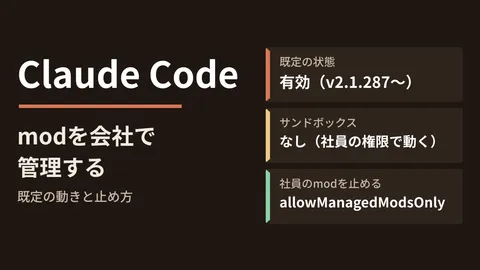
- Single sign-on (SSO): The gateway supports OIDC (OpenID Connect) and integrates with existing identity providers such as Google Workspace, Microsoft Entra ID, and Okta. Instead of distributing credentials to each developer, users can be signed in automatically with short-lived sessions, ensuring access revocation upon offboarding takes effect centrally.
- Budget limits (spend caps): You can apply daily, weekly, and monthly limits across the entire organization, by group, or per user. This structurally prevents "realizing you overspent after the fact."
- Distribution of common settings: Because you can distribute company-wide unified default settings, you can curb variations across individual teams.
In terms of architecture, it can be operated as a single container running on your own infrastructure (combined with PostgreSQL), and procedures for deploying to environments like Google Cloud's Cloud Run are also provided. By design, inference traffic and usage data are not sent to Anthropic unless API usage is explicitly configured, making the ability to retain data flows on your own side effective for companies handling internal information.
The sequence for IT teams to master in company-wide rollouts
Even with the right mechanism in place, an incorrect approach will stall due to pushback from the frontline. The sequence for transitioning smoothly to governance is as follows.
- Take inventory of the current state: First, identify who is using which AI coding tools under what contracts. Assessment comes before control.
- Connect with your identity provider: Integrate the gateway with Google Workspace, Entra ID, or Okta that you already use, consolidating access under corporate accounts.
- Apply budget limits first: Rather than starting with strict restrictions, first set organization-wide caps to "stop overspending" and prevent runaway costs.
- Distribute common settings and input rules: Distribute clear boundaries on what can and cannot be entered through both configuration and documentation. For thinking on cloud-wide AI governance, see Cloud AI governance and shadow AI.
The critical point is not taking away the frontline's convenience. The gateway's goal is not prohibition, but enabling teams to use tools with peace of mind once the company has secured control over costs and data. Development workflows using Claude Code is also helpful for managing development post-adoption.
First, list the AI tools used within the company
A company-wide rollout of AI coding tools is neither about "spreading them because they are convenient" nor "banning them because they are risky"—it comes down to letting teams use them while the company holds control over costs, data, and access. To begin, try listing who currently uses which AI tools across the company in a single spreadsheet. Any items you cannot account for are the exact gaps you should fill first with a mechanism like the gateway.
Whether you need advice on how to introduce governance in your environment, how to integrate with your existing Google Workspace or Entra ID, or how to design budget and data management, feel free to reach out through GleamHub's Consultation on development, AI, and automation. From taking inventory of your current state to designing and implementing authentication, budgets, and data management, we will partner with you tailored to your infrastructure.
Sources
- "Claude apps gateway for AWS/Google Cloud" debuts: enables organization-wide SSO, team and individual cost caps, default configuration, and more for Claude Code | Publickey
- Introducing the Claude apps gateway for Amazon Bedrock and Google Cloud | Anthropic
- Anthropic Adds Enterprise Gateway to Simplify Claude Code Access on AWS and Google Cloud - DevOps.com
- AWS Ships Claude Apps Gateway as Self-Hosted Control Plane for Claude Code and Claude Desktop - InfoQ