"I want to summarize documents containing customer information, but I hesitate every time, wondering whether it is permissible to paste this into a cloud AI." This is a frequent dilemma for professionals in privacy-sensitive industries. No matter how capable generative AI is, organizations cannot use it for sensitive data without clarity on where input data travels and how it is handled. This has driven interest toward "on-device AI (local AI)," which processes data entirely within the local hardware without sending it off the device.
The hardware specifications of the latest generation Gemini Nano v3 clearly illustrate how close on-device AI is to practical deployment. What captured attention was not its benchmark scores, but the steep requirement of 12GB of RAM. This number highlights the gap between the ideal of fully local AI and the hardware realities supporting it. Here is an overview of what SMBs can anticipate and where patience is still required.
Why Demand for "On-Device AI" Is Growing
Cloud-based AI is powerful, but enterprise adoption always brings the question: "Where is my input data being processed?" When handling customer information or proprietary internal records, the ability to process data without exporting it becomes an asset in itself. On-device AI runs models locally on hardware and computes inferences without network communication, guaranteeing that sensitive data never leaves the device.
This trend is not limited to smartphones. Running local AI models inside PC business workflows is also gaining momentum. The integration of AI inside the browser is covered in our article on Chrome's built-in AI (Prompt API), and running local models on PCs is explored in our article on Microsoft Foundry Local. The pressing demand to apply AI to data that cannot be uploaded to the cloud is fueling this local computing trend.
What the 12GB Barrier Actually Means
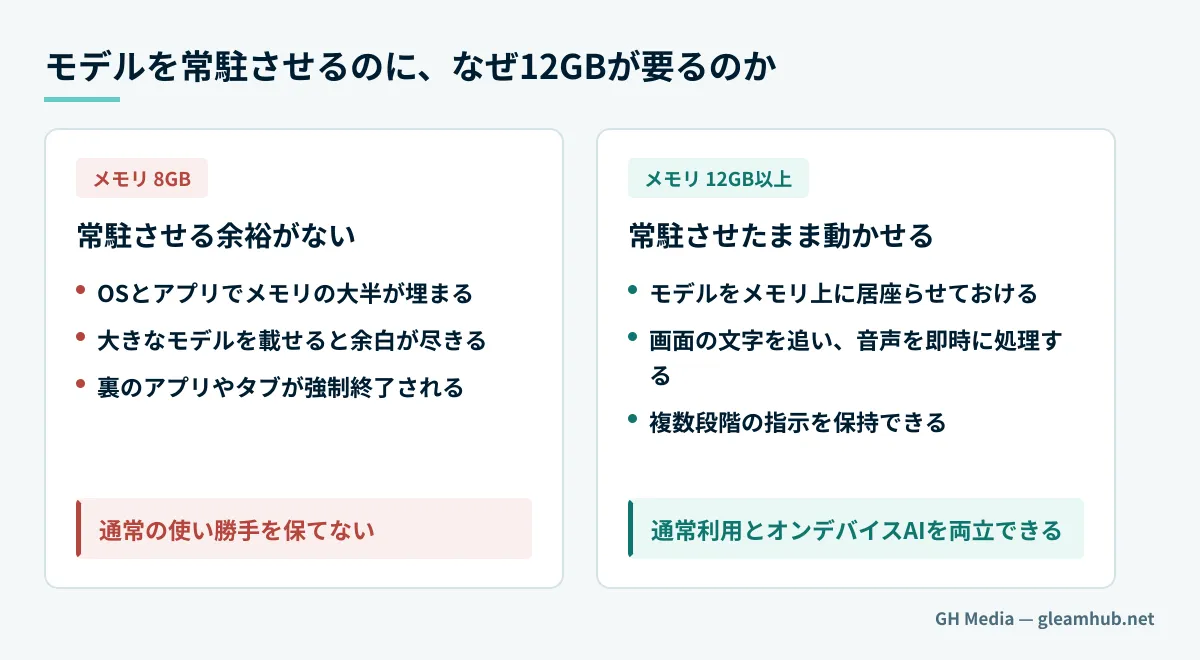
Why does Gemini Nano v3 demand 12GB of memory? This requirement exposes the inherent engineering challenges of on-device AI.
To execute AI tasks smoothly on a local device, the model must remain permanently resident in RAM. Tracking on-screen text, processing real-time audio, and maintaining multi-step contextual instructions simultaneously requires the model to reside in active memory without interruption. However, keeping a large model resident on an 8GB device causes the operating system to aggressively kill background apps, drop browser tabs, and create severe latency. Google set 12GB as the minimum baseline to prevent compromising regular device usability—a requirement 50% higher than the 8GB baseline required by Apple Intelligence (9to5Google: Gemini Intelligence Requirements, Android Headlines).
Furthermore, RAM is not the only prerequisite.
| Requirement | Details |
|---|---|
| Memory | 12GB or more (8–10GB unsupported) |
| Processor | Flagship-tier chipset |
| Software infrastructure | Support for Gemini Nano v3 and Android AICore |
| Support | Long-term update support (ongoing major OS upgrades and security patches) |
In practice, running Gemini Nano v3 is currently restricted to newer 2026 flagship hardware (Thurrott: Demanding Hardware Requirements).
What SMBs Can Realistically Do Today
There is no need to view this "12GB barrier" with discouragement. Instead, it serves as a valuable milestone to distinguish what to expect from on-device AI and what to delegate to the cloud or alternative tools.
Here is a practical perspective: advanced on-device AI requiring flagship hardware is not yet at a stage where it can be rolled out uniformly across all employee devices. However, the objective of utilizing AI without leaking data can be achieved through alternative methods, such as running local AI on desktop PCs or utilizing private cloud configurations with restricted processing locations. Deciding in advance what information can leave your network and what must remain local enables progress without waiting for full device refresh cycles. For differences in browser environments and how to bridge them, see our article on Prompt API fragmentation and fallback alternatives.
The key is to avoid framing this as an "on-device AI versus cloud AI" dichotomy. Depending on data sensitivity and computational load, categorize workloads into tasks handled locally, tasks delegated to the cloud, and data never fed into AI systems. With this framework in place, you can start using AI safely with existing hardware without overextending to meet high hardware specs.
First, Draw the Line on What Information Can Be Shared
The 12GB requirement of Gemini Nano v3 demonstrates that fully localized AI is still evolving. Therefore, the highest-value action today is not procuring high-end hardware, but defining what corporate data can be shared with AI models. Once that line is drawn, you can safely deploy AI across compliant scopes, whether through on-device or cloud setups. In your next AI review, begin by compiling an inventory of shareable versus restricted data rather than chasing the latest hardware announcements.
If you need to establish guidelines on what internal data can be shared with AI, or want to design an AI architecture that operates without exposing sensitive information, GleamHub is here to help through our Development, AI, and Automation consulting. Optimal setups vary based on requirements, so we provide customized estimates. Please reach out via Contact Us.
Sources
- Gemini Intelligence has high spec requirements on Android — 9to5Google
- Gemini Intelligence’s Requirements Are More Demanding Than You Thought — Android Headlines
- Google Details Strict Hardware Requirements for Gemini Intelligence on Android — Thurrott
- Why 12GB RAM is becoming the new Android standard in 2026 — Nokiamob