If your company stores inquiry histories or product reviews in BigQuery, you can call generative AI from within SQL and classify or summarize tens of thousands of records at once. Convenient as that is, a query you ran as a test might call generative AI on every record, and you might only notice it on the next month's bill. This is because pricing is determined by the volume of tokens (the units of text that AI processes).
In an official blog post on October 14, 2026 (US time), Google Cloud introduced token-based cost controls (daily quotas) for BigQuery's generative AI functions. According to the BigQuery release notes, this feature became generally available (GA) on June 8, 2026, temporarily could not be configured from June 15, and was restored on August 31. Based on the blog post and BigQuery's documentation (Control costs with token quotas), this article summarizes the types of quotas, how processing stops when a quota is reached, and how to configure them.
The four daily quotas and their defaults
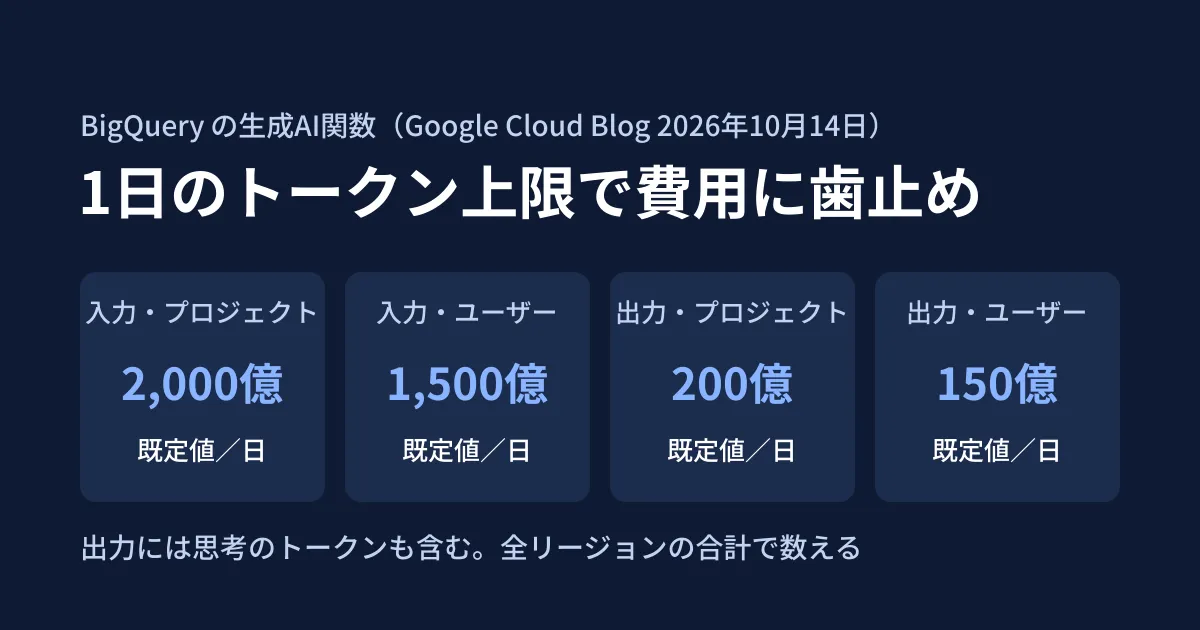
The quotas are managed through Google Cloud IAM's Quotas mechanism and exist at the project level and the user level. The default values are the same in the blog post, the documentation, and BigQuery's quotas page.
| Quota name | What it counts | Scope | Defaults |
|---|---|---|---|
| AI input tokens per day | Input tokens | Per project, per day | 200 billion |
| AI input tokens per day per user | Input tokens | Per user within a project, per day | 150 billion |
| AI output tokens per day | Output tokens (including thinking tokens) | Per project, per day | 20 billion |
| AI output tokens per day per user | Output tokens (including thinking tokens) | Per user within a project, per day | 15 billion |
The key points listed in the blog post and documentation are as follows.
- Quotas are counted as the total across all regions. Usage in regions you do not normally monitor is also added up
- The output quota also includes "thinking" tokens. Reasoning tokens are counted as output, just as in Gemini billing
- User-level quotas apply per user within a project. They are not per user across the entire organization
- The day boundary is midnight Pacific Time. In Japan time, quotas reset at 16:00 during daylight saving time and at 17:00 otherwise (documentation)
- Cached tokens are not counted. Also, because usage is aggregated in units of one million tokens, small amounts under a few million tokens may not be reflected accurately (documentation)
- If you use models with Provisioned Throughput (purchasing processing capacity in advance), it is recommended to set the quotas relatively high, because billing does not depend on token volume (documentation)
The default values are very large. It is safest to assume that, if you do nothing, they will not act as a meaningful safeguard.
Functions covered and functions not covered
The quotas apply to the following functions, which perform generation.
AI.GENERATE,AI.GENERATE_TABLE,AI.GENERATE_TEXT(also known asML.GENERATE_TEXT)AI.CLASSIFY、AI.IF、AI.SCORE、AI.AGG
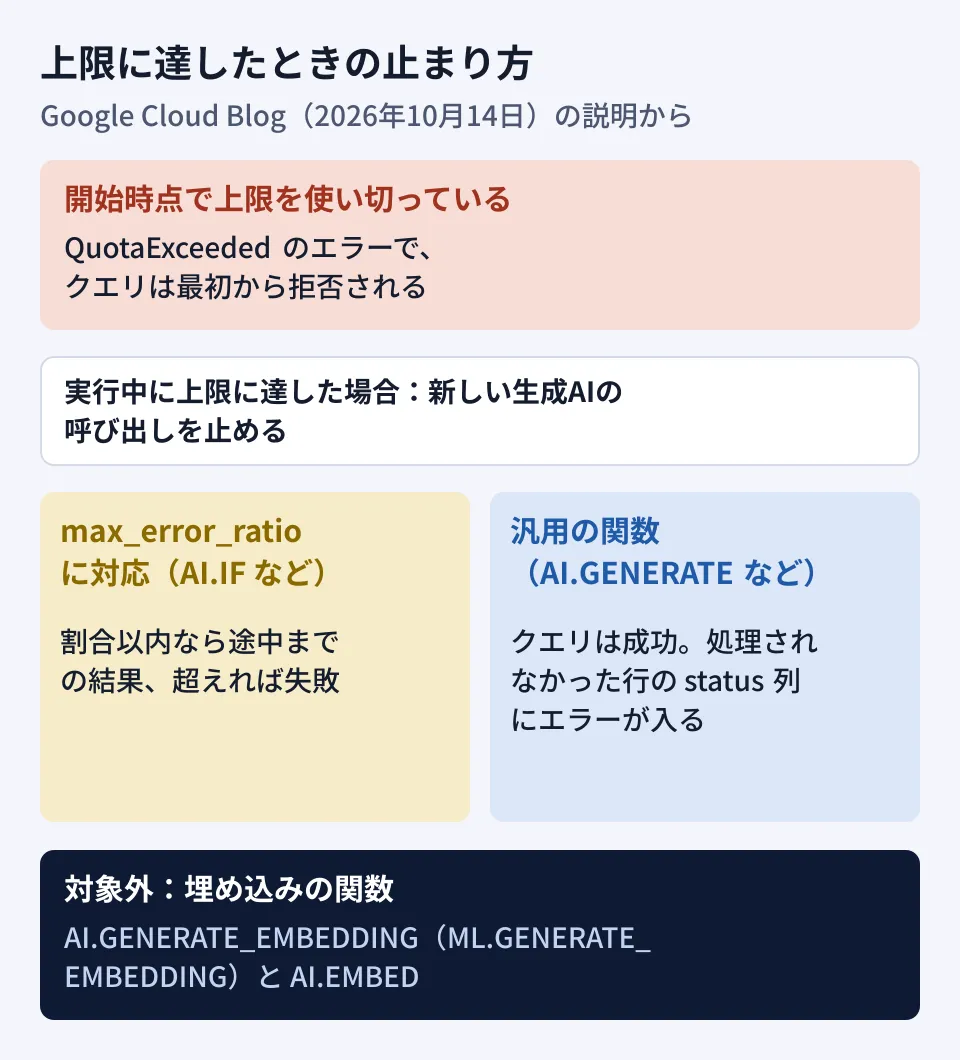
The embedding (vectorization) functions AI.GENERATE_EMBEDDING (ML.GENERATE_EMBEDDING) and AI.EMBED are not covered. The blog post explains the reason as "they run on separate, much cheaper models." The documentation also excludes semantic search functions because they have a different pricing structure.
How processing stops when a quota is reached
This is the part you most want to confirm when building them into your aggregation pipeline. According to the blog post, quotas work by "stopping processing" rather than "letting the query run past the quota."
- If the necessary quota has already been used up when the query starts, it is rejected from the outset with a
QuotaExceedederror - Otherwise the query starts, and if the quota is reached partway through, BigQuery stops making new generative AI calls
- Functions that accept
max_error_ratio(such asAI.IF) return partial results if the proportion of rows that could not be processed is within that value, and fail if it is exceeded - General-purpose functions (such as
AI.GENERATE) succeed as queries. Rows that were not processed get empty generated results, and a quota-exceeded error is placed in thestatuscolumn
- Functions that accept
- Once the quota is used up, queries that use generative AI functions fail with
QuotaExceededuntil the day boundary (midnight Pacific Time) (documentation)
The last point, about general-purpose functions, directly affects how you design your aggregation. In aggregations that use AI.GENERATE, a successful query does not necessarily mean every row has a result. If the process writes results to another table, you need to build in checks such as counting rows whose status column is not empty and then carrying the rest over to the next day or sending a notification.
How to change quotas and the permissions required
The steps introduced in the blog post are as follows.
- In the Google Cloud console, open "IAM & Admin" then "Quotas & System Limits" (these are the English labels from the blog post; we have not checked the labels in the Japanese interface)
- Under service, select "BigQuery API," sort by the name column, and find the four AI quotas (the documentation also describes searching by names such as
GenAiInputTokensPerDay) - From the menu of the target quota, select "Edit quota"
Changes that lower a quota take effect immediately without approval, while to raise one you submit a request from the same screen (the blog post says "many are approved automatically, and large increases may be reviewed"). Making changes requires one of the following roles: Owner, Editor, Quota Administrator (roles/servicemanagement.quotaAdmin), or Service Usage Admin (roles/serviceusage.serviceUsageAdmin). The post also says quotas can be configured from the Cloud Quotas API, gcloud, and Terraform. On the same screen, you can also review the trend in past token usage.
Choosing quota values: AI.COUNT_TOKENS
As a guide for choosing values, the blog post introduces the AI.COUNT_TOKENS function. This function was added on May 12, 2026, and as of October 19 the reference lists it as Preview (a stage before general availability). It returns the number of tokens a string contains as counted by the model's tokenizer, and does not make any billable generation calls. By running it on a column, you can estimate the input volume in advance.
However, the number returned is a lower bound on input tokens. It does not include output or thinking tokens, the instructions AI functions add around the input, or non-text input such as images. The blog post recommends actually running a small sample and measuring input and output usage before deciding on quotas.
The blog post also includes a sample calculation for keeping daily costs to about $100 with Gemini 3.1 Flash-Lite. Using the pricing at the time the post was published (with a 50% discount because BigQuery uses batch processing) of $0.125 per million input tokens and $0.75 per million output tokens (responses and reasoning), and assuming an input-to-output ratio of 100 to 1, the guideline works out to about 754 million input tokens and about 7.54 million output tokens per day. These unit prices match the Flex/Batch global prices on the pricing page as of October 19 (endpoints other than global are 10% more expensive). Because pricing varies by model and over time, recalculate using the price list in effect when you actually set the quotas.
How this differs from a billing cap (spend cap)
The blog post also touches on how this differs from Cloud Billing's spend cap. Token quotas are a preventive mechanism specific to generative AI: BigQuery counts usage while the query runs and stops just before the quota. A spend cap is a broad safety net that applies to projects or services in monetary terms, and because it does not take effect immediately, some overage occurs. The blog post recommends using both together, with token quotas as the first line of defense and the spend cap as a safety net for the whole project.
Points to check before building them in
From here on are the editorial team's suggestions.
- Tighten user-level quotas first. As the blog post also recommends, lower user-level quotas first so that one person's experiments or a runaway query do not use up the project's budget. Also take into account that scheduled service accounts and analysts' personal accounts need different amounts
- Add a step that checks the
statuscolumn. For scheduled aggregations that useAI.GENERATE-family functions, design them so that a successful query alone is not treated as completion - Manage embeddings separately. Embedding functions are not covered by the quotas. If you use them heavily, for example in preprocessing for RAG (a system that searches internal documents and passes them to AI), monitor the volume by other means
- Identify other workloads in the same project. Project-level quotas are shared by every workload that uses generative AI functions in that project. If other people's scheduled aggregations or similar jobs run in the same project, lowering the quota could also stop those jobs partway through, so identify all the uses first and then decide on the values
We cover how to think about permissions when letting AI work with BigQuery in Data Agent Kit GA: before handing BigQuery to AI, and how to decide where to run analysis in Before adopting a DWH because monthly aggregation is heavy.
Scope of verification
On October 17, 2026, we retrieved the official Google Cloud blog post "Predictable AI spend in BigQuery: Introducing cost management for generative AI functions" (October 14, 2026) and checked it in the original (document research). On October 19, we opened BigQuery's documentation (Control costs with token quotas, the quotas page, and the
AI.COUNT_TOKENSreference), the release notes, and the generative AI pricing page, and cross-checked the GA date, default values, behavior when a quota is reached, and the day boundary. The editorial team has not tried setting quotas in a Google Cloud project or observed the actual behavior when a quota is reached.
For building data utilization systems that combine BigQuery and generative AI, contact us through development, AI, and automation consulting.