From an IT perspective, have you ever encountered a situation where an accounting employee asked Gemini to "summarize this quarter's departmental costs," and it returned a clean summary of the cost breakdown table?
Hurrying to check user permissions reveals no unauthorized access. The employee possessed view permissions for the file, and Gemini simply read within authorized access boundaries. It operated entirely as designed.
The problem lay elsewhere: until now, there was no way to distinguish between "files an individual may open" and "files an AI may read and summarize."
Traditional DLP could not stop this path
Google Workspace DLP (Data Loss Prevention) has been available for some time. However, its primary focus was the exact moment data leaves the organization.
- Attempting to send an external email containing confidential information via Gmail
- Attempting to share a Drive file with external parties
- Pasting personally identifiable information into chat
All of these are designed to monitor the "exits to the outside world." The comprehensive architecture of DLP was detailed in Unified DLP: Monitoring Gmail and Drive under a single rule.
On the other hand, when an employee has Gemini read and summarize a file, no data leaves the organization. Within the same tenant, an authorized user is accessing an authorized file. This pathway never triggered traditional DLP filters in the first place.
This changes with the August 2026 update.
Two controls arrive: restricting reading and blocking execution
The updates announced on Google Workspace Updates fall into two practical categories.
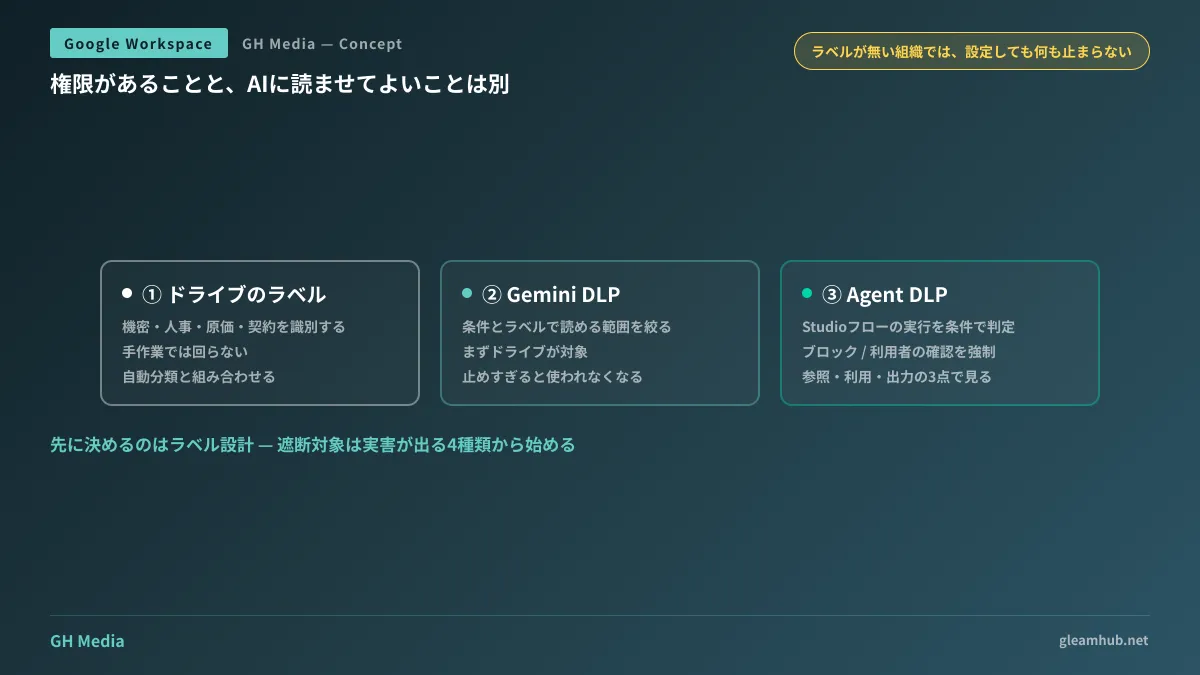
The first is Gemini DLP. It allows administrators to restrict the scope of Drive data Gemini can access based on content conditions and labels. This means you can specify rules such as preventing Gemini from reading any file labeled "Confidential." Drive is supported first, with rollouts to other services planned sequentially.
The second is Agent DLP. This targets flow execution in Workspace Studio, allowing you to either block flow execution outright or require end-user confirmation based on conditions regarding referenced data, utilized data, and output destination visibility.
In short, conditional blocking mechanisms are introduced at both the "AI reading" and "AI executing" stages. Permissions and logging for Studio are discussed in When the actor in audit logs is no longer necessarily human.
Check eligible editions and rollout schedules first
Whether your company can use these features depends on this criteria.
| Item | Details |
|---|---|
| Availability | Rolling out gradually from August 20, 2026 for Rapid Release domains, and from September 1, 2026 for Scheduled Release domains |
| Eligible editions for DLP for Studio | Frontline Standard / Plus、Enterprise Standard / Plus、Enterprise Essentials Plus、Education Fundamentals / Standard / Plus |
| Expected visibility timeline | Up to 3 days for Rapid Release; up to 15 days for Scheduled Release |
A critical caveat is that DLP-related features are frequently excluded from Business editions. If an SMB operating on Business Standard looks for these settings, the options will not even appear in the Admin console. Examples of navigating this boundary are covered in What to do instead on plans where DLP is unavailable.
If you do not know which release track your domain is on, verify it in the Admin console first. Operational considerations are covered in Which release track should you choose?
Labels are needed before touching the settings
This is the primary stumbling block in practice: a filtering system based on labels and conditions only works once the targets can be identified.
In many organizations, Drive currently looks like this:
- Shared drives are divided by department
- File-level labels are almost entirely absent
- Confidentiality is managed solely by folder names and staff memory
If you enable Gemini DLP in this state, not a single file matches the criteria, so nothing gets blocked. The configuration is turned on, yet you remain completely unguarded—the most dangerous state of all.
The first step is designing your labels. However, manually labeling every file is unrealistic. Drive provides an automated classification system based on content, and combining that with labels is the practical starting point. For details, refer to Drive automated classification labels and DLP.
If you want to start by understanding your current status, you can begin by counting external shares. The inventory reports discussed in Auditing external shares in Drive can also serve as source material for label design.
Blocking too much stops AI adoption altogether
Another pitfall lies in the opposite direction.
If you decide to "block Gemini from anything that looks confidential," Gemini will become almost entirely useless. Most business documents are confidential to some degree. It is common to see companies paying for licenses while nobody uses the tool. How to track actual usage with metrics was covered in Metrics that answer "Is Gemini actually being used?"
A pragmatic boundary is to restrict only materials that cause tangible financial or legal harm if leaked. Personnel evaluations, detailed cost and quote breakdowns, unannounced contracts, and rosters containing personal data. Starting with these four categories and expanding as you operate ensures far better adoption.
Finally, inform users about what is blocked by labels. If users receive a "Cannot read this document" error without explanation, they will start pasting content into personal accounts or browser-based AIs. What was intended as governance merely pushes usage into shadow IT.
What to do next
First, verify your company's edition and release track in the Admin console. If you are on a Business edition, these features will remain unavailable for now. In that case, segregating confidential files across distinct shared drives provides faster results.
If you are on an eligible edition, the next step is listing about four categories of files you do not want AI to read. Administrators cannot decide this alone; coordinate with stakeholders in accounting, HR, and legal. Label design is an exercise in building consensus, not just a technical task.
GleamHub offers free IT and Google Workspace consultations covering permission architecture, label and DLP operational design, and guideline development for safe Gemini usage. Because viable solutions depend on organizational size and edition, please share your current setup through our inquiry form.
Sources
- Google Workspace Updates: August 2026
- New enterprise security controls for Workspace Studio enable expanded collaboration use cases — Google Workspace Updates
- About DLP for Studio — Google Workspace Help
- About DLP — Google Workspace Help
- Summary of Google Workspace updates announced the week of August 17 — CodeZine