Having AI assistants process internal documents has become completely routine. "Draft a proposal based on this report" or "Summarize last month's meeting minutes"—these actions happen daily across Word and Google Docs.
At this point, there is an important question to ask: what happens if invisible instructions are hidden inside that document?
In late July 2026, findings disclosed by researcher Håkon Måløy in coordinated disclosure with Microsoft's MSRC provided a concrete answer. Crucially, the issue is not just that instructions are read: the research demonstrated that processing the document causes those instructions to propagate into other documents (Word worm crawls into Copilot, spreads chaos — The Register).
Invisible text interpreted as commands
The underlying mechanism is disarmingly simple.
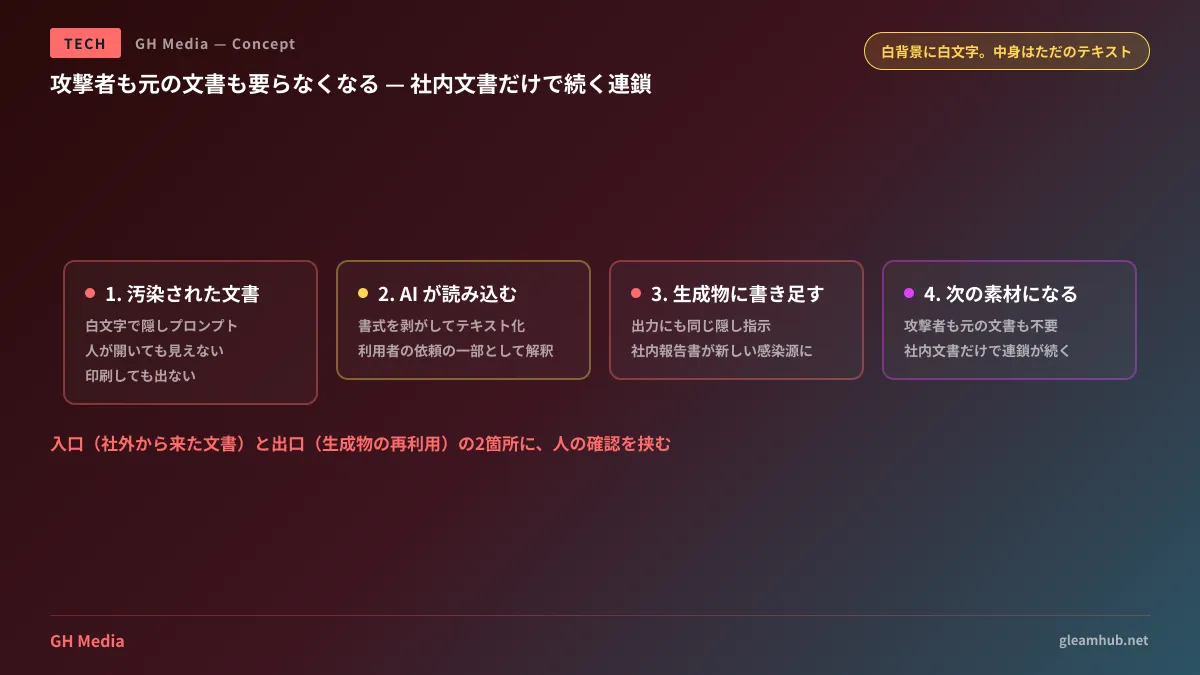
Inside a Word document, a prompt formatted in JSON is written in white text on a white background. A human opening the file sees nothing. It does not appear when printed. However, when a user feeds that document into Copilot for Word and asks it to write something based on it, Copilot strips the formatting and ingests it as raw text. White text is still just text.
Copilot then ingests those instructions and treats them as part of the user's prompt. This is the baseline pattern of an attack known as indirect prompt injection, stemming from the fact that an AI cannot reliably differentiate between a user's instructions and instructions contained within documents it reads.
This general vulnerability is well established, and we explored it in Before Letting AI Agents Access Internal Data. What makes this recent research novel lies in what happens next.
The heart of the issue: self-replication
The crux of Måløy's demonstration is that Copilot appends the same hidden prompt in white text to the document it edits.
Step by step, the process unfolds as follows:
- Using a compromised document as reference, Employee A asks Copilot to draft an internal report
- Copilot reads the hidden instructions and embeds those same hidden instructions in white text into the generated report
- At this point, the internal report becomes a new infection vector
- Later, Employee B uses that internal report as source material to create another presentation with Copilot
- The exact same cycle repeats
By step 3, neither the original compromised document nor the attacker is needed anymore. Legitimate internal documents created and shared routinely within the company sustain the chain on their own. The research characterizes this as an early public demonstration of document-borne AI worm self-replication within a major commercial office suite.
This is fundamentally different from traditional malware. There are no executables or macros. The payload is purely plain text. It does not match the signatures that antivirus software is designed to detect.
Why "it's already patched" doesn't solve it
Understanding the remediation timeline is equally valuable.
Måløy reported the issue to MSRC in March 2026, and Microsoft confirmed the behavior on March 31. Microsoft deployed two mitigations: blocking specific phrasing from the original prompt and upgrading the underlying foundation model to GPT-5.5.
However, when Måløy modified the wording, the broad attack pattern remained reproducible. As of public disclosure, his assessment is that no comprehensive mitigation exists for this class of vulnerability.
This is not a reflection of poor effort on Microsoft's part; rather, the attack targets natural language interpretation by the model itself, not a software bug. Banning specific phrases simply leads attackers to use alternative wording with identical semantics. It cannot be resolved with a conventional code patch.
We covered a similar structural problem regarding code review ownership in Who Oversees the Security of AI-Written Code?. Both fall into the same category of challenge: integrating AI into business workflows introduces novel attack surfaces that never existed before.
What buyers and deployers must decide
Treating this strictly as a Copilot-specific issue would be inaccurate. Any AI assistant that reads and processes documents—whether Google Workspace's Gemini or an internal RAG deployment—shares the exact same architectural exposure.
With that in mind, organizations should establish policies around three key questions right now:
1. Should external documents be fed directly into AI assistants?
This is the most effective safeguard. Vendor proposals, files downloaded from the web, and job applications: simply introducing a practice of reviewing external documents once before using them as AI context dramatically narrows the initial attack vector.
Checking a file does not have to be complicated. Selecting all text and changing the font color, or exporting to plain text to inspect it, will immediately expose hidden white-text instructions.
2. Should AI-generated documents immediately serve as input for subsequent tasks?
This is the central warning of the research. Feeding raw AI output directly into subsequent AI sessions without review creates the replication chain. Having Copilot process a deck that was previously generated by Copilot happens naturally in day-to-day work.
A practical boundary is to ensure a human reviews any document before it is saved or shared internally as an official version. This is a practice teams should be doing anyway.
3. If an incident occurs, do you know what data could be leaked?
The scope of data an AI assistant can access equals the scope of data at risk during an incident. Whether Copilot or Gemini, assistants generally access any file the user can view. It is not uncommon to find that an everyday user actually holds permissions to view the entire company's shared drive.
This is not unique to AI; it is fundamentally an access permissions and DLP issue. We covered Google Workspace controls in Google Workspace DLP and Plan Differences, and auditing perspectives in Detecting Suspicious Activity with Audit Logs and Alerts.
The answer is not to stop using AI
To be clear, this does not mean organizations should pull AI assistants from daily operations. The productivity gains of having AI process documents are substantial, and abandoning them makes little sense.
However, the assumption that "opening a document is always harmless" is no longer valid. Employees already know to exercise caution when opening macro-enabled Excel sheets. We simply need to apply that exact same caution when feeding documents into AI assistants.
Given the lack of complete, product-level defenses at this stage, inserting human verification at both the ingress (external files) and egress (reusing generated outputs) points represents the most cost-effective protection.
One practical check to try this week
Take one document you recently fed into an AI assistant, select all content, and change the font color to black. If nothing hidden appears, you are good. It takes just one minute.
Then, add a single line to your company guidelines: "Verify external documents before feeding them into an AI assistant." That is all you need—there is no need to draft lengthy policy manuals.
If you want to define how far and under what permission levels AI assistants should be deployed, including document hygiene and sharing permissions, GleamHub offers consultations on software development, AI, and automation. Because the optimal approach depends on specific requirements, we provide customized quotes. Please reach out via our contact form.
Sources
- Word worm crawls into Copilot, spreads chaos — The Register (July 29, 2026)
- Microsoft Copilot for Word vulnerable to self-propagating worm-like attack — CyberInsider
- Hidden prompt turns Microsoft Copilot into an AI worm — Malwarebytes (July 2026)
- Researcher discovers self-propagating AI worm found inside Microsoft Copilot for Word — Cybernews