"An employee accidentally shared a spreadsheet containing billing data with someone outside the company. Fortunately, the recipient noticed and contacted us, so it didn't turn into an incident, but there's no guarantee luck will be on our side next time." We received this consultation from a general affairs representative at a company with about forty employees. Their wish was clear: "We want the system to automatically block external sharing for files containing confidential information."
Google Workspace has that exact feature: DLP (Data Loss Prevention), known in the admin console as "data protection rules." However, upon investigating, we found that this company could not use it. That was because their subscription was Business Standard. This scenario of "thinking you have it only to find it out of reach" occurs quite frequently among small and medium-sized businesses, so let us examine the facts and practical alternatives.
DLP Is "Not Included in Business Plans"
To state the conclusion first: data protection rules are available by default in editions such as Frontline Standard/Plus, Enterprise Standard/Plus, Education Fundamentals/Standard/Plus, and Enterprise Essentials Plus. Business Starter, Standard, and Plus are not included in this list (Google Workspace Admin Help: Create data protection rules).
Most small and medium-sized businesses choose Business Standard or Business Plus. In other words, the single most desirable countermeasure—"automatically detecting and blocking external sharing of files containing confidential information"—lies outside the standard scope of their contract.
There is only one workaround. If you add a Cloud Identity Premium license to a Business edition user, DLP for Drive and Chat becomes available. However, because this means layering on paid licenses for each user, it is a cost decision rather than a simple feature addition (Cloud Identity Pricing).
In environments where DLP is available, rule templates for typical patterns—such as financial information, health-related information, and personally identifiable information—are provided, allowing you to get started without having to assemble conditions from scratch. If you can use it, it is a highly valuable feature. That is precisely why knowing early on that you "cannot use it" is the main point here.
What and How Much You Can Protect Under the Assumption You Cannot Use It
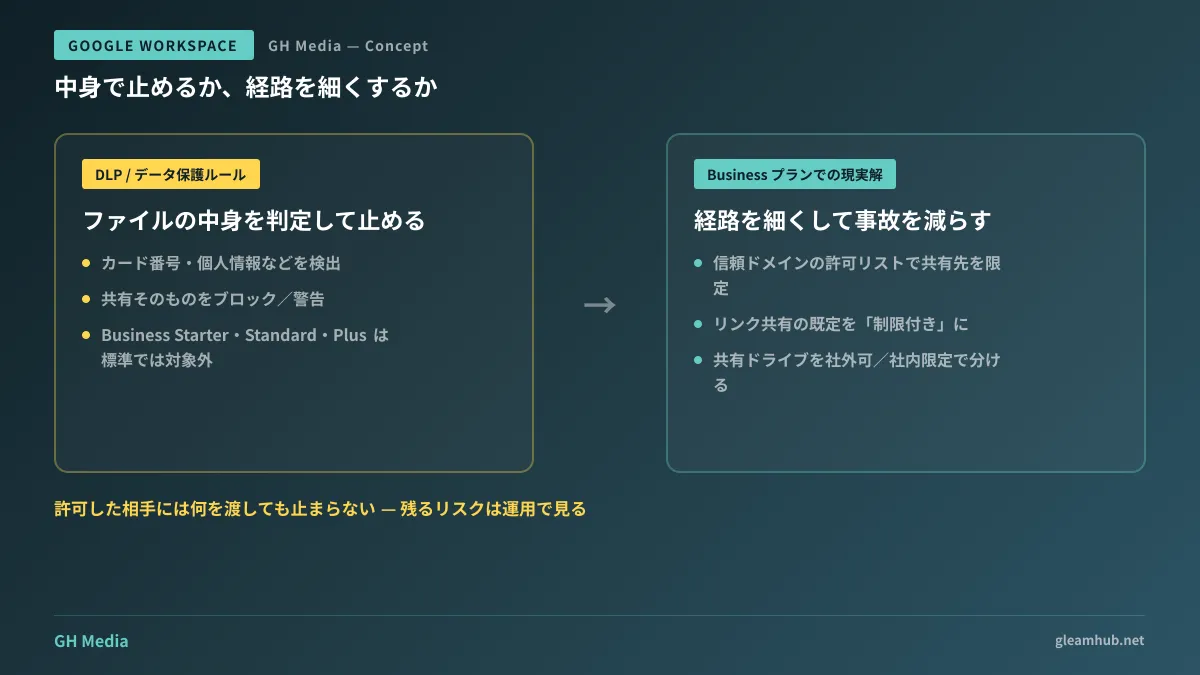
Not having DLP does not mean you are out of options. Even on Business plans, a full suite of settings is available to restrict the entry points of external sharing itself. While DLP is based on the idea of "inspecting content and blocking it," this approach focuses on "narrowing the pathways."
| Protection Method | Permissions | Limitations |
|---|---|---|
| Data protection rules (DLP) | Inspects file contents to block or warn about sharing | Not available by default on Business plans |
| Sharing settings / Allowlist | Permits or denies external sharing; restricts target domains | Does not inspect content. Anything can be sent to permitted recipients |
| Shared drive permissions architecture | Separates external sharing permissions by storage location | Does not apply to materials stored in individual My Drives |
What works first in practice is the middle option: the allowlist (allowing sharing only with trusted domains). From the admin console, you can register a list of domains permitted for sharing. If you configure it so that "only Client Company A and our accounting firm's domains are allowed, while all others cannot be shared with," accidents where files are mistakenly shared to unrelated free email addresses are stopped right there (Google Workspace Admin Help: Allow external sharing only with trusted domains).
Another key element is the default link sharing setting. If the default remains "Anyone with the link can view," materials leak outside the moment a URL is forwarded. If you set the default to "Restricted (only specified people)," users will have to explicitly specify the recipient every time they share. The detailed configuration steps are covered in our Google Drive Sharing Settings Guide, so please compare your current state against it.
Finally, there is the design of storage locations. If sensitive materials remain in personal My Drives, everything depends on individual user actions, regardless of what settings are in place. Creating separate shared drives for "external sharing allowed" and "internal only," and turning off external sharing at the organizational unit level for materials placed in the latter, provides a solution. If you cannot block by content, separate by location—that is the realistic answer.
Honestly Understanding the Risks That Still Remain
Protecting data by narrowing pathways has clear limitations. Whatever you hand over to an allowed recipient will not be stopped. Once you have permitted Client Company A's domain, even if you share a cost sheet with Company A, the system will raise no objection. The role of "inspecting content" previously handled by DLP reverts here to human vigilance.
That is precisely why creating a state where you can "notice things" is just as necessary as configuring settings. This involves unglamorous operations such as periodically reviewing Drive audit logs for external sharing occurrences, and assigning shared drive administrators by department to run regular inventory reviews. Setting aside just 15 minutes once a month to view recent external shares in a consolidated list dramatically improves your chances of noticing unintended recipients.
In addition, with the widespread adoption of generative AI, we are no longer in an era where monitoring external file sharing alone is sufficient. Pathways where internal documents are fed to AI models and where conversation histories are retained must also be considered on the same map. We have outlined this perspective in Gemini Conversation History and Governance with Vault.
Criteria for Deciding Whether to Upgrade to a Higher-Tier Plan
Deciding whether you should upgrade to Enterprise cannot be resolved by merely comparing feature matrices. We believe the following two points are what drive the decision.
The first is the nature of the information handled. If you routinely handle customer credit card data, individual tax/social security numbers, health records, or unreleased financial data, this is an area where automated mechanisms that inspect content and stop sharing are essential. Operating under the assumption of relying solely on human attention is unsustainable. The other factor is the frequency and breadth of external sharing. If your sharing partners are limited to a fixed set of a few companies, an allowlist is sufficient. If counterparty organizations change with every project and dozens of external shares occur each month, pathway controls alone leave the net far too loose.
Frankly speaking, for companies to which neither applies, tightening settings and operational workflows while staying on a Business plan offers far better cost-effectiveness. Conversely, if even one applies, you have reached the stage where you should calculate estimates based on your actual headcount to compare adding Cloud Identity Premium against migrating to Enterprise Standard. As noted in Which Plan Should You Choose for Gemini in Google Workspace?, sound plan selection begins not from individual features in isolation, but by working backward from where your company's actual business processes encounter bottlenecks.
One Thing to Check at the Next IT Team Regular Meeting
First, verify exactly which edition your company subscribes to. Not just "we use Google Workspace," but whether it is Business Standard, Plus, or Enterprise. Then open the sharing settings in the admin console and check whether the allowlist remains completely empty, or if the default link sharing is set to "Anyone with the link." Addressing just these two points will make security significantly firmer for many companies starting today.
Whether you want to inventory how well your current plan protects your data, or determine whether to upgrade to a higher tier based on headcount and workflows, GleamHub is available to help through our free IT and Google Workspace consultations. Tailored to organizations without dedicated IT personnel, we recommend practical steps starting from what works best without unnecessary expense. Please reach out via Contact Us.
Sources
- Create data protection rules — Google Workspace Admin Help
- Prevent data leaks with recommended data protection rules — Google Workspace Admin Help
- Allow external sharing only with trusted domains — Google Workspace Admin Help
- Set Drive users' sharing permissions — Google Workspace Admin Help
- Cloud Identity Pricing — Google Cloud