Discussions about connecting internal systems to AI agents usually begin with "let's start with read-only." Checking inventory, reporting project statuses, locating documents—up to this point, consensus is easy to reach.
The issue is that at the moment of connection, the system is often configured such that updates are also possible. In the list of tools exposed by MCP servers, create, update, and delete actions appear alongside search. Even if you tell the agent "please only reference data" via a prompt, that is merely an instruction, not an enforcement boundary.
And when an incident occurs, only the name of the service account used by the agent remains in the audit log. Who requested it, which agent executed it, and why that operation was performed cannot be reconstructed from the logs.
WriteGuard, announced by Cloudflare in August 2026 as a private beta, is a mechanism designed to handle this. While the product itself is not yet widely accessible, what it seeks to separate serves as a guide for designing your own systems.
Reads and writes fail in completely different ways
Even when categorized under the same phrase "the agent made a mistake," the aftermath of a read versus a write is an entirely different matter.
With read errors, an incorrect answer is simply returned. A human can review and notice it, and the system state remains unchanged. You can always try again.
Write errors, on the other hand, are discovered after state has already changed. Emails with incorrect statuses are dispatched to business partners, inventory drops, and records are deleted. Furthermore, because AI agents can execute the same operation multiple times in a short window, the scale of affected records before someone notices is orders of magnitude larger compared to human operational errors.
Despite this, both are treated identically in many connections. That is because permissions are granted at the level of "allow access to this system."
What WriteGuard separates
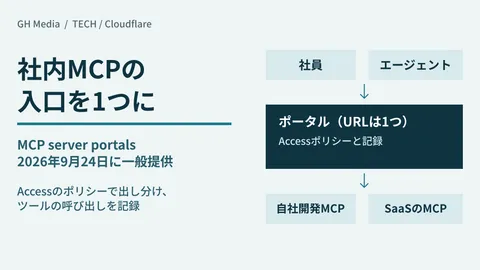
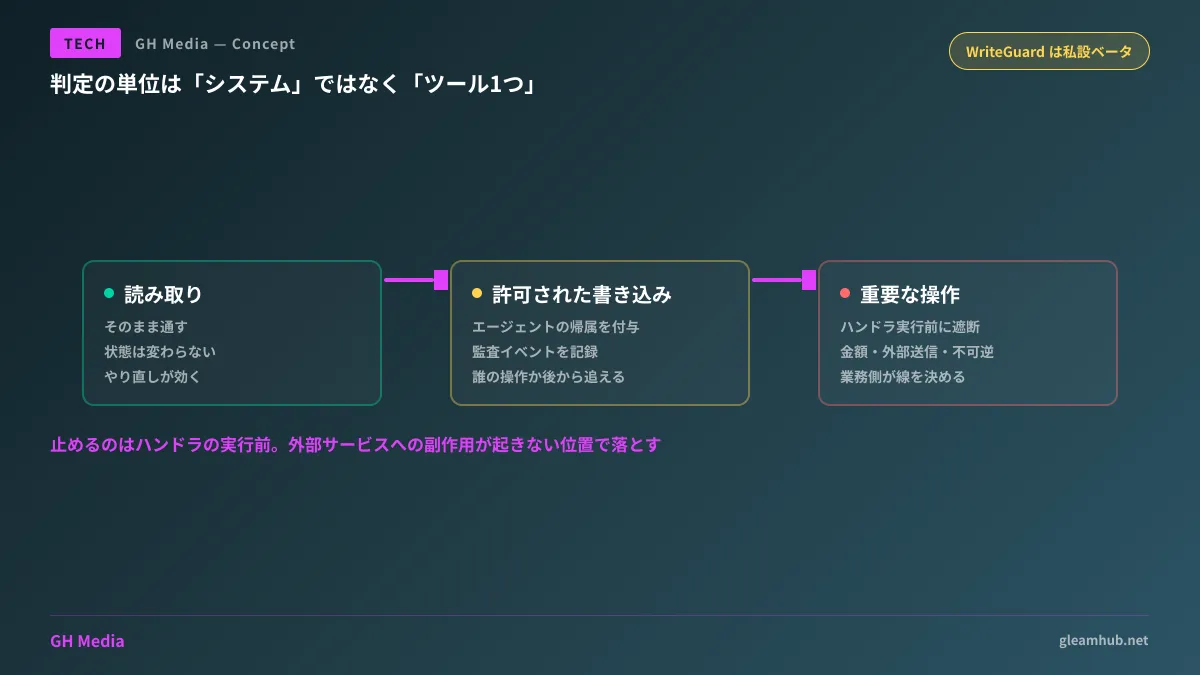
Positioned behind Cloudflare's MCP Server Portal, WriteGuard intercepts all incoming MCP requests. It loads policies associated with the target tool, evaluates the context of the request, and routes it into one of the following:
- Reads — passed straight through as is
- Permitted writes — passed through after attaching agent attribution metadata (which agent performed the operation) and recording an audit event
- Critical operations — blocked before the tool's handler executes
What makes this effective is that the unit of evaluation is individual tools. It does not ask "may this system be connected?" but rather "may this operation on this system proceed within this context?" It assigns risk tiers to each tool and manages enablement individually.
Another factor is where execution is stopped. Because it drops the request before the handler executes, it is not a case of "it ran, but we rolled it back." No side effects are generated against external services.
The issue of how to grant permissions when allowing agents to interact with internal systems has surfaced on the Google Workspace side as well. How to evaluate permission scopes on preview-stage MCP servers is summarized in Permission scopes to verify on Google Chat MCP servers.
Three things you can decide beforehand without waiting for vendor features
WriteGuard is in private beta and cannot be adopted immediately. However, the three structural preparations underpinning this mechanism can be undertaken within your organization today. Moreover, adopting such products without doing this groundwork leaves you unable to configure them.
1. Audit tools at the individual operation level. List every tool exposed by connected MCP servers and classify each by whether it "only reads," "mutates state," or "calls out externally." Do this per operation, not per system. When you compile this list, you will often find deletion tools included on servers connected strictly for reference purposes.
2. Define operations to block using business terminology. Rather than conducting an abstract technical risk evaluation, ask business process owners: "Which automated operations would cause serious trouble?" Moving money, dispatching items externally, irreversible actions—anything matching these three serves as prime candidates. If left to engineers alone, definitions almost always end up either overly strict or overly lax.
3. Determine the subject of recordkeeping. If the name remaining in audit logs is simply the service account, tracing actions later becomes impossible. Decide implementation policies in advance: will you separate accounts per agent, or append identifiers to requests? Realizing "we don't know who performed the operation" after an incident occurs is the costliest outcome of all.
This third point goes hand in hand with designing how far humans should approve agent actions. The challenge where inserting approvals into everything grinds operations to a halt is addressed in How to avoid approval fatigue.
The single line to confirm during ordering and acceptance reviews
When contracting out development involving AI agent integrations, including the following single line in your specifications makes verification after implementation concrete:
The operations an agent can execute shall be cataloged into three tiers—read, update, and irreversible operations—and for operations categorized as updates or higher, the actor and timestamp shall be recorded in audit logs.
Having this single line clarifies what to inspect during acceptance reviews. While asking "Was the agent built securely?" leaves no way to answer, asking "Please show us the list of mutating tools and their corresponding audit logs" makes verification straightforward.
Conversely, if an organization is in a state of "we adopted AI agents" without this organization, chances are no one understands the scope of what is running. How to proceed with an audit that includes managing credentials issued to agents is outlined in AI agent credentials and incident response.
What to do next
If your internal systems are already connected to AI agents, export the list of tools exposed by the destination MCP server and count how many mutating operations exist. There will likely be more than expected. This represents your actual current permission boundary, regardless of whether prompts instruct them to "read only."
If you are planning an adoption, define the three tiers above before choosing your connection method. Tightening permissions after connection means shutting down active workflows, forcing you to start over from renegotiating consensus with business units.
Designing integrations between AI agents and internal systems, designing permissions and audit logs, and auditing existing deployments are handled through GleamHub's Development, AI, and Automation consultations. Because the scope of verification changes depending on target systems and how deeply they are integrated into business workflows, please consult with us individually. Feel free to reach out via Contact Us.