Only one person in the company can accurately answer the question, "Where was that specification decided again?" The documentation only records the conclusion, while the background behind how it came to be remains buried in chat spaces.
While this situation is often framed as a searchability problem, it is actually a handoff problem. When only a few individuals can trace past logs, the background context is lost the moment those individuals transfer. That is precisely why the desire to "have AI read the chat" arises naturally.
With the Google Chat MCP server becoming available in Developer Preview, doing so has become technically feasible. However, what is technically possible and what is ready for production operations are two different things.
Not just a read-only feature
The Model Context Protocol (MCP) is an open standard for connecting AI applications with external services. Google provides this across Workspace services, adding a Chat server to its lineup following Gmail, Drive, Docs, Sheets, Slides, and Calendar. The phased rollout began in May 2026.
Capabilities listed for the Chat MCP server include searching conversations, listing messages, and sending messages to spaces.
This is often skimmed past, but in practice it represents a massive difference. With read-only access, the worst incident is information being viewed by unintended parties. The ability to send messages means AI output becomes internal record itself. Posts made under someone's name are indistinguishable in hindsight from those written by humans.
The expected connection endpoints are AI clients such as Google Antigravity or Claude. Usage requires participation in the Developer Preview program, enablement on the Google Cloud project side, and client-side configuration. In other words, employees cannot simply connect it on their own initiative. For those evaluating adoption, this provides a buffer period.
Permissions do not expand, but reach changes
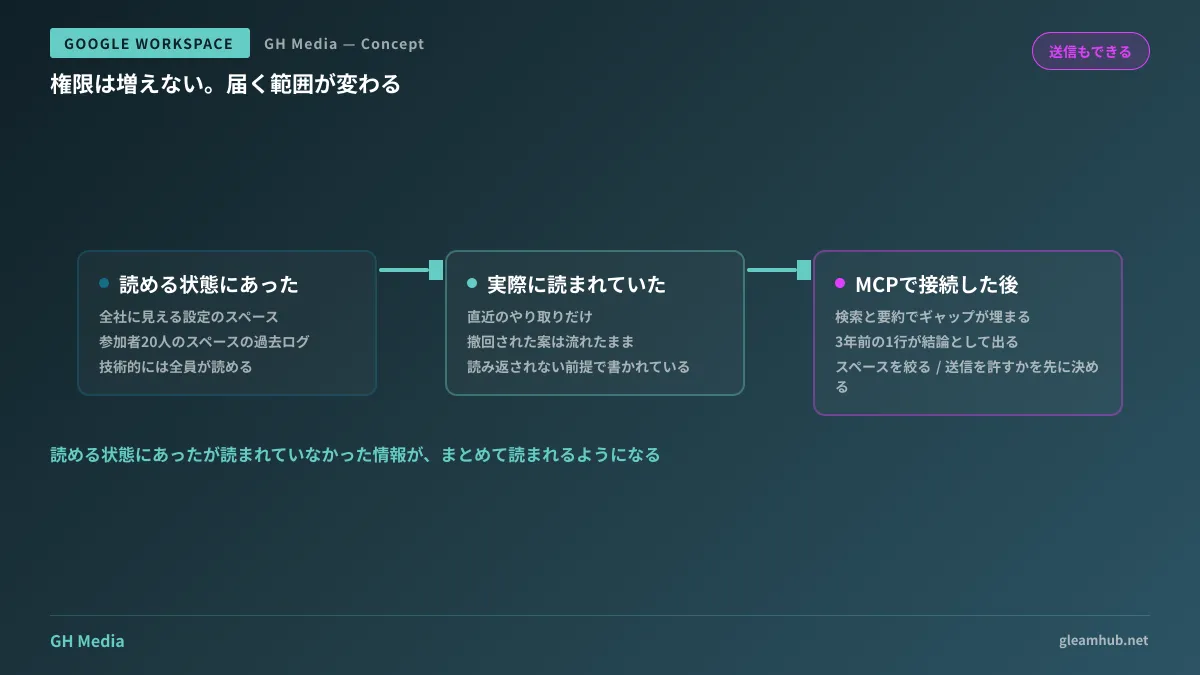
The first concern raised with features like this is whether users can see things they shouldn't. The answer is generally no. Because access via MCP operates under the permissions of the connected user, it does not enable reading spaces that the user cannot view in the Chat interface.
The issue is not that, but rather that information which was readable in principle—yet never actually read—can now be read in aggregate.
Internal chat statements are written for the immediate context. Even in a space with 20 members, hardly anyone actually scrolls back through history. The gap between "technically viewable by everyone" and "actually read by no one" is what supported chat's usability as a tool. Casual phrasing, proposals retracted mid-stream, candid appraisals of specific business partners—these were written on the assumption they wouldn't be reread.
Allowing AI to search and summarize eliminates this assumption. A single line from three years ago may be presented as a conclusion in a summary. A retracted proposal may be cited without the context of its retraction.
This is not a bug; it is the feature working as intended. That is why you must examine your spaces before connecting. How many spaces are configured to be visible company-wide is directly tied to the points discussed in Designing Google Chat Space Visibility.
Four points to decide before testing
This isn't about enabling it company-wide overnight. Because it is in preview, you will start by testing it in a limited scope. Here are points to determine in advance to minimize backtracking.
1. Limit target spaces or include everything. In practice, limiting the initial scope to spaces intended for records—such as meeting notes or specification discussions—is easiest to manage. Including casual watercooler spaces or HR-related spaces from the start makes explaining incidents difficult should one occur.
2. Allow sending messages, or keep it read-only. If summarization and search are your goals, sending is unnecessary. Enabling only what is necessary rather than "enabling it because we can" is far cheaper than narrowing permissions later.
3. Which AI client to connect. Where the connected service sends data and how long it retains it cannot be controlled via Google-side settings. This falls under the terms of service and configurations of the destination client.
4. Whose credentials to run it under. Connecting with an individual account means it stops working when that person transfers or leaves. Conversely, connecting via an account with broad privileges extends its reach beyond the user's actual scope of work. Whichever you choose, documenting your decision ensures successors won't have to repeat the same review.
Our audit of AI tools entering meetings is summarized in Auditing AI Meeting Minutes Tools. This chat integration shares the same risk of proliferating before anyone notices.
What to do next
First, count the spaces configured to be visible company-wide in your Google Chat. You can check this from the Admin Console. If this count is higher than expected, tidying them up takes priority over connecting AI.
From there, pick one space used for recording project histories, and limit your testing strictly to that space as a pragmatic starting point. Expanding a preview feature company-wide can wait until general availability and Admin Console controls are fully established.
GleamHub provides free IT and Google Workspace consultations regarding AI integrations with Google Workspace, auditing space permissions, and improving searchability for internal knowledge. Because the approach depends on your environment's scale and operational practices, please reach out individually via Contact Us.
Sources
- Configure the Chat MCP server — Google Chat, Google for Developers
- Configure the Google Workspace MCP servers — Google for Developers
- MCP Reference: chatmcp.googleapis.com — Google Chat, Google for Developers
- Google Workspace developer release notes — Google for Developers
- New: Agent tools and security updates for Google Workspace developers — Google Workspace Updates