Monthly maintenance reports arrive stating "Backup: completed successfully." Monitoring is configured, and alerts are set to fire on failure. Most companies manage to reach this point.
However, who has verified that data can actually be restored from that backup? Few companies can answer this question with a specific date. While remaining unable to answer is not uncommon, the problem lies in management counting it as "addressed" without knowing it has never been verified.
What success notifications actually show
When a backup process finishes normally, all that proves is that the process ran to completion. Exit codes do not convey whether the written output is sufficient for restoration.
Real-world accidents occur within this gap.
- Target directory paths were outdated, omitting data moved six months ago
- The database dump succeeded, but attachments referenced by the app were excluded
- Data was stored encrypted, but the key required for decryption existed only on that same server
- Destination storage ran out of capacity, silently purging older generations
In all of these cases, the process finishes successfully. Because there was no failure, no alert is triggered.
Measuring "restorable" across five levels
Recoverability is not a binary choice of exists or does not exist. Measuring it as stages of how far verification has been conducted better fits practical operations. Engineer unchox published a helpful framework, which we adapted into the following five levels for use in discussions between clients and contractors.
| Stage | What is being verified | Effort |
|---|---|---|
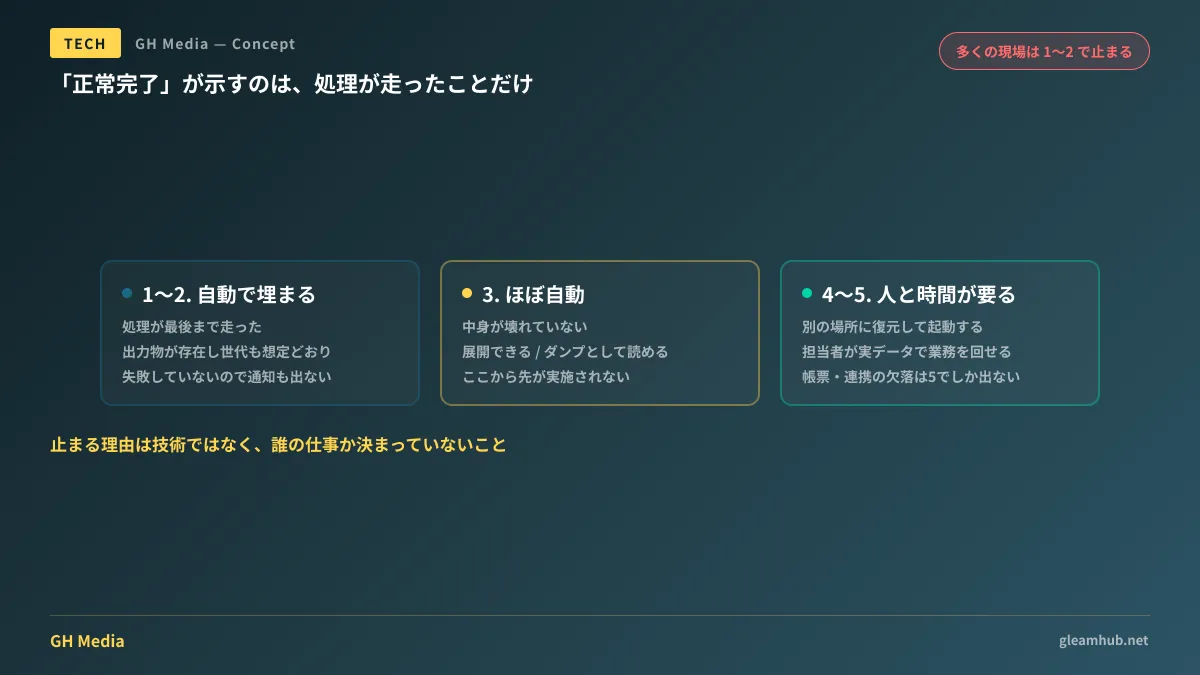
| 1 | Process ran to completion | Automatic |
| 2 | Output exists with expected generation and size | Automatic |
| 3 | Contents are not corrupted (can be extracted, readable as dump) | Mostly automated |
| 4 | Restored to an alternate location, and the system boots | Requires human involvement |
| 5 | Restored environment allows operators to conduct business operations | Requires people and time |
The higher up you go, the more human effort verification requires. And the order in which levels are fulfilled does not follow this numerical sequence.
In many companies, only 1 and 2 are checked, and progress stops there. From level 3 onwards, years pass while "knowing it should be done, but never deciding when to do it." The reason it stalls is not technical; it is that no one has defined whose job it is.
The gap between levels 4 and 5 is also easily overlooked. Even if a system starts up, staff may not necessarily be able to say "we can resume operations with this." Recent entries are missing, forms cannot be printed, or external service integrations are severed. These issues are not discovered at level 4; they are discovered only at level 5.
Data entrusted to SaaS disappears due to contract circumstances
This is not just about on-premises servers. The assumption that data is safe simply because it is in the cloud does not hold.
In June 2026, triggered by Microsoft's program changes to free licenses for non-profit organizations, approximately 171,000 small organizations were reported to have lost OneDrive data. A representative of the US non-profit Canopy reportedly renewed their annual license in October 2025 and received email guidance confirming access through October 4, 2026, yet discovered on June 11, 2026, that all data had vanished.
Where liability lies in this case remains in dispute, and we make no judgment here. However, the takeaway for users is clear.
- Free and discounted frameworks end at the vendor's discretion. When they end, how data is treated depends entirely on the terms written in the contract.
- Notices stating "usable for another year" are not guarantees of retention. Discrepancies between notifications and actual operations can occur.
- Data on SaaS is not in your hands. Without a copy under your company's control, access can be cut off by a single vendor decision.
How to protect files stored in Google Workspace or Microsoft 365 is compiled in Data protection and backups in Google Workspace. How to incorporate the premise of service termination into contracts is summarized in Architecting for service end-of-life. For routes where departing employee account data disappears, refer to Archive users and licenses.
Three questions to ask your contractor
When outsourcing maintenance, there are questions that gauge status without needing to understand technical details. Here are the three:
- "When was the last time you attempted a restore, and what did you restore?" See whether specific dates, file names, or system names are returned. It is safe to assume that an answer like "we do it periodically" usually means it is not being done.
- "If everything were lost right now, how long would it take to restore, and what range of data would be lost during that time?" Time to recovery and scope of loss. If these two are not answered with numbers, they have not been defined in the design.
- "Are the keys and passwords needed for recovery stored in a separate location from the environment you are trying to recover?" There are indeed cases where they are stored in the same place. This is only discovered during an incident where the entire server is lost.
If you receive answers to these three questions, you will generally know how far along the five stages above you have progressed. There is no need to blame anyone for not having an answer. In many cases, it simply is not included in the contract. Once you understand that it is not included, you can decide whether to add it.
Do not try to reach stage 5 all at once
If you plan a company-wide initiative declaring "Let's conduct a recovery drill starting tomorrow," it usually will not happen. This is because you will be unable to secure either the personnel or the time.
If you are going to start, begin by selecting a single piece of business data and restoring just that data to a separate location. It can be a single directory level in a shared folder used by accounting, or a single table in a business system. Once you do it, unwritten assumptions in the procedure manual will inevitably emerge: where the keys are located, whose permissions are required, and how much time it takes. The fact that these issues emerge is itself the achievement.
Then, record what you did along with the date and the target data. Without a record, the next time you are asked the same question, you will revert back to "It's probably fine." If you have reached the stage of re-evaluating the database recovery architecture itself, Database redundancy and recovery design serves as a helpful reference.
What to do next
First, open your most recent maintenance report and check whether the backup section includes a "date recovery was verified." If it is not there, that is where you currently stand. A state where only the success of the process is reported corresponds to stages 1 and 2 in the five stages above.
On top of that, decide on just one thing at your next regular meeting: "Which data will be restored and verified, when, and by whom." Conducting a single verification moves your status forward far more than an exhaustive plan.
At GleamHub, we assist with backup and recovery design, reviews of business system maintenance setups, and cloud data protection through our development, AI, and automation consulting services. Since the approach varies depending on system architecture and the nature of the data handled, please reach out for an individual consultation via Contact Us.
Sources
- Measuring whether backups "can be restored" across 5 stages — Zenn
- Microsoft made a quiet change to a popular software grant. Small nonprofits lost everything. — Slate
- Nonprofits report losing all data after Microsoft discontinues license grants — Cybernews
- Microsoft 365: did 171,000 nonprofits lose their OneDrive data? — IT-Connect