Accounting reaches out saying, "Last month's invoice headcount doesn't match," and an investigation reveals that an account for an employee who left two years ago remains suspended. This happens with remarkable frequency in SMB IT teams.
The reason accounts are left suspended is obvious: deleting them erases emails and Google Drive files, so nobody wants to press the delete button. When someone claims, "We might need them later," it is impossible to counter, yet suspended accounts continue to be billed as standard licenses. Surprisingly few people know the options available to break this deadlock.
Four post-offboarding account states
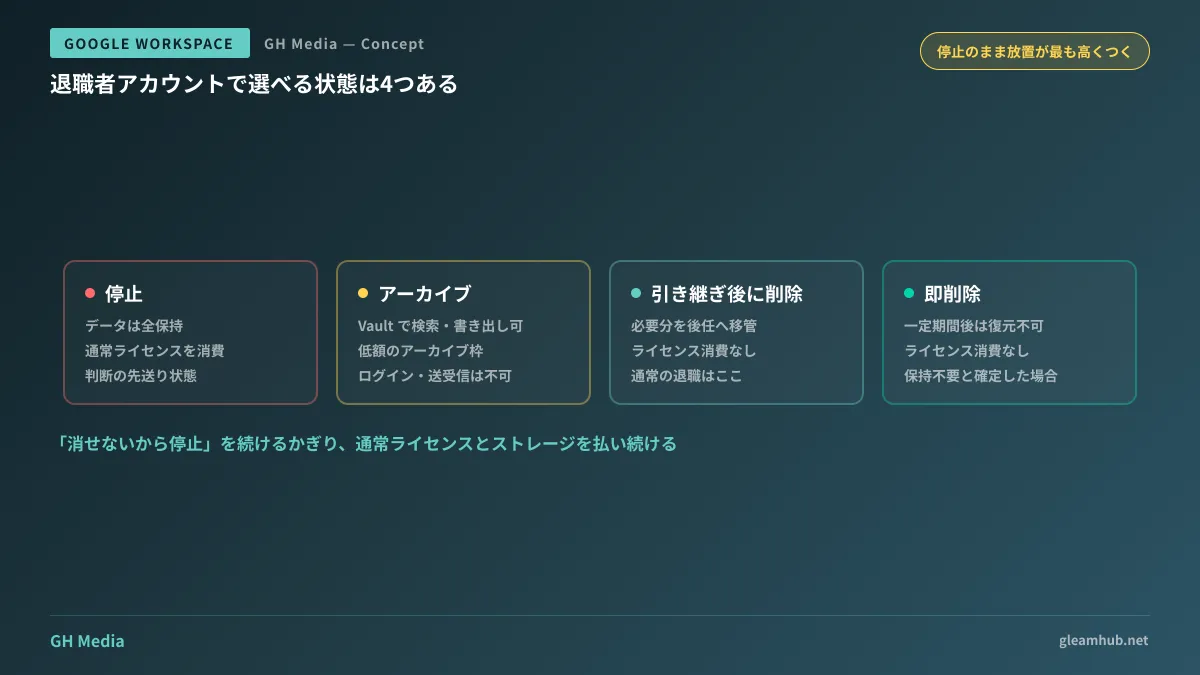
When handling offboarded accounts in Google Workspace, there are four actual states you can choose from. Many organizations think it is a binary choice between suspension and deletion, but options exist in between.
| Status | Data | License | Primary use case |
|---|---|---|---|
| Suspended | Retains everything | Consumes standard license | Leave of absence, active investigation, or periods where reinstatement is possible |
| Archived User | Retains Gmail, Drive, etc., and remains searchable | Discounted Archived User license | Post-employment retention obligations, litigation readiness |
| Delete after handover | Transfer required data to other users | Does not consume license | Standard offboarding |
| Immediate deletion | Irrecoverable after a fixed period | Does not consume license | When it is confirmed that retention is unnecessary |
Many organizations remain stuck on "suspended" because they are unaware of the second and third rows in this table. In particular, Archived User is a state created solely for the purpose of "retaining data without deleting, at a lower cost than a standard license," making it the exact mechanism built for this deadlock.
What Archived User can and cannot do
Switching an account to Archived User turns it into a "frozen record."
What it can do is retention and investigation. Data across Gmail, Google Drive, Chat, and other services remains intact and can be searched, held, and exported via Google Vault. It is easiest to understand as a state that allows you to respond when asked during an audit or legal inquiry to "produce correspondences from that period."
What it cannot do is any day-to-day activity. Users cannot log in, send or receive emails, or edit files. Consequently, it cannot accommodate requests like "I want to keep receiving emails sent to the departed employee" or "I want to retain edit permissions on shared files." Conflating these capabilities will result in inquiries like "emails stopped arriving" after the switch.
While pricing is set lower than standard licenses, the exact amount varies depending on your subscription plan and reseller. Domestic reseller guides in Japan cite a level around 400 yen per month (Ardent), but checking your invoices or contacting your reseller is the most reliable way to confirm pricing for your contract.
Leaving accounts "suspended" is the most expensive option
Continuing to choose the suspended state poses problems beyond just licensing fees.
Billing does not stop. Because licenses remain assigned during suspension, they continue to incur the same unit price as active users. If a 10-person company leaves three suspended accounts untouched for two years, it is throwing away three person-years' worth of fees. A comprehensive guide to reviewing licensing is summarized in Reviewing Google Workspace license costs.
Storage consumption continues. The Drive storage of suspended accounts is deducted directly from the organization's pooled storage. It is not uncommon for organizations considering purchasing more storage due to capacity constraints to discover that the cause was offboarded user accounts (How to evaluate storage pool strain).
Deferred decisions pile up. Suspension is an "I'll decide later" state, so when the decision-maker departs, the accounts remain indefinitely. Moving an account to archive embodies the explicit intention of "we decided to retain this," meaning at least one definitive decision has taken place.
The decision sequence: "whose, how many years, and why"
Evaluating offboarded user data on a case-by-case basis guarantees accounts will accumulate, so establish a policy beforehand. Here is the sequence:
- Articulate why you are retaining it. "Just in case" is not a valid reason. The types of data and retention periods differ depending on whether it is evidence of client interactions, statutory accounting obligations, or litigation risks
- Narrow down whose accounts qualify. Archiving all departing employees uniformly causes costs to mount. A practical line is to target only roles that engaged in external transactions
- Decide how many years to retain them. Unless you set a timeframe, you cannot delete them. Defining a retention period turns audits into the simple routine of "deleting what has expired"
- Extract items that can be settled via handover first. Transfer file ownership to successors for files still referenced in operations, rather than archiving them. Archived data cannot be retrieved routinely, so making a mistake here will disrupt business operations
The overall offboarding process is covered in Google Workspace offboarded account processing. This article focuses specifically on "which license state to use for data that must be retained."
How procedures differ by subscription plan
This is an area where practical operations often hit snags.
Under the Flexible Plan, archiving a user automatically assigns an Archived User license. There is no need to purchase licenses in advance.
Under the Annual Plan / Fixed-Term Plan, you must secure Archived User licenses in advance. Getting blocked by "trying to archive a user only to find no licenses available" almost always happens under these plans. When an offboarding date is confirmed, check beforehand whether target licenses are available.
If you contract through a reseller, orders and cancellations may have to go through the reseller. Planning around the assumption that everything can be completed in your own Admin console can cause you to miss month-end deadlines. An overview of where features are located in the console is summarized in Introduction to the Google Workspace Admin console.
Another easily overlooked detail is the procedure for unarchiving and reverting to a standard user. This happens when an employee is rehired or when temporary access to data is required for litigation. If there are no available standard licenses to assign, the user cannot be restored on the spot. Organizations on Annual Plans that tightly restrict seat counts are particularly prone to this bottleneck.
What to do next
Filter the user list in your Admin console by suspended status, and determine how many months each account has been suspended. Within three months is normal as a decision pending period, but accounts exceeding one year indicate that decision-making has been abandoned.
Next, verify whether any of those accounts belong to people who still hold files referenced in active work. If so, handing over ownership comes first; if not, the choice narrows down to archiving or deletion. Once you reach this point, nearly all reasons preventing you from pressing the delete button will disappear.
If you would like to consult on retention policies for departed employee data or review your licensing structure including plan changes, GleamHub offers free IT and Google Workspace consultations. Because appropriate retention periods vary by contract type and industry, please consult with us individually via Contact Us.