You want to cross-reference sales line items with inventory history to analyze monthly trends. Yet for such a straightforward task, Excel freezes on hundreds of thousands of rows, while data warehouse quotes run two orders of magnitude higher. Companies across all industries frequently find themselves stuck in this gap.
When left unresolved for years, things usually settle into a pattern where "the tech-savvy person aggregates data on their own PC." Because it works, nobody minds—until that person transfers.
Options that bridged the gap, and their limits
Intermediate options have existed for analyses of this scale. One example is analytical engines capable of aggregating data directly within flat files without setting up a server. DuckDB was the prominent choice, gaining popularity embedded directly inside applications (in-process).
Because it can aggregate tens of millions of CSV or Parquet rows locally, it was sufficient as a pre-analysis step before deploying BI tools. On the other hand, its embedded nature imposed clear constraints: data effectively resided on one person's machine, making it unsuitable for concurrent multi-user reads and writes or serving as the backend for continuous services.
Consequently, it remained confined to speeding up personal analysis without serving as an organizational analytics platform.
What DuckDB 2.0 adds
DuckDB 2.0, planned for fall 2026, addresses this limitation. A preview was released in August 2026, and while nightly builds are available for testing, the release candidate date remains unannounced.
The centerpiece is server mode (client/server operation). What was previously confined to a local process can now be accessed across a network by multiple clients. Alongside this, it introduces remote query pushdown, triggers, a VARIANT type, asynchronous I/O, a new SQL parser, and a new storage format.
| New addition | Practical significance |
|---|---|
| Server mode | Multiple users and applications can reference the same data |
| Trigger | Database can host BEFORE/AFTER and row-/statement-level logic |
| VARIANT type | Semi-structured data similar to JSON can be handled as a native type |
| Asynchronous I/O | I/O and query processing layers scale independently |
The benefits of asynchronous I/O depend heavily on workload. Reported numbers vary widely, claiming up to 20x for remote queries and 40x under specific conditions. Do not base budget or sizing estimates on these multipliers until you measure with your own data.
While DuckLabs has announced it will become an AWS subsidiary, DuckDB will reportedly retain its open-source MIT license. If licensing continuity is a concern for adoption decisions, this represents the current baseline.
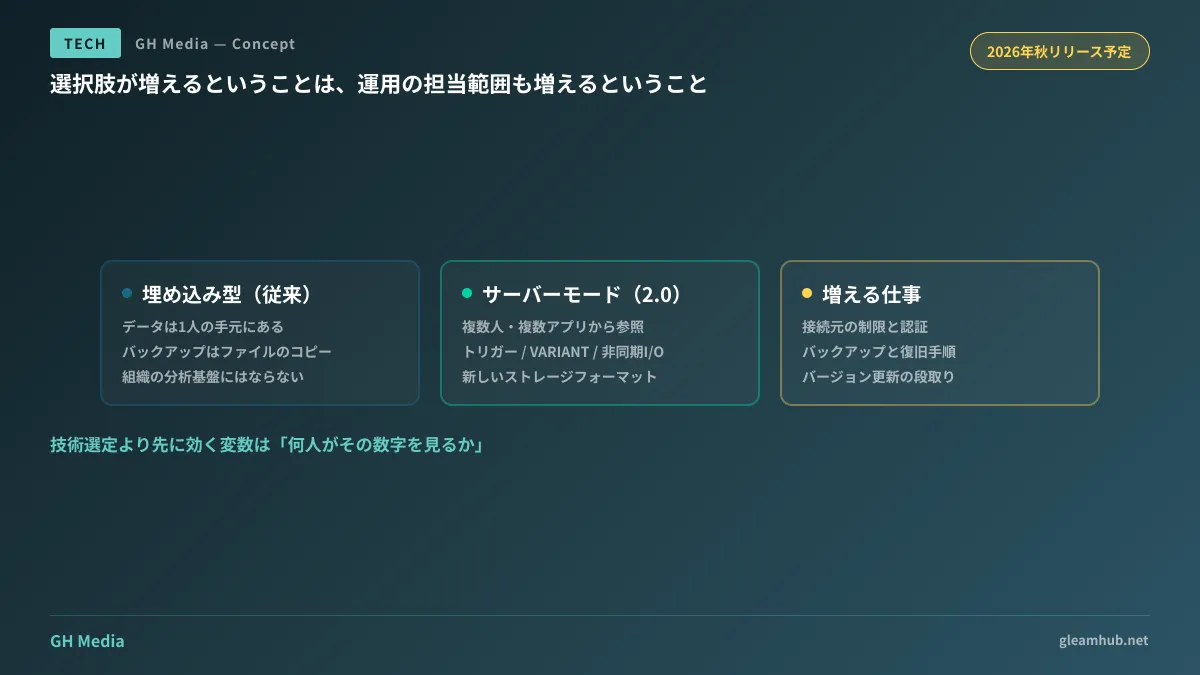
"Becoming a server" means increased operations
This is the crux of the decision. Server mode removes existing constraints, but removing those constraints creates operational tasks that were previously unnecessary.
When handling files locally, backups meant simply copying the file. Access control was dictated by who could log into that PC. The moment you run it as a server, connection restrictions, authentication, backup and restore procedures, and version upgrade arrangements all fall within your organization's domain.
So while options have indeed expanded, it does not mean you have acquired a "cheap data warehouse." Depending on how it is deployed, the operational overhead can draw uncomfortably close.
As a decision-making sequence, first verifying whether you truly need a server is the fastest route. If only two or three people query the data and updates run via daily batches, keeping it embedded while placing the file on shared storage often suffices. If visualization is the sole goal, approaching it from BI Dashboard Architecture yields faster results.
Conversely, if you expect persistent queries behind line-of-business applications, that falls under business system architecture rather than analytics foundations. Determining whether off-the-shelf products suffice can draw on the criteria outlined in Limits of No-Code SaaS.
An easy-to-overlook factor: storage format changes
There is another element to incorporate into your planning: version 2.0 introduces a new storage format.
Discussions about updating analytics engines often fixate on feature additions, but real-world time sinks stem from migrating storage formats. How will existing database files be migrated? Must queries be paused during migration? Can you roll back? Testing against production data without answers to these three questions risks putting data into an irreversible state.
Because it remains in preview, migration procedures will only solidify after the official release. If testing today, use copies of production data in disposable environments. Waiting for the fall release to verify formal migration procedures before touching production data is much safer. If existing aggregations are running smoothly, there is no pressing reason to rush a migration.
What to do next
First, count the row volume and update frequency of the aggregations currently causing bottlenecks. Requirements differ between viewing hundreds of thousands of rows monthly and running tens of millions of rows daily. Comparing products without these two numbers will not yield a clear answer.
Next, identify who consumes those aggregated figures. For a single person, a self-contained local setup is the cheapest, fastest, and least prone to failure. If multiple departments base decisions on the same numbers, designing storage location and permissions must come first. Headcount is a variable that dictates outcomes well before technology selection.
Deciding whether to wait for the fall release can wait until after you have evaluated these two points. It is still too early to base plans on preview features.
At GleamHub, we assist with evaluating data aggregation architectures, migrating from existing Excel workflows, and connecting to business systems through our development, AI, and automation consulting services. Because optimal architectures depend on data volume and user count, feel free to consult with us individually via Contact Us.