Clients often tell us: "We consulted another agency, and the very first thing they said was, 'You're using jQuery.' It sounded negative, so assuming that was the standard, we accepted an estimate for a complete rebuild."
Released in August 2006, jQuery reached its 20th anniversary in 2026. Even now, depending on the statistics, it is detected on roughly 70% of all websites. Among sites where JavaScript libraries are detected, the overwhelming majority run jQuery. Its mere presence is hardly justification for "rebuilding because it is old."
At the same time, scenarios where a rebuild is genuinely advisable do exist. The dividing line lies not in jQuery itself, but elsewhere.
What is actually happening in the first place
jQuery gained widespread adoption because it allowed developers to handle tedious browser inconsistencies with concise, unified syntax. Since then, native browser standards have caught up, diminishing reasons to choose it for greenfield development.
However, "not choosing it for new builds" and "ripping it out of working systems" are two different decisions. While usage has noticeably declined among top 10,000 high-traffic sites, it remains active in WordPress themes, plugins, and legacy business web apps. As long as you run WordPress, themes and plugins load jQuery, meaning the site owner often cannot remove it by choice alone.
In short, removing jQuery is not a matter of technical preference; it is a question of whether the architecture allows it to be removed.
Three conditions that justify a rebuild
Clients should evaluate the following three criteria:
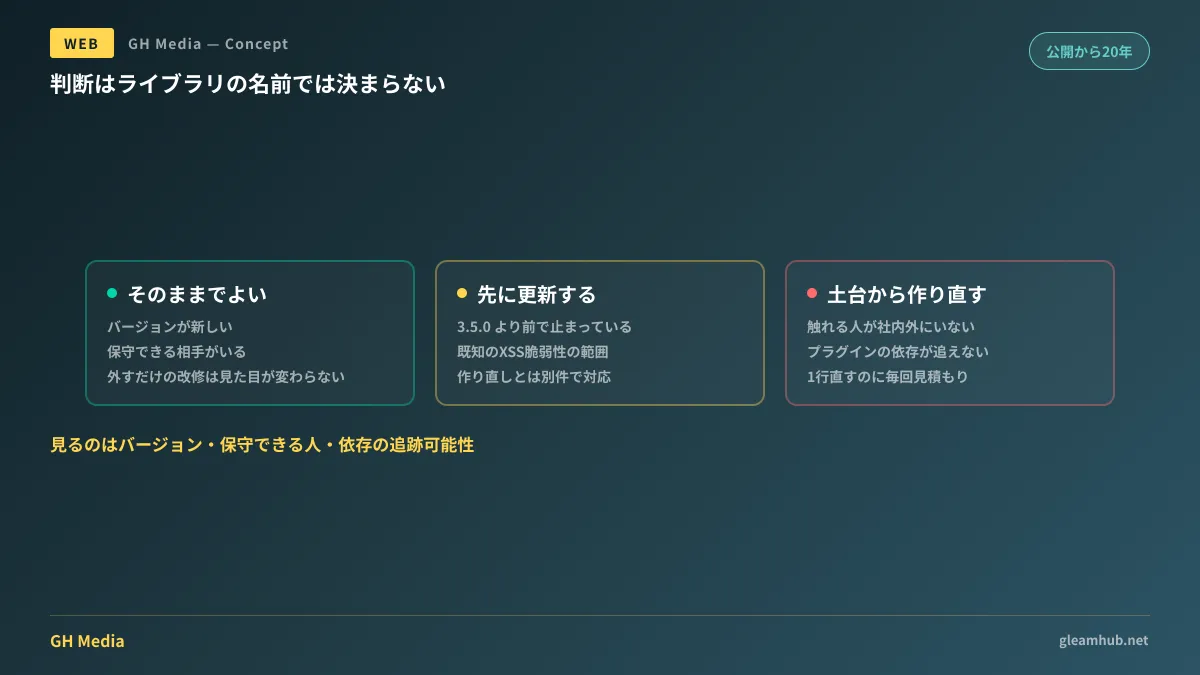
Frozen on an obsolete version. This is the only issue with a strict deadline. Versions prior to jQuery 3.5.0 contain known cross-site scripting vulnerabilities disclosed as CVE-2020-11022 and CVE-2020-11023. On sites that inject external inputs into the DOM, these can cause real harm. Verifying your version is straightforward: simply ask your agency, "What version of jQuery is currently installed?"
No one left to maintain it. A situation where ties with the original agency are severed and no internal staff can read the code is dangerous regardless of jQuery. If changing a single typo requires an estimate every time, restructuring the site so it can be maintained takes priority.
Held together by layers of legacy plugins. Over a decade's worth of plugins layered on top of each other, where no one knows what breaks if one is removed. In this state, partial modification estimates end up costing more than a rewrite.
| Status | Appropriate Action |
|---|---|
| jQuery is legacy, but version is current and maintained | Take no action |
| Stuck on a version older than 3.5.0 | Update first; handle separately from a rebuild |
| No maintainer / dependencies untrackable | Proceed with planning a ground-up rebuild |
Why WordPress complicates matters further
Many corporate websites run on WordPress. In this environment, the phrase "removing jQuery" refers to two distinct targets.
One is jQuery loaded by your theme or custom scripts, which can be removed at the developer's discretion. The other is jQuery loaded internally by installed plugins. This cannot be eliminated without removing the plugins themselves. If a plugin depends on legacy syntax, simply upgrading the jQuery version can cause it to break.
To bridge that gap, a helper library called jQuery Migrate is often loaded; its presence itself serves as an indicator that legacy syntax remains.
Consequently, when discussing jQuery on a WordPress site, estimates must separate "parts removable on the site level" from "parts that cannot be removed without replacing plugins." If you receive a blanket estimate stating "jQuery removal," clarify which scope it covers. If it includes the latter, it effectively entails plugin replacements and testing hours.
Why refactoring solely to remove jQuery isn't worth it
Suppose a site is well-maintained and running an up-to-date version, yet you refactor it solely to remove jQuery.
Visuals and functionality will remain identical. Loading speed may improve slightly, but for most corporate sites, the difference is not large enough to impact inquiry volume. You end up incurring costs for zero user-facing change.
If spending that budget on speed, measuring what is actually causing latency before refactoring yields far better returns. If rebuilding from scratch, focusing on enabling internal updates after launch rather than purging jQuery will lower ongoing operational costs.
The decision to rebuild or continue maintaining is largely determined by site health and internal organizational readiness, not the name of the library in use.
What to do next
Ask your development agency two questions about your existing site:
First: "What version of jQuery is installed?" If it is older than 3.5.0, immediately verify update viability separate from any rebuild discussions. Second: "What steps are required to edit a single line of text?" If the answer is "our team handles it every time," the issue is not jQuery, but an architecture that prevents self-service updates.
GleamHub offers website production and renewal consultations covering current site evaluations, determining rebuild necessity, and restructuring sites so they can be updated in-house post-launch. Because optimal approaches depend on current setups, please reach out via Inquiries.