If you keep shared UI components and configuration in a monorepo and version them with Changesets, simply adding a new property to a shared package (a minor change) bumps all the surrounding packages that list it in peerDependencies (hereafter, the dependents) to a new major version at once. This is the default behavior of Changesets v2.
When a major version goes up, the people who use the dependents have to read the release notes, check that everything still works and, in some cases, get approval again, even though nothing has actually broken. Having this overhead come with every change to a shared component is no small maintenance burden.
What changed in v3
Changesets released v3 on August 11, 2026. Version 3.0.0 was published to npm the same day, and as of September 26 the latest version is 3.0.3, published on September 14.
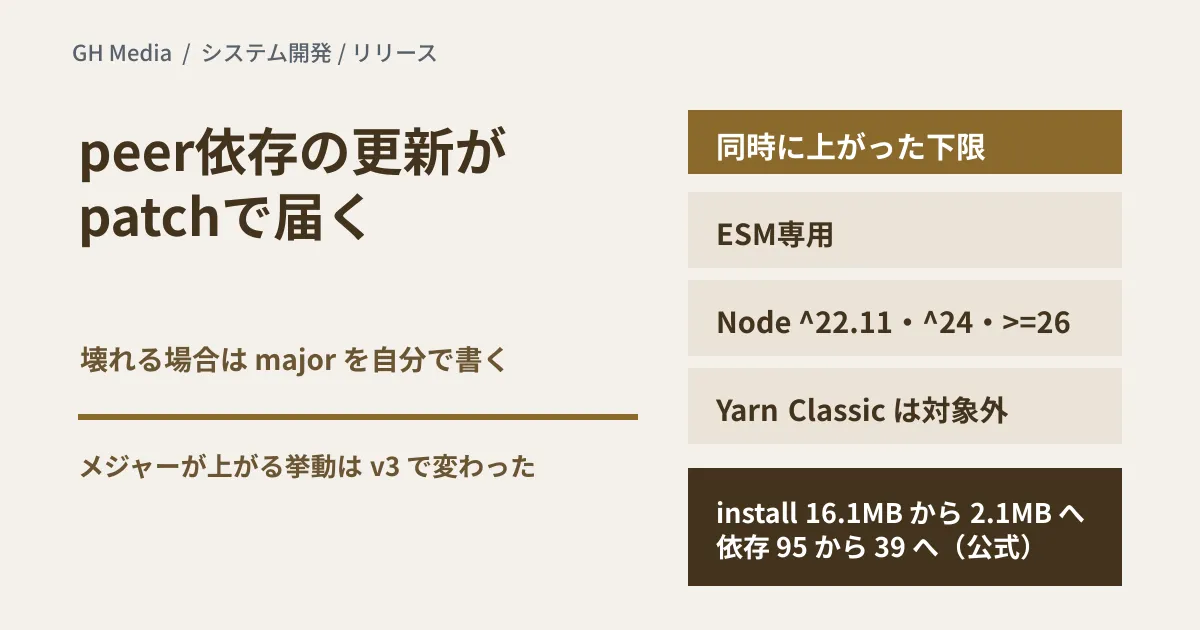
The official blog describes the change to how peer dependencies are handled as the most requested change for years. In v2, when a package referenced as a peer dependency got a minor bump, its dependents were bumped by a major version even if their usage had not been broken. In v3, a peer dependency update gives dependents a patch bump. The division of roles has changed: if a dependent really is incompatible with the new version, the person writing the changeset marks that dependent as major explicitly.
When peer dependents get bumped, tested locally
The official description alone makes it hard to tell exactly when dependents get bumped, so on September 26, 2026 we ran both versions in a minimal test setup and compared them. We created a shared package (1.0.0), a package that lists it in peerDependencies as ^1.0.0, and a package that lists it as 1.0.0 (an exact match), then added a patch, minor and major changeset for the shared package and ran changeset version once for each. The environment was an npm workspace with Node.js 22.22.2 and npm 10.9.7, and the configuration was left at its defaults except that changelog generation was turned off.
| Change to the shared package | Dependent's peer range | Dependent in v2 (2.31.1) | Dependent in v3 (3.0.3) |
|---|---|---|---|
| patch (to 1.0.1) | ^1.0.0 | Not bumped | Not bumped |
| patch (to 1.0.1) | 1.0.0 | patch | patch |
| minor (to 1.1.0) | ^1.0.0 | major(2.0.0) | Not bumped |
| minor (to 1.1.0) | 1.0.0 | major(2.0.0) | patch |
| major (to 2.0.0) | ^1.0.0 | major(2.0.0) | patch (range becomes ^2.0.0) |
| major (to 2.0.0) | 1.0.0 | major(2.0.0) | patch (range becomes 2.0.0) |
The results show three things.
- In v2, a minor change to the shared package alone bumped its dependents to a new major version, even when the new version stayed within the declared range (
^1.0.0). This is where the extra work described at the start comes from. - In v3, peer dependencies are treated the same as regular dependencies (dependencies). A dependent gets a patch bump only when the new version falls outside its declared range; within the range, it is not bumped. For comparison, a package that listed the shared package in dependencies as
^1.0.0was not bumped on a minor change and got a patch on a major change, in both v2 and v3. - When the shared package gets a major bump, v3 rewrites the dependent's peer range to
^2.0.0, yet the dependent itself only gets a patch. For anyone who uses the dependent while staying on the 1.x line of the shared package, that patch is in practice an update with real impact. As the migration guide says, review the dependents when you write the changeset, and mark a dependent as major explicitly if it is no longer compatible.
In a pnpm workspace, specifying workspace:^ and workspace:* gave the same results as ^1.0.0 and an exact match, respectively (pnpm 10.33.0). Bumping only when the new version leaves the range comes from the default value ("out-of-range") of the experimental setting updateInternalDependents. With "always", the ^1.0.0 dependent got a patch bump on a minor change even in v3. All of these were checked in a minimal setup; we have not migrated an actual repository.
Prerequisites that changed at the same time
However, upgrading is not just a matter of bumping the version. The same release also changes the prerequisites.
| Item | Requirement in v3 |
|---|---|
| Module format | All packages are ESM-only |
| Node.js | 22.11 or later on the 22.x line, the 24.x line, and 26 or later (^22.11, ^24, >=26). The 23.x and 25.x lines are not supported |
| Package manager | pnpm 10.0.0 or later / npm 10.9.0 or later / Yarn 4.5.2 or later. Yarn Classic is not supported |
| GitHub Actions | changesets/action@v2 is required. v1 works only with Changesets v2 |
changeset version when there is nothing to release | Exits with code 1 (0 in v2) |
| Install size | 16.1MB → 2.1MB (about 87% smaller) |
| Number of dependencies | 95 → 39 |
The official migration guide says that older versions of Node.js and the package managers might happen to work, but are neither tested nor supported.
The install size and dependency count are the official blog's figures; we calculated the roughly 87% from 16.1MB and 2.1MB. When we installed both into empty directories with npm on September 26 and compared them, node_modules for 3.0.3 came to about 2.1MB with 39 dependencies, matching the official figures. For 2.31.1 on the v2 line, it was about 17.6MB with 100 dependencies. The official blog does not say which v2 version it used for the comparison.
What to check before upgrading, in order
To decide whether to upgrade a project you maintain, it helps to check the following in order.
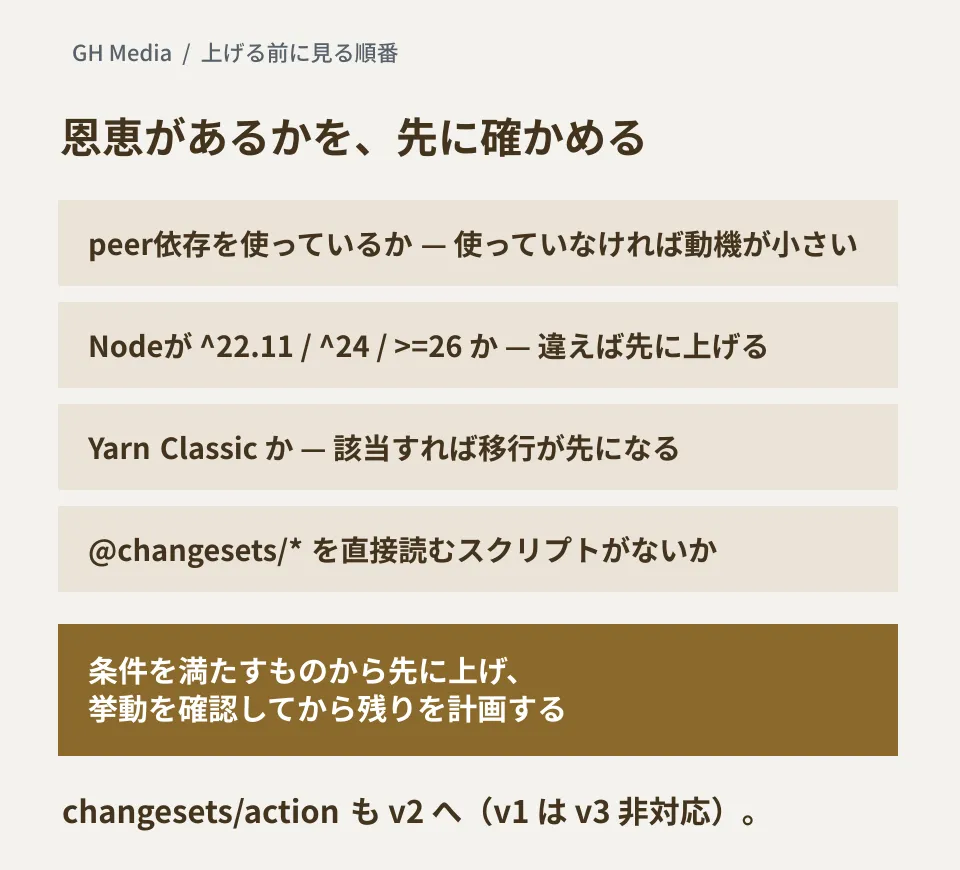
- Do you use peer dependencies inside the monorepo? If none of your internal packages are listed in peerDependencies, you get no benefit from the headline change. The reasons to upgrade are then limited to things like the lighter install.
- Are CI and your development environments on a supported Node.js version? Besides versions below 22.11, the 23.x and 25.x lines are not supported either. If you are outside the range, updating Node.js comes first.
- Are you using Yarn Classic (1.x)? v3 does not support it, so if you are, migrating your package manager is a prerequisite.
- Do your own scripts load Changesets packages directly? According to the migration guide, if you only call the
changesetcommand from package.json scripts or CI, no other change is needed once you are on a supported Node.js version. If you use packages such as@changesets/get-release-plandirectly, or specify packages such as@changesets/changelog-githubin the config, upgrade them according to the version table in the migration guide and check each package's CHANGELOG for breaking changes. - Fix the CI definitions and config files. Upgrade
changesets/actionto v2 and follow the renamed inputs (version→version-script,publish→publish-script,commit→commit-message,title→pr-title). Becausechangeset versionnow counts as a failure when there is nothing to release, review any place that runs it unconditionally. In addition,changeset taghas becomechangeset git-tag,--sinceMasterhas become--since, and the default value ofbaseBranchis nowmain. Private packages are no longer versioned by default, and theprettiersetting has been replaced byformat.
You can look at the first item before anything else. If there is no benefit, there is little reason to rush the work of meeting the prerequisites now. The v2 line still has a maintenance tag on npm (maintenance-v2, 2.31.1, published July 15), but the official documentation we checked does not say how long maintenance will continue.
Release permissions are a separate design question
Even though the way versions are bumped has changed, the underlying structure of "if CI passes, it gets published" has not. Who approves a release of shared components, and at what stage, has to be decided separately from the tool's configuration. On npm staged publishing, the official Changesets blog says support is in progress and will be included in the next feature update; as of September 26, it is not in any release up to 3.0.3. We covered how to put human approval in front of publishing in our article on npm staged publishing.
This is also a good time to review how much of your dependency updating you let happen automatically. As the table above shows, in v3 a major change to a shared package can come out as a patch for its dependents. Unless the author marks it as major explicitly, users whose setup automatically takes in patches can receive an update with real impact as a patch. For the idea of delaying intake through the package manager's defaults, see our article on pnpm's "one-day delay" default.
What to do next
For each repository you maintain that uses Changesets, list the Node.js version in CI, the package manager and its version, the changesets/action version, and how peer dependencies are used. They will split into those that already meet the v3 prerequisites and those that need work to meet them.
A realistic approach is to upgrade the ones that already meet the prerequisites first, confirm in your own repositories that peer dependents are bumped as shown in the table above, and then plan the rest.
We checked the official Changesets blog (the v3 announcement dated August 11, 2026), the v2-to-v3 migration guide, the configuration file documentation, the @changesets/cli CHANGELOG, and the publish dates and
enginesentries in the npm registry on September 26, 2026. The peer dependent bumps and install sizes were confirmed the same day by running @changesets/cli 2.31.1 and 3.0.3 in a minimal test setup (npm and pnpm workspaces, Node.js 22.22.2). We have not migrated an actual repository, tested CI with changesets/action@v2, or published to npm. InfoQ's article dated September 22, 2026 was used as a news report.
For monorepo release design or setting dependency update policies for projects under maintenance, please consult GleamHub.