About three months after delivering a business system, a message like this often arrives: "The screens in the manual don't match the actual system."
Usually, the changes are minor: a button label was updated, menu items were reordered, or a field was added. The modifications themselves are correct and recorded in release notes; the only things left unupdated are the screenshots in the manuals. Because manuals are the first thing newcomers read, encountering discrepancies immediately leaves an impression that the system cannot be trusted.
What Has Become Obsolete Is Not the Content, but the Update Pipeline
Treating this as an issue of "manual quality" fails to solve it, because the documentation was entirely accurate at delivery.
What is broken is the update pipeline. When changing code, developers update automated tests. If tests are not updated, they fail, so developers are forced to fix them. In contrast, nothing happens when documentation is left untouched. Deliverables whose breakage goes undetected will inevitably be neglected.
Including "manual maintenance" in a maintenance contract might seem like a solution, but in practice it rarely works. Manually recapturing screenshots, redrawing callout boxes, and re-adding arrows every time a screen changes is monotonous, unpredictable in effort, and consistently deprioritized. What is written in a contract is very different from what functions in practice.
What Can Be Automated: Operations and Capture; What Cannot: Deciding What to Include
An implementation approach to this problem was demonstrated in a case study published in August 2026. The development team at Commune tackled a mechanism to automatically generate and update web service guidebooks using Playwright and LLMs.
The core of the architecture lies in its division of responsibilities: the LLM reads specifications from the code to write explanatory copy, while Playwright interacts with actual screens to capture screenshots. It even generates images with highlight borders applied, leaving humans responsible only for "instructions on what to build" and "final review."
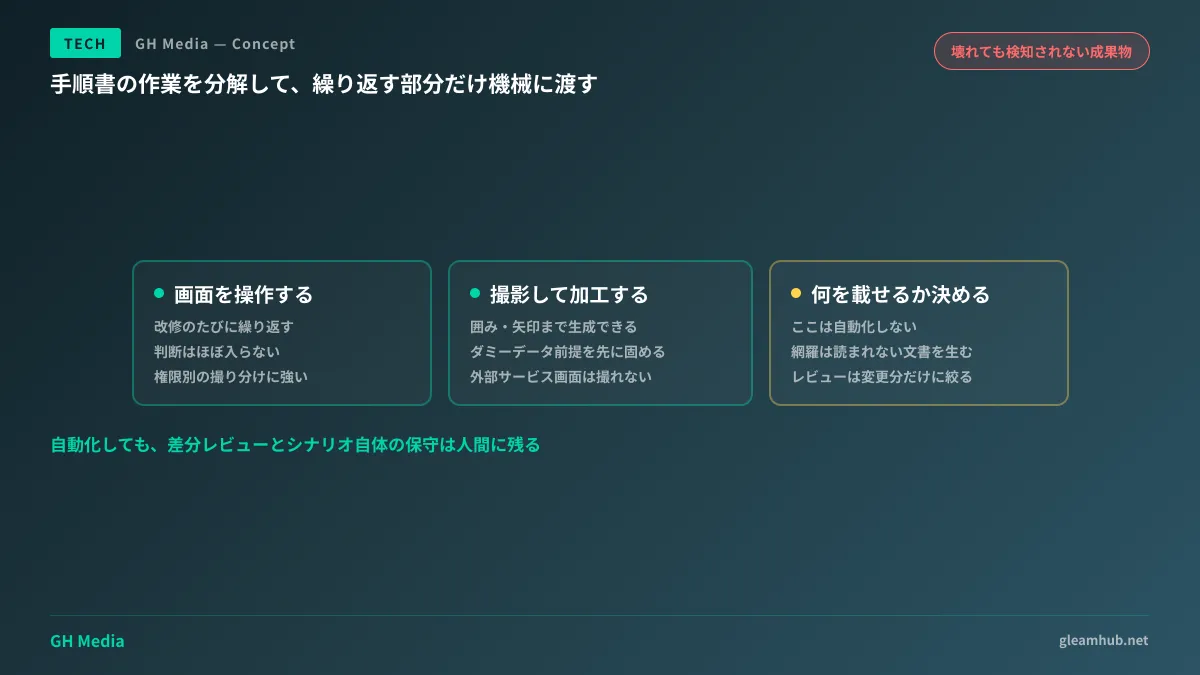
There is a sound reason for this division. Breaking down manual creation reveals three tasks of fundamentally different natures:
- Navigating screens in a predetermined order (mechanical and reproducible)
- Capturing and annotating screenshots (mechanical and reproducible)
- Deciding which screens to show and at what granularity (requires judgment)
The first two require virtually no judgment despite recurring with every change. Automating them brings regeneration after feature revisions down to a realistic cost. Conversely, attempting to automate the third task tends to produce documentation that is exhaustive yet unreadable.
How to Handle Screens That Cannot Be Captured
When actually integrating this, this is the first wall you hit. Capturing screens via browser automation comes with prerequisites.
Test data is required. To capture an "invoices list" screen, you need plausible invoice data populated. Capturing an empty state does not yield a usable manual. If existing E2E seed data can be reused, that serves as the starting point. If none exists, preparing seeds becomes a prerequisite task.
Screens vary by permission level. In systems where views differ across administrators, regular users, and read-only roles, you must log in and capture screens separately for each role. Because this aligns well with automation—and is an area frequently overlooked in manual workflows—automation yields substantial benefits here.
Screens involving external integrations may not be capturable. Payment gateway screens, third-party auth login pages, and email inboxes—screens outside your direct control either cannot be automated or look different in staging environments. The practical approach is to either retain manual capture for these or add a note: "External service screen; actual display may vary."
Beware of capturing confidential information. Capturing production-like data leaves real names, email addresses, and client names directly in images. Unless the premise of capturing strictly dummy data is locked in upfront, everything will have to be retaken later.
Changing the Definition of Deliverables Away from Static Manuals
From the perspective of custom development, the essential shift lies in how deliverables are drafted in contracts.
Traditionally, the deliverable itself is defined as a static artifact, such as "One complete set of user manuals (PDF)." Under this definition, degradation begins the moment it is handed over, and updates become billable change requests.
If this is redefined as "a mechanism to regenerate runbooks alongside the initial edition generated by it," the dynamic changes completely. When screens change, the client's task is simply running the generator, reviewing diffs, and tweaking text if necessary. The effort of recapturing screens vanishes.
To be frank, there is an important caveat: this approach raises initial costs. Writing interaction scenarios, preparing test data, and reviewing generated text require upfront investment. For systems with low update frequencies or only about 10 screens, manual recapturing remains cheaper.
The rule of thumb depends on multiplying screen count by change frequency. If a system has 50 screens that change quarterly, the investment pays for itself by the second revision. If it changes only once a year, the automation system itself will become obsolete before breaking even.
Because this mirrors the structure of external links quietly decaying over time, the evaluation framework aligns with Auditing Broken Links. The architecture for embedding browser automation into maintenance workflows directly leverages the setup covered in E2E Automation with Headless Browsers.
Remaining Pitfalls
Even with a regeneration pipeline in place, two problems persist.
First, diff reviews remain a human task. The generating system cannot judge whether generated copy is accurate. Regenerating 50 screens all at once creates 50 screens of review debt simultaneously. Operations must be structured to regenerate only modified screens per release, or reviews will stall.
Second is maintaining the mechanism itself. If screen selectors change, interaction scenarios break. If no one internally can fix them when broken, the entire system is abandoned. Ending up having merely swapped "manual obsolescence" for "scenario obsolescence" is a very real possibility. Avoiding this requires running scenarios periodically in CI so breakages are surfaced immediately—treating them just like automated tests.
What to do next
First, open the manual for a system you currently operate and compare the first screenshot against the live screen. If they differ, verify whether you can pinpoint when that divergence occurred. If you cannot, it means you have no update pipeline.
Next, estimate how much screens are expected to change over the coming year. If changes will continue, rethinking deliverable definitions is worthwhile. If they will remain static, simply taking new screenshots manually once is sufficient.
GleamHub provides development, AI, and automation consultations covering deliverable design for business systems, structuring maintenance contract scopes, and automating document generation. Because the optimal approach varies depending on screen count and change frequency, we provide customized estimates. Please reach out via our contact page.