Have you ever asked how deployments are handled for systems whose maintenance you outsource? The two most common responses are:
- The engineer builds on their local machine and uploads manually to the server
- CI (automated build) is set up, and pushing updates reflects them to production
In both cases, credentials stored somewhere power the process behind the scenes: server keys, package publishing tokens, or cloud access keys. Moreover, many of these have never been updated once since their initial issuance.
The security measures GitHub introduced for npm and GitHub Actions in 2026 operate on the premise that attackers are targeting precisely these credentials.
The target is long-lived credentials
When people hear "supply chain attack," they often picture unknowingly using a library infected with malicious code. In practice, there is a prior step: attackers first compromise the publishing permissions of legitimate developers. Once acquired, they can distribute malicious code disguised as legitimate packages, making it indistinguishable to consumers.
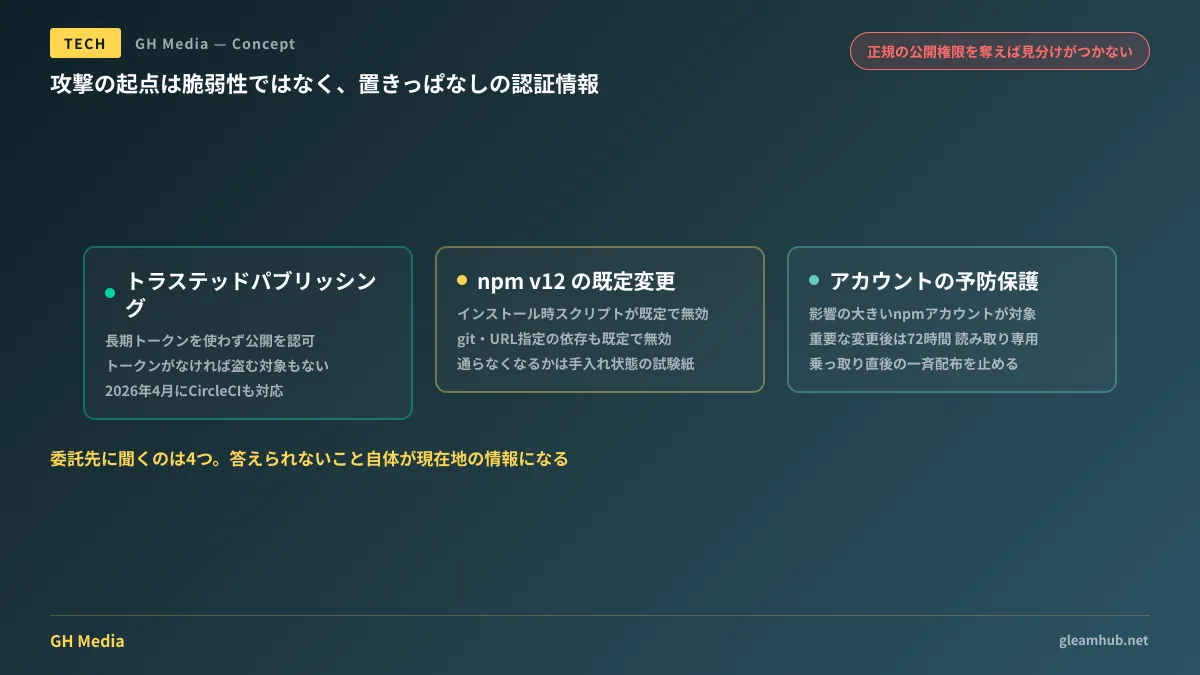
In most cases, publishing permissions take the form of long-lived tokens stored in CI environments. They feature extended validity, persist indefinitely unless revoked, and can be exfiltrated from CI logs or environment variables. The starting point of attacks is not code vulnerabilities, but abandoned credentials—this reflects operational reality.
GitHub's countermeasures are aligned toward eliminating this very entry point (Disrupting supply chain attacks on npm and GitHub Actions — The GitHub Blog).
Trusted publishing authorizes publishing from CI to registries based on the identity of the CI workflow execution itself, without relying on long-lived tokens. In April 2026, CircleCI joined the list of supported providers. Without tokens, there is nothing to steal.
In npm v12 (June 2026), install scripts became disabled by default. Commands like postinstall, which attackers used as vectors to exfiltrate credentials, no longer run by default. Concurrently, dependencies specifying git repositories or arbitrary URLs were disabled by default, narrowing avenues for arbitrary code execution during installation.
High-impact npm accounts received proactive protections. Following critical changes like email updates or 2FA recovery, accounts enter a 72-hour read-only state. This window is designed to halt attempts to rapidly distribute malicious versions immediately after account takeover.
The Dependabot cooldown period, which delays dependency update PRs by several days, stems from the same underlying philosophy (Dependabot Introduces Default Cooldown Periods).
The other side: "Builds broke after updating"
This brings a change directly impacting organizations outsourcing maintenance: with install scripts disabled by default in npm v12, projects dependent on them may experience broken builds.
Compiling native modules, downloading browser binaries, and fetching platform-specific binaries have traditionally relied on install scripts. While explicitly whitelisting required scripts restores functionality, determining which scripts are essential requires deep familiarity with the project internals.
Systems left unmaintained for long periods are the most likely to stall here. When builds fail, teams often default to: "If we don't update it, it keeps running, so let's leave it as-is for now." The accumulation of this mindset over years results in the "untouchable legacy systems" prevalent across many organizations today.
Conversely, whether builds succeed under these new defaults serves as a litmus test for whether a system remains maintainable. It is well worth having your contractor test this.
Four questions to ask your contractor
You do not need to delve into deep technical minutiae. As a client, verify these four points:
| What to verify | Healthy state | State requiring review |
|---|---|---|
| Where builds are executed | On a server-hosted CI with execution audit trails | Only on a specific developer's local PC |
| Expiration of publishing and deployment credentials | Short-lived or tokenless workflows | Unknown issuance date or no expiration |
| Number of people with access to those credentials | Limited strictly to necessary personnel, fully listed | Vague responses like "probably a few people" |
| Revocation procedure upon contract termination | Documented procedure exists | Undecided |
The first point is the most critical. A situation where builds can only run on a specific individual's PC is both a security vulnerability and a business continuity risk. The moment that person leaves, the system becomes impossible to update.
The fourth point is also frequently overlooked in practice. Contractor credentials often remain active for years after contract termination without anyone noticing. Even without malicious intent, if that former contractor is compromised, the breach reaches your company. Revocation procedures when ending contractor relationships should be defined at the start of engagement (Lost Contact with the Development Vendor).
What you can do today
First, compile a complete list of contractors your company engages with—not just development agencies, but website maintenance vendors, e-commerce partners, and internal tooling providers. Then, ask each vendor the four questions above.
It does not matter if complete answers are not immediately available. The inability to answer is itself vital situational data. If a vendor responds, "We do not track credential expiration dates," that pinpoints your first area for remediation.
Next, check for unlisted contractors: systems built years ago with whom communication has lapsed, or maintenance arrangements initiated informally by departed staff. Because these go unlisted, compromises will go undetected. For designing development environments under the premise that npm install represents arbitrary code execution, see Development Environments in the Era of "npm install Is Arbitrary Code Execution".
Whether you want to audit maintenance setups including contractors or assess how maintainable your existing systems are, GleamHub accepts inquiries through our development, AI, and automation consultation service. Because the optimal setup varies depending on requirements, we provide individual estimates. Please reach out via Contact Us.
Sources
- Disrupting supply chain attacks on npm and GitHub Actions — The GitHub Blog
- Our plan for a more secure npm supply chain — The GitHub Blog
- GitHub to Update npm to Thwart Software Supply Chain Attacks — Infosecurity Magazine
- The npm Threat Landscape: Attack Surface and Mitigations — Unit 42, Palo Alto Networks