Editor extensions installed on development PCs can rewrite files and run commands with the user's permissions. With automatic updates enabled, they are replaced by a new version before the user does anything. When outside development firms or partner companies work on their own PCs, the client cannot see which versions of which extensions are installed unless a system is set up to track them.
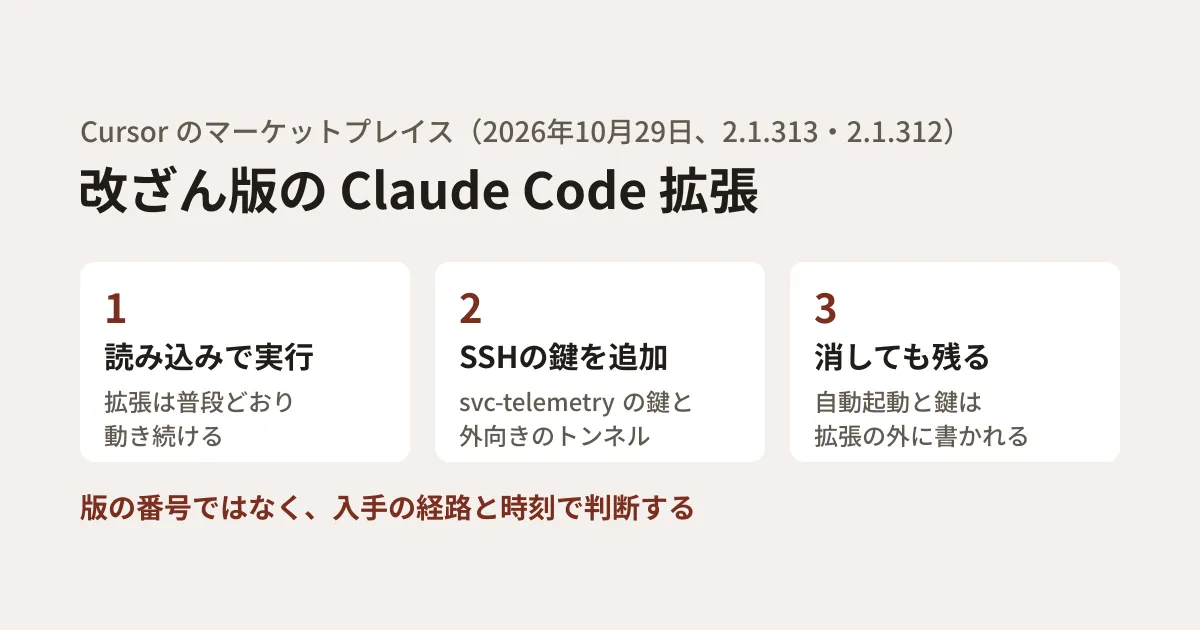
On October 29, 2026, tampered versions of the Claude Code extension (anthropic.claude-code) were distributed for about 11 hours on the extension marketplace of the AI editor Cursor. Cursor issued a notice the same day, and Microsoft also published an analysis on October 30. Based on these two sources, this article covers what happens on a PC where it was installed, where to check, and how to decide your approach to installing extensions.
What was distributed
According to Cursor's notice (October 29, updated October 30), the tampered versions were 2.1.312 and 2.1.313 of the Claude Code extension, distributed through Cursor's extension marketplace, and targeting macOS and Windows. The notice gives package hashes for two builds: Apple Silicon (darwin-arm64) and Windows (win32-x64). They were distributed from around 2:27 a.m. to around 1:35 p.m. Pacific Time, which in Japan time corresponds to around 18:27 on October 29 to around 5:35 on October 30.
On the scope of the impact, the sources say the following.
- The tampered versions were not made by Anthropic (Cursor). Anthropic told Microsoft that its own systems had not been compromised
- The tampered versions were not published or distributed through Microsoft's Visual Studio Marketplace or npm's
@anthropic-ai/claude-code(Microsoft) - There is no evidence that other versions or official distributions were affected, and no other extensions were tampered with (Cursor)
- Current evidence indicates that the impact is limited to the Cursor marketplace (Microsoft)
Early on, some posts reported Open VSX as the distribution source. On October 30, Phorion corrected its description of the affected party to Cursor. When the editorial team looked at the public Open VSX API on November 6, 2026, there was no record of 2.1.313, and 2.1.312 had been published on October 27. According to Cursor's documentation, Cursor's extensions are based on Open VSX but pass through Cursor's own delivery path (marketplace.cursorapi.com). The notice does not say how the tampered versions got into the Cursor marketplace. Cursor explains that after detection it removed the tampered versions, temporarily halted the entire marketplace, and rotated keys and rebuilt it.
What happens on a PC where it was installed
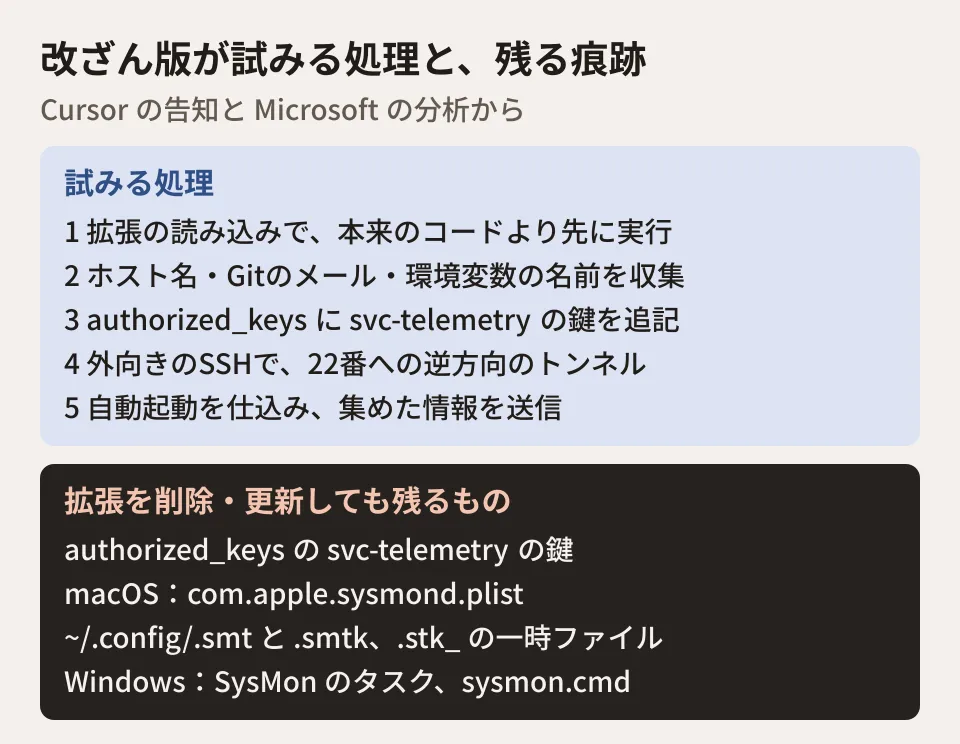
The tampered versions had JavaScript embedded that runs before the extension's original code. When the extension is loaded, it attempts the following steps in order.
- Information gathering: Host name, user name, OS, working directory, global Git email address, public IP address, and so on. It collects up to 40 environment variables whose names contain KEY, TOKEN, SECRET, PASS, AWS, or GCP (what it sends is the variable names, not the values)
- Adding an SSH key: It appends the attacker's public key, with the comment
svc-telemetry, toauthorized_keysand tries to enable the SSH service - Outbound tunnel: It connects from the PC to the attacker's server over SSH and tries to create a reverse tunnel that lets the server side reach port 22 on the PC
- Auto-start: For each OS, it plants a mechanism that re-establishes the tunnel even after a restart
- Reporting: It tries to send the gathered information to the attacker's server
The extension itself keeps working as usual, so it is built in a way users are unlikely to notice. Whether someone can actually get into the PC from outside depends on the PC's permissions and SSH settings. Cursor's notice says that enabling the local SSH service requires administrator privileges, so on many macOS and Windows PCs this step failed and login through the tunnel was not possible.
However, the same notice says that even on those PCs the key was added, auto-start was planted, and information was sent, and it asks users to go through the response steps. Phorion, which analyzed macOS, points out that you cannot rely on this failure for Macs that already had Remote Login enabled or that enabled it later. Cursor worked with the hosting provider to take down the attacker's server, so the tunnel and information sending are said to no longer function.
What remains after removing the extension
What Microsoft's report states clearly is that removing or updating the extension does not erase what was written outside the extension folder. Cursor's notice also says that uninstalling the extension alone may not be enough. Taking down the attacker's server does not erase the traces left on PCs either. The main locations the two sources list are as follows.
| OS | Auto-start mechanism | Main traces |
|---|---|---|
| macOS | User LaunchAgent | ~/Library/LaunchAgents/com.apple.sysmond.plist、~/.config/.smt、~/.config/.smtk |
| Linux | @reboot in the user's crontab | ~/.config/.smt、~/.config/.smtk |
| Windows | A task named SysMon (on failure, sysmon.cmd in Startup) | %USERPROFILE%\.config\smt.cmd、%USERPROFILE%\.config\smtk |
Cursor's notice covers macOS and Windows, but the tampered code also includes processing for Linux, which appears in the list of traces.
On all OSes, the things to check are the keys in svc-telemetry under authorized_keys (and also C:\ProgramData\ssh\administrators_authorized_keys on Windows) and files in the temporary folder with names starting with .stk_. The auto-start names are made to resemble monitoring software, and Microsoft asks you not to judge by the name alone but to check what is actually executed.
In network records, the clues are connections to TCP port 22 on 134.209.82[.]225 and HTTP POSTs to /beacon on port 8099 at the same address. According to Phorion, a login through the tunnel is recorded in SSH logs as a connection from 127.0.0.1 or ::1, so this can be used to tell whether a tunnel was merely established or someone actually got in.
Checking for the key
Cursor instructs anyone who installed or updated to 2.1.312 or 2.1.313 on macOS or Windows during the affected window to check for the key with the following commands. On macOS, it is as follows.
grep -qs svc-telemetry ~/.ssh/authorized_keys && echo "svc-telemetry key found" || echo "No key found; machine not impacted"On Windows, run the following in PowerShell.
$files = "$HOME\.ssh\authorized_keys", "C:\ProgramData\ssh\administrators_authorized_keys" | Where-Object { Test-Path $_ }
if ($files -and (Select-String svc-telemetry $files)) { "svc-telemetry key found" } else { "No key found; machine not impacted" }
When nothing is found, this command displays "machine not impacted". However, Microsoft writes that you should not judge solely by the absence of the indicator, and should also look at evidence from installations, processes, the network, and auto-start. Phorion likewise recommends looking at the key itself rather than relying only on the comment string. To find it even if the comment has been rewritten, you can search for the body of the public key listed in Cursor's notice.
grep -F 'AAAAC3NzaC1lZDI1NTE5AAAAIDdvylCEJ/k2TpezcTfedrkHyFSK9IZ3vmP6vhY4Ss0P' ~/.ssh/authorized_keysThis command is an editorial proposal. On an editorial team PC (macOS 26.5.1), we only confirmed that it works against a test file containing the key. We also confirmed with ssh-keygen -lf that the fingerprint of the public key in Cursor's notice matches SHA256:0Z6R+DF64Do2nwQic8a7kkfDLNNk4IiK+2U2Rci4htk.
What to do, in order, if you find it
Cursor asks that any PC where the key is found be treated as affected and that you proceed to isolation, removal, and credential rotation. Combined with Microsoft's recommendations, the order is as follows.
- Identify the affected PCs: Look for PCs matching the conditions above using endpoint, network, and extension installation records
- Preserve evidence: Before deleting anything, save the extension package, the rewritten SSH authentication files, the keys and scripts that were created, and the auto-start settings (Microsoft)
- Isolate: Disconnect PCs with signs of execution or intrusion from the network
- Remove: Remove the attacker's keys, auto-start, and running tunnel processes, and decide whether to rebuild the PC
- Rotate credentials: From a separate trusted PC, rotate the credentials and sessions usable from that PC
On credential rotation, Cursor writes that even if only the names of environment variables were collected, it cannot be ruled out that credentials were accessed later through the backdoor. Microsoft's report says to rotate them if there are signs that credentials were accessed or if trust in the PC cannot be restored. The editorial team recommends rotating them, following Cursor's guidance, on any PC where the key is found.
For the removal steps, you can use remediate-macos.sh for macOS and remediate-windows.ps1 for Windows, both distributed by Cursor. Run the macOS script with the affected user's permissions (not as root), and the Windows script in an administrator PowerShell. These scripts delete the tampered extension folders and trace files, so organizations that need an investigation should preserve evidence first. Cursor's notice has no script for Linux. If you delete the key by hand, note that the attacker's key may be written on the same line, following a legitimate key (according to a comment in the macOS script).
Do not judge by the version number alone
When the editorial team checked npm's publication records, Claude Code's official changelog, and the public APIs of Open VSX and Visual Studio Marketplace on November 6, 2026, a legitimate version numbered 2.1.312 also existed (published to npm on October 27). 2.1.313 was in none of these, and the next legitimate version is 2.1.314 from October 30. A comment in Cursor's removal script also says that the tampered versions keep real version numbers, so they must be matched by their contents.
In other words, neither "it has 2.1.312, so it is infected" nor "it is 2.1.312, so it is safe" can be said from the version number alone. What you can base a judgment on is the route and time of acquisition: whether you installed or updated from the Cursor marketplace, during the window above, on macOS or Windows. If the extension folder remains, Cursor's notice gives as an indicator that extension.js contains 134.209.82[.]225 and svc-telemetry. However, if you have since updated or removed it, the folder will not remain, so even if it is gone you still need to check for the key as described above. Extensions installed from the VS Code Marketplace and the CLI installed from npm are out of scope, as far as the sources go.
Deciding how to install extensions (editorial proposal)
As measures for organizations using Cursor, Microsoft lists the settings in Cursor's security hardening guide, in particular limiting extensions to approved publishers and a setting that delays installation of newly published versions for a set period. In Cursor's documentation, these are the following settings.
- Allowed Extensions: Specify it in the
extensions.allowedsetting, the team admin dashboard, or the MDM policyAllowedExtensions. Entering even one item makes it work as an allowlist, and unless you add"*": true, all other extensions are blocked - Marketplace Install Cooldown: Specify the time under Security & automation in the team settings. The default is 0 (disabled). Individuals can also set it with
extensions.installCooldownHours - Require Extension Signature Verification: Enterprise teams can make signature verification of Open VSX extensions mandatory
These tampered versions kept the legitimate publisher's name, so narrowing by publisher alone may not have prevented this (the editorial team's view). Cursor also writes that the waiting period and signature verification supplement other measures and do not replace them.
With that in mind, we propose that companies that outsource development and organizations where multiple developers work on their own PCs decide on the following in advance.
- Keep a list of AI development tools and extensions. Track which editors and extensions are on whose PC, including those of outside developers
- Do not leave automatic updates on across the board. Set a waiting period so new versions are not installed right away. This distribution was stopped in about 11 hours
- Do not keep secrets resident in environment variables. This time only the variable names were sent, but code running with the same permissions can also read the values. Move toward a management system that loads them only when needed
- Decide on contacts for incidents. At the contract stage, decide whom to contact and which keys to rotate if traces are found on an outside developer's PC
For a similar tampering case in a Python package, we laid out how to investigate in our article on the tampered LiteLLM 1.107.0. A case where an editor extension was the entry point is also covered in our article on the compromise of GitHub's internal repositories via a VS Code extension.
Scope of verification
On November 6, 2026, we checked Cursor's notice (October 29, updated October 30) and removal scripts, its documentation on extensions and security hardening, and Phorion's analysis (October 30, updated October 31) (document research). We also reopened the Microsoft Security Blog report (October 30, 2026) on November 6 and checked it against the original text. The page shows no update notice. We confirmed version publication dates in the records of npm, the Claude Code changelog, Open VSX, and Visual Studio Marketplace. We could not find a notice from Anthropic itself. We did not obtain or run the tampered versions, and we did not run Cursor's scripts.
For designing development environment permissions and operating rules that include outside developers, please contact us through consultation on development, AI, and automation.
References
- Security notice — malicious version of Anthropic.claude-code (2.1.312 and 2.1.313)(Cursor)
- Inside a malicious Claude Code-branded extension and its persistent SSH backdoor(Microsoft Security Blog)
- Official Claude Code Extension Compromise: Security Advisory(Phorion)
- Cursor's Extensions documentation (delivery path, Cooldown, signature verification)
- Cursor's Identity and Access Management documentation (Allowed Extensions)
- Cursor's Security hardening documentation
- Claude Code changelog
- npm registry — @anthropic-ai/claude-code
- Open VSX API — anthropic/claude-code 2.1.312