In May 2026, Publickey reported VS Code Previews "Agent window," a New Feature Simplifying Development with Multiple AI Agents. This is a new development paradigm where multiple AI agent sessions run simultaneously inside a single editor window, each maintaining an independent workspace, context, and execution history.
In our custom development work, running "refactoring agents," "test-addition agents," and "documentation-generation agents" in parallel across separate windows was already becoming standard practice. Agent window officially supports this "multi-agent parallel development" as a standard UI. As an extension of the themes in VS Code 1.118 and Copilot CLI Remote Control — Guidelines for Bringing Copilot into Custom Engagements, this introduces a new challenge: "governing multiple agents in custom development."
Why "parallel execution of multiple agents" will become the standard
| Bottleneck | Single agent | Multiple agents in parallel |
|---|---|---|
| Task dependency waiting | Sequential 30-minute wait | 5 minutes in parallel |
| Context pollution | Heavy task volume in 1 session | Separated by concern |
| Review granularity | Massive diff | Small diffs per task |
| Impact of failure | Redo all tasks | Failed agent only |
| Model selection | Fixed to 1 model | Optimal model per task |
In particular, "context pollution" was the primary cause of quality degradation in long sessions. By isolating independent contexts per task with Agent window, achieving both quality and speed becomes practical for the first time.
Four design principles for running multiple agents in parallel in custom development
Principle 1: Explicitly define workspace boundaries
While Agent window can execute in parallel across different branches or worktrees of the same repository, accidents where agents "modify the same file simultaneously" become more likely. In custom development, we define a task × file ownership matrix in advance to physically prevent conflicts. This extends to multi-agent support the "agent operational conventions" covered in Claude Code Client Convention Extraction Services.
Principle 2: Assign "roles and restrictions" to each agent
| Agent | Role | Restrictions |
|---|---|---|
| Refactor Agent | Refactoring | Modifying external API calls |
| Test Agent | Adding / modifying tests | Altering production code |
| Docs Agent | Updating comments and READMEs | Changing code logic |
| Review Agent | PR review assistance | Direct commits |
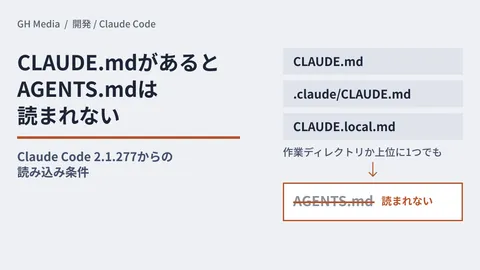
Overlapping roles or omitted restrictions cause incidents where "everyone does the same thing." We explicitly define roles in CLAUDE.md / AGENTS.md and have agents automatically load them at launch. This is an application of AI Coding Convention Extraction Client Projects.
Principle 3: Concurrency limits and approval gates
Running 5 or more agents in parallel rapidly accelerates model API rate limits and quota consumption. In custom development contracts, we agree on numerical thresholds for "maximum concurrency N" and "nightly batch concurrency limits." This aligns with the philosophy of Claude Code Auto Mode Approval Gate Client Engagements.
Principle 4: Persisting execution logs for each agent on a "per-session basis"
For each Agent window session, we store execution logs of "what prompt made what change" in persistent storage. This serves as an audit foundation for tracing "why this change was introduced" later.
Four phases to build in custom development
Phase 1: Evaluating the multi-agent foundation (2 weeks)
We conduct hands-on testing of the Agent window preview and take an inventory of parallelizable tasks in existing client projects. We clearly distinguish between tasks accelerated by parallelization and tasks safer left sequential.
Phase 2: Role design and guardrail implementation (3 weeks)
We define 4 to 6 agent roles in AGENTS.md / CLAUDE.md and implement guards in CI that reject changes exceeding those roles.
Phase 3: Shadow parallel operations (4 weeks)
We run 2 to 3 types of agents in parallel on existing projects and measure execution logs, review times, and the presence of production incidents.
Phase 4: Production release and contract renegotiation (3 weeks)
We add clauses for "parallel multi-agent operation" to custom development contracts, agreeing with clients on audit log retention periods, concurrency limits, and billing apportionment.
Standard technology stack set for custom development
| Layer | Recommended technology | Alternative |
|---|---|---|
| Editor | VS Code Agent window | Cursor Composer 2 |
| Model | Claude Sonnet 4.6 / GPT-5.4 mini | Codex / Gemini |
| Role definition | AGENTS.md + CLAUDE.md | Repository Wiki |
| Concurrency control | Git worktree + branch isolation | Devcontainers |
| Log aggregation | OpenTelemetry + S3 | Langfuse |
| CI guard | GitHub Actions + danger.js | reviewdog |
| Approval UI | Slack Block Kit | Linear / Jira |
The number of competing editors supporting multi-agent setups is growing, such as Cursor Composer 2 and Zed 1.0 — Onboarding Custom Development Teams to AI Editors. In custom development, the key is to design "editor-agnostic" guardrails.
Which projects it fits best
| Suited projects | Benefit |
|---|---|
| Migrations involving large-scale refactoring | 3× to 5× faster through parallelization |
| Adding tests to legacy code | Rapidly adding tests with dedicated agents |
| Monthly documentation updates | Automated with Docs Agent |
| Client engagements advancing multiple PRs concurrently | Eliminates review bottlenecks |
| Large teams × AI custom development | Role assignment prevents collisions |
Five clauses to include in custom development contracts
| Clause | Details | What the client should verify |
|---|---|---|
| Concurrency limit for running agents | Explicitly stated up to N in parallel | Liability upon exceeding limit |
| Demarcation of role definition responsibility | Defined by contractor / client | Remedies upon role breach |
| API billing apportionment | Per agent / per project | Monthly reports |
| Log retention period | 90 days / 1 year / 3 years | Alignment with audit requirements |
| Immediate shutdown upon runaway behavior | Kill switch implementation | Communication channels |
Four common pitfalls
Pitfall 1: Making everything parallel actually slows things down
Parallelizing tasks despite underlying dependencies frequently results in resolving merge conflicts taking longer than sequential execution. Select parallel targets only after visualizing dependency graphs in advance.
Pitfall 2: Depleting model API quotas
5 parallel agents running long prompts can trigger incidents where a full day's quota is consumed in the morning. Physically restrict the monthly budget per agent. This is the same issue addressed in GitHub Copilot Pay-as-You-Go Token Governance.
Pitfall 3: Breakdown of code reviews
When a flood of small PRs is generated in parallel, human reviews cannot keep pace. Combine Review Agents with automated merge thresholds so that human reviews focus strictly on critical changes.
Pitfall 4: Scattered logs rendering audits impossible
If Agent window session logs remain strictly local, audit trails vanish when projects conclude. Build in real-time aggregation via OpenTelemetry from day one.
Summary — From "one agent per person" to "N agents per person"
The preview release of the VS Code Agent window marks the turning point where custom development transitions from "one person, one agent" to "one person acting as the command center for N agents." While the speed benefits of parallelization are substantial, failures will cascade unless you design from day one the role definitions, concurrency limits, and log aggregation.
How much to parallelize depends on repository dependency graphs, the staffing available for reviews, and how much audit logging must be retained. For those who want to begin by consulting on Phase 1 of this article—distinguishing which tasks speed up with parallelization and which are safer left sequential on an actual codebase—please share your repository scale and current review structure via our inquiry form.
Sources
- VS Code Previews "Agent window," a New Feature Simplifying Development with Multiple AI Agents (Publickey)
- VS Code 1.118 and Copilot CLI Remote Control — Guidelines for "Bringing Your Own Copilot" in Client Development (GH Media)
- Claude Code Client Convention Extraction Services (GH Media)
- Claude Code Auto Mode Approval Gate Client Engagements (GH Media)
- GitHub Copilot Pay-as-You-Go Token Governance Client Services (GH Media)
- Zed 1.0 — AI Editor Client Team Onboarding (GH Media)