You may want to run aggregation scripts written by generative AI or plugins received from outside the company inside your business apps. However, if you run them with the same permissions as the app, that code can reach the keys in the server's home directory, the API keys stored in environment variables, and even the internal network. Having a person read the code before every run does not scale once the volume grows.
Microsoft has released MXC (Microsoft eXecution Containers) as a building block for "running untrusted code within defined limits." The Windows Developer Blog announced on October 7, 2026 that it is "now generally available," and explained that the lightweight isolation method usable on Windows 11, macOS, and Linux (process container) uses Bubblewrap on Linux. The README describes it as a "sandboxed code execution system" for running untrusted code such as model output, plugins, and tools on Windows, Linux, and macOS. You embed it in your app as an SDK and pass it the isolation method (backend), file and network rules, and the command to run, and MXC validates the request before launching it in an isolated environment.
For the Node SDK (@microsoft/mxc-sdk), version 1.0.0 was published on npm on October 6, 2026 (UTC) and 1.0.1 on October 17. The GitHub release describes 1.0.0 as the "first stable release" of the Rust, .NET, and Node.js SDKs. It is licensed under MIT and requires Node.js 24 or later. The repository documentation also describes version 1.0.0 of the schema that defines the request format as "current stable." In this article, after reviewing the published documentation, we installed 1.0.1 on Linux in the editorial team's test environment and actually ran code with Bubblewrap (the default backend on Linux).
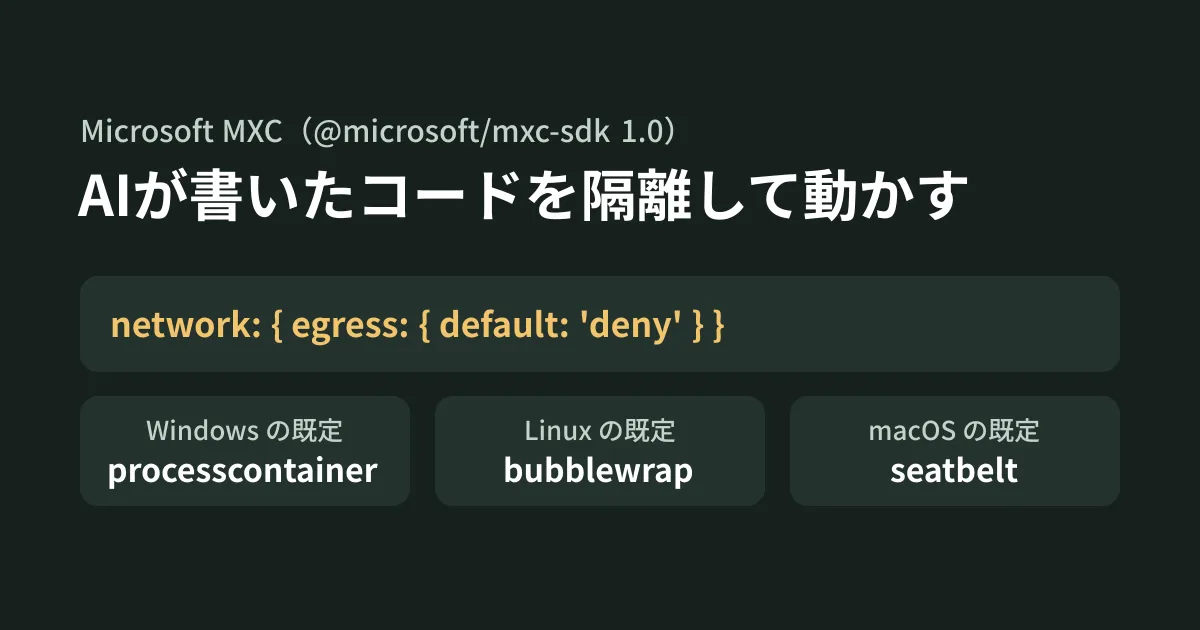
Isolation methods available for each OS
MXC uses a different isolation mechanism for each OS. The table in the README can be summarized as follows.
| OS | Default backend | Other options |
|---|---|---|
| Windows 11(x64・ARM64) | processcontainer | windows_sandbox (experimental), wslc, microvm (experimental), hyperlight (experimental), isolation_session |
| Linux(x64・ARM64) | bubblewrap | lxc、microvm、hyperlight |
| macOS(ARM64・x64) | seatbelt | None |
The ones marked "experimental" in the README are windows_sandbox, microvm, and hyperlight, which are flagged in the Windows row. The SDK 1.0.1 type definitions also list these three as experimental backends. In addition, in the Node types, only seven values can be specified for containment: process, processcontainer, wslc, lxc, seatbelt, isolation_session, and bubblewrap; microvm, hyperlight, and windows_sandbox are not included. If you plan to use it for business, it is safest to start by considering the default backend for each OS.
Using process isolation (processcontainer) on Windows also requires OS updates. According to the compatibility table, Windows 11 24H2 requires build 26100.9278 or later, and 25H2 requires 26200.9278 or later.
The rules you can specify cover files (lists of read-only, read-write, and hidden paths), network (allowing and denying outbound and inbound traffic, and proxies), and UI (clipboard, screen, and input injection). However, the documentation says "Native validation decides which policies the backend can enforce," so which rules can be enforced depends on the backend.
The code we actually ran on Linux
The test environment was Ubuntu 24.04, Node.js 24.22.0, @microsoft/mxc-sdk 1.0.1, and bubblewrap 0.9.0 (installed with apt). getPlatformSupport() returned isSupported: true, and the available methods returned bubblewrap.
This code runs a generated.py written by generative AI under these conditions: the input folder is read-only, the output folder is writable, the network is blocked, and execution is cut off after 30 seconds (the paths are examples for testing).
import { getPlatformSupport, run, spawn, type ContainerRequest } from '@microsoft/mxc-sdk/v1';

const support = getPlatformSupport();
if (!support.isSupported) throw new Error(support.reason);

const request: ContainerRequest = {
  command: '/usr/bin/python3 generated.py',
  workingDirectory: '/srv/job/in',
  filesystem: {
    readonlyPaths: ['/srv/job/in'],
    readwritePaths: ['/srv/job/out'],
  },
  network: {
    egress: { default: 'deny' },
    ingress: { default: 'deny', hostLoopback: 'deny' },
  },
  timeoutMs: 30_000,
};

// 終了まで待って、出力をまとめて受け取る
const result = await run(request);
console.log(result.exitCode, result.timedOut, result.warnings);

// 実行中の出力を順に受け取る
const child = await spawn(request);
try {
  child.standardOutput?.on('data', (chunk) => process.stdout.write(chunk));
  child.standardError?.on('data', (chunk) => process.stderr.write(chunk));
  console.log(await child.wait());
} finally {
  child.dispose();
}
This code passed tsc (strict) type checking. When run, generated.py could write to the output folder, writing to the input folder failed with "Read-only file system," and the connection to 1.1.1.1 failed. Both run and spawn had exit code 0, with no timeout and no warnings.
The following diagram summarizes the results of testing other conditions as well.
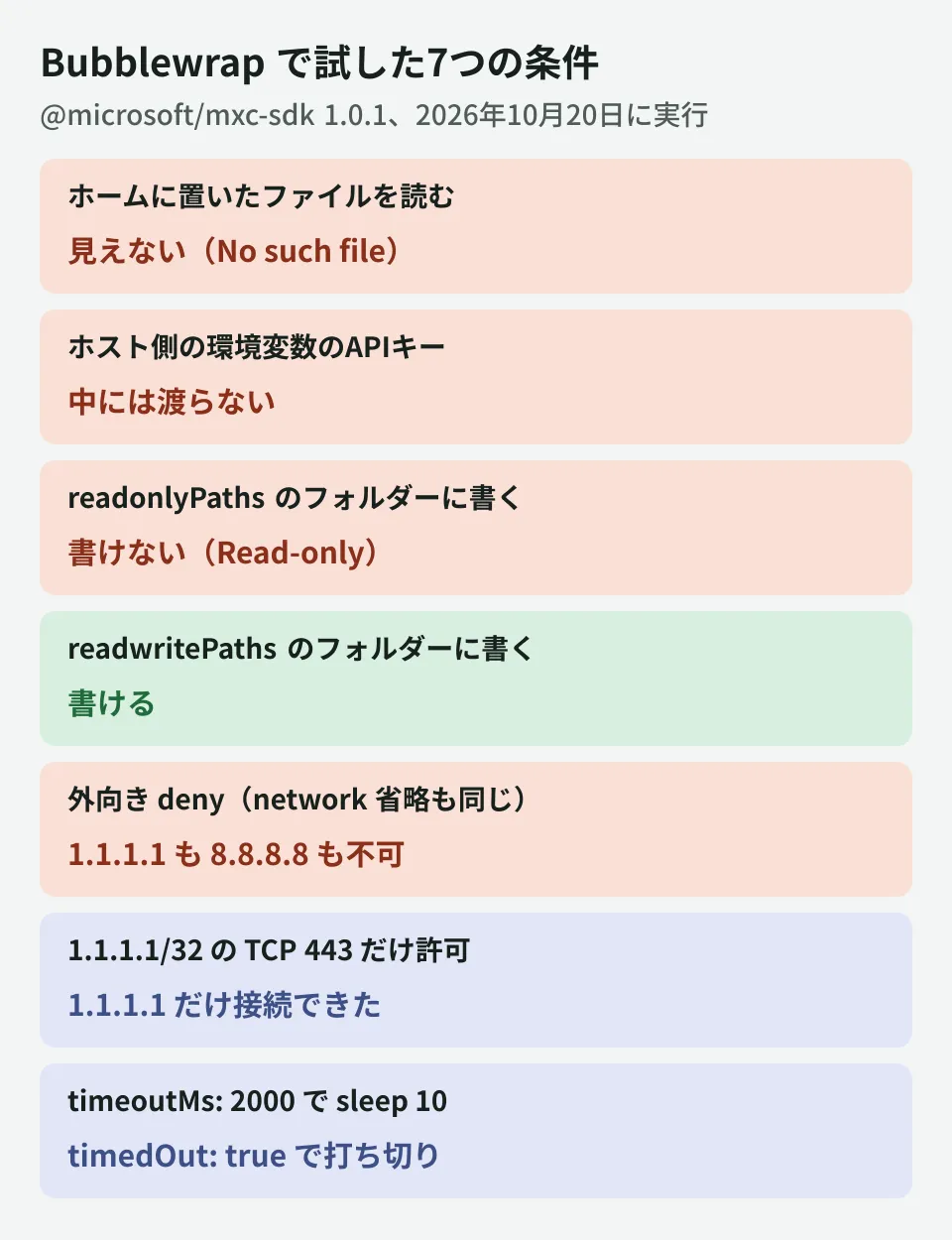
There are two things to note. First, anything you do not specify is not visible. As the Bubblewrap documentation states, apart from fixed system paths such as /usr/bin and /etc, nothing is visible from the sandbox unless you list it in readonlyPaths or readwritePaths. A file in the home directory resulted in "No such file or directory," and the environment variable FAKE_API_KEY set on the host side was not passed in either (the only environment variables inside were PATH, PWD, and TERM). Second, the code cannot get out even if you do not write network. When network was omitted, it could not connect, just as with egress.default: 'deny'.
What you need to restrict network destinations
If you choose "allow only specific destinations" or "allow outbound" instead of "block," you need more tools. When we tried egress.default: 'allow' with only bubblewrap installed, it stopped before launching with the following error.
Bubblewrap: network.egress requires 'slirp4netns' on PATH: No such file or directory (os error 2). Install slirp4netns or use ruleless network.egress.default='deny'.According to the documentation, blocking without rules only requires separating namespaces, but restricting destinations requires slirp4netns, iptables, ip, nsenter, and unshare, as well as the kernel's nf_conntrack. After installing slirp4netns and iproute2, we tried writing only TCP 443 to 1.1.1.1/32 in egress.allow: 1.1.1.1 was reachable, and 8.8.8.8 timed out. At that point, a warning that IPv6 rules had not been applied was returned in warnings (because the kernel in this environment does not support IPv6).
Some settings are rejected at the configuration stage. These include ones we confirmed locally and ones the documentation says are rejected.
| Configuration | Result | Reason (summary of the documentation or error) |
|---|---|---|
ingress.default: 'allow' | Error before launch | Because no path into the sandbox from outside can be created |
Host name (example.com) in cidr | Error before launch | Rules accept only IP addresses or CIDRs. To restrict by name, use an external proxy |
Using a proxy together with egress.allow | Rejected (documentation) | When using a proxy, you are limited to blocking outbound traffic and not writing rules |
If you want to restrict destinations by host name, MXC does not keep a list of names. The documentation shows an approach in which you specify a local proxy with runtimeConfig.networkProxy and configure name-based allowing and denying on that proxy (we did not test traffic through a proxy in this article).
Limitations to check before building it in
Based on the documentation and our testing, here are points to confirm before building it into business apps.
- The working folder becomes HOME. When you specify
workingDirectory, that folder becameHOME(the same in our testing). The documentation warns that files there such as.gitconfigand.npmrcare read as user settings. If the folder holds untrusted input, specify a different location forHOMEwithenvironment - Passing even one environment variable drops the defaults. If you specify
environmentwithout settinginheritDefaultEnvironmentto true, the defaultPATHandTERMare not passed. When we passed onlyenvironment: { FOO: 'bar' }in testing, the only entries inenvinside wereFOOandPWD(note thatecho $PATHdisplays values the shell fills in on its own, which makes this hard to notice at a glance) - Bubblewrap supports only one-off runs. It does not support operations that create a container and reuse it (such as provision). In the Node SDK 1.0.1 types, only isolation_session and wslc (both Windows) can be specified for these operations
- Detection results are reused for the life of the process. In the Node version,
getPlatformSupport()keeps the result, including failures, for as long as the module is loaded. If you install bwrap or other tools afterward, restart the Node process - Logging of denied access is Windows only. The mechanism that records which files were denied (learning mode) applies only to the Windows AppContainer family. On Linux, you have to tell whether access was denied from the run's output
- Diagnostic data that is sent. Microsoft's official builds can send diagnostic data when several conditions are met, such as user consent. According to the README, it is designed to do nothing on platforms other than Windows
Note that the tests were run as root (uid 0). id -u inside the sandbox was also 0. In a real service it would run as a regular user, and we have not checked how it behaves under that condition.
How to decide where to draw the isolation boundary is covered in our article on drawing the line for AI execution environments, and reviewing allowlists for outbound traffic is covered in our article on outbound traffic from AI sandboxes.
If you want to try it locally first
- Run one script with the default blocking: Install the SDK on the target OS, check the available methods returned by
getPlatformSupport(), then specify only network blocking, a read-only input folder and a writable output folder, and run the script you actually want to run. Missing paths and connections will surface as errors - Identify rejected settings first: Write down the network conditions your work requires, such as allowed destinations, hostname-based restrictions and inbound connections, and check before
runwhether the backend you use accepts them. If any condition is rejected, decide whether to add a proxy or switch to a different backend
On October 20, 2026, we reviewed the MXC announcement on the Windows Developer Blog (October 7, 2026), the GitHub releases (v1.0.0 and v1.0.1) and README of microsoft/mxc, docs/glossary.md, docs/api-reference (README and Node V1), docs/container-lifecycle.md, docs/schema.md, docs/containment-policy/README.md, docs/backends/bwrap/bubblewrap-backend.md, docs/backends/process-container/os-version-support.md, docs/logging-access-denied.md, docs/telemetry.md, the README and CHANGELOG of sdk/node, schemas/stable/mxc-config.schema.1.0.0.json, and the npm publish dates of @microsoft/mxc-sdk and the type definitions of 1.0.1 (desk research). In the editorial team's test environment (Ubuntu 24.04, Node.js 24.22.0, bubblewrap 0.9.0, slirp4netns 1.2.1, run as root), we used @microsoft/mxc-sdk 1.0.1 to run the code in this article and each condition shown in the diagrams (hands-on testing). We did not check the Windows or macOS backends, lxc, traffic through a proxy, running as a regular user, or the .NET and Rust SDKs.
GleamHub's development, AI and automation consulting can help you build a setup for running AI-generated code and plugins safely in business systems. The configuration depends on the data you handle and the destinations you connect to, so please reach out through our contact form.
References
- Microsoft Execution Containers: Policy-driven containment for AI agents(Windows Developer Blog, 2026-10-07)
- microsoft/mxc — Releases
- microsoft/mxc — README.md
- microsoft/mxc — Bubblewrap Backend(docs/backends/bwrap/bubblewrap-backend.md)
- microsoft/mxc — Configuration Schema(docs/schema.md)
- microsoft/mxc — Containment policy language(docs/containment-policy/README.md)
- microsoft/mxc — @microsoft/mxc-sdk README(sdk/node/README.md)
- microsoft/mxc — Windows OS-version support
- microsoft/mxc — Learning-mode capabilities(docs/logging-access-denied.md)
- npm registry — @microsoft/mxc-sdk