You publish internal admin panels or business tools through Cloudflare Tunnel, split them by path like /admin/, and require a Cloudflare Access login only for that part. If you operate a setup like that, this change is worth checking once. Depending on how the path is written, a request could be routed not to the rule you meant to protect but to a different, unprotected rule.
On October 22, 2026, Cloudflare announced that cloudflared, the Tunnel connector software, can normalize URLs before selecting an ingress rule (the rule that decides which hostname and path go to which service) starting with 2026.10.0. The changelog says this is to improve the security of tunnels that have rules requiring Access validation.
Starting from version
2026.10.0, Cloudflare Tunnel can normalize URLs before matching ingress rules. This improves security for tunnels with rules that require Cloudflare Access validation. The URL path sent to your origin stays the same.
This setting is currently off by default. It will be on by default starting with new versions released on or after January 25, 2027.
What could happen
cloudflared checks ingress rules from top to bottom and handles a request with the first rule that matches. A setup that protects only the admin panel is written like this, for example (an illustrative configuration).
ingress:
  - hostname: app.example.com
    path: ^/admin/
    service: http://localhost:8080
    originRequest:
      access:
        required: true   # cloudflaredがAccessのJWTを確かめてから転送する
        teamName: example-team
        audTag:
          - <AccessアプリケーションのAUDタグ>
  - hostname: app.example.com
    service: http://localhost:8080   # それ以外は検証なしで同じアプリへ
  - service: http_status:404
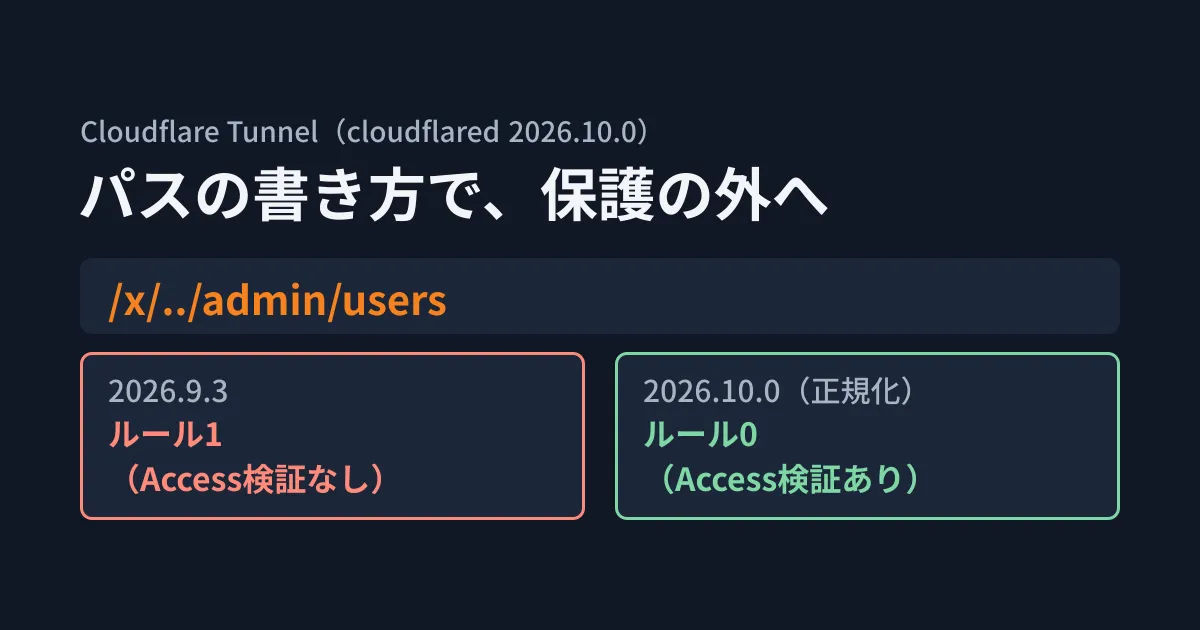
When a path like /x/../admin/users arrives here, it does not match ^/admin/ as a string, so it is routed to the second rule, the one "without validation." Meanwhile, if the destination app or web server resolves .., what actually opens is /admin/users.
In the cloudflared changelog (RELEASE_NOTES in the repository), the 2026.10.0 entry reads "VULN-141859: Normalize request path when using access rules," carrying a vulnerability tracking number. The description of the added startup option also mentions the risk of not normalizing.
An unnormalized request path could bypass Cloudflare Access rules and reach a protected origin.
What normalization changes and what it does not
According to the official documentation ("How traffic is matched" in the configuration file docs), normalization does the following three things.
- Removes
.and..using the RFC 3986 procedure - Converts backslashes (
\) to forward slashes - Collapses consecutive slashes into one
The normalized path is used only to select a rule. The path sent to the destination (the origin) does not change. In the documentation's example, /hello/../path uses /path to evaluate rules and is sent to the origin unchanged as /hello/../path.
Also, normalization applies only to tunnels whose configuration has a rule requiring Access validation (access.required: true). The repository source (ingress/ingress.go) is also written to leave the path untouched when there is no rule requiring validation. The changelog states that "configurations without rules requiring Access validation are not affected."
This approach is the second attempt. Path normalization was first introduced in 2026.8.0 and then reverted in 2026.8.2. The commit for the 2026.10.0 fix, which came after the revert, says that the previous approach rewrote even the path sent to the destination, which caused problems with Next.js route groups and WordPress trailing slashes. This time, the approach leaves the destination path unchanged, and because it could break compatibility, it is off by default. That is the background.
Results of testing two versions
In the editorial team's test environment (Ubuntu 24.04.5, x86_64), we used the official cloudflared 2026.9.3 and 2026.10.0 binaries obtained from the GitHub releases and ran cloudflared tunnel ingress rule against the configuration file above. This command shows which rule a given URL matches without starting the tunnel.
cloudflared tunnel --config admin-first.yml ingress rule "https://app.example.com/x/../admin/users"| Path tested | 2026.9.3 | 2026.10.0 |
|---|---|---|
/admin/users | Rule 0 (with Access validation) | Rule 0 (with Access validation) |
/x/../admin/users | Rule 1 (no validation) | Rule 0 (with Access validation) |
/x/%2e%2e/admin/users | Rule 1 (no validation) | Rule 0 (with Access validation) |
//admin/users | Rule 1 (no validation) | Rule 0 (with Access validation) |
/x\..\admin/users | Rule 1 (no validation) | Rule 0 (with Access validation) |
In 2026.9.3, there were four ways to write a path that contained /admin/ yet was routed to the unprotected rule. In 2026.10.0, all of them matched the rule with Access validation. When we ran the same check with the rule requiring Access validation removed from the configuration, /x/../admin/users still went to rule 1 even in 2026.10.0.
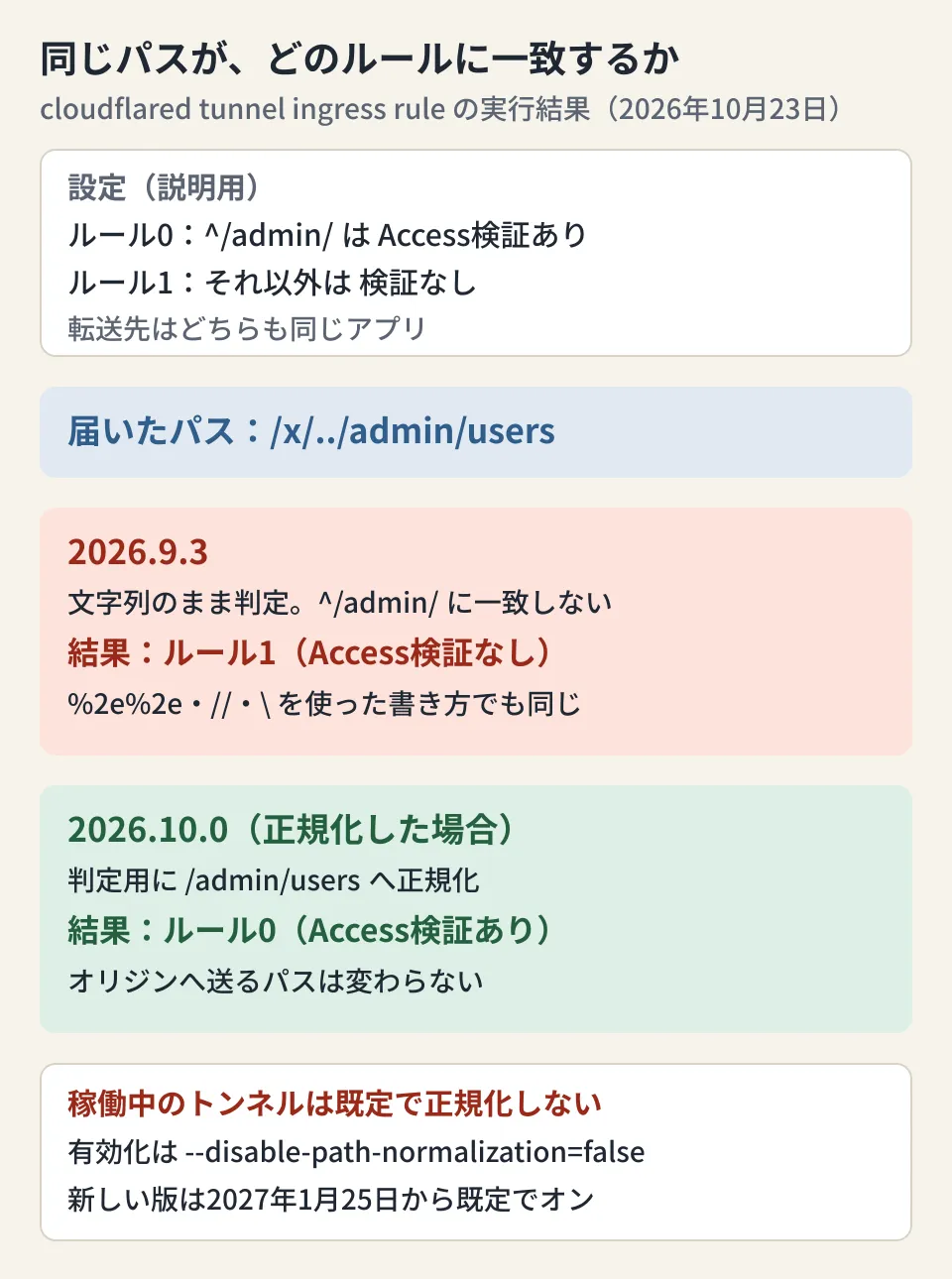
The check command shows results "after normalization"
One caveat here. The ingress rule command in 2026.10.0 displayed the post-normalization result even when we passed the startup option --disable-path-normalization=true (the default) or the environment variable TUNNEL_DISABLE_PATH_NORMALIZATION=true. Looking at the repository source (cmd/cloudflared/tunnel/ingress_subcommands.go), this command reads the configuration file and evaluates it directly, without passing the startup option's value. The option's value takes effect only in the processing that runs the tunnel (orchestration).
In other words, even if running ingress rule in 2026.10.0 says "matches the protected rule," a tunnel running with the default cloudflared tunnel run selects rules without normalizing. Do not read the check command's result as the behavior of a running tunnel. It is useful for checking in advance how requests will be routed after you enable normalization.
What to review before enabling it
From here on is the editorial team's own summary. For tunnels that use rules requiring Access validation, it is safer to check the following in this order without waiting for January 25, 2027, when the default changes.
- Upgrade the version: Check the version with
cloudflared --versionand move to 2026.10.0 or later. As of October 27, 2026, the latest is 2026.10.4, released on October 26. 2026.10.4 also includes a fix for a separate vulnerability (VULN-176088). According to the fix commit, the issue was that startup arguments passed on the command line, such as--token, could be read from the metrics server's/debug/vars(not verified by the editorial team). If you upgrade, choose 2026.10.4 or later - Check the routing: For each rule in the configuration file, use
ingress ruleto check which rule it matches after normalization. In particular, setups that split traffic to different services by path, or that split finely with regular expressions, may see the matching rule change - Enable it: Add
--disable-path-normalization=falseat startup, or set the environment variableTUNNEL_DISABLE_PATH_NORMALIZATION=falseon each replica and restart. If you run multiple replicas, set it on all of them - Review how paths are written: In our test,
/admin(without a trailing slash) did not match^/admin/and fell through to the final 404 rule. Write the range you want to protect with attention to its boundary, like^/admin(/|$)
It is also worth considering a setup that does not rely on path splitting alone for protection. If you move the admin panel to a separate hostname and protect that entire hostname with Access, you no longer need to think about routing differences caused by how paths are written. Also keep defense in depth on the destination app side, such as validating the Access JWT and requiring authentication in the admin panel's routing.
Protection bypasses caused by differences in how paths are written have happened in other software too. In the OpenNext Cloudflare authentication bypass, we covered conditions under which an encoded path slips past the middleware check. A setup that protects in-house MCP servers together with Access is covered in A single entry point for in-house MCP servers.
Scope of verification
On October 23, 2026, we checked Cloudflare's changelog entry "Cloudflare Tunnel supports URL normalization" (October 22, 2026), the configuration file documentation (How traffic is matched), and the references for startup options and origin settings in the source repository of the official documentation (cloudflare/cloudflare-docs). We also checked sources in the cloudflare/cloudflared repository, including
RELEASE_NOTES, the 2026.10.0 fix commit, andingress/ingress.go(document research). In the editorial team's test environment (Ubuntu 24.04.5, x86_64), we used the official 2026.9.3 and 2026.10.0 binaries and rancloudflared tunnel ingress ruleagainst an illustrative configuration file (hands-on testing). We did not verify actually starting a tunnel, in what form requests passing through Cloudflare's edge reachcloudflared, how Access authentication behaves, or how the destination app resolves... On October 27, 2026, before publication, we re-reviewed the published changelog and documentation pages and thecloudflaredreleases and source, and added a note on the release of 2026.10.4. We did not re-runingress ruleon 2026.10.4.
For designing or reviewing how internal tools are exposed and authenticated, contact us through Development, AI, and automation consultations.
References
- Cloudflare Tunnel supports URL normalization(Cloudflare changelog, 2026-10-22)
- Configuration file — How traffic is matched(Cloudflare Tunnel docs)
- Run parameters — disable-path-normalization(Cloudflare Tunnel docs)
- Origin parameters — Access settings(Cloudflare Tunnel docs)
- cloudflare/cloudflared RELEASE_NOTES(GitHub)
- VULN-141859: Normalize request path when using access rules(cloudflare/cloudflared commit 059f86a)