Nightly batches, CI jobs, and webhooks from external SaaS call internal APIs and admin panels protected by Cloudflare Access. In setups that let these through by attaching a "service token" (a pair of Client ID and Client Secret) to the headers instead of a human login, a setting added in October changes how failures are returned and the conditions under which requests get through.
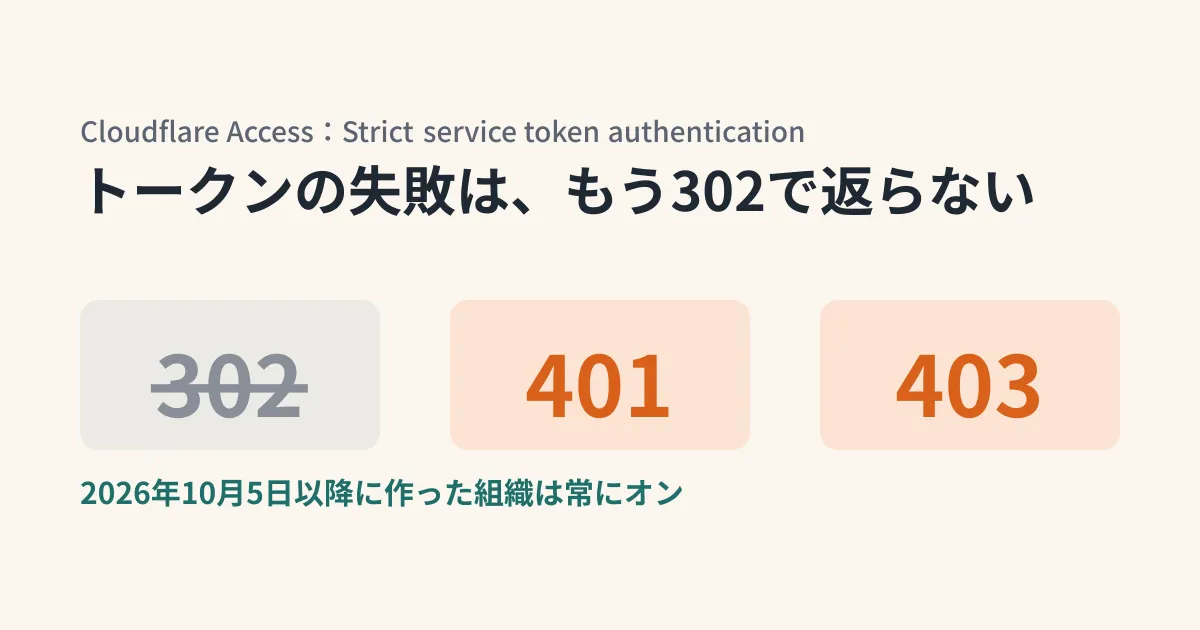
On October 2, 2026, Cloudflare added an organization-level setting to Access called "Strict service token authentication." In Zero Trust organizations created on or after October 5, 2026, it is on from the start and cannot be turned off. In organizations created before that, you can choose to turn it on or off. Cloudflare recommends turning it on for existing organizations as well.
Zero Trust organizations created on or after October 5, 2026 have strict service token authentication turned on by default and cannot turn it off. Cloudflare recommends that existing organizations turn it on as well.
Four things that change when you turn it on
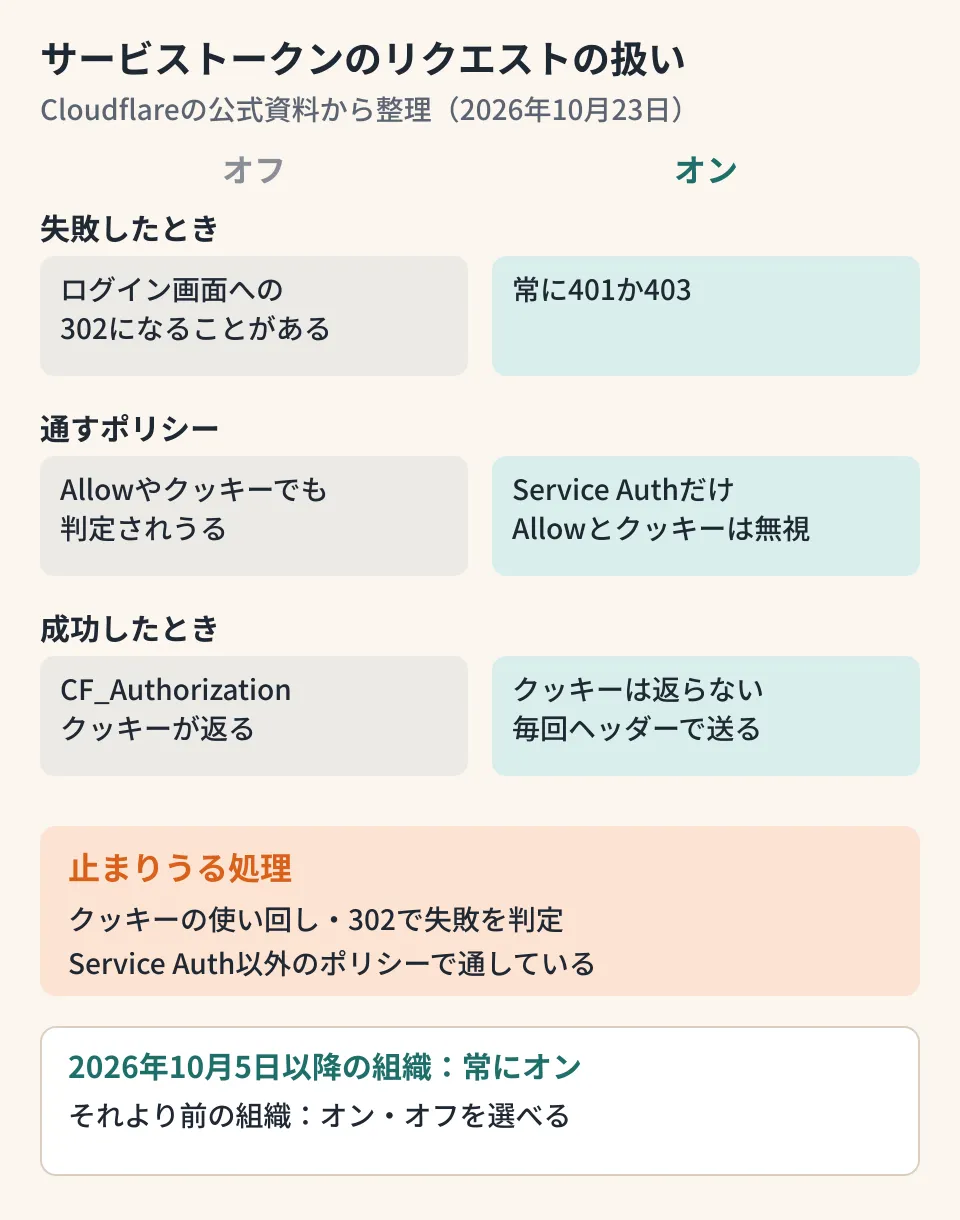
According to the changelog and the service token documentation, when the setting is on, Access handles requests carrying service token headers as follows.
| Item | When turned on |
|---|---|
| When authentication or authorization fails | Always returns 401 or 403 instead of a 302 redirect to the login page |
| Policies that let requests through | Evaluates only with Service Auth policies. Ignores Allow policies and any CF_Authorization cookie sent |
| When it succeeds | Does not return the CF_Authorization cookie. Subsequent requests are also sent with the service token headers |
| Logs | Records failures with recognized service tokens in the Access authentication logs (expired or revoked tokens, wrong Client Secret, tokens not allowed for that app). Malformed headers and unknown Client IDs are not recorded |
The first is a change that makes things clearer for automated jobs. Until now, a failure redirected to the login page with 302, so an HTTP client could follow the redirect and receive the login page's HTML as a "successful 200 response." With the setting on, failures are returned as 401 or 403.
Ways automated jobs are written that could stop working
From here on is the editorial team's summary based on the behavior described in the official documentation. Jobs built in the following ways may stop working as soon as you turn the setting on.
1. Sending the token only the first time and using a cookie after that
This is a design that sends the service token on the first request, saves the returned CF_Authorization cookie, and uses it from the second request onward. With the setting on, no cookie is returned, and it is ignored even if sent. Change it so that every request carries the headers.
2. Letting requests through with a policy other than Service Auth
The documentation has long asked that the action of policies accepting service tokens be set to "Service Auth," and says that otherwise a login will be required. With the setting on, Allow policies are ignored, so check for each application whether the policy meant to let service tokens through is set to Service Auth.
3. Detecting failures by redirects
Monitoring or scripts that use a redirect as a sign of failure, such as "if 302 is returned, treat the token as expired and send a notification," should be changed to look at 401 and 403.
4. Sending the token in a single header
The official documentation does not state whether the method of sending the Client ID and Secret in a single header such as Authorization (read_service_tokens_from_header) falls under the stricter handling. Assuming it does, also check the policy actions of applications that accept this method.
How to turn it on
In an existing organization, go to Zero Trust > Access controls > Access settings in the dashboard, turn on Strict service token authentication under Manage service tokens, and select Enable on the confirmation screen. For the API, the changelog and documentation show an example that sends strict_service_token_auth: true with PATCH to the endpoint that updates the Zero Trust organization.
curl -X PATCH "https://api.cloudflare.com/client/v4/accounts/$ACCOUNT_ID/access/organizations" \
  -H "Authorization: Bearer $CLOUDFLARE_API_TOKEN" \
  -H "Content-Type: application/json" \
  -d '{"strict_service_token_auth": true}'
However, the API reference (Update your Zero Trust organization) lists only PUT as the update method for this endpoint, not PATCH. The editorial team has not called it, so we have not confirmed which one works. If you switch via the API, first retrieve and save the current organization settings, and check the result in a test organization before using it. If in doubt, switch from the dashboard.
This setting applies to the entire organization and cannot be chosen per application. It is safer to identify which jobs will be affected before switching. As the editorial team's suggestion, proceed in the following order.
- List the Access-protected applications that accept service tokens, along with their policy actions
- Check the jobs that use those tokens (CI, batches, webhooks from external services, monitoring) and how their HTTP clients handle redirects and cookies
- Turn it on during a low-traffic period and watch the Access authentication logs for failures. If there is a problem, organizations created before October 5 can turn it back off
Service token settings worth reviewing at the same time
From August through September, there has been a series of changes to service token management. Reviewing them alongside the stricter authentication makes it easier to take inventory of your tokens.
- Client Secret format (August 26, 2026): Newly created Secrets use a format that starts with
cfast_and has a checksum at the end. This makes them easier for secret scanning tools to find. Existing 64-character hexadecimal Secrets continue to work and do not need to be recreated - Grace period for rotating Secrets (August 25, 2026): When rotating a Secret, you can choose how long the old Secret remains usable, between 1 hour and 30 days
- Automatic cleanup of unused tokens (September 22, 2026): Tokens that have not been used for a period you set between 30 and 365 days can be automatically revoked or deleted. Tokens specified directly in Access policy rules are excluded. Deleted tokens cannot be restored
How to decide which permissions to give internal jobs was also covered in Before letting AI run gcloud. A setup that protects in-house MCP servers with Access and connects agents using service tokens is covered in A single entry point for in-house MCP servers. If you split paths in Cloudflare Tunnel and apply Access validation, also check Cloudflare Tunnel URL normalization.
Scope of verification
On October 23, 2026, we checked Cloudflare's changelog entry "New strict service token authentication setting for Access" (October 2, 2026), the service token documentation (Strict service token authentication, Connect your service to Access, Manage inactive service tokens, and others), and the service token changelog entries from August 25 and 26 and September 22, 2026, in the source repository of the official documentation (cloudflare/cloudflare-docs) (document research). Because we do not have a Cloudflare Zero Trust environment, we did not verify switching the setting, the actual response codes, how the authentication logs display, or behavior in each HTTP client. "Ways automated jobs are written that could stop working" is the editorial team's summary based on the official descriptions of the behavior. On October 27, 2026, before publication, we re-reviewed the published changelog and documentation pages and the API reference, and added notes that the documents differ on the API update method (
PATCHversusPUT) and that the handling of the single-header method is not stated.
For designing or reviewing integrations between Access-protected internal systems and automated jobs, contact us through Development, AI, and automation consultations.
References
- New strict service token authentication setting for Access(Cloudflare changelog, 2026-10-02)
- Service tokens — Strict service token authentication(Cloudflare One docs)
- Update your Zero Trust organization(Cloudflare API reference)
- Access service token secrets use a scannable format(Cloudflare changelog, 2026-08-26)
- Grace periods for service token rotation(Cloudflare changelog, 2026-08-25)
- Automatically manage inactive Access service tokens(Cloudflare changelog, 2026-09-22)