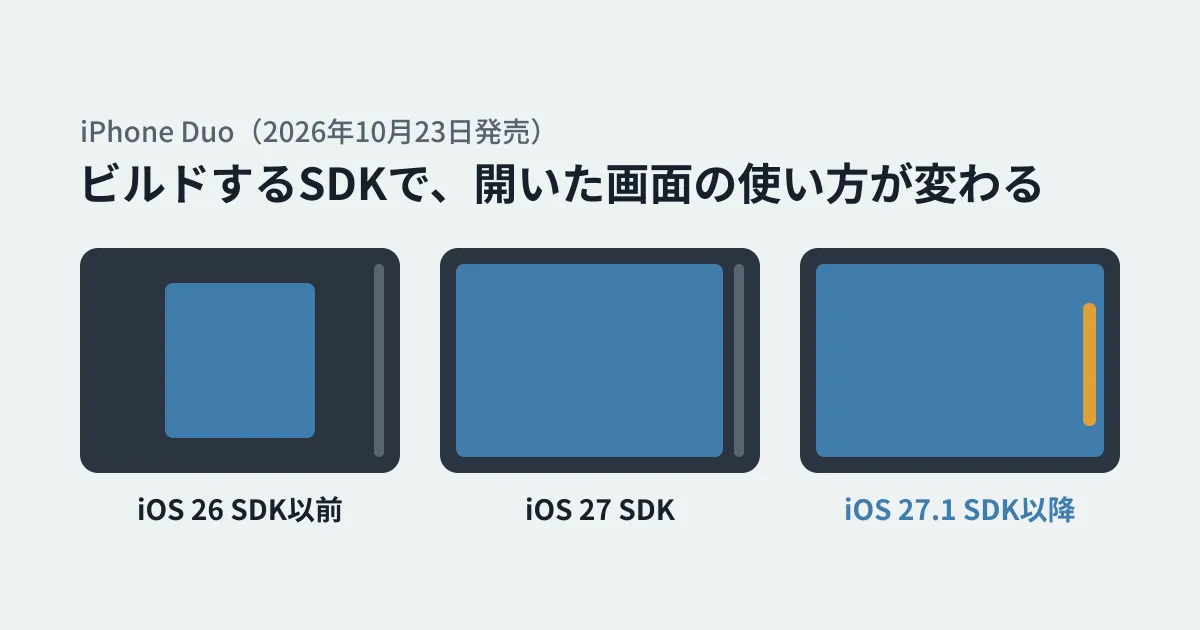
Companies that have business iPhone apps or apps for their own services need to check whether their apps are okay every time a new iPhone comes out. The foldable "iPhone Duo," released on October 23, 2026, requires more checking effort than usual. When opened, the app moves to the large inner screen, and when closed, to the outer screen, and the app's size changes each time.
In its guidance for developers, Apple writes that code that hard-codes screen size, orientation or device model causes layouts to break.
Hardcoded screen sizes, fixed orientations, and device assumptions can break layouts, leading to stretched, clipped, or misplaced content.
In this article, based on Apple's news and preparation page (Three steps to make your app shine on iPhone Duo) and the screenshot specifications page, we outline what app maintainers and clients need to check.
The SDK you build with changes how apps look on iPhone Duo
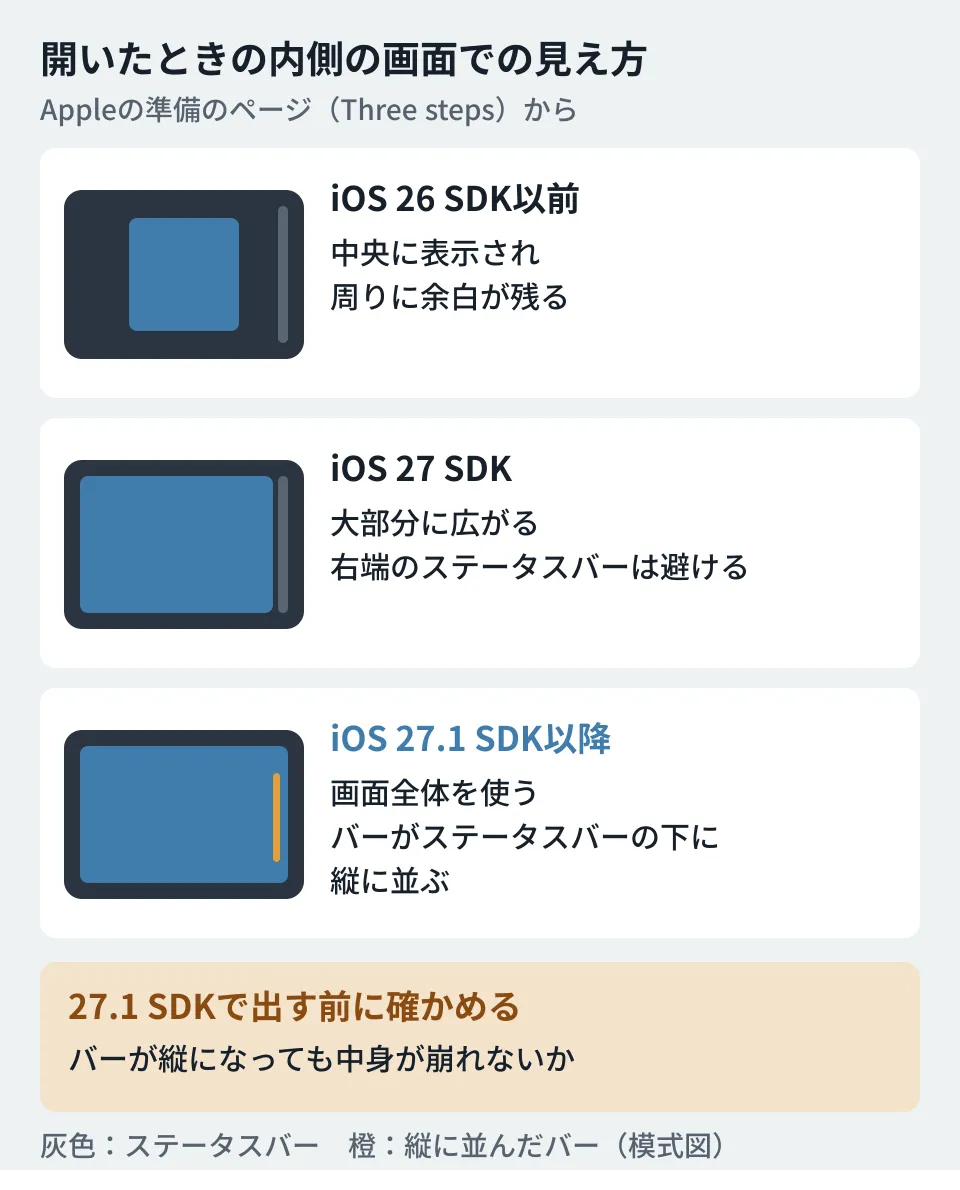
All apps run on iPhone Duo, but how they are displayed differs depending on which SDK (software development kit) they were built with. Apple's preparation page can be summarized as follows.
| SDK used to build | When open (inner screen) | When closed (outer screen) |
|---|---|---|
| iOS 26 SDK or earlier | Displayed in the center of the screen with margins around it | Displayed to the left of the status bar and camera |
| iOS 27 SDK | Expands across most of the inner screen, avoiding the status bar on the right edge | (Not separately described on the page) |
| iOS 27.1 SDK or later | An optimized display that uses the full screen. Toolbars and tab bars are arranged vertically below the status bar | (Not separately described; it only says the experience stays consistent when moving between screens) |
The point to note here is that the newer the SDK you rebuild with, the more work is needed on the app side. With an old SDK, the app is simply displayed with margins, but building with the iOS 27.1 SDK or later makes it fill the screen, and toolbars and tab bars also become vertical. Apple asks developers to check that content does not break when the bars become vertical before shipping builds made with the iOS 27.1 SDK.
Code patterns that tend to break layouts
Apple's preparation page lists specific code patterns to review. The main ones are as follows.
- Getting the size from
UIScreen.main: on iPhone Duo, the app's size may not match the screen size. Useview.boundsorwindow.bounds, or in SwiftUI,GeometryReaderoronGeometryChange - Reading the size only once at launch: because folding changes the size midway, lay out with
layoutSubviewsorviewDidLayoutSubviews, and useviewWillTransition(to:with:)for size changes - Creating windows with
UIWindow(frame: UIScreen.main.bounds): replace it withUIWindow(windowScene:) - Deciding layout by device orientation: stop making decisions with
UIDevice.current.orientation,statusBarOrientationandinterfaceOrientation, and compare the available width and height instead - Hard-coding the device by model or size class: stop branching on
userInterfaceIdiom == .phone/.padand assuming that "a regular width means iPad." Comparisons with a specific model's size, such asbounds.height == 844, also do not work - Full-screen background images and videos: stretching them to a wide screen with
.scaleAspectFillor similar can cut off important parts
The assumption that "a regular width means iPad" is especially worth checking in apps that also support iPad. Apple writes that on iPhone Duo and in resizable iPhone Mirroring, iPhone apps can end up with any combination of size classes. If the only condition for showing the iPad screen is "regular width," that screen will also appear on iPhone.
Search your code for these patterns
Apple explains that asking Xcode's coding assistant to "get my app ready for iPhone Duo" runs a "skill" that finds the patterns above and shows how to fix them. If you use a different coding agent, Apple says you can export the skill by running xcrun agent skills export in the terminal. However, Apple also writes that this skill "finds most issues, but not all."
As preliminary research before using Xcode, you can also search for the patterns listed above with grep. The following searches were created by the editorial team from the list on the preparation page.
grep -rnE 'UIScreen\.main|UIDevice\.current\.orientation|statusBarOrientation|interfaceOrientation|userInterfaceIdiom *== *\.(phone|pad)|horizontalSizeClass *== *\.regular|bounds\.(height|width) *== *[0-9]+' --include='*.swift' .In the editorial team's test environment (Linux), we ran them against a test Swift file written to include these patterns and confirmed that all six lines were caught: UIScreen.main (two places), userInterfaceIdiom == .pad, horizontalSizeClass == .regular, UIDevice.current.orientation and bounds.height == 844. Before publication, on October 27, 2026, we also confirmed that grep on macOS 26.5.1 produced the same six lines for a file with the same contents. We have not checked building the Swift code or how the Xcode skill behaves. For parts written in Objective-C, or apps built with Flutter, React Native and the like, you need to adapt the search to the way code is written in each framework.
Not every match is a problem. For example, if UIScreen.main is used only to adjust screen brightness, it has nothing to do with layout. Check each one to see whether it is used for layout decisions.
Tools for checking
Apple lists the following three ways to test size changes.
- The resizable iOS simulator in Device Hub
- iPhone Mirroring in macOS 27 (test by resizing the window to extreme sizes in both directions)
- The iPhone Duo simulator in Xcode 27.1 (described as the best way to test the native experience)
Even without a physical device, you can use the simulator to check switching between open and closed, and how things look when toolbars and tab bars become vertical.
Screenshot requirements from April 2027
For apps on the App Store, the screenshots shown on the store page also have a deadline. However, the wording differs slightly between Apple's materials.
- The October 5 news post: "Starting April 2027, any apps or games submitted will need to include screenshots for iPhone Duo."
- The screenshot specifications page: "Starting in April 2027, screenshots will be required for any app using the iOS 27.1 SDK or later."
As of October 27, 2026, when we checked before publication, the wording in the two materials had not changed, and we could not determine from the materials which condition is correct. Either way, screenshots will be required for apps submitted with the iOS 27.1 SDK or later from April 2027 onward, so it is safe to prepare on that basis. According to the specifications page, the iPhone Duo screenshot sizes are as follows.
- Outer screen: 1398 x 2034 pixels or 2034 x 1398 pixels
- Inner screen: 2007 x 2853 pixels or 2853 x 2007 pixels
Apple says that submitting iPhone Duo screenshots displays a badge indicating "Optimized for iPhone Duo" on the App Store page.
What clients and maintainers should decide
From here on, these are the editorial team's suggestions. If you have outsourced app maintenance, deciding the following three points will save you from scrambling.
- The SDK version for the next build: whether to move to the iOS 27.1 SDK or later, and if so, when. Before moving, include in the work a review of the code patterns above and a check of how things look with vertical bars
- The scope of the review: whether to include not only the Swift code but also Objective-C parts and the external libraries you use
- Preparing screenshots: who will create screenshots of the outer and inner screens by April 2027
The effort involved in maintaining native apps and how to compare them with cross-platform options are covered in Before outsourcing a business smartphone app, and how to think about choosing between native and cross-platform is covered in App development estimates in light of Shopify's return to native.
Scope of verification
On October 26, 2026, we reviewed the Apple Developer news posts "Prepare and submit your apps for iPhone Duo" (October 5, 2026) and "Build for iPhone Duo with new resources" (September 18), the iPhone Duo overview page and preparation page (Three steps to make your app shine on iPhone Duo), and the App Store Connect help page "Screenshot specifications". On October 27, before publication, we rechecked the content against the same materials and Apple's Newsroom (the October 23 article on the launch) (document research). The grep searches were run against Swift files created for testing, in the editorial team's test environment (Linux) and on macOS 26.5.1 (hands-on testing). We have not tried an actual iPhone Duo device, Xcode 27.1, the simulator, or the Xcode skills, and we have not checked the screens of any real app.
For supporting new devices in business apps or reviewing how maintenance is handled, contact us through consultation on development, AI, and automation.
References
- Prepare and submit your apps for iPhone Duo(Apple Developer、2026-10-05)
- Build for iPhone Duo with new resources(Apple Developer、2026-09-18)
- Three steps to make your app shine on iPhone Duo(Apple Developer)
- Screenshot specifications(App Store Connect Help)
- iPhone Duo arrives at Apple Store locations worldwide(Apple Newsroom、2026-10-23)