On websites and apps that use Sign in with Apple for registration or login, when a user chooses "Hide My Email" to hide their real email address, the site receives a relay address created by Apple. Until now, those addresses have ended in @privaterelay.appleid.com. If this domain is hard-coded somewhere in the registration flow, it can lead to inquiries such as only users with addresses on the new domain being unable to register, or emails not arriving.
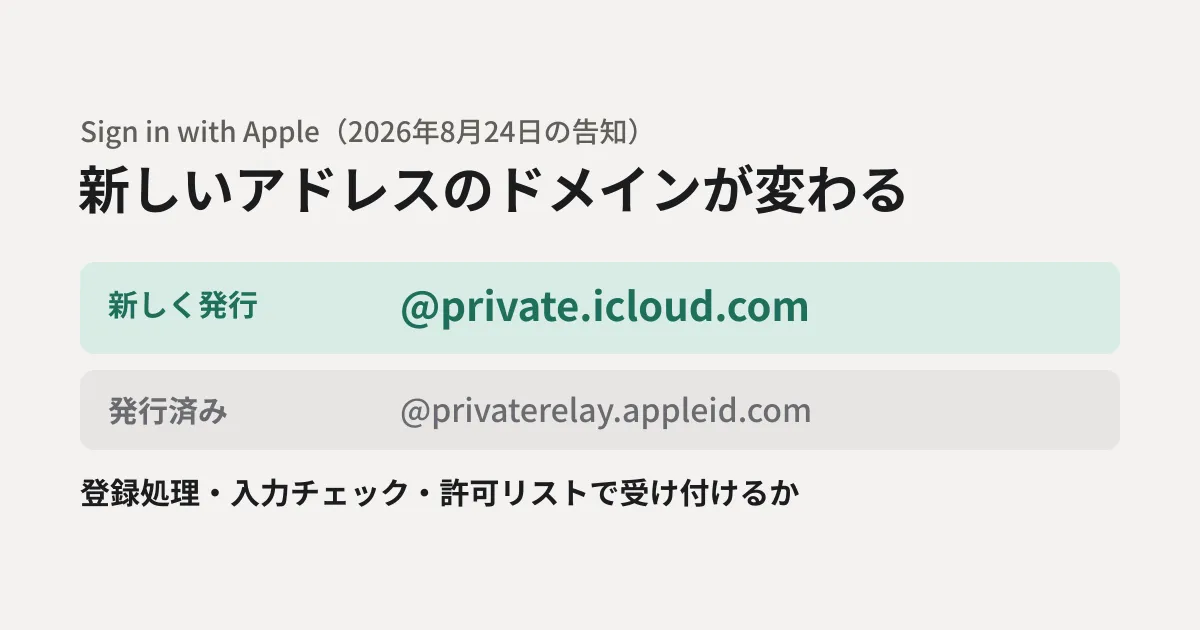
In a developer announcement on August 24, 2026, Apple said it would change the domain of addresses newly issued through Sign in with Apple.
Starting later this year, new Sign in with Apple addresses, previously issued on privaterelay.appleid.com, will be issued on private.icloud.com. Existing addresses on privaterelay.appleid.com will continue to work and forward mail to users without interruption.
Based on Apple's announcement and developer documentation, this article lays out what maintenance staff for websites and business systems should check.
What changes and what does not
The announcement has three key points.
- Newly issued addresses: will become
@private.icloud.com("later this year", meaning planned within this year. As of October 27, 2026, when we checked before publication, no start date had been given) - Already issued addresses: remain
@privaterelay.appleid.comand continue to work, and forwarding continues - Hide My Email in iCloud+: stays
@icloud.comwith no change
The last point changed from the first announcement on June 15. The June announcement said Hide My Email would also be consolidated into private.icloud.com, but this was withdrawn in the August announcement, and the June announcement page now carries a note saying it "contains outdated information." If you read the June page during your research, treat the August announcement as authoritative.
The announcement asks one thing of developers.
Developers with apps or websites that use Sign in with Apple should ensure that their account systems, email validation logic, and allowlists accept addresses on the new private.icloud.com domain in addition to the existing privaterelay.appleid.com domain.
In other words, the question is whether three places accept the new domain: member registration and update processing, email address input validation, and allowlists.
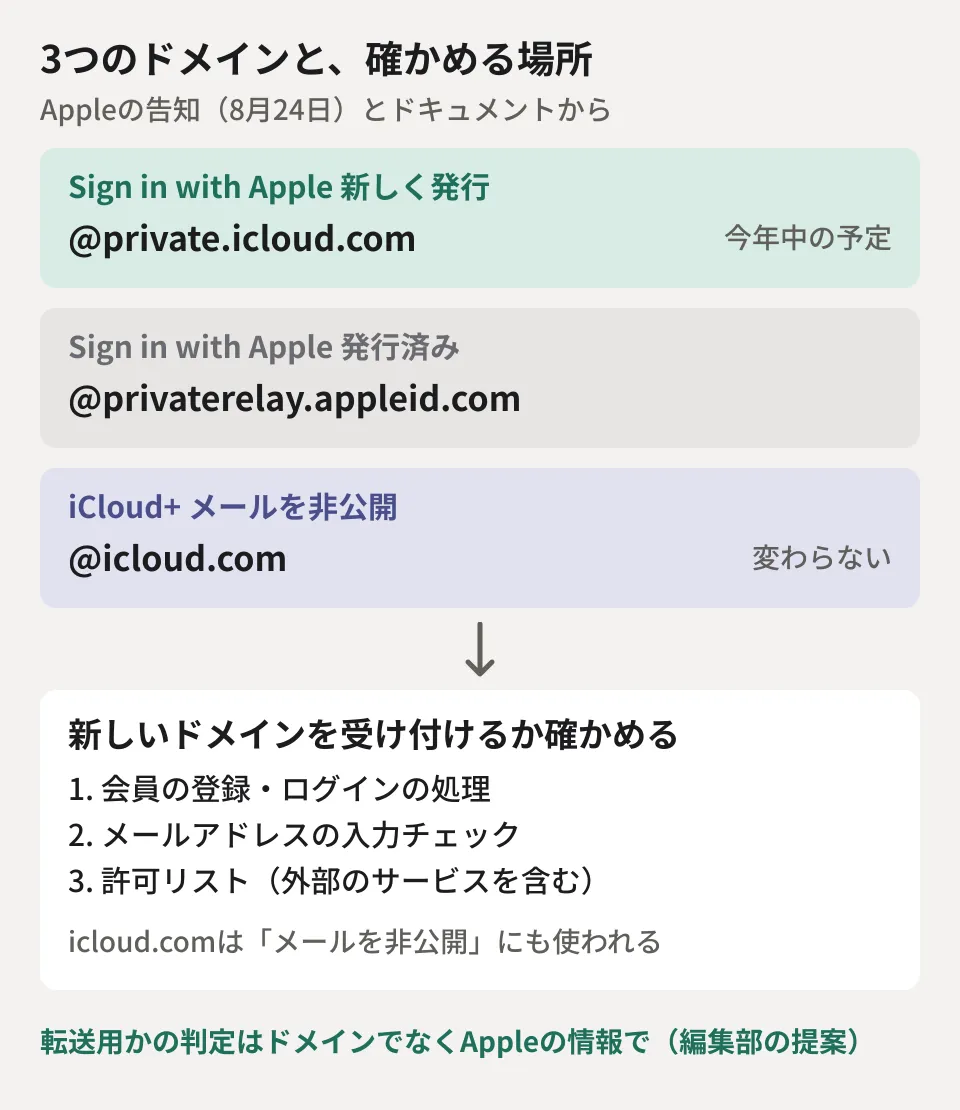
Where to check for hard-coded domains
From here on, this is the editorial team's breakdown of the three places in the announcement in terms of concrete code and settings.
- Registration and login processing: processing that looks at the domain of the email address received from Apple to judge whether it is a relay address and handles it differently (for example, asking the user to re-enter an email address or sending them to a separate confirmation screen)
- Email address input validation: form validation, and lists of "allowed domains" or "blocked domains" used to reject disposable email addresses
- Allowlists and internal integrations: domain-based filtering or blocking settings on the side of external services that receive members' email addresses (email delivery, CRM, payments, and so on)
The June announcement (now noted as containing outdated information) also asked email delivery providers to update filters, unsubscribe lists, and routing rules that list the relay domains. This paragraph is gone from the August announcement, but if an external email delivery service has domain-based settings, it is safer to review them in the same way.
Pitfalls of judging by domain
We compared an example of the old approach with an example that adds the new domain, in the editorial team's test environment (Node.js 22.22.0). The test addresses are fictitious.
// 古い書き方:privaterelay.appleid.com だけを見ている
const legacy = /@privaterelay\.appleid\.com$/i;

// Appleのドキュメントが挙げる、転送用アドレスのドメイン
const APPLE_RELAY_DOMAINS = new Set(['private.icloud.com', 'privaterelay.appleid.com', 'icloud.com']);

function emailDomain(email) {
  const at = email.lastIndexOf('@');
  return at < 0 ? '' : email.slice(at + 1).trim().toLowerCase();
}
const isAppleRelayDomain = (email) => APPLE_RELAY_DOMAINS.has(emailDomain(email));
The results were as follows.
| Test address | Old approach | Judging by a domain list |
|---|---|---|
ep9ks2tnph@privaterelay.appleid.com | Match | Match |
ab12cd34ef@private.icloud.com | No match | Match |
AB12CD34EF@Private.iCloud.com | No match | Match |
taro@icloud.com | No match | Match |
x@private.icloud.com.evil.example | No match | No match |
The old approach cannot recognize addresses on the new domain as relay addresses. On the other hand, adding icloud.com to the list causes every address ending in icloud.com to be judged a Sign in with Apple relay address. Apple's documentation describes relay addresses as "ending in @private.icloud.com, @privaterelay.appleid.com, or @icloud.com," but it does not say that every address ending in icloud.com is a relay address. According to the August announcement, icloud.com will also continue to be used for iCloud+ Hide My Email addresses. The domain alone cannot distinguish these addresses used for other purposes.
The editorial team therefore suggests the following division of roles.
- Whether to accept (input validation and allowlists): reject none of the three domains. Add the new
private.icloud.com - If you want to judge whether an address is a relay address: use the information sent by Apple rather than guessing from the domain. Apple's example of server-to-server notifications (notifications that email forwarding has been enabled or disabled) includes a field called
is_private_email
Compare domains, as in the example above, by lowercasing everything after @ and then checking for an exact match. Comparing by prefix or "contains" lets through other domains such as private.icloud.com.evil.example.
Checks for those sending email to relay addresses
If you send member emails to relay addresses, check the settings of Apple's relay service separately from the domain change. According to Apple's documentation, to go through the relay service you need to register the sending domains and email addresses in your Apple developer account (Certificates, Identifiers & Profiles) and authenticate them with SPF or DKIM.
- Emails sent from unregistered senders are not forwarded and come back (bounce)
- You can register up to 100 senders if registered as an organization, and up to 32 as an individual
- A single relay address can handle up to 100 emails per day (the total of emails from the developer and replies from the user)
This mechanism is the same when sending to addresses on the new domain. It is reassuring to use the domain change as an opportunity to review situations such as having added senders but forgotten to register them, or having switched email delivery services without updating the SPF and DKIM settings. The approach to SPF, DKIM, and DMARC settings is explained in SPF/DKIM/DMARC settings for small and medium-sized businesses.
How to ask your outsourced vendor
If you do not write the code in-house, checking the following points with your web agency or development company will speed things up.
- Is there any processing that judges email addresses received through Sign in with Apple by domain?
- Is
privaterelay.appleid.comwritten anywhere in email address input validation or in the allowlists of external services? - If so, what is the plan for adding
private.icloud.comand for testing?
How to approach acceptance testing, including social logins such as "Sign in with Google," is covered in We had "Sign in with Google" implemented: what to check during acceptance testing.
Scope of verification
On October 26, 2026, we reviewed the Apple Developer news posts "Update: New domain for Sign in with Apple" (August 24, 2026) and "New domain for Sign in with Apple and iCloud+ Hide My Email" (June 15, 2026, noted as containing outdated information), the documentation pages "Communicating using the private email relay service" and "Processing changes for Sign in with Apple accounts," and the help page "Configure private email relay service," and on October 27, before publication, we rechecked the content against the same materials. No new announcement about this domain change has been issued since the August announcement (document research). We ran the domain-checking code in the editorial team's test environment (Linux, Node.js 22.22.0) and confirmed the results in the table above. Before publication we also ran it on macOS (Node.js 22.23.4) and got the same results (hands-on testing). We have not checked signing in with a real Apple Account, the start of issuance of addresses on the new domain, or sending and receiving email through the relay service.
For changes to the login functions of membership sites or business apps, contact us through consultation on development, AI, and automation.
References
- Update: New domain for Sign in with Apple(Apple Developer、2026-08-24)
- New domain for Sign in with Apple and iCloud+ Hide My Email(Apple Developer、2026-06-15)
- Communicating using the private email relay service(Apple Developer Documentation)
- Processing changes for Sign in with Apple accounts(Apple Developer Documentation)
- Configure private email relay service(Apple Developer Help)