On servers that run nginx in front of websites or business systems, you may not be able to answer right away whether a given vulnerability affects you. That is because all five issues covered here occur only when specific directives are combined, so you need to check separately whether the package has been updated and whether your configuration meets the conditions.
On October 26, 2026, Ubuntu published the security notice "USN-8955-1," which fixes five nginx vulnerabilities. It covers Ubuntu 26.10, 26.04 LTS, 24.04 LTS, and 22.04 LTS. In this article, based on Ubuntu's notice and the page for each CVE, we organize the conditions of the five issues by configuration and show the steps we used to install and check the fixed version in the editorial team's test environment (Ubuntu 24.04).
Each of the five involves different configuration
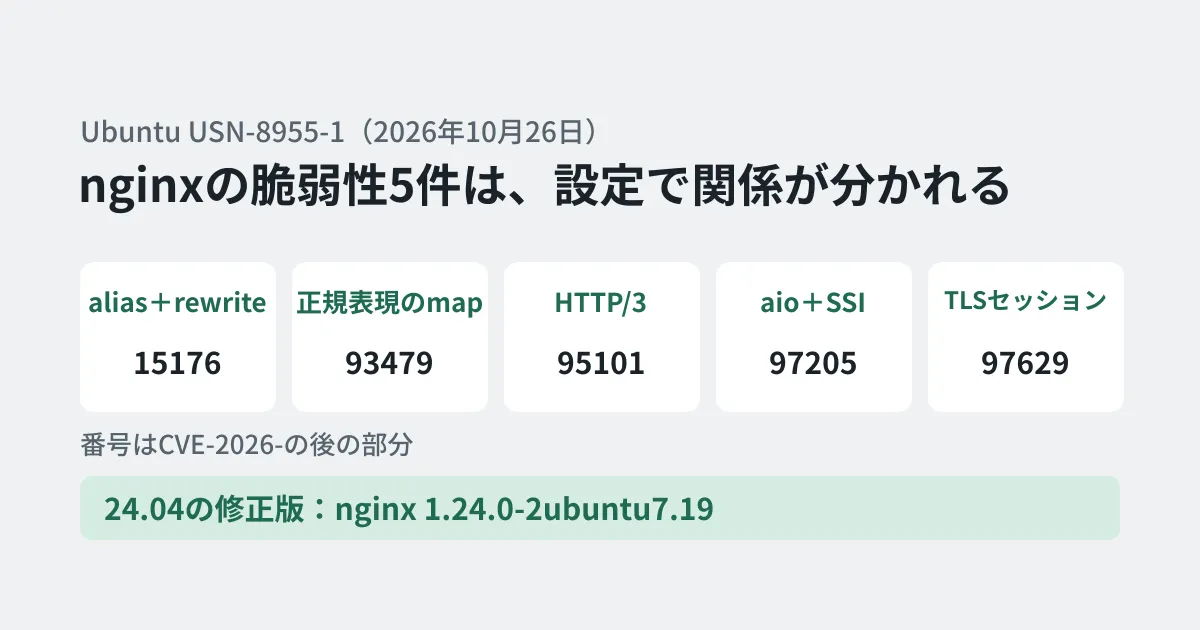
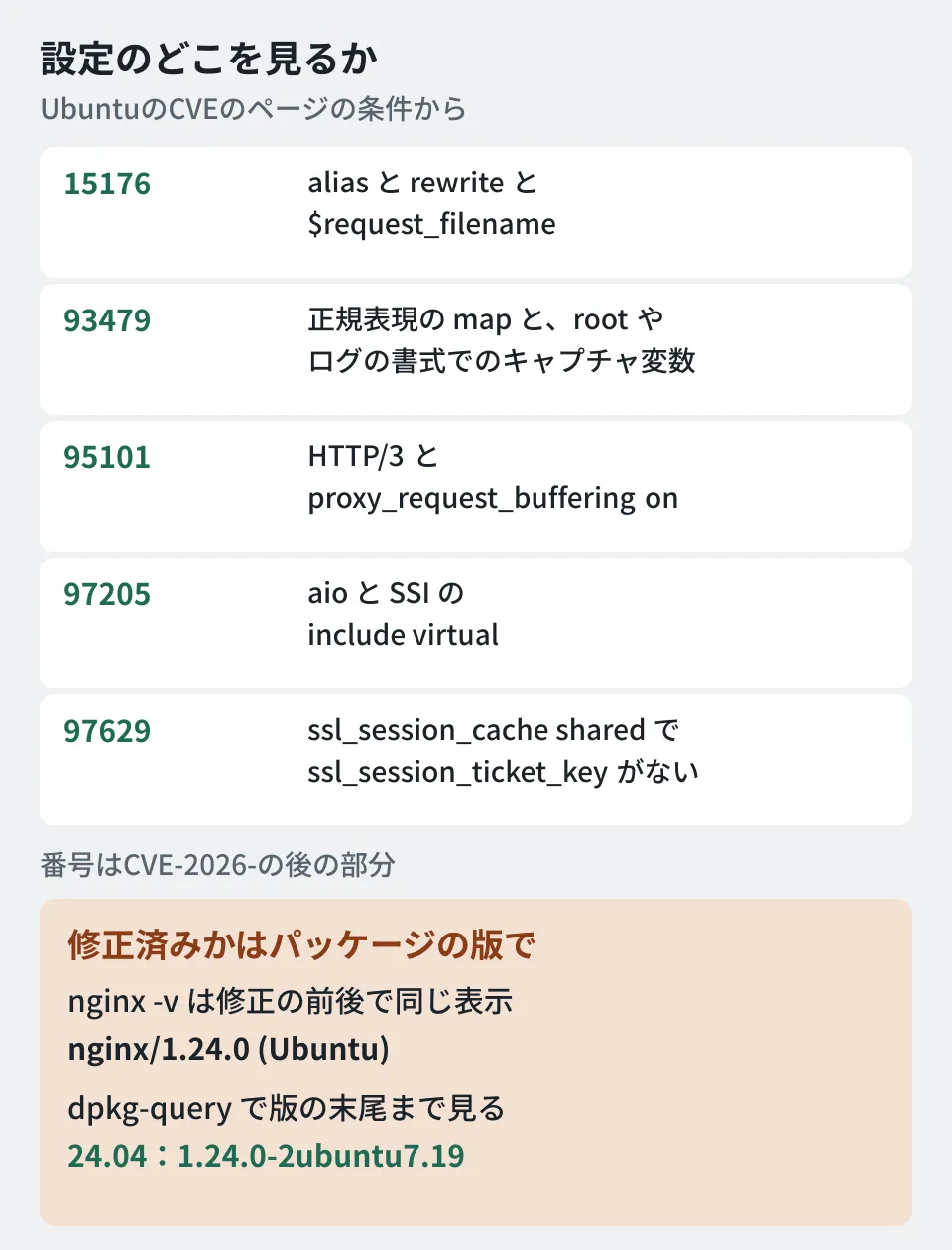
Ubuntu's CVE pages list descriptions of the five issues and their status for each Ubuntu release. Summarized around the configuration that triggers them, they are as follows.
| CVE | Triggering configuration | Possible impact | 24.04 LTS |
|---|---|---|---|
| CVE-2026-15176 | In a location that uses alias, rewrite together with set or return (or an access log format) that references $request_filename | Worker crash; code execution under certain conditions | Target |
| CVE-2026-93479 | In a regex map, root or a log format references capture variables before the map output | Same as above | Target |
| CVE-2026-95101 | HTTP/3 and proxy_request_buffering on | Data can be injected into requests to the proxied server | Ineligible |
| CVE-2026-97205 | Asynchronous file I/O (aio) is enabled and pages containing the SSI "include virtual" are processed | Same as above (use-after-free) | Target |
| CVE-2026-97629 | ssl_session_cache shared:... is used and ssl_session_ticket_key is not explicitly set | Client TLS sessions can be forged, bypassing client certificate verification | Target |
CVE-2026-95101 concerns the HTTP/3 feature (added in 1.25.0), and on Ubuntu only 26.04 LTS and 26.10 are affected. CVE-2026-97629 stems from a change introduced in 1.23.2, and 22.04 LTS is listed as not affected.
The severity ratings differ depending on the source. Ubuntu's CVE pages show CVE-2026-15176, 93479, and 97205 as 9.2 (Critical) in CVSS v4.0 and 8.1 (High) in v3. On the other hand, Ubuntu's own priority (Ubuntu priority) is Medium for all five, and the advisory from the upstream developer nginx.org also rates all five as medium. Because every one of them is limited to cases with specific configuration, how urgent it is depends on whether your configuration matches.
Fixed packages, and what nginx -v cannot tell you
The fixed versions listed in USN-8955-1 are as follows.
- 26.10:nginx 1.30.4-7ubuntu1.1
- 26.04 LTS:nginx 1.28.3-2ubuntu1.12
- 24.04 LTS:nginx 1.24.0-2ubuntu7.19
- 22.04 LTS:nginx 1.18.0-6ubuntu14.22
The nginx-core, nginx-full, nginx-light, and nginx-extras packages have the same versions. The notice states that "a standard system update will make all the necessary changes."
If you use nginx.org packages or a self-built nginx rather than Ubuntu's packages, judge by the upstream fixed versions. According to nginx.org's security advisory, the five issues were fixed in stable 1.30.6 and mainline 1.31.7, released on October 14, 2026. The only fixed versions listed in the advisory are "1.30.6 and later" and "1.31.7 and later"; there are no fixed versions for earlier branches such as 1.28.
The range of affected versions differs by CVE. For example, according to nginx.org's advisory, CVE-2026-93479 affects only 1.30.0 to 1.30.5 and 1.31.2 to 1.31.6. Ubuntu, on the other hand, also fixes this issue in its 22.04 LTS and 24.04 LTS versions (a note on Ubuntu's CVE page mentions an adjustment related to the fix for CVE-2026-42533 that Ubuntu incorporated in its September update (1.24.0-2ubuntu7.18 for 24.04 LTS)). If you use Ubuntu's packages, judge by the USN's fixed versions, not the upstream version numbers.
When we ran apt-get install nginx in the editorial team's test environment (an Ubuntu 24.04.5 LTS container) on October 27, 2026, 1.24.0-2ubuntu7.19 was installed. What to watch out for here is the output of nginx -v.
$ nginx -v
nginx version: nginx/1.24.0 (Ubuntu)
$ dpkg-query -W -f='${Package} ${Version}\n' nginx nginx-common
nginx 1.24.0-2ubuntu7.19
nginx-common 1.24.0-2ubuntu7.19
For comparison, we rolled back to the version shipped at the 24.04 LTS release (1.24.0-2ubuntu7) and ran the same command, and the nginx -v output was still "nginx/1.24.0 (Ubuntu)." nginx -v shows only the upstream version number, not the trailing part of the Ubuntu package version. Check whether it is fixed by the package version (including the trailing ubuntu7.19).
The package changelog (/usr/share/doc/nginx/changelog.Debian.gz) also recorded that four CVEs were fixed in 7.19.
nginx (1.24.0-2ubuntu7.19) noble-security; urgency=medium
  * SECURITY UPDATE: heap overflow in certain configurations
    - CVE-2026-15176
  * SECURITY UPDATE: heap overflow in certain configurations
    - CVE-2026-93479
  * SECURITY UPDATE: UaF when asynchronous file I/O is enabled
    - CVE-2026-97205
  * SECURITY UPDATE: client SSL session forgery
    - CVE-2026-97629
(Excerpt. CVE-2026-95101, which does not affect 24.04 LTS, is not included.)
Finding out whether your configuration meets the conditions
Assuming you will update every server, checking in parallel whether any configuration meets the conditions makes it easier to set priorities and decide what measures to take until the update. The editorial team created a script that picks out the directives related to the five issues from the output of nginx -T (which displays all loaded configuration).
#!/bin/sh
# nginx -T の出力から、USN-8955-1 の5件のCVEの条件に関係するディレクティブを拾う
# 拾えたら即「脆弱」ではなく、該当の設定を人が読むための目印
conf=$(mktemp)
nginx -T 2>/dev/null > "$conf" || { echo "nginx -T に失敗(root権限が必要な場合あり)"; exit 1; }
hit() { printf '\n[%s] %s\n' "$1" "$2"; grep -nE "$3" "$conf" | grep -vE '^[0-9]+:\s*#' | head -20; }
hit CVE-2026-15176 "alias と rewrite と \$request_filename の組み合わせ" '^\s*(alias|rewrite)\s|\$request_filename'
hit CVE-2026-93479 "正規表現の map と、root・log_format でのキャプチャ変数" '^\s*map\s|^\s*~|^\s*(root|log_format)\s.*\$([0-9]|[a-z_]+)'
hit CVE-2026-95101 "HTTP/3 と proxy_request_buffering" '\bquic\b|http3|proxy_request_buffering'
hit CVE-2026-97205 "aio と SSI" '^\s*(aio|ssi)\s'
hit CVE-2026-97629 "共有セッションキャッシュとチケットキー、クライアント証明書" '^\s*ssl_(session_cache\s+shared|session_ticket_key|session_tickets|verify_client)\b'
rm -f "$conf"
In the test environment, we prepared one configuration file containing patterns that meet the conditions, confirmed with nginx -t that the syntax was correct, and then ran the script. The output is as follows (line numbers are positions within the nginx -T output).
[CVE-2026-15176] alias と rewrite と $request_filename の組み合わせ
205:        alias /srv/files/;
206:        rewrite ^/files/old/(.*)$ /files/$1 break;
207:        set $target $request_filename;

[CVE-2026-93479] 正規表現の map と、root・log_format でのキャプチャ変数
190:map $uri $legacy_dir {
191:    ~^/old/(?<section>[a-z]+)/  /srv/legacy/$section;
194:log_format withsec '$remote_addr $section $legacy_dir';

[CVE-2026-95101] HTTP/3 と proxy_request_buffering

[CVE-2026-97205] aio と SSI
210:        ssi on;
211:        aio threads;

[CVE-2026-97629] 共有セッションキャッシュとチケットキー、クライアント証明書
200:    ssl_session_cache   shared:SSL:10m;
201:    ssl_verify_client   optional;
When we removed that configuration and ran the script with only Ubuntu's default configuration, it picked up nothing for any of the five.
This script is a marker for finding lines related to the conditions. A picked-up line does not necessarily mean you are vulnerable, and a lack of matches does not guarantee you are safe. For example, the description of CVE-2026-93479 also mentions a separate condition, "using non-cacheable variables in string expressions," which cannot be determined by text search. Have a person read the picked-up lines against the conditions in the table above, and ultimately address the issues by updating the package.
How to proceed until you update (the editorial team's suggestion)
What follows is the editorial team's own breakdown.
- List the servers you manage along with their Ubuntu release and nginx package version (collect the results of
dpkg-query) - Use the script above to identify first which servers have configuration that meets the conditions
- Update to the fixed version, check the configuration with
nginx -t, and then confirm that nginx is running on the new binary - On servers that meet the conditions of CVE-2026-97629 (a shared session cache and client certificate verification), also consider explicitly setting a ticket key or disabling session tickets until you update
The configuration change in step 4 is not a mitigation presented in Ubuntu's notice or CVE pages; it is an option the editorial team derived from the descriptions of the conditions. If you make the change, verify its behavior in a test environment before applying it. Also, for 20.04 LTS and earlier, three of the five issues are marked "Needs evaluation." If you still have servers on older releases, you need to plan for them, including OS upgrades.
How leaving old servers unattended becomes a problem was also covered in Vulnerabilities that remain on neglected sites half a year after React2Shell. For how to think about nginx maintenance itself, Critical nginx vulnerabilities and configuration audits is also a useful reference.
Scope of verification
On October 27, 2026, we reviewed Ubuntu's security notice USN-8955-1 and the pages for the five CVEs (document review). We also installed nginx 1.24.0-2ubuntu7.19 in the editorial team's test environment (an Ubuntu 24.04.5 LTS container) and checked the version output (including a comparison with 1.24.0-2ubuntu7 from the release), the package changelog, and the output of the script above (hands-on testing). We did not reproduce the vulnerabilities or verify starting and restarting nginx as a service. In addition, we checked the upstream fixed versions and the ranges of affected versions in the security advisory and changelog (CHANGES) from the upstream developer nginx.org.
For how to proceed with updating and maintaining your web servers and systems, contact us through Consultation on development, AI, and automation.