Your WordPress site or your company's contact form runs on PHP, but it is unclear which PHP version the server is running right now, or who is supposed to update it. This vulnerability is hard to leave alone in that state. PHP's official announcement describes the scope as "every PHP that handles web requests" and gives examples where an attack starts with an unauthenticated request before any application code runs.
On October 21, 2026, the PHP development team released 8.5.12, 8.4.27, 8.3.36 and 8.2.35, which fix two vulnerabilities (CVE-2026-109618 and CVE-2026-109619). The announcement opens as follows.
PHP 8.5.12, 8.4.27, 8.3.36 and 8.2.35 fix two critical vulnerabilities that can allow unauthenticated remote code execution. All PHP users are strongly encouraged to update immediately.
Based on the official announcement and on what we found when checking how the settings behave on our own PHP, we lay out what site maintainers should check today.
What was fixed
According to the official announcement, both are bugs that can lead to "unauthenticated remote code execution (RCE)".
- CVE-2026-109618 (GHSA-w8hw-w9fx-j79w): out-of-memory handling can abort the request's internal data while it is only partly built, and the cleanup code may then treat that invalid data as valid
- CVE-2026-109619 (GHSA-6wmf-4rv5-p3rp): internal state belonging to a request can remain after its memory is freed, and the next request handled by the same worker may end up using it
As affected setups, the announcement lists PHP-FPM, Apache mod_php, php-cgi, FrankenPHP and LiteSpeed, and calls mod_php the most dangerous. According to the GitHub advisories, full exploitation was confirmed mainly on mod_php, but for GHSA-6wmf-4rv5-p3rp a path that also works on PHP-FPM, depending on conditions on the application side, has been confirmed as well. Being on FPM is no reason to put this off. Both the pre-announcement the day before (October 20) and the advisories rate both vulnerabilities 9.2 on CVSS v4.0.
Google Cloud's October 21 blog post gives the affected versions as "PHP 5.4 through 8.5.11". That is Google's own summary: the php.net announcement does not state the same range, and the advisories only say versions before the fixed release of each branch.
The pre-announcement set the release for 14:00 UTC on October 21 (23:00 Japan time), but the advisories were published at 13:34 UTC (22:34 Japan time), slightly earlier than announced. The php.net ChangeLog dates all four versions October 22, while the announcement and advisories are dated October 21.
Which version to upgrade to
| Release line | Fixed version | Details |
|---|---|---|
| 8.5 | 8.5.12 | One of the mitigations (fatal_error_backtraces) applies only to this branch |
| 8.4 | 8.4.27 | |
| 8.3 | 8.3.36 | |
| 8.2 | 8.2.35 | According to the announcement, security fixes end on December 31, 2026 |
| 8.1 and earlier | Not provided by the PHP project | Minimal source branches containing only the backported fixes were published for 7.4, 8.0 and 8.1 |
For 8.1 and earlier, the announcement asks users to contact their vendor or update to a supported version. The branches for 7.4 to 8.1 are meant for people who build from source themselves. Because fixes for 8.2 end at the close of the year, plan a move to 8.3 or later at the same time.
You cannot judge OS packages by the version number
The announcement says that "Linux distributions were given the patches in advance". The point to watch here is that PHP from OS packages often keeps the same version number even after the fixes are applied.
The PHP on our editorial team's test environment (Ubuntu 24.04) showed "8.3.6" in php -v, and the package version was 8.3.6-0ubuntu0.24.04.12. Opening this package's changelog (/usr/share/doc/php8.3-cli/changelog.Debian.gz), we found that the update dated October 7, 2026 included September's fixes (such as CVE-2026-91768), but not this time's CVE-2026-109618 and 109619.
In its October 21 security notice (USN-8948-1), Ubuntu released 8.3.6-0ubuntu0.24.04.13 for 24.04. Even after the fix, php -v still shows "8.3.6"; only the end of the package version changes. The number alone tells you neither that you are safe nor that you are at risk; what you need to check is the package version and its changelog. As of October 22, the official information from each distribution listed the following versions.
- Ubuntu 26.04 LTS: php8.5
8.5.4-0ubuntu1.5 - Ubuntu 24.04 LTS: php8.3
8.3.6-0ubuntu0.24.04.13 - Ubuntu 22.04 LTS: php8.1
8.1.2-1ubuntu2.28 - Debian 13 (trixie): php8.4
8.4.27-1~deb13u1(DSA-6574-1) - Debian 12 (bookworm): php8.2
8.2.35-1~deb12u1(DLA-4848-1)
The changelog for 8.3.6-0ubuntu0.24.04.13 published on Ubuntu's package archive (Launchpad) lists CVE-2026-109618 and CVE-2026-109619. We have not actually updated our editorial test environment to this version to confirm it.
# Debian・Ubuntu系:入っているPHPのパッケージに、今回のCVEの修正が入っているか
zcat /usr/share/doc/php8.3-cli/changelog.Debian.gz | grep -E "CVE-2026-10961[89]"
If nothing is shown, the fix is not included in that package.
For RHEL-based systems using PHP from rpms.remirepo.net, an additional repository run by volunteers, the announcement says "no updates will be available on the day" and asks users to switch to the distribution's packages or to building from source. We have not checked the update status of this repository as of October 22.
Who does what, by hosting setup
From here on is the editorial team's own analysis.
| Hosting setup | What it checks |
|---|---|
| Shared hosting | Whether the provider has issued a notice. Which PHP branches you can choose in the control panel, and whether the fix has reached that branch. If you have selected 8.1 or earlier, switch branches |
| VPS and dedicated servers | Update the OS packages and check the CVEs in the changelog. Restart every process that runs PHP, such as PHP-FPM and Apache |
| Containers (Docker, Cloud Run, etc.) | Rebuild the base image with the fixed version and redeploy. Unless you rebuild, you stay on the old image |
According to Google Cloud's blog, the App Engine standard environment (PHP 8.2 and later) is updated automatically; Cloud Run and Cloud Run functions are updated automatically if "automatic base image updates" is enabled, and otherwise need a rebuild and redeploy. The App Engine flexible environment is not updated automatically. The post states clearly that container images you build yourself are the customer's responsibility.
If a web agency handles your maintenance, take this opportunity to confirm in writing which side is responsible for the updates. For a real example of confirming a provider's update by the displayed version on managed hosting, see PHP emergency security fixes: a record of our response on managed hosting and the cloud edition of a CMS.
Mitigations if you cannot upgrade right away, and their limits
The announcement states that updating is the only complete fix, and then lists settings that reduce specific attack paths. Each of them is explicitly described as "not making you safe". The main ones are as follows.
- CVE-2026-109618: set
memory_limit=-1in a way the application cannot override (php_admin_valuein the FPM pool or Apache configuration). Lowerpost_max_size(8M if uploads are not needed, 32M if they are; keepupload_max_filesizesmaller than that). Limit the size and number of fields of requests at the web server or proxy - CVE-2026-109619: set
session.upload_progress.enabled=0in php.ini, the FPM pool or the server configuration, and restart all workers (do not rely onini_set()or FPM's.user.ini). On PHP 8.5, alsofatal_error_backtraces=0
We checked what "in a way the application cannot override" means using ini_get_all() and ini_set() on our local PHP 8.3.6 (command-line version).
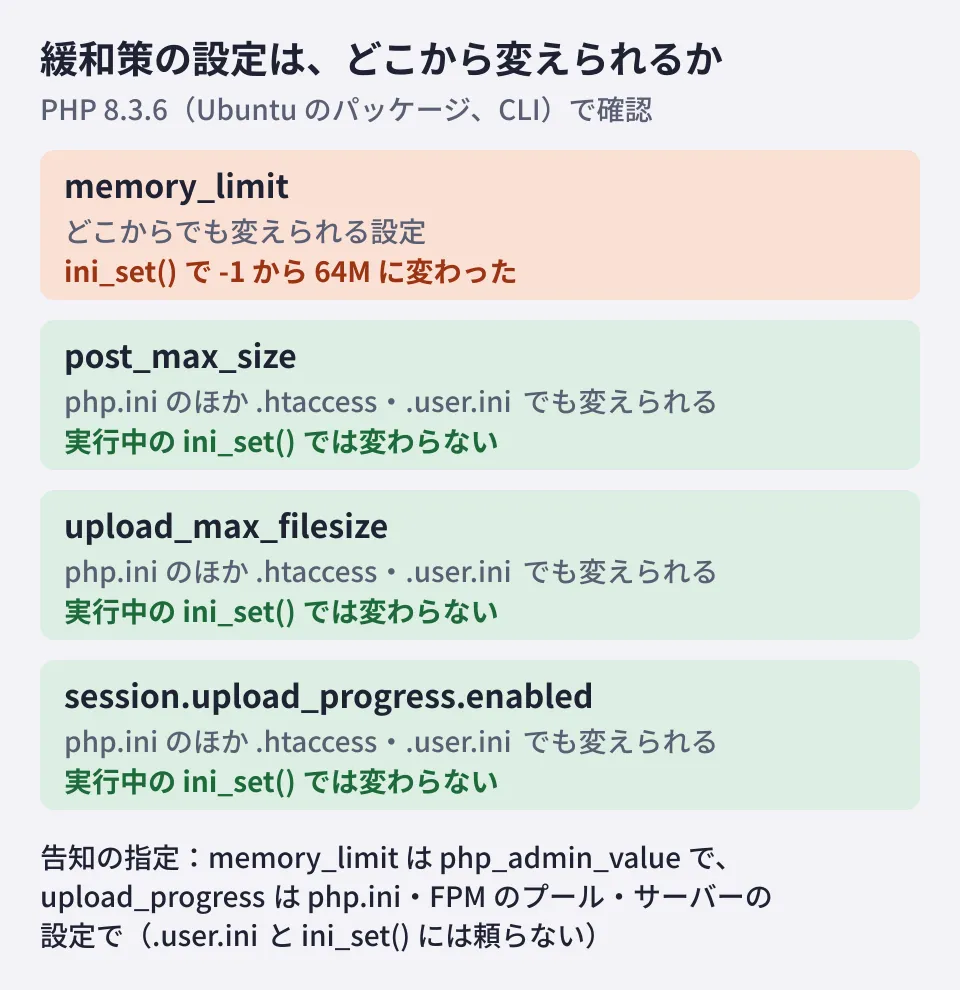
memory_limit turned out to be a setting that application code can change with ini_set(). Even if you set it to -1 in php.ini, the application or a plugin can set it back to a finite value. This is why the announcement specifies php_admin_value and says to "check that nothing sets a finite value back". Reading the WordPress core code (wp-includes/default-constants.php), we found that it does not rewrite the limit when the current limit is -1, but how themes and plugins handle it needs to be checked separately.
The other three did not change at runtime, but they are the kind of setting that can also be changed in .htaccess or .user.ini. On shared hosting, this is the layer users can touch, so ask your provider whether it meets the announcement's condition (a place that takes effect before the request is parsed). According to the advisory (GHSA-6wmf-4rv5-p3rp), mod_php's .htaccess settings are applied before request handling begins, whereas FPM's .user.ini is applied after normal initialization.
The reliable way to check the settings is to temporarily place a small script like the one below where it runs through the web server (under PHP-FPM or mod_php) and look at the output. Command-line PHP may read a different php.ini; in the test above as well, the command-line version's memory_limit was -1 as specified in php.ini, and 128M without a configuration file. Delete the script as soon as you have finished checking.
<?php
// 版と、緩和策に関係する設定を表示する(確認後はすぐに削除する)
echo PHP_VERSION, ' / ', PHP_SAPI, "\n";
foreach (['memory_limit', 'post_max_size', 'upload_max_filesize',
          'session.upload_progress.enabled', 'fatal_error_backtraces'] as $k) {
    $v = ini_get($k);
    echo $k, ' = ', $v === false ? '(この版にはない設定)' : $v, "\n";
}
echo 'php.ini: ', php_ini_loaded_file() ?: '(なし)', "\n";
Mitigations are only a stopgap until you update. Lowering the upload limit can also break forms, so record the settings you apply and decide whether to revert them after updating. As for session.upload_progress.enabled=0, the advisory says that if you do not use this feature, it may be wise to keep it disabled even after updating.
How to check WordPress updates is covered in Did the WordPress 7.1.2 fixes reach your site?, the first response to the critical core vulnerability in The critical WordPress core vulnerability "wp2shell", and upgrading the server's OS itself in Ubuntu 24.04 to 26.04.1 upgrades.
Scope of verification
On October 22, 2026, we checked the php.net news (the October 20 pre-announcement and the October 21 announcement) and ChangeLog; the two advisories in php/php-src on GitHub; the announcement source (
public/archive/entries,include/version.incandinclude/branches.incin the php/web-php repository); the NEWS and fixed-release tags of each PHP-8.2 to 8.5 branch of PHP itself (php/php-src), and the existence of the branches for 7.4 to 8.1; Ubuntu's security information (the CVE pages and USN-8948-1) and the Launchpad changelog for php8.3; the Debian security tracker and DSA-6574-1; the Google Cloud blog post "Responding to core PHP vulnerabilities CVE-2026-109618 and CVE-2026-109619"; anddefault-constants.phpin WordPress core (wordpress-develop) (desk research). In addition, on our editorial test environment (Ubuntu 24.04, the command-line version of packaged PHP 8.3.6), we checked where each setting can be changed, the results ofini_set(), and the package changelog (hands-on testing). We did not reproduce the vulnerabilities. We have not checked the write-up by the discoverer (Wiz Research), the NVD, or the update status of RHEL-based distributions and rpms.remirepo.net. We also have not checked howphp_admin_valuebehaves on PHP-FPM and mod_php, how things behave after updating to the fixed packages, or how each shared hosting provider is responding.
To review how you update and maintain sites and business systems running on PHP, contact us through Consultation on development, AI, and automation.
References
- Security advisory: Critical remote code execution vulnerabilities, update now(php.net、2026-10-21)
- Upcoming Critical PHP Security Release(php.net、2026-10-20)
- PHP 8 ChangeLog(php.net)
- GHSA-w8hw-w9fx-j79w: RCE via OOM corruption(php/php-src)
- GHSA-6wmf-4rv5-p3rp: RCE via stale global state(php/php-src)
- php/web-php (source of php.net)
- php/php-src NEWS (PHP-8.4 branch)
- USN-8948-1: PHP vulnerabilities(Ubuntu)
- CVE-2026-109618(Debian Security Tracker)
- Responding to core PHP vulnerabilities CVE-2026-109618 and CVE-2026-109619(Google Cloud Blog)
- wordpress-develop: src/wp-includes/default-constants.php