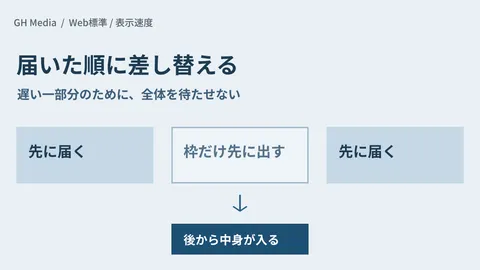
Using Declarative Partial Updates for Streaming SSR gained attention on Zenn. The core concept is that rather than leaving the screen blank while waiting for the entire page's data, the server streams ready sections sequentially and declaratively swaps in screen components. This improves not only measured speed, but also the "perceived performance" experienced by users.
Meanwhile, in client web development, incidents where "the screen stays blank while waiting on data fetching, causing users to bounce" never cease. From our position supporting client web development, we view this not as a matter of "making everything fast," but as an architectural challenge of "whether critical parts can be displayed first, perceived performance enhanced, and the system handed over integrated into operations." Connecting with sequential rendering UI design in Custom Development of Resilient Interfaces for Streaming LLM UIs (GH Media), improving perceived transition speeds in Custom Cross-Document View Transitions (GH Media), and rendering speed quality assurance in Core Web Vitals Improvement Guide (GH Media), this article organizes "Streaming SSR Perceived Performance Improvement Support" as a custom development package.
Why perceived performance matters right now
| Dimension | Wait for everything (traditional) | Sequential streaming (2026) |
|---|---|---|
| Initial render | Blank screen waiting for all data | Critical sections render immediately |
| Perceived performance | Feels slow | Feels fast |
| Bounce rate | Users bounce while waiting | Retained by early rendering |
| Implementation | All-at-once fetching | Phased streaming |
| UX | Janky transitions | Smooth progressive filling |
| Deliverable | Optimizing numbers only | Optimizing perceived experience too |
In other words, "having fast measured metrics" and "feeling fast to the user" are completely different things, and even in custom development, "showing critical sections first, streaming sequentially, and handing over the system integrated into operations" has become a prerequisite for quality. This enables us to guarantee "websites that look fast and resist bounces" as a deliverable.
Three structural changes beneficial to custom development projects
Structure 1: From "waiting for everything" to "critical sections first"
Waiting for all data drives user bounce. In custom development, we deliver above-the-fold content with top priority, instantly improving perceived performance.
Structure 2: From "all-at-once fetching" to "phased delivery"
Heavy APIs stall the entire page. In custom development, we deliver sections incrementally via streaming, providing an architecture where slow areas do not hold up the rest of the page.
Structure 3: From "jank" to "smooth replacement"
Flicker during component replacement degrades quality. In custom development, we use declarative partial updates and placeholder design to hand over a smooth experience.
5 phases of "Streaming SSR perceived performance improvement support" provided in custom development
Phase 1: Current state audit (1 week)
- Measuring above-the-fold rendering time
- Identifying heavy APIs and blocking points
- Reviewing bounce rates and conversion rates
- Assessing current Core Web Vitals
Phase 2: Delivery strategy design (1 week)
- Separating above-the-fold content from deferred delivery
- Designing streaming boundaries (Suspense, etc.)
- Placeholder and skeleton strategy
- Behavior during fallbacks and errors
Phase 3: Implementation (2–3 weeks)
- Integrating Streaming SSR
- Converting heavy components to deferred streaming
- Implementing declarative partial updates
- Preventing layout shifts
Phase 4: Validation and optimization (1 week)
- Re-measuring perceived speed and Core Web Vitals
- Observing bounce rates and conversions
- Testing on slow networks
Phase 5: Ongoing operations (continuous)
- Periodic performance benchmarking
- Applying guidelines to new pages
- Operating measurement dashboards
Standard technology stack set for custom development
| Layer | Recommended technology | Alternative |
|---|---|---|
| Framework | Next.js / Astro(SSR) | Remix |
| Distribution | Streaming SSR / Suspense | Progressive hydration |
| UI | Skeletons / placeholders | Spinners |
| Measurement | Core Web Vitals / RUM | Lighthouse |
| Delivery network | CDN / edge | Direct from origin |
| Observability | Bounce rate / CVR | GA4 |
Which projects need this and which do not
| Projects requiring this | Low-priority projects |
|---|---|
| Blank screen persists while waiting for data | Static with nearly instant display |
| Heavy APIs block above-the-fold content | Light data dependencies |
| Looking to improve bounce rate and CVR | Internal use not targeted for measurement |
| Many users on low-speed connections | Internal network assuming high-speed connectivity |
| Service website operated long-term | Short-lived campaigns |
Six clauses to include in client contracts
| Clause | Details | What the client should verify |
|---|---|---|
| Target scope | Pages to improve | Agreement on priorities |
| Quality goals | Perceived speed / CWV | Target standards |
| Delivery strategy | Streaming boundaries | Agreement on design |
| Measurement | RUM / CVR | Observed metrics |
| Handover | Procedures / runbook | Maintenance framework |
| Continuous operations | Periodic measurement | Operating costs |
Client-side ROI estimation (assuming service website)
| Item | Existing (wait for everything) | Streaming SSR | Difference |
|---|---|---|---|
| Above-the-fold | Make users wait on a blank screen | Display immediately | Improved perceived speed |
| Bounce rate | Users bounce while waiting | Retained by early rendering | Reduced bounce rate |
| Conversions | Opportunity loss | Improvement | Increased revenue opportunities |
| Core Web Vitals | Poor rating | Improvement | SEO contribution |
| Annual benefit | — | — | Recovering lost opportunities by improving bounce rates |
Even with upfront costs, the initiative is fully justified by recovering lost opportunities through a few percentage points of bounce rate improvement.
Five common pitfalls
Pitfall 1: Fetching everything at once
Heavy APIs stall the entire screen. Deliver content in stages.
Pitfall 2: Not providing skeletons
Content replacement causes flicker. Design placeholders properly.
Pitfall 3: Ignoring layout shifts
Perceived quality drops. Reserve layout space in advance.
Pitfall 4: Skipping testing on slow connections
The experience breaks down for real users. Test on low-speed networks.
Pitfall 5: Failing to measure perceived experience
You cannot prove improvements. Track metrics with RUM.
90-day action plan
| Week | Action |
|---|---|
| Week 1 | Speed and bounce measurement + bottleneck identification |
| Week 2 | Delivery strategy + boundary design |
| Week 3〜5 | Streaming SSR implementation |
| Week 6 | Re-measurement + low-speed network testing |
| Week 7〜13 | RUM monitoring + start of continuous improvement operations |
Conclusion — from "making users wait for everything" to "showing content first and handing over"
Streaming SSR and declarative partial updates elevate perceived performance alongside raw metrics. From our perspective supporting client web development, "Streaming SSR Perceived Performance Improvement Support"—where we display critical sections first, stream sequentially, and hand over systems integrated into operations—is our new flagship service delivering web experiences that feel fast and keep bounce rates low.
If you are facing issues such as "users bouncing during blank wait times," "heavy APIs blocking above-the-fold content," or "wanting to boost CVR," please contact us via our inquiry form.
Sources
- Using Declarative Partial Updates for Streaming SSR (Zenn, June 2, 2026)
- Custom Development of Resilient Interfaces for Streaming LLM UIs (GH Media)
- Custom Cross-Document View Transitions (GH Media)
- Core Web Vitals Improvement Guide (GH Media)
- Accelerating Client Frontend Development with Next.js 16.2 (GH Media)