
In site redesign meetings, the most common request is "we want a bit more motion." In most cases, the person making the request has no specific visual in mind, having simply looked at other companies' websites and felt theirs "somehow looks dated."
Following that single remark, two things typically happen: implementation hours for visual flair are piled onto the estimate, and after release, page rendering slows down when viewed on smartphones. Neither issue is caused by adding motion itself. The root cause is commissioning the work without deciding which format to build it in.
Motion serves three roles, each requiring a different format
To clarify beforehand, motion on the web divides into three categories based on purpose. If you discuss them without distinguishing these roles, the conversation inevitably drifts into "whether it looks cool or not."
- Informative motion — charts extending, steps appearing sequentially. Aids understanding of content
- Reactive motion — buttons being pressed, forms submitted, panels toggling. Returns feedback for user actions
- Decorative motion — backgrounds slowly drifting, elements floating up on scroll. Creates an impression
Issues with cost and performance almost exclusively arise from the third category. The second takes just a few lines of CSS, and the first is confined to specific, necessary spots. Nonetheless, the "motion" discussed in meetings usually refers to the third, and that is where the most money is spent.
Pros and cons of each format
There are primarily three implementation options. While web development agencies often choose silently on their own, knowing them changes how clients read project estimates.
| Format | Ideal applications | Important precautions |
|---|---|---|
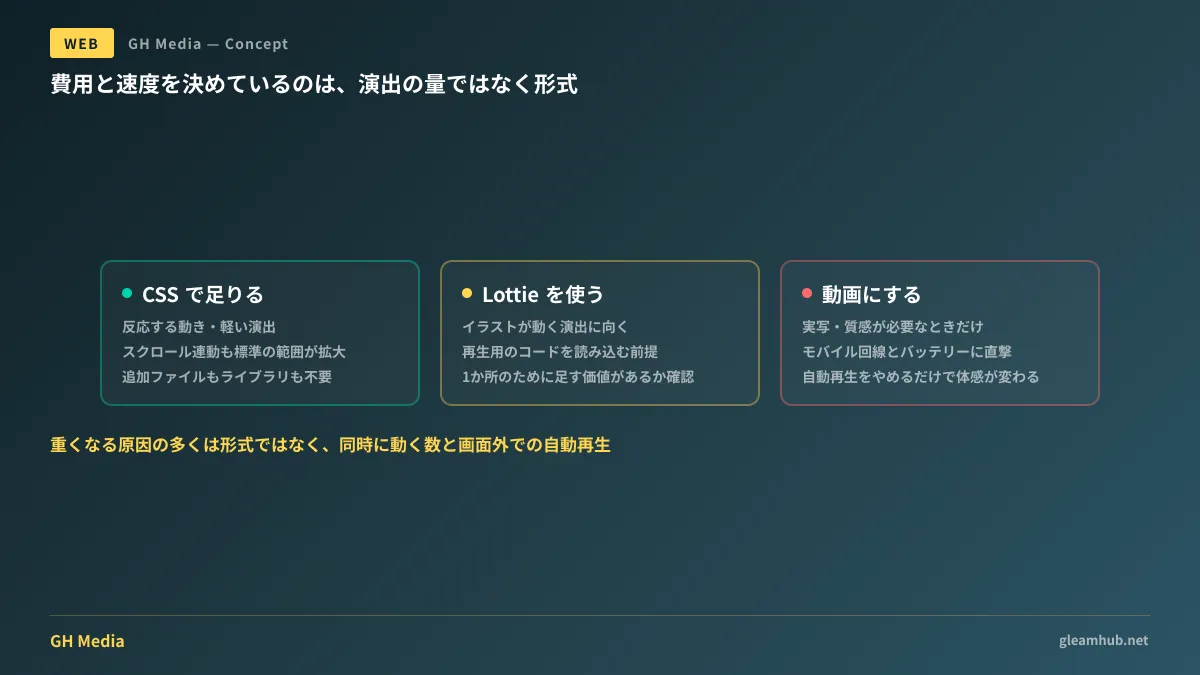
| CSS animation | Reactive motion, lightweight accents, scroll-linked effects | Cannot fully render complex illustration motion |
| Lottie(dotLottie) | Illustration and character animation, loading effects | Requires a playback library. Overly complex animations consume CPU |
| Video / GIF | Live-action video, textured visual expression | Heavy file sizes. Autoplay impacts bandwidth and battery |
CSS is natively supported by browsers; for transitions in transform or opacity, browsers handle rendering efficiently. No additional files or libraries are required. The scope of what can be written purely in CSS for scroll-driven effects has also expanded considerably.
Lottie exports animations created in design tools as JSON and plays them back on the web. It delivers animated illustrations that are lighter than video and scale without quality loss. Recent advances in the .lottie format and WebAssembly-based playback engines have also improved rendering efficiency. However, it still requires loading playback code. If you are adding tens of kilobytes of library overhead for a single location, it is worth checking first whether a similar effect can be built in CSS. The principle of re-evaluating what browser standards can do before adding libraries applies here as well.
Video is the choice when live-action footage or textured depth is necessary. Using video as a background on top pages remains popular, but bandwidth consumption and battery drain over mobile networks are unavoidable. Simply switching to a static image and letting only interested users hit play creates a noticeable difference in perceived speed.
Sluggishness is caused by count and autoplay, not just format
While we have discussed formats, examining websites that actually render slowly reveals causes rooted in far simpler factors.
One is the number of elements moving simultaneously. A background video above the fold, an animated logo, scroll effects in three separate places, and a loading animation overlaid. Even if each element is light individually, running them concurrently strains the device.
Another is autoplaying off-screen elements. Effects located at the bottom of the page continue running before they ever enter the viewport. Without ever being seen by the user, they consume CPU cycles. Simply adding a directive to "animate only once in viewport" solves this, but that behavior will not be included unless explicitly specified.
When an estimate merely lists "Animation implementation: 1 set," it is impossible to tell whether these controls are included. Simply asking whether they are included changes the site's post-launch performance.
Breaking down "animation package" on an estimate
When an agency's estimate bundles visual effects into a single line item, it comprises some combination of: design hours for planning the motion, asset production hours, and implementation hours. Among these, costs are hardest to predict for the first two.
For effects that can be written in CSS, implementation hours remain minimal. On the other hand, drawing new illustrations to animate incurs design fees for asset creation, and every revision requires rebuilding the asset from scratch. When "tweaking just one spot" proves impossible, it is usually due to this pattern.
The most practical question to ask is: "Does this effect require recreating the underlying assets?" If the answer is yes, you must decide whether to abandon the premise of post-launch fine-tuning or lean toward CSS-based expression from the start. This is where it is decided whether the inevitable post-redesign requests for "a little faster" or "a little more subtle" will incur additional costs.
Designing animations that can be stopped
Another crucial point to settle when commissioning work is consideration for users who wish to stop motion.
Operating systems provide settings such as "Reduce motion," which can be detected on the web via prefers-reduced-motion. For users with this setting enabled, motion should be stopped or replaced with a subtle alternative. It requires only a few lines of code, but it will not be implemented unless explicitly specified.
This is both a matter of user consideration and a practical business concern. Users who experience motion sickness from web animations do exist, and having a corporate site become unviewable due to animation harms the brand. Much like questioning necessity before adding superfluous UI components, the ability to disable motion matters just as much as whether to add it.
A single line to write in your order form
Instead of saying "we want some motion" during meetings, writing the following stabilizes both estimates and deliverables:
Implement visual effects primarily in CSS, using Lottie only where illustrated motion is required. Do not autoplay off-screen elements. Disable motion in environments where
prefers-reduced-motionis enabled.
Beyond that, test the site on an actual smartphone with Wi-Fi turned off prior to launch. Over fast development connections on desktop browsers, sluggishness is virtually imperceptible. An animation that forces a visitor to wait three seconds on a real device becomes a reason for them to bounce.
GleamHub provides consultations on website design effects, balancing visual motion with display speed, and diagnosing causes of slowness on existing sites through our website creation and redesign services. Because the most effective measures vary depending on your current site architecture, please contact us for individual guidance via Contact Us.