Inquiry notification emails sometimes contain submissions like these: a company name cut off at "Kabushiki Gai..."; a message body containing only "Nice to meet you"; or a second message arriving three minutes later from the same person, this time written out to the end.
It is not because the sender was careless. The form was submitted the moment they pressed Enter to confirm a Japanese IME conversion. The person typing had no intention of submitting anything. Because "it was sent even though I didn't click Submit," they panic, rewrite it, and send it again. If you only look at incoming notifications, it just looks like a form prone to duplicate submissions.
The culprit is not Enter itself, but the Enter that confirms conversion
In Japanese input, the Enter key serves two roles: confirming conversion candidates, and pressing Enter after confirmation. From the browser's perspective, both arrive as identical keypress events.
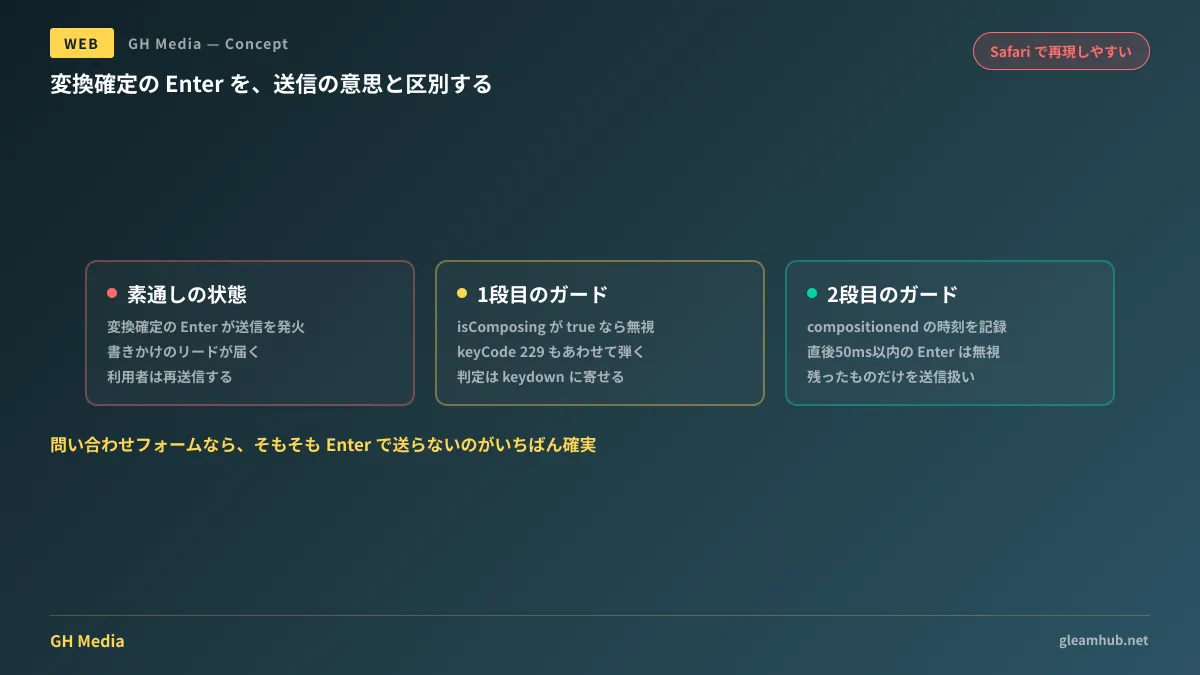
To distinguish between the two, KeyboardEvent provides isComposing. It returns true while the IME is in composition mode and false after composition is finished. Reading it straightforwardly, it looks like simply checking whether isComposing is true would suffice.
In fact, this fixes the issue for many forms. The problem is that there are browsers where it does not completely work.
Why isComposing alone is not enough
In Safari, cases have been reported where isComposing is already set to false at the moment the Enter key is pressed to confirm conversion. In this state, isComposing cannot distinguish between the Enter used for confirmation and an Enter intended for submission after confirmation. Almost all inquiries about guards failing only on Safari stem from this.
Additionally, in some environments, the Enter key confirming conversion arrives with keyCode 229. Although keyCode is a deprecated property in the specification, it remains effective today as a fallback to filter out IME-derived events.
Therefore, we adopt a two-tier implementation.
const input = document.querySelector('#message');
let composingEndedAt = 0;

input.addEventListener('compositionend', () => {
  composingEndedAt = performance.now();
});

input.addEventListener('keydown', (e) => {
  if (e.key !== 'Enter') return;

  // 1段目: 変換処理中の Enter を弾く
  if (e.isComposing || e.keyCode === 229) return;

  // 2段目: 変換確定の直後に届いた Enter を弾く(Safari 対策)
  if (performance.now() - composingEndedAt < 50) return;

  // ここまで来たものだけを「送信の意思がある Enter」として扱う
  e.preventDefault();
  submit();
});
A good rule of thumb for the second-tier threshold is around 50 milliseconds. It is impossible for a human to finish confirming a conversion and then deliberately press Enter again within just 50 milliseconds. Conversely, an Enter event that fires concurrently with composition confirmation will fall comfortably within this window.
Do not use the keypress event. It is already deprecated, and its IME-related behavior is inconsistent across browsers. Consolidate your checks into keydown.
The option of not submitting with Enter in the first place
While we have discussed technical workarounds, when it comes to inquiry forms, the most reliable approach is simply "do not submit via Enter."
HTML forms feature a mechanism known as implicit submission: pressing Enter while focused on a text input field is treated the same as clicking the submit button. Because this is standard specification behavior, a form will not stop submitting on Enter unless you explicitly write JavaScript to prevent it.
Here is a breakdown by intended use:
| Input field type | Role assigned to Enter |
|---|---|
| Fields in an inquiry form | Do nothing (submission only via button) |
| Search boxes | Execute search (only one field, so accidental submission causes minimal harm) |
| Chat / comment input boxes | Line break. Submission via modifier keys (Ctrl / ⌘ + Enter) or submit button |
Whether to map Enter to send in chat UIs has long been debated, but if you assume Japanese input, requiring a modifier key to send will reliably reduce accidents. While some users may dislike adding an extra step to send messages, the cost of sending half-written text is usually far greater.
How to verify this in acceptance testing
If you outsource development to an agency, this defect cannot be spotted just by looking at deliverables. This is because testing only with alphanumeric characters will fail to reproduce it. Make sure to explicitly include the following steps in your acceptance testing:
- Turn on the Japanese IME and enter a string that requires conversion. Choose words that cannot be confirmed in a single keystroke, such as "kabushikigaisha."
- Press Enter while conversion candidates are displayed. If the form submits at this point, it is a defect.
- Test in both Chrome and Safari. The most common pattern is that it works in Chrome but reproduces in Safari.
- Test on smartphones as well. Japanese keyboards on iOS and Android behave differently from desktop computers.
These four checks are separate from reducing input fields for form optimization (EFO). Even if you decrease the number of fields, premature form submissions can still occur. Checking how error messages are phrased and keyboard navigation and focus movement design during the same acceptance test will save you from having to redo the work later.
What to do next
First, review inquiry notifications from the past three months and count submissions that are abnormally short or sent consecutively by the same person. If you find a noticeable number, your form may be working technically, but you are losing leads. Once you see the numbers, there will be no reason to postpone fixing it.
Next, try submitting your own company's form yourself with an IME turned on. If pressing Enter while conversion candidates are displayed submits the form, this issue is happening right now to your users.
At GleamHub, we offer website creation and redesign consultations covering inquiry form fixes, input experience overhauls, and investigations into lost leads. The fastest remedy depends on your existing site's architecture, so please reach out for personalized advice via our Contact Us page.
Sources
- KeyboardEvent.isComposing — MDN Web Docs
- Element: compositionend event — MDN Web Docs
- How I struggled to handle the Enter key during IME confirmation in Safari — Zenn
- Why websites with poor Japanese input compatibility get built — Future Tech Blog
- 4.10.21.2 Implicit submission — HTML Living Standard