A corporate website that was outsourced to a web agency years ago, with no one looking after its updates or maintenance. The bills for the domain and hosting arrive every year without fail, but no one can remember the last time anyone logged into the admin dashboard. Small and midsize businesses with websites in this exact state are far from rare.
For sites of this type, the WordPress core vulnerability that came to light in mid-July 2026 is the kind of news you cannot afford to ignore. With so many sites running on WordPress, standard site configurations were affected regardless of whether plugins were installed, and unauthenticated attackers could potentially take over the site. That is precisely why clients who usually tune out security discussions need to check the status of their own sites this time.
In this article, after breaking down what actually happened, we outline what small and midsize business site owners who lack maintenance contracts or leave everything entirely to web agencies should check immediately, along with what happens if it is left unattended. We will avoid technical jargon as much as possible and write from the client's perspective.
What happened: the core vulnerability known as “wp2shell”
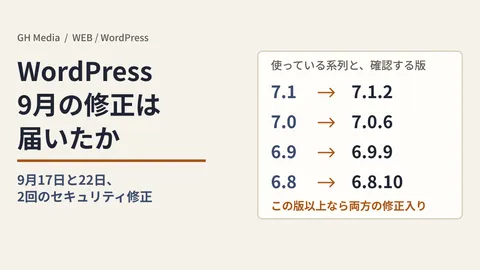
On July 17, 2026, the maintainers of WordPress released security updates after discovering a high-severity vulnerability in the core software, enabling forced updates via the automatic update system for sites on affected versions. Patched releases have been distributed as WordPress 6.8.6, 6.9.5, and 7.0.2. What makes this extraordinary is this action of the maintainers semi-forcibly applying updates.
At issue are two vulnerabilities: a flaw in REST API batch processing where requests and process content can fall out of sync (CVE-2026-63030), and an SQL injection flaw where an attacker can inject values into internal article search processing (CVE-2026-60137). Chaining these two together can lead to remote code execution (RCE)—allowing arbitrary programs to be run on the server—from an "unauthenticated" state requiring neither a login nor a password; the discoverer named this exploit method "wp2shell." Actual exploitation has been observed, and exploit code is already in circulation, prompting warnings from multiple sources urging early updates.
What needs to be understood here is the alignment of risk factors. This vulnerability combines three conditions simultaneously: "anyone can trigger it (unauthenticated)," "the outcome is a site takeover (RCE)," and "it directly affects standard site configurations without requiring additional plugins." Depending on the tally, over 90% of WordPress vulnerabilities are said to originate from plugins or themes (approximately 91% stemmed from plugins in Wordfence's 2024 report), making it rare to find a flaw of this severity in the core itself. The assumption that "we're safe because we haven't installed any unusual plugins" does not apply this time.
There is another troubling aspect for owners of neglected sites: the requests used in the attack are well-formed communications sent to legitimate endpoints and do not contain overtly suspicious strings, making them difficult to filter out mechanically at the perimeter (such as with a WAF). In other words, relying solely on the hope that "our hosting company must be protecting us with something" is precarious; ultimately, keeping the core updated remains the most reliable defense.
Why "neglected sites" are especially at risk
The vulnerability itself is patched once updated. The issue lies with sites where no one is around to update them. Sites left as-is without a maintenance contract after being built by a development agency, or where the original person in charge has left the company, leaving no record of admin credentials—even when the project maintainers push a forced update, automatic updates may fail depending on server settings or the WordPress version, leaving these sites unpatched. What routinely slips through the protective net are "sites that no one is monitoring."
What happens to a hijacked site is not always obvious or dramatic. In fact, what is far more insidious is the quiet kind of damage. Once attackers take over a site, their first priority is to stay unnoticed. A frequent scenario is tampering where massive numbers of unfamiliar, fraudulent outbound links or advertisements targeting overseas users are embedded across pages. If this continues, Google flags the site as a "dangerous site" or "site containing deceptive content," causing warnings to appear in search results or triggering a red warning screen when opened in a browser.
From here on out is where the real pain begins for small and medium-sized businesses. A flagged site sees its search traffic plummet, severely damaging the search reputation (SEO) built up over time. In real cases, companies only notice when a business partner points out, "Your website is showing a virus warning." Cleaning up the tampering and requesting a reconsideration from Google takes time, during which opportunities continue to be lost. These risks inherent in "build-it-and-forget-it" sites were previously outlined in Why "Build-It-and-Forget-It" Websites Are Dangerous, and this core vulnerability can be understood as simply adding another trigger.
Another frequently overlooked risk is personal information submitted through forms. If a site hosting contact forms or inquiry forms is hijacked, customer names, contact details, and business discussion content submitted through them could be extracted, or malicious code could be injected into forms to intercept input data. A takeover is not just a matter of "our company site being defaced"; it leads directly to external trust issues stemming from "leaking customer information entrusted to us."
| What can happen to a neglected site | Visible impacts |
|---|---|
| Page tampering; embedding of malicious links and ads | Google warning notices; red browser warning screens |
| Drop in search engine evaluation | Plummeting search traffic; damage to SEO standing |
| Web shell deployment; takeover of administrative privileges | Site used as a stepping stone to attack others; prolonged recovery |
| Data leaks via forms | Leakage of customer personal information; loss of external trust |
Three points to verify on your site right now
Even without technical expertise, there are things you can check from a client's standpoint. Start with these three points.
First, check whether your site is built on WordPress. Simply reaching out to your development agency with a quick question—"Is our site built on WordPress, which version is it running, and has the recent core vulnerability (wp2shell) been addressed?"—is sufficient. Once they respond, confirm the update status and keep a record.
Second, determine whether you even have an active point of contact. The contract with the agency has expired, the person in charge left, the original firm went out of business—such "sites with ambiguous owners and administrators" are the most prone to being left behind during widespread update events like this. Take this opportunity to track down where the admin dashboard login credentials, server contract details, and domain management rights currently reside. How to take over a site when contact has been lost is covered in Taking Over a Website When You Can No Longer Reach the Agency.
Third, check whether updates are in a state where they apply automatically. While the core team pushed a forced update this time, it assumes a server environment where automatic updates function properly. Sites running on outdated PHP versions or heavily customized with auto-updates disabled may slip through. The safest route is to have your web development agency or maintenance provider confirm whether automatic updates are functional and whether the core is running the latest security release.
| Party checking | What to verify |
|---|---|
| What clients (you) can do today | Check if it runs on WordPress, verify if a reachable administrator exists, and locate contract information |
| What to confirm with the agency or maintenance provider | Core version, wp2shell patch status, and whether automatic updates are enabled |
Deciding whether to outsource maintenance or handle it in-house
What situations like this demonstrate is the self-evident truth that a site is never "finished upon launch"—someone must continually look after it. The core decision criterion is simple: "When news of a vulnerability breaks, do you have someone in-house who can check your site's status and take action within 24 to 48 hours?"
If you do, running it in-house is viable. Regularly checking the WordPress admin panel, applying core, plugin, and theme updates, taking backups, and testing form operation—if you have staff capable of handling this level of routine management, a baseline defense can be sustained without outside help. However, because updates can occasionally cause layout breakage or functional glitches, properly verifying conditions before and after changes is an absolute prerequisite.
If you do not, outsourcing maintenance is the realistic path. Avoiding the scenario where you have no idea whom to contact during an emergency like this is the central value of a maintenance contract. With risks increasingly introduced through plugins and situations demanding specialized judgment becoming more common, having an external set of eyes is often far safer than trying to handle everything alone. For clients wanting a solid grasp of web security basics, Introduction to Web Security Measures serves as a helpful reference.
Because a site's current status and degree of protection vary entirely based on configuration and operational structure, an assessment cannot be made without individual diagnosis. If you want to determine whether your site is secure and how to structure maintenance, the most dependable approach is to start with an inspection followed by a formal estimate.
First steps to take
Do not overcomplicate it; start with the actions you can take today. First, send a single inquiry to your web development agency or maintenance provider asking: "Is our site on WordPress, has the recent core vulnerability been patched, and are automatic updates working?" If you discover that there is no reachable administrator or that contract details are unaccounted for, do not leave things unattended—move quickly to take over the site and review your maintenance arrangements.
From verifying your website's current health to consulting on maintenance and redesigns, if you are unsure where to begin, please contact us. We can start by reviewing the current state of your site together.
Sources
- Critical Vulnerability in WordPress Core; Operators Issue Rare Forced Update — Experts Explain the "Real Danger" (@IT)
- Summary of WordPress Core Vulnerabilities CVE-2026-63030 / CVE-2026-60137 (Known as "wp2shell") (piyolog)
- Overview of WordPress "Critical" Severity Vulnerability wp2shell and Response Guidelines (GMO Flatt Security Blog)
- High-Risk Vulnerability wp2shell in WordPress Core (Security Measures Lab)
- What Is wp2shell? How to Address the WordPress Urgent Vulnerability (CVE-2026-63030) and Its Impact on SEO (Orange Software)
- Exploit brokers pay $500,000 for a WordPress RCE. I found one with GPT5.6(Searchlight Cyber)
- Wordfence 2024 Annual WordPress Security Report (Approx. 91% Caused by Plugins)