Monthly reports show sessions have increased compared to last year. Yet contact form submissions remain flat, with only bandwidth usage and hosting bills growing. When consulting a web agency, you are advised to strengthen bot defenses; once deployed, inquiries start coming in saying, "I can't submit the form."
This breakdown occurs because saying "block bots" no longer refers to a single task. Automated traffic includes scrapers scraping body text without permission, but it also includes AI agents visiting to compare products on behalf of users. You want to stop the former, but stopping the latter is akin to turning paying customers away at the door. Conventional detection methods, however, possessed virtually no signals to distinguish between the two.
One-off checks can no longer tell them apart
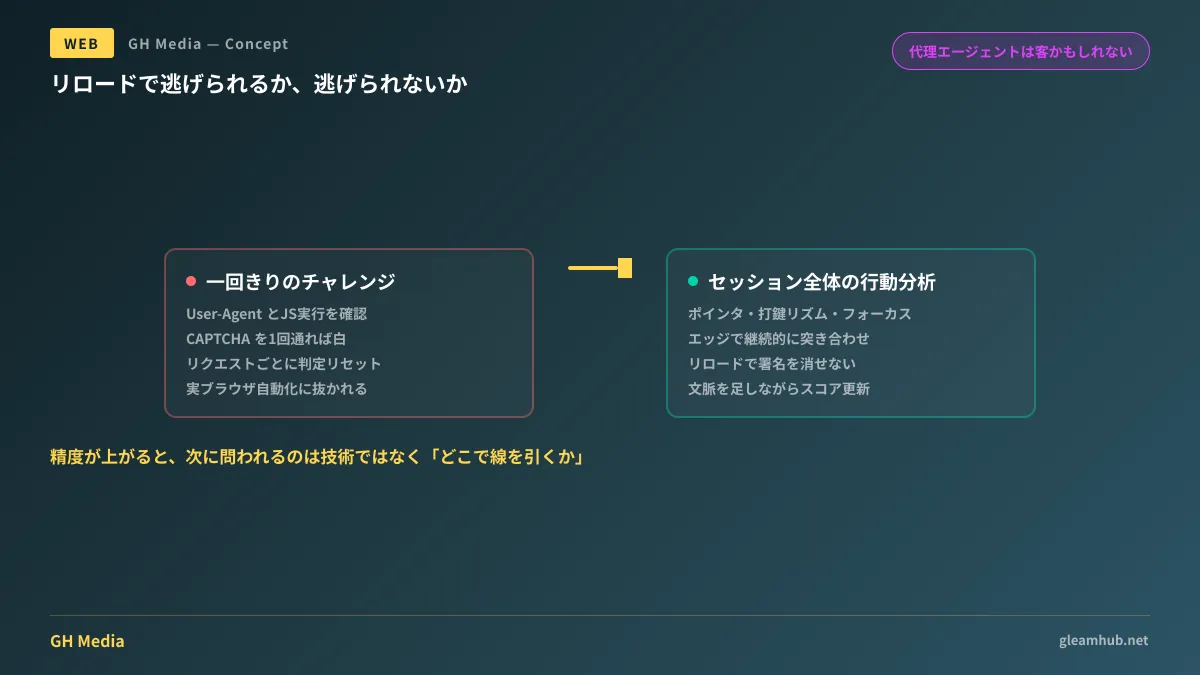
Conventional bot detection primarily relied on making an instant judgment at the moment a request arrived. Checking the User-Agent, testing whether JavaScript can execute, or serving a CAPTCHA to verify humanity. Every one of these issues a verdict on a single encounter.
This approach broke down because automated tools began using real browsers. JavaScript runs, cookies are retained, and CAPTCHAs are solved. If you look only at an isolated snapshot, it is indistinguishable from human access. Moreover, since evaluations reset with every request, even suspicious behavior is wiped clean on the next page load.
Precursor, introduced by Cloudflare in 2026, is designed to challenge this very assumption. By injecting a lightweight client-side script, it gathers signals such as pointer movements, keystroke timing, focus changes, and page visibility continuously throughout the session. These are matched in real time at the edge, adjusting the Bot Score while building up the context of the entire session.
What makes this effective is that reloading the page offers no escape. Because behavioral history is tied to the session, refreshing the page does not reset the signature. It exploits an asymmetry: while pretending to be human for a brief moment is easy, consistently acting human throughout an entire session is difficult.
Regarding privacy, published architecture details state that for keystrokes, only timing and cadence are observed rather than the actual keys pressed, and signals are handled as aggregated patterns without being tied to individuals. Even so, the fact remains that you are inserting a script that continuously observes visitor actions on your site, so verifying whether this aligns with your privacy policy and consent management disclosures is something you should check firsthand before deployment.
"Blocking everything" is no longer an option
As detection accuracy increases, what matters next is policy rather than technology. While accuracy was low, you could get by with "blocking anything suspicious," but once you can tell them apart, you must decide for yourself where to draw the line.
Automated traffic can be categorized by nature into at least the following groups:
| Type | What they come to do | Criteria for allowing access |
|---|---|---|
| Training crawlers | Scrape body text as model training data | Whether you want your content used for AI training |
| Search and answer engine crawlers | Collect content for citation in search results and answers | The value of being cited versus the risk of users bypassing your site |
| AI agents acting on behalf of users | Conduct research, comparisons, and signups requested by specific individuals | A human decision-maker sits behind them |
| Malicious automation | Inventory hoarding, form spamming, credential stuffing | No reason to allow |
The third row represents a tier that has emerged over the last few years. A real person exists behind them, potentially leading to purchases or inquiries. Blocking this traffic across the board is comparable to turning away a customer visiting during business hours because "facial recognition couldn't identify them."
On the other hand, for the first row, choosing whether to allow or block them changes your revenue structure. The reality of how handling training crawlers has become a core business issue was covered in Traffic Plummets as AI Scrapes Articles for Free. Tactics for actively thwarting unauthorized scraping are closely related to the discussion in Deconstructing Cloudflare AI Labyrinth.
Starting with costs leads to faster decisions
Debates over drawing the line tend to become abstract, so starting with financial figures brings them to a quicker conclusion.
First, calculate what you are paying for bots. If you use hosting that charges for bandwidth or function executions, check what percentage of the bill stems from automated traffic. If that figure is small, it is not an urgent issue to begin with. The relationship between cost visibility and plan design is detailed in Bot Defenses and Hosting Costs.
Next, separate your metrics. If you continue reporting "page views grew" using numbers that include automated visits, all campaign evaluations will be distorted. Before blocking, establish a setup where you can count visits segmented by detection results. You can decide whether to block them afterward.
Finally, write your allowlist first. If you start by writing blocking rules, you will not notice when you inadvertently block something you wanted to permit. List the answer engines where you want citations, payment and shipping integrations, monitoring services, and the scope of user-proxy agents you want to permit first, then decide how to handle the rest.
Things to verify before implementation
Behavioral analysis relies on script injection. Sites with strict Content Security Policies will not run it without adjustments. Furthermore, on sites already running multiple tracking scripts, the impact on page rendering speed will compound. If you track Core Web Vitals, measure your numbers before and after deployment.
Some users exhibit interaction patterns that do not look "human." Visitors using screen readers or switch devices rarely move a pointer, and their keystroke rhythms deviate from typical distributions. In principle, behavior-based detection inherently tends to misclassify this demographic. If you apply strict thresholds to critical flows like form submissions, always ensure an alternative fallback path for genuine humans when misclassified. Because rejected visitors cannot submit contact inquiries, this failure mode will persist unnoticed.
Detection strength can be adjusted per page. A standard baseline is lenient settings for article pages and strict enforcement for forms and logins. Applying uniform strict detection across the entire site skews the balance between what you protect and what you lose.
What to do next
First, begin by counting automated traffic without blocking it across your past month's visits. Once you have the numbers, you can judge whether this is a cost issue, a content protection issue, or not a significant problem at all.
Next, write out the list of traffic you want to allow first. Working backward from there will lead to fewer operational accidents in your defensive architecture.
GleamHub offers consultations on software development, AI, and automation, including designing bot detection architectures and establishing operational flows that separate measurement from defense. Available approaches depend on your website structure and hosting environment, so please reach out for an individual consultation. Feel free to reach us via Contact Us.
Sources
- Introducing Precursor: detecting agentic behavior with continuous client-side signals — Cloudflare Blog
- Cloudflare’s Precursor Detects Bots and AI Agents Through Continuous Behavioral Analysis — InfoQ
- Cloudflare Precursor uses continuous behavioral analysis to stop advanced bots — Help Net Security
- Cloudflare Introduces Precursor; One-Click Behavioral Defense Against Modern Bots — Cloudflare Press