You only want to change a single line in a top page heading. You open the admin dashboard thinking you can fix it there, only to discover that section is a non-editable block. When requesting the change from the web development agency, you are told it will take a week to produce an estimate and another week to complete the work.
Why does this happen when it's just one line of text? When you actually ask for the reason, sometimes it has nothing to do with design issues or workload. The answer comes back: "Because the build environment from that time doesn't run in our current environment, we have to start by getting it working."
Why custom blocks made maintenance so heavy
More than seven years have passed since the introduction of the WordPress block editor (Gutenberg). During this time, the standard approach for creating site-specific elements—such as pricing tables, case study cards, and announcement lists—has been building them as "custom blocks."
This method of creating custom blocks had an inherent quality that made maintenance heavy. This was because it was necessary to write the editor-side display in JavaScript (React), build it, and deploy it. As a result, the following elements increase independently of site content.
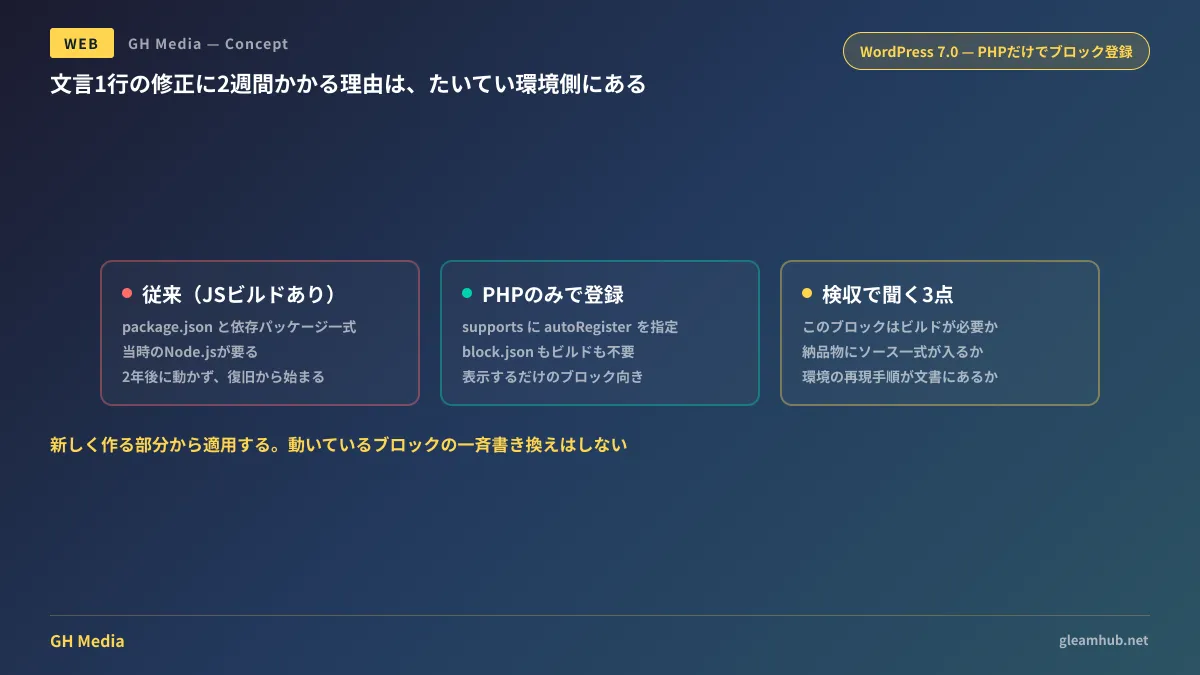
package.jsonand massive dependency packages- Node.js (the version at that time) to run the build
- The post-build artifacts and the full set of pre-generation source code
Two years after launching the site, this full set turns into a problem. The packages from back then no longer run on current Node.js. If the original developer has left the company, nobody even knows the procedure. The estimate of two weeks to fix a single line of text represents the quote for this recovery work.
I also addressed how unmaintained dependencies specifically rear their teeth in Vulnerabilities and Maintenance Contracts for Stagnant Websites.
Block registration with only PHP in WordPress 7.0
Published in March 2026 as a developer announcement for WordPress Core and included in WordPress 7.0 is "PHP-only block registration." You can register blocks with only PHP, without block.json or JavaScript builds.
In terms of code, when calling register_block_type(), enabling autoRegister inside supports causes WordPress to automatically output that block on the editor side as well.
register_block_type( 'gleamhub/price-table', array(
    'supports' => array(
        'autoRegister' => true,
    ),
    'attributes' => array(
        'plan' => array( 'type' => 'string', 'default' => 'standard' ),
    ),
    'render_callback' => 'gleamhub_render_price_table',
) );
You need neither npm install, running builds, nor deploying build artifacts. With just a single PHP file, that block appears in the editor.
The targets are blocks that are merely rendered server-side and do not require advanced operations in the editor. When JavaScript is strictly necessary, the recommended approach is to handle registration via init and load scripts from the render callback. In this scenario, even if multiple instances of the same block exist on the page, scripts will not duplicate and are loaded together at the end of the page.
It doesn't mean "switch everything to this"
When a new option emerges, a common tendency is trying to rewrite every existing block. Because that amounts to breaking things that are currently working, I do not recommend it.
The decision hinges on what that block actually does inside the editor.
| Block characteristics | Suitable build method |
|---|---|
| Display only (pricing tables, case study cards, banners) | PHP alone is sufficient |
| Visual preview required in editing screen | Conventional approach containing JavaScript |
| Complex interactions in editing screen (reordering, dynamic input assistance) | Same as before |
On many corporate websites, the vast majority of custom blocks fall into the first row. For pricing tables, case study cards, and announcement lists alike, all you do in the editing screen is "enter text" and "choose images." Bringing React and a build environment into this was simply the convention until now.
By applying this starting with newly built sections, the entire site's dependence on build environments will gradually decrease. Other changes introduced in WordPress 7.0 are also touched upon in WordPress 7's AI Connectors and Abilities.
Three points to check during ordering and acceptance inspection
There are things the commissioning client can verify without specialized technical knowledge.
- Ask, "Does this block require a build?" If they answer that it is necessary, ask why along with it. If it is for previews in the editing screen, that is reasonable. If the answer is "because that's just how it's built," there is room to reconsider
- Confirm whether the deliverables include the pre-build source code. If you are only handed generated artifacts, fixing it next time means rebuilding from scratch. Explicitly state the complete source code in the deliverables clause of your contract
- Check whether reproduction steps for the development environment are documented in writing. A procedural manual that does not specify down to the Node.js version will be unusable two years later
The third point is a check that never arises in the first place if builds are unnecessary. Reducing dependencies is the most reliable handover safeguard. When considering things from the CMS selection stage, please also read Choosing a CMS to Ensure an Updatable Website.
What to do next
First, open your company's site admin dashboard and count how many areas cannot be modified. If there are five or more sections where you have been told "you cannot touch this here," your structure incurs outsourcing costs every time an update is needed.
From there, when requesting your next modification, try asking one question: "Can this section be built in a way that requires no build?" Whether the other party can answer tells you a great deal about the maintenance outlook. Assuming you do not halt WordPress core updates, it is also prudent to check Core Vulnerabilities and Update Operations.
At GleamHub, we accept consultations regarding WordPress site maintenance planning, rebuilding sites into an updatable state, and defining deliverables during redesigns through our website creation and redesign consultations. Because available approaches vary depending on your current setup, please let us know your current situation via Contact Us.