“When an order is confirmed, we first create order data from the quoting software, transcribe it into the order management spreadsheet, re-enter it into the accounting software when invoicing, and enter it once more into another sheet at month-end for sales aggregation”—when interviewing a manufacturing order processing clerk about their workflow, the same customer name and amount were being entered four times.
This company is by no means underinvesting in tools. Quite the opposite: they have implemented specialized SaaS applications for quoting, order intake, and accounting. Individually, each is a good piece of software. Despite this, manual transcription increased at the clerk's desk. The phenomenon of adding tools only to increase human labor is taking place.
Smashing Magazine aptly captured this dynamic: users do not need more tools; they need seamless integrations (Users Don’t Need More Tools: They Need Seamless Integrations — Smashing Magazine).
“Not a lack of tools,” but “lack of connections”
This sensation is not merely a workplace impression; it is reflected in the numbers. In a survey of 536 professionals involved in IT service adoption and selection at companies using SaaS, 86.9% reported challenges in SaaS data integration (BizteX Survey Report (2024)).
The breakdown of challenges clearly illustrates the reality. The most common was “departments use different SaaS tools, preventing cross-departmental data integration” at 39.9%. This was followed by “data integration has become complicated, making it impossible to grasp the overall picture” at 35.4%, and “failure to centralize or synchronize data and status management across disparate SaaS tools” at 35.3%.
Looking at them together, none of the top three is a complaint that “features are missing.” The features exist. The grievance is that because individual departments picked tools suited to their own needs, the systems ended up disconnected.
Misinterpreting this leads to misdirected investments. Hearing complaints that “workflows are inefficient” and initiating evaluations of feature-heavy, all-in-one platforms is a natural impulse, but in many cases, companies incur switching costs only to end up right back at the same problem. Department-specific requirements do not disappear just by switching tools.
Why manual CSV integration persists in more than a quarter of companies
The same survey also inquired about integration methods. iPaaS or comparable functionality accounted for 47.9%, custom scratch-built programs for 46.5%, and 26.7% responded that they integrate manually via CSV exports and imports.
More than one in four companies still manually export and import files. This is often not negligence, but the result of a rational choice. Manual CSV integration has two advantages that other methods lack: it does not break, and anyone can fix it. Automated integrations fail silently when one SaaS makes an API specification change. Stories of realizing an integration stopped only during month-end closing are all too common.
Even so, manual CSV integration has its limits. As frequency increases, it consumes staff hours and invites transcription errors. Above all, it easily creates a situation where only one person knows the procedure. In the company mentioned at the outset, only a single staff member fully understood the four-step entry process. This goes beyond operational efficiency—it is a business continuity risk.
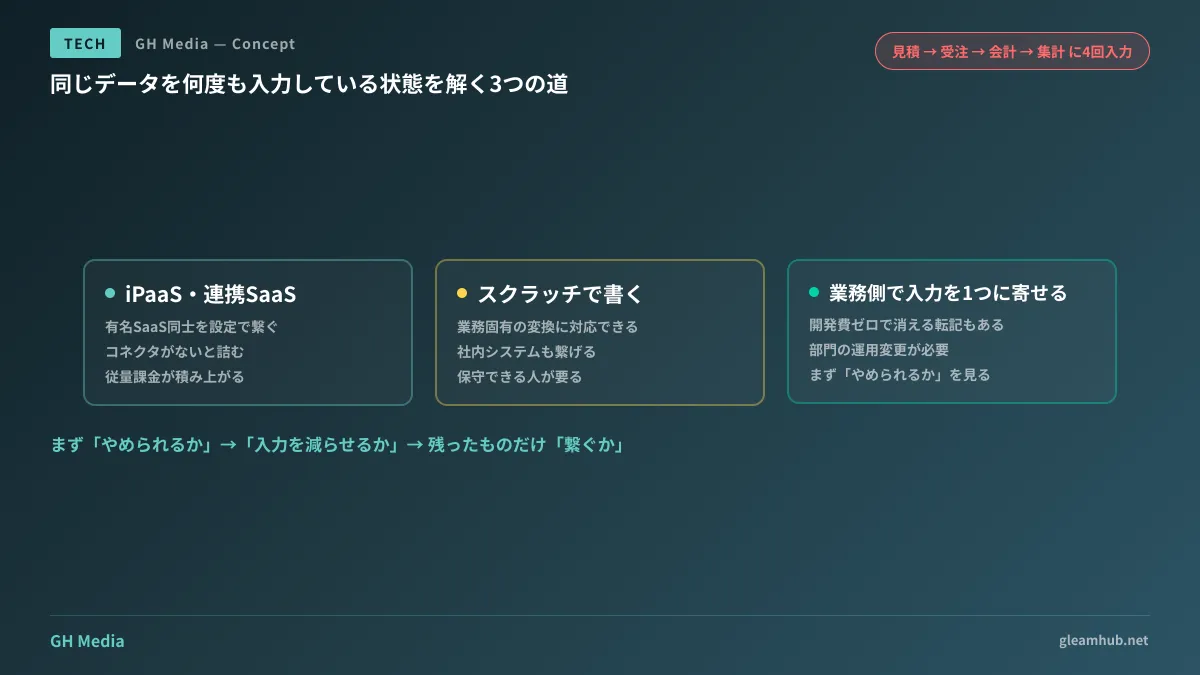
Three ways to integrate: the selection criterion is “frequency of change”
Once you decide to integrate, there are effectively three options.
| Method | Best-Suited Scenarios | Weakness |
|---|---|---|
| iPaaS / integration SaaS | Connecting well-known SaaS platforms, simple field mapping | Stalls if no pre-built connector exists. Usage-based billing accumulates |
| Building custom scratch integrations | Custom business transformation logic, involvement of internal legacy systems | Becomes technical debt if no one other than the author can maintain it |
| Consolidating data entry points operationally | Data origination points can effectively be narrowed down to one | Requires changes to departmental operations. Consensus building takes time |
The most decisive criterion when choosing among them is how frequently that business rule changes.
If you write custom integrations for business processes where pricing tiers or approval workflows change multiple times a year, you incur development costs with every revision. Here, mechanisms configurable through settings like iPaaS, or simply leaving decisions to humans, prove less expensive. Conversely, routing a ten-year-unchanged order intake format through a usage-billed iPaaS offers little justification for paying continuous monthly fees.
Do not underestimate the third option: “operational consolidation.” Reducing entry points to one is integration without technology. In the company mentioned earlier, two of the four entry points existed solely to “transcribe into a separate sheet for aggregation”; simply changing aggregation to generate directly from the source data eliminated them. Development cost was zero. Examining what can be discontinued before deciding what to automate is the correct sequence.
Prioritizing which business operations to tackle first was covered in Business automation priorities and ROI. Additionally, if you already have homegrown automations running internally, such as Google Apps Script, confirm beforehand the issue raised in Legacy Apps Script and maintenance: “who will maintain it after the author resigns?”
Decide which data source is canonical before connecting
The decision that must be made prior to technical choices to avoid guaranteed friction is which system's data serves as the source of truth.
When a customer's address differs between the quoting software and accounting software, which one takes precedence? If you correct one, does the other change automatically, or is the sync strictly unidirectional? Setting up bidirectional synchronization without this agreement leads to accidents where stale data overwrites newer entries. While recoverable, invoices for the intervening period will have already gone out.
The decision rule is simple: make the location where the field is first entered the source of truth. Basic customer information originates where sales reps first input it; billing amounts originate where orders are confirmed. Designating the origin as canonical naturally establishes a unidirectional update flow. Fields that genuinely require bidirectional synchronization are far fewer in most companies than commonly assumed.
There are also domains, such as chat and communication platforms, where consolidating the tools themselves is effective. This perspective was detailed in Consolidating business chat platforms.
Keep the option not to integrate on the table
Finally, let us address the counterpoint: you do not need to integrate everything.
Automating a task that takes five minutes of transcription once a month merely increases development overhead and maintenance scope without delivering a return. Candidates for automation must meet at least one criterion: high frequency, severe consequences of error, or heavy reliance on a single person. For transcriptions fitting none of these three, leaving them alone is the right answer.
The proper assessment sequence is: first, “can we eliminate it?”; next, “can we reduce entry points?”; and only for what remains, “should we integrate it?” Eliminating steps in this order frequently reveals that far less development is required than initially thought.
Count your workflow entry steps this week
Try just one thing: select a single core workflow and count how many times the same information is entered. For the company mentioned at the beginning, it was four times. If it is three or more, it is worth evaluating whether to integrate or consolidate.
When counting, count spreadsheets as distinct entry locations alongside official systems. Summary spreadsheets are almost always forgotten in counts, yet they typically demand the most effort.
Whether you want to audit workflow processes and clarify together what to connect and what to retire, GleamHub offers support through our development, AI, and automation consultations. Because the optimal setup varies depending on your requirements, we provide customized quotes. Please reach out to us via Contact Us.
Sources
- Users Don’t Need More Tools: They Need Seamless Integrations — Smashing Magazine
- [Survey Report] SaaS adoption grows, yet 86.9% of companies face data integration challenges — BizteX Inc. (June 2024)
- 86.9% perceive challenges in SaaS data integration: survey reveals issues including cross-departmental coordination — DX Magazine
- Challenges and solutions in inter-SaaS data integration — Waha! Transformer