On a morning when no one pushed a deployment, an admin panel button suddenly stops responding.
Investigating the root cause reveals that not a single line of internal code has changed. What changed was the external library imported by the page. Because it was loaded without specifying a version, the moment the provider published a new release, the running script was swapped out.
To prevent this kind of incident, a recent decision made in a late August release provides a valuable case study.
htmx 4.0 deliberately avoided becoming "latest"
htmx 4.0.0 was released on August 28, 2026. A major version developed over eight months, it shifted its internal implementation from XMLHttpRequest to fetch(). By unlocking ReadableStream, it enabled so-called HTML streaming, rendering server fragments in the order they arrive. Delivering that capability within a lightweight ~14KB library is the flagship highlight of this release.
There are also breaking changes. The most significant is attribute inheritance. Previously, attributes like hx-target were inherited implicitly by child elements, but 4.0 disables inheritance by default, requiring explicit declarations such as hx-target:inherited="#div" when inheritance is desired. This change resolves previous ambiguity where child elements suffered unexpected, unexplained side effects.
Additionally, event names have been standardized to the htmx:フェーズ:動作 pattern, history handling shifted from localStorage dependency to re-fetching on back navigation, morph swapping is now built in as standard, and the <hx-partial> tag was introduced.
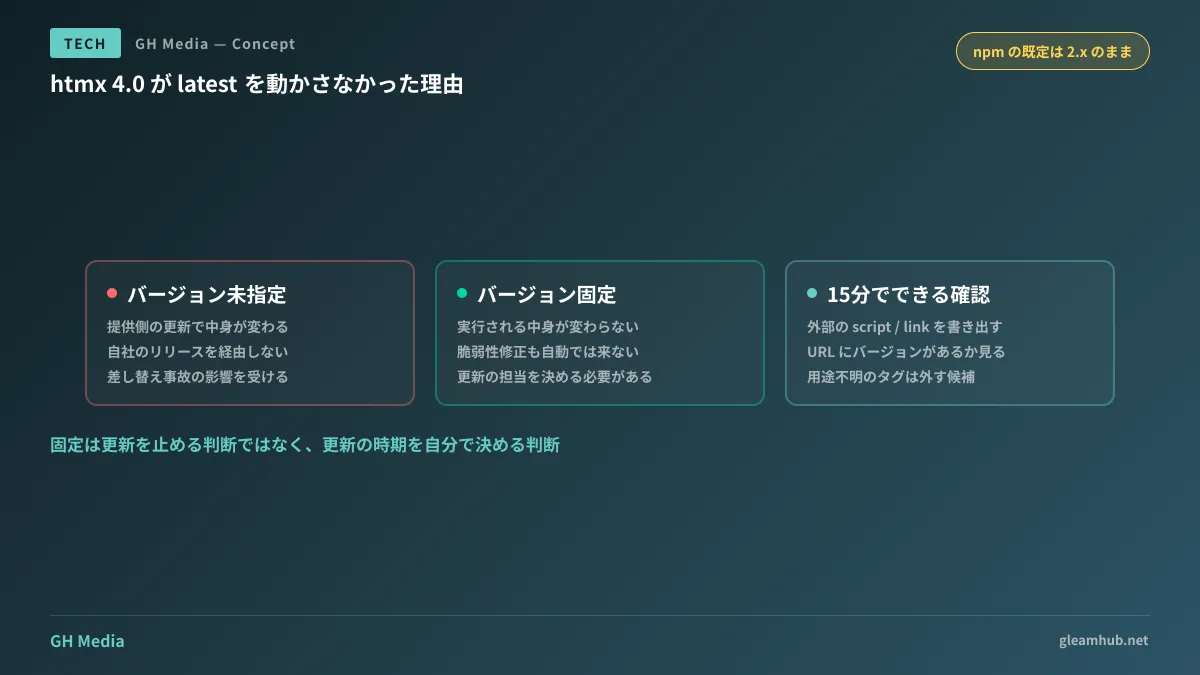
On top of that, the npm latest tag remains pinned to 2.x. The 4.0 series is distributed under next, and plans call for maintaining this setup until early 2027. The maintainers explicitly stated that htmx 2 will be supported indefinitely.
The rationale is straightforward: to prevent forcibly updating sites that import htmx via unversioned CDN URLs.
Are you set up to "upgrade automatically"?
This is where the issue becomes relevant even for organizations that do not use htmx.
When loading external scripts from a CDN, there are two common URL formats.
<!-- バージョンを固定している -->
<script src="https://cdn.example.com/lib@2.0.7/lib.min.js"></script>

<!-- バージョンを指定していない -->
<script src="https://cdn.example.com/lib/lib.min.js"></script>
If you use the latter format, the executing code changes completely independently of your company's deployments. It bypasses package-lock files, release processes, and verification testing entirely. The moment the provider places a new version on latest, new code runs across every user's screen.
The htmx development team made the deliberate decision not to update latest precisely to protect sites configured this way. Conversely, there is no guarantee that other third-party providers will be equally considerate.
Furthermore, unexpected updates do not just alter functionality. Real-world incidents have occurred where third-party scripts were compromised and distributed malicious code. The polyfill.io incident was a prime example, and those affected were sites loading scripts without pinning versions.
Checking what your company is loading
This audit takes only about 15 minutes to complete.
- Open your company website's primary pages in a browser and view the page source.
- Find lines containing
<script src=and<link href=, and compile a list of everything outside your company domain. - Check whether each URL includes an explicit version number. Note any URLs with ambiguous versions, such as
@latest,/dist/, or/v1/. - For each listed item, verify why it is being loaded. It is not uncommon to find leftover analytics tags originally installed for past campaigns.
Items identified in step 3 represent locations whose contents can change at the whim of external providers. Items in step 4 with no discernible purpose are prime candidates for complete removal.
Simply pinning versions is not enough
When you pin versions, vulnerability fixes will no longer arrive automatically. Pinning is not a decision to stop updating; it is a decision to control your own update timing. The party making that choice assumes the responsibility for executing it.
Consequently, pinning must be paired with clear agreements regarding "who updates what and when." If you outsource development and maintenance, check whether checking library updates is included in the scope of your maintenance contract. Contracts that omit this are surprisingly common. Without it, you end up with configurations left pinned and unmaintained for years.
Another valid approach is avoiding extra dependencies in the first place. What to Consider Before Adding a Dependency for a Single Feature directly connects to this context.
Should you adopt htmx 4 right now?
For administrative panels and internal tooling centered on tables and forms where HTML is rendered server-side, partial update mechanisms like htmx are strong candidates. Compared to introducing React or similar frameworks, both code volume and learning curves remain compact.
On the other hand, for interfaces involving complex client-side state manipulation—such as diagram editors and spreadsheets—or those requiring offline functionality, frameworks with robust state management remain the appropriate choice. This boundary mirrors the criteria discussed in When Re-evaluating Framework Choices.
However, there is little incentive to immediately upgrade existing systems running on htmx 2 to 4. Version 2 is supported indefinitely, and npm defaults remain on version 2. If you do upgrade, the maintainers provide a CLI tool to inspect migrations from 2.x and a htmx-2-compat extension that restores version 2 defaults and event names on version 4, allowing a smooth, phased transition.
Common pitfalls
"A major version was released" does not equate to "we must upgrade." As demonstrated here, providers sometimes maintain legacy releases as defaults. Make upgrade decisions only after weighing the benefits gained against the verification effort required.
Do not restrict your audits solely to internally written code. Embedded chats, web forms, analytics tags, and web font loaders are typically left untouched after initial implementation. The smoother things run, the less scrutiny they receive.
What to do next
Generate an inventory of all external scripts loaded across your public sites and internal systems. If even a single URL lacks a specified version, that script is outside your internal control.
Once the inventory is ready, establish three things for each entry: "Is it necessary?", "Should we pin the version?", and "Who monitors updates?". If any of these remain unassigned when your next release arrives, a morning like the one described at the beginning will come.
GleamHub provides audits of external dependencies, frontend architecture reviews, and operational designs that integrate library updates into maintenance scopes through our development, AI, and automation consulting. Because the optimal process depends on your current stack and operational team structure, please reach out via our contact page to discuss your needs.