Opening a repository from an inherited maintenance project and running npm install. Surprisingly few people can explain what actually happens during those few seconds.
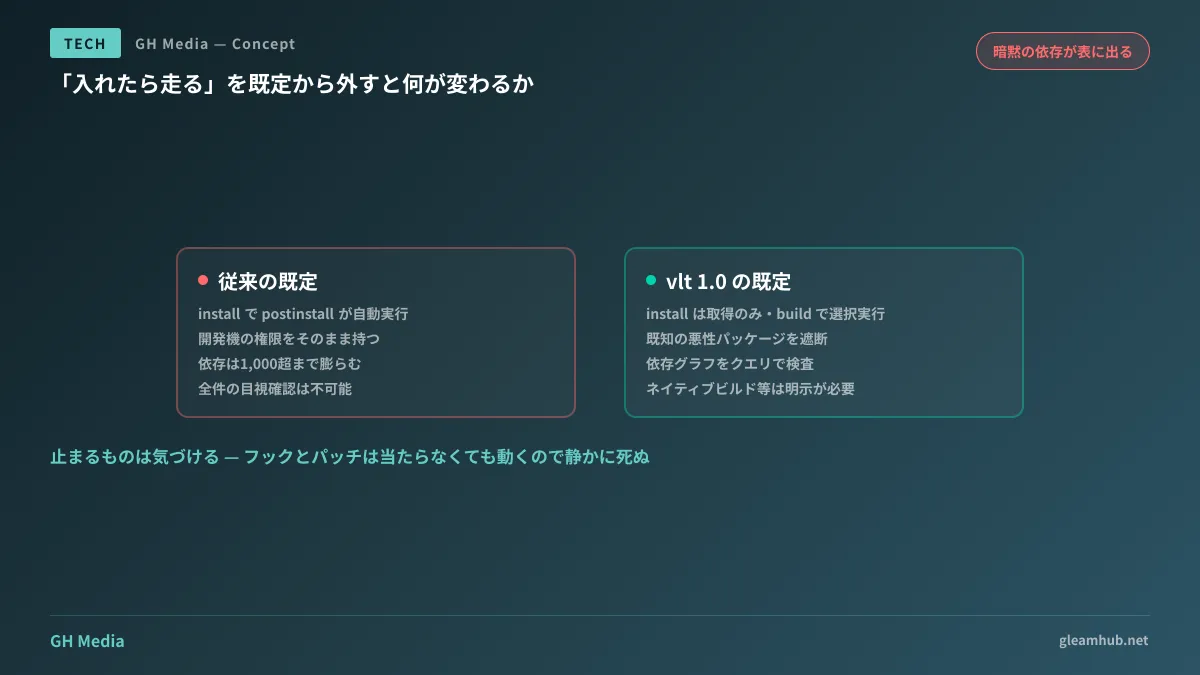
Dependency packages can include lifecycle scripts like postinstall. These execute automatically upon installation and, crucially, run with the privileges of your development machine. Environment variables, SSH keys, and cloud credentials all come within reach at that moment. Even if direct dependencies number just 20, pulling in transitive dependencies routinely puts the count over 1,000 packages, making manual visual inspection impossible.
A package manager that reorganizes this very default of "run upon installation" reached version 1.0 in August 2026.
Three defaults flipped by vlt
vlt is a JavaScript package manager developed by former npm core team members. Designed to be npm-compatible, it acts as a drop-in replacement for projects with existing package.json files. What stands out in 1.0 is not raw performance, but its design of defaults.
First, lifecycle scripts do not run by default. Installation and building are separated; vlt install only fetches packages, while script execution is handled selectively via vlt build. That "runs the moment you install" scenario mentioned earlier does not happen by default.
Second, known malicious packages are blocked at install time. It integrates vulnerability databases like OSV alongside public malware feeds, scanning continuously across a secure npm mirror.
Third, the dependency graph can be inspected with queries. Over 60 selectors are available, around 30 of which are security-focused. You can query and extract matching packages from the dependency tree using conditions like :malware, :cve, :vuln, :unmaintained, :outdated, :eval, :fs, and :license.
In terms of performance, clean installs are reported to be up to 38% faster than npm. However, putting speed first as your reason to switch will lead you astray. If choosing purely for speed, multiple alternatives already exist; that is not where vlt distinguishes itself.
What breaks when choosing "do not run scripts"
Having defaults lean toward safety also means behaviors relied upon implicitly until now will stop working. Adopting it without looking here means only realizing it once CI turns red.
| Things relying on install scripts | What happens |
|---|---|
| Native module builds (node-gyp family) | Fails unless build steps are explicitly defined |
| Binary downloads (bundled browser/CLI family) | Binary not found at runtime |
| Initial dev tool configuration (Git hook registration, etc.) | Hooks are not registered, silently disabled |
| Automatic patch execution | Runs without patches applied |
The most troublesome are the fourth and third rows. Things that fail with an error are easy to catch, but hooks and patches run even if not applied, causing review and formatting automation to quietly die. During adoption, you need to verify not merely that "it ran," but that "what was supposed to run actually ran."
A realistic adoption path for custom development and maintenance
Assuming you handle multiple projects, moving everything at once is impractical. Taking phased steps in the following order is realistic:
- Start with newly created projects. Since they are unburdened by legacy dependencies, you can design explicit script configurations right from the start
- Run dependency graph queries purely as a CI inspection step. Without replacing your package manager, periodically checking for dependencies matching
:malwareor:vulncarries zero side effects - For maintenance projects, align with major dependency update cycles. Since you are running regression tests anyway, mixing in default changes allows for clean troubleshooting
Before considering a migration, it is also worth checking how much of this your current package manager can already do. pnpm has also moved toward stricter handling of install scripts, a background we covered in pnpm 11 and supply chain defenses. If modifying existing tool settings suffices, that is the more cost-effective path.
Articulating what you are actually afraid of
Before selecting tools, what you want to clarify is which vector your company's risks come from.
If a development machine is compromised, customer credentials stored there are taken. If CI is compromised, it reaches your deployment targets. How attacks routed through public npm packages are constructed in practice is covered in Paths for arbitrary code execution in npm install, while the overall landscape of attacks via dependencies is summarized in Supply chain attack techniques and countermeasures.
If reading these two leads you to determine that "CI is our more vulnerable side," your priority might not be swapping package managers, but tightening CI permissions. Getting the sequence wrong yields minimal protection for the effort spent.
What to do next
First, try counting how many packages in the dependency tree of one active project have been left outdated. Even without installing vlt, you can obtain a rough count using existing tools. If that number reaches triple digits, proceeding to discussions on defaults is worthwhile. If it stays in double digits, establishing update routines first will be more effective.
Reevaluating maintenance frameworks, including dependency management and CI security design, is available through GleamHub's Development, AI, and Automation consultations. Because proper boundaries differ based on project scale and operational setups, we provide individualized estimates. Please consult us via Contact Us.