You rolled out accounting SaaS and expense management apps. Yet at month-end, staff are still opening spreadsheets and cross-checking numbers. The frustration of "Why are we still doing manual work when we supposedly computerized?" is widely shared across SMB back offices.
What remains are tasks between systems: reviewing receipt photos to interpret details, selecting account titles, verifying qualified invoice registration numbers, and reconciling figures across multiple tools. Each task takes only minutes on its own, but as volume stacks up, it consumes entire working days.
In 2026, conditions aligned to bridge this gap. Accounting software vendors have started providing standard connection endpoints designed for direct interaction by AI agents.
Accounting SaaS Opens Connectivity to Agents
Starting March 27, 2026, Money Forward opened remote MCP servers and external integration APIs for cloud accounting to all plan users. MCP (Model Context Protocol) is an open standard allowing AI agents to access external tools and data, with supported clients including Claude Desktop, Claude Code, Cursor, and Gemini CLI (Money Forward Cloud Developer Portal).
What this means is that AI agents can directly read and write without building dedicated integration tools for the accounting software. Previously, this type of automation required writing small, dedicated programs for each API call. The architecture of MCP itself is covered in The Complete Guide to MCP.
Real-world operational examples are also emerging. An individual case study on Zenn reported that handling everything from receipt OCR and journal entry decisions to invoice verification and accounting software entry via chat fully resolved most everyday expense tasks (Zenn). While a sole proprietor setup cannot be copied verbatim to organizations, it gives a practical sense of how much can be offloaded.
Separating "Reading" and "Writing" Processes
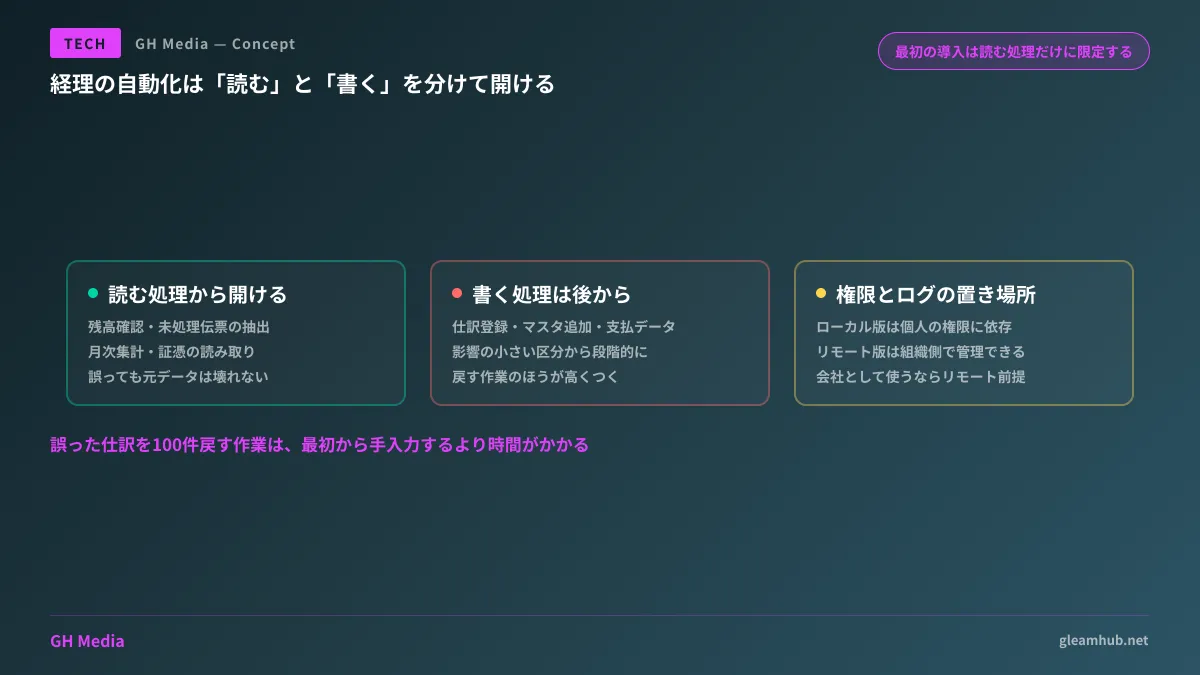
When evaluating adoption, the first thing to do is not compare features, but split operations into read and write processes, because the nature of the risks is entirely different.
| Type | Examples | Impact of errors |
|---|---|---|
| Read operations | Checking balances, extracting unposted slips, monthly totals, reading voucher details | Leads to incorrect judgment, but data remains unharmed |
| Write operations | Registering journal entries, adding vendor master records, creating payment data | Corrupts ledgers, requiring subsequent effort to identify and fix |
At worst, read operations end with "the AI gave the wrong answer." Humans can catch it upon review, and the source data is unaffected.
Write operations are another story. If 100 incorrect journal entries are committed, locating and reverting them takes longer than entering them manually from scratch. Therefore, standard practice is to limit initial rollouts strictly to read operations. Unlocking write operations can comfortably wait until you have established confidence in accuracy through read workflows.
Efforts Eliminated vs. Efforts That Remain
To maintain accurate expectations, we separate what this setup reduces from what it does not.
Transcription and searches disappear. Tasks like hunting down numbers hidden somewhere, copying data from one system to another, and filtering lists for matching conditions vanish entirely. These represent the tasks that consumed the most time while producing the least value.
Judgment and accountability remain. Determining whether an expense is legitimately business-related, whether a vendor payment is sound, and how a transaction is treated under tax law still requires human verification even if handed off to AI. It is more accurate to say that staff gain more dedicated time to focus on verification.
What newly increases is record keeping. If you cannot trace who (or what) posted what and when, audits become problematic. What must be retained under electronic bookkeeping preservation laws is discussed in Electronic Bookkeeping Preservation Act and Google Drive Workflows.
Where to Govern Permissions and Logs
This is the factor that determines adoption success or failure.
MCP servers come in two flavors: local versions running on user PCs and remote versions hosted by providers, with remote versions recommended because they require no technical setup. However, your choice dictates where permission management resides.
Local versions run on the user's workstation, inheriting that individual's account privileges. While convenient, connections tend to linger through resignations or transfers, and execution history remains isolated on local machines.
Remote versions manage connectivity within the accounting SaaS platform, allowing organizations to govern privilege assignment and execution logs centrally. If deployed organization-wide rather than for personal use, designing around remote versions saves substantial effort later.
From there, you still need to define what internal accounts are permitted to do. Restricting setup to "only the accountant's PC" works in single-person teams, but breaks the moment multiple people are involved. Organizational boundaries for AI tooling are summarized in Generative AI Usage Policies and Shadow AI Countermeasures.
Step-by-Step Sequence for Starting Small
There is no need to switch company-wide accounting all at once. The recommended sequence is as follows:
- Test a single read operation. Pick something visually verifiable, such as "List unposted slips for this month"
- Assess the scope where accuracy is dependable. Observe whether outputs are consistent and how unexpected inputs are handled. If confidence is lacking, do not proceed to write operations
- Open write operations starting with low-impact categories. Begin with areas where mistakes are easily spotted and reversed, such as small expense reimbursements
- Verify how records are preserved. Confirm you can trace whose authority initiated actions before opening broader access
When designing integration with internal business systems, considerations differ from introducing a single tool. For structuring existing systems for AI agent access, refer to Design Patterns for Turning Existing APIs into MCP Servers.
What to do next
Ask your accounting staff how much time they spent last month simply copying figures from one place to another. If that amounts to several hours a week, automating read operations alone delivers tangible results. If it is under an hour, there is no immediate rush.
Next, confirm whether your accounting software supports MCP or API connections. If supported, you can start simply by piloting a single read operation.
For advice on designing automations spanning accounting, sales management, and ERP systems, or adapting legacy systems for AI agent integration, GleamHub offers custom development, AI, and automation consultations. Practical scope depends on your existing tool stack, so please reach out individually via our Contact page.
Sources
- MCP Server — Money Forward Cloud Developer Portal
- Money Forward Cloud Accounting Launches Remote MCP Server for All Plans — PR TIMES
- Ditching Expense Apps and Excel: How I Fully Automated Accounting with Claude Desktop (MCP) + Money Forward API — Zenn
- What Is Money Forward Cloud Accounting MCP? Setup Guide and Practical Use Cases for AI Agent Automation — uconnect