"A vulnerability was found in a library you are using. Please update immediately." For companies running active websites, this message arrives out of the blue.
What you discover upon investigating is the fact that the version is already end-of-life and will receive no patches. No patches means the response is not a simple "update," but a full "migration." That changes the estimate by an order of magnitude.
React Router v8, released in June 2026, serves as an ideal case study for this dynamic. Even though the development team described it as striving to be "as boring as possible," security updates for two earlier versions ceased simultaneously.
Even in a "boring" release, where things stop is clearly defined
React Router v8 was released on June 17, 2026. Future flags introduced in v7 (such as middleware, the Vite env API, and Split Route Modules) all became defaults, and splitRouteModules was enabled by default as a top-level configuration option. Upgrading from v7 is billed as straightforward.
What was bundled under breaking changes essentially comes down to raised environment prerequisites.
- Distributed exclusively as ESM (tsconfig target and lib bumped to ES2022)
- Node.js 22.22.0 or higher
- React 19.2.7 or higher
- Vite 7 or higher
These are not "code rewrites"—they are "runtime environment shifts." Even if you do not touch a single line of application code, your build will fail if the Node version in your CI pipeline is outdated. And switching to an ESM-only distribution breaks peripheral tooling and configuration files that rely on CommonJS require.
This is where estimates surge. A short changelog does not mean an update is easy; raising environment prerequisites affects the entire project.
What really has an impact is the deprecation of older versions
With the same release, React Router v6 and Remix v2 reached end of life. Neither will receive security updates going forward.
From an operational standpoint, this single fact carries far more practical significance.
| Status | Options when a vulnerability emerges |
|---|---|
| Using a supported version | Update to a patch release |
| Using an end-of-life version | Migrate to a supported version, or build an in-house workaround |
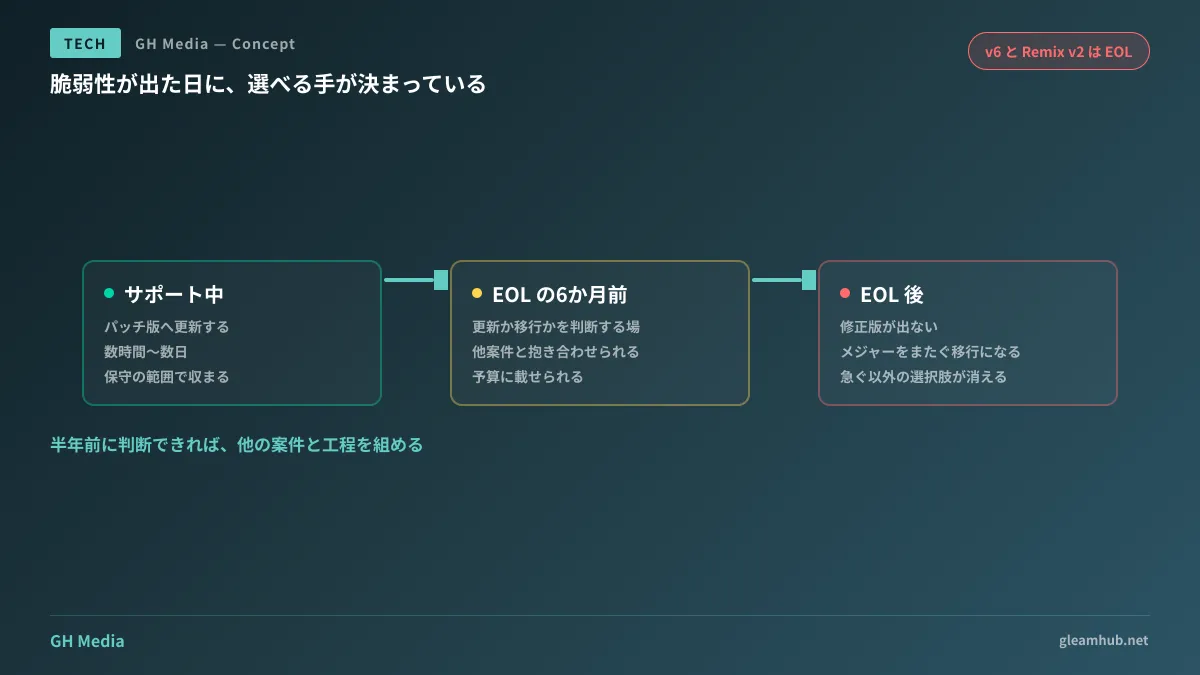
The top scenario can be resolved in a matter of hours to a few days. The bottom scenario requires migrating across major versions, which can turn into a multi-week initiative depending on the scale. If you only discover this difference after a vulnerability is disclosed, your only remaining option is a rushed migration.
What makes this tricky is that even though EOL schedules are announced in advance, site owners rarely have the habit of monitoring them. Almost no client reads framework blogs every month.
Where to check for support deadlines
To ensure teams asked to "provide an inventory" are not left stranded, here are places you can check. No specialized tools are required.
The package's own release announcements. Major version release posts almost always state how prior versions will be handled. In the case of React Router, the v8 announcement explicitly noted the End of Life for v6 and Remix v2. Viewing a new version announcement as an end-of-life notice for older versions helps prevent oversights.
Runtime release schedules. Some environments, such as Node.js, publish support lifecycles for each version in advance. The minimum versions required by frameworks shift in lockstep with these deadlines.
The dependency list itself. Running npm ls --depth=0 lists direct dependencies alongside their versions. Being aware of just what appears here allows you to immediately judge whether your organization is affected when vulnerability alerts are released.
Update frequency matters more than exhaustiveness. Even a rough list covering only direct dependencies works well in practice if updated once a year. That provides far more enduring value than compiling a perfect inventory once and abandoning it.
Annual major releases let maintenance teams plan ahead
React Router has stated it is moving to an annual release cycle. For recipients, this is not bad news. Budgeting for a predictable annual release is far easier than planning around updates that arrive without warning.
When incorporating this into maintenance contracts, the following approach is practical.
- Compile an inventory of major dependency packages with current versions and support deadlines
- Update that inventory once a year and share it with the client
- Schedule a review checkpoint six months prior to end of life to decide whether to update or migrate
The third point is crucial. Deciding right before the deadline means choosing from a diminished set of options. With six months' lead time, you can bundle the work with planned feature enhancements into a single schedule.
As discussed in When Maintenance Cost Increases Turn Out to Be CI Expenses regarding opaque maintenance breakdowns, dependency lifecycle management faces the same issue: if work is not specified in the contract, nobody touches it while time simply ticks away.
Three lines to add to your maintenance contract
Back-and-forth over dependency updates can be drastically reduced by addressing them at the contract stage. The following three items are well worth including.
Submission of version inventories and update cadence. If you do not know what packages and versions are in use, you cannot determine whether you are affected when vulnerability alerts emerge. Even an annual inventory makes a significant difference.
Obligation to notify of upcoming end of life. "If an active package approaches end of life, notice shall be provided upon discovery." Having this single line prevents reaching EOL without prior notice.
Clear distinction between updates and migrations. Defining boundaries ahead of time—such as patch updates being covered under maintenance while major version migrations require a separate quote—establishes what incurs extra costs early and shortens negotiations when urgent issues arise.
For risks inherent to dependencies themselves, please also refer to When npm 12 Turned Off Install Scripts by Default. As update frequency increases, the update process itself introduces an attack surface, creating another consideration.
What to do next
If you manage an active site or system, ask your maintenance contractor for an inventory listing "currently used frameworks, their primary dependencies' versions, and their support lifecycles." If they cannot provide one, that in itself reveals the current state of affairs.
If you already have an inventory on hand, extract only those items with less than one year remaining until end of life. That defines the scope to budget for your next cycle. There is no need to update everything at once.
GleamHub provides consultations on development, AI, and automation to assist with dependency audits for existing systems, framework version migrations, and maintenance framework design. Because project timelines vary depending on architecture and scale, please reach out for an individual consultation via Contact Us.