You only replaced a few product images, but to make sure the change shows up, you hit Cloudflare's "Purge Everything." Right afterward, requests pile up on the origin and the e-commerce site slows down, which bothers you. But if you leave the cache alone, a business partner gets in touch saying, "It's still showing the old image."
On September 28, 2026, Cloudflare added the ability to invalidate cached content as an alternative to purging it. Instead of deleting the content, it marks it as "stale" and, on the next request, asks the origin whether it has changed. On the same day, the behavior of purge also changed for sites using Cache Reserve.
To help you decide which to use each time you update your site, we organize what the official documentation says, and present our recommendations on when to use each separately as the editorial team's suggestions.
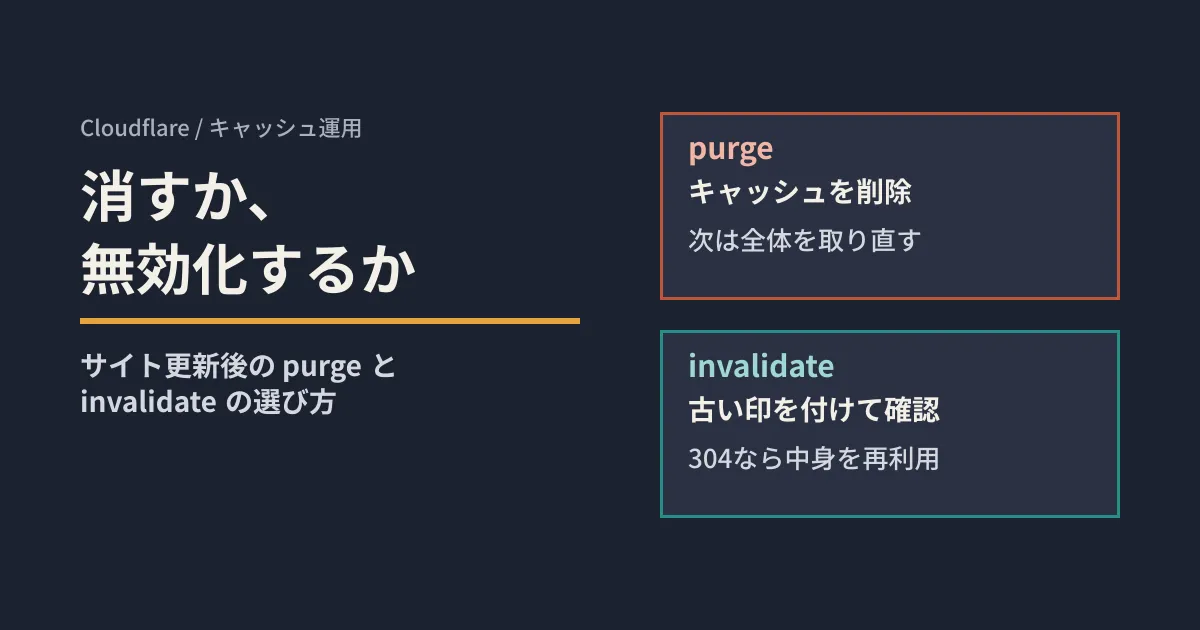
Purge deletes; invalidate marks as stale
Invalidation is also called a "soft purge." You specify targets the same way as with purge: by URL, cache tag, hostname, URL prefix, or everything. The difference is what happens to the specified cached content.
| Behavioral | purge | invalidate |
|---|---|---|
| Cached content | Deleted | Kept but marked stale |
| Next request | Fetches the entire response from the origin again | Checks with the origin using a conditional request |
| Serving stale content | No | May serve it during revalidation or when the origin fails |
| API endpoint | purge_cache | invalidate_cache |
In the dashboard, run it from "Invalidate Cache" under Caching > Configuration. In the API, the request body format is the same as for purge; only the endpoint changes to invalidate_cache.
curl --request POST \
  "https://api.cloudflare.com/client/v4/zones/$ZONE_ID/invalidate_cache" \
  --header "Authorization: Bearer $CLOUDFLARE_API_TOKEN" \
  --header "Content-Type: application/json" \
  --data '{"tags":["product-images"]}'
The API token needs the same "Cache Purge" permission as purge. Invalidation does not proactively fetch new content; revalidation begins when the first request arrives after invalidation.
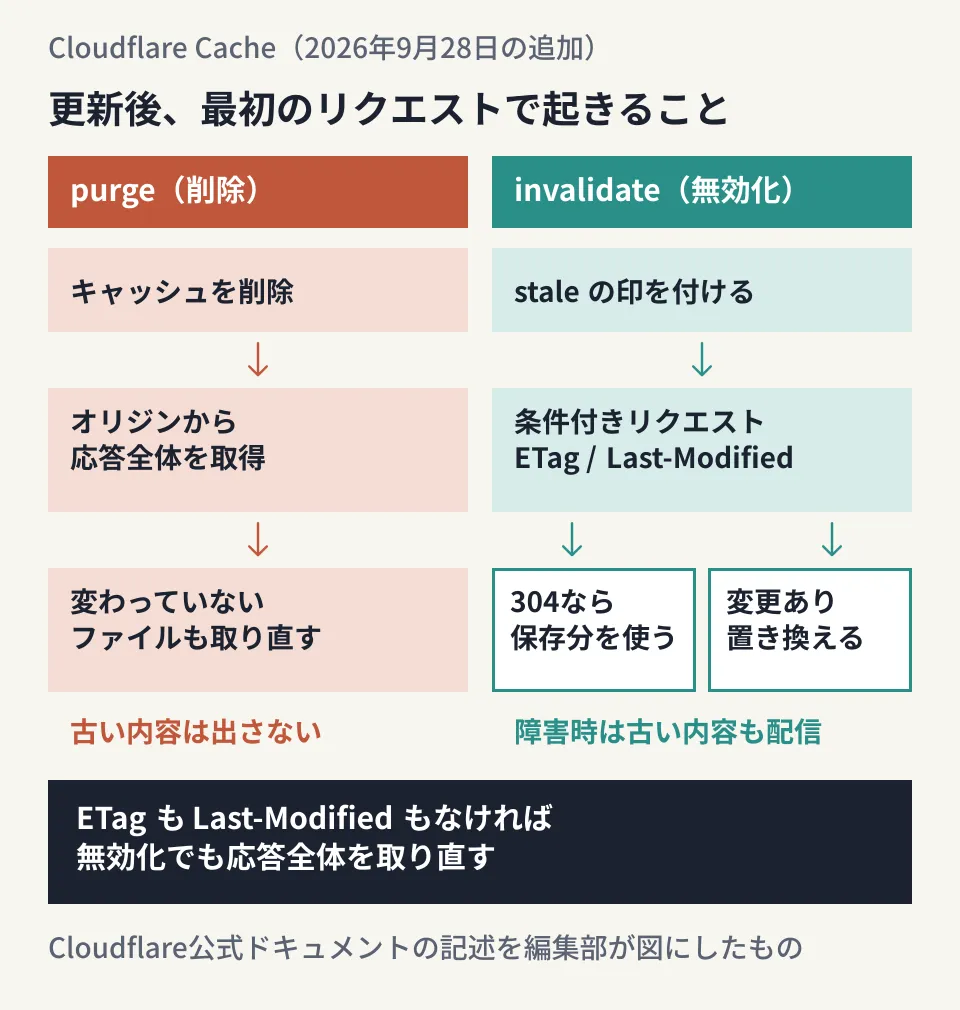
The key point in the diagram is how unchanged files are handled. A purge fetches everything from the origin again, including images that have not changed. With invalidation, files for which the origin returns 304 Not Modified reuse the stored content and get a new TTL. The official documentation cites updating a group where "only some items have changed," such as a set of images sharing a cache tag, as a use case.
Content is reused only when the origin can return 304
How effective invalidation is depends on the origin. Cloudflare sends a conditional request using the ETag or Last-Modified header that the origin originally returned. If the origin returned neither header, or cannot answer a conditional request with a 304, Cloudflare fetches the entire response again, just as with purge. The official documentation explicitly states that "invalidation does not guarantee reuse."
One thing to watch for when checking: even if a response via Cloudflare includes Last-Modified, the origin is not necessarily the one returning it. If the origin returns neither header, Cloudflare may return its own cache time to the browser as Last-Modified (smart revalidation towards users). This value is not used for revalidation against the origin, so check the headers by sending a request directly to the origin, bypassing Cloudflare.
The following constraints also apply.
- A 304 response does not update cache tags added with Cache Response Rules. The origin's
Cache-Tagheader is updated only if it is also included in the 304 response. If you need to retag content, purge it - Invalidation from the dashboard or
invalidate_cachedoes not apply to Workers Cache (the cache held by a Worker). Workers Cache belongs to the Worker, not the zone, so callctx.cache.purge()from the Worker's code
Which headers the origin returns depends on your CMS and hosting settings. We also explain how headers affect caching behavior in our article on why old pages still appear after updating, viewed through headers.
If the origin goes down, stale content keeps being served
The most important thing to watch with invalidation is the default behavior when the origin does not respond.
Whether stale content is returned during revalidation depends on the Cache-Control of the cached response. If stale-while-revalidate is present, Cloudflare returns the stale content while revalidating in the background. If not, the request waits for revalidation to complete. You can stop serving during revalidation with "Serve stale content while revalidating" in Cache Rules.
It is a different story when the origin returns 5xx or is unreachable. Even without a stale-if-error directive, Cloudflare can serve invalidated content as stale for as long as it remains in the cache. The troubleshooting section of the official documentation states that this is the default behavior and that Cache Rules settings do not change it. Here is how to stop it.
- To limit how long it is served: add
stale-if-errorwith a number of seconds to the origin's response - To prevent it from being served: add
stale-if-error=0 - If Origin Cache Control is enabled,
must-revalidate,proxy-revalidateands-maxagealso stop it - To stop serving it immediately: purge instead of invalidating
In the official documentation's example, if a Cache-Control: public, max-age=3600, stale-while-revalidate=30 response is invalidated before it expires, stale content can be returned while revalidating for up to 30 seconds after invalidation (the grace period is counted from the moment of invalidation). Because there is no stale-if-error, if the origin is down, stale content continues to be returned even after 30 seconds, for as long as it remains in the cache.
From here on is the editorial team's assessment. Keeping pages available during an outage is an advantage for product listings and article pages. On the other hand, this behavior backfires when you need to replace an incorrect price or information that must not be published. It is safest to decide in advance that such updates will use purge rather than invalidation.
If you use Cache Reserve, purge now means something different
Cache Reserve is a paid feature that keeps cached content in R2 storage so it persists even after being evicted from the edge. Since September 28, 2026, any type of purge against Cache Reserve content always results in a cache miss.
Previously, tag, hostname, prefix and everything purges only marked Cache Reserve content for revalidation (purge by URL already deleted content and is unchanged). The change applies to both the API and the dashboard, and Cache Reserve is now treated the same as the edge cache.
The official announcement lists the following cost implications and encourages you to review origin data transfer and Cache Reserve usage if you use such purges frequently.
- The first request after a purge is a Cache Reserve miss, and the origin returns the full response even for unchanged content. Writing that content back to Cache Reserve is billed as a Class A operation
- With tag, hostname, prefix and everything purges, content is not deleted immediately. Storage charges continue until it is replaced by a later request or its retention period ends
According to the pricing table, storage is $0.015 per GB per month, Class A operations (writes) are $4.50 per million, and Class B operations (reads) are $0.36 per million, with billable counts rounded up to the next million. Purge requests themselves are free operations.
If you want to keep the previous "revalidate" behavior, send the same request to invalidate_cache. However, invalidation reduces data transfer from the origin, not the number of Cache Reserve operations. Updating stored content after receiving a 304 is a Class A operation, and invalidation by URL also updates stored content at the time the request is sent, which is likewise a Class A operation. In addition, content served from Cache Reserve is not returned stale during revalidation even if stale-while-revalidate is present. Only copies in the edge cache can be served stale.
Choose by type of update and verify with headers
What follows are the editorial team's recommendations based on the specifications above.
- Use purge for updates where stale content must never be shown, such as corrections of erroneous postings, price changes or removal requests. As the official documentation says, update or delete the content on the origin first, then purge. If you do it in the reverse order, the old version will be cached again on the next request.
- Use invalidation for updates to groups where only some items have changed, such as sets of images or CSS. Narrow the scope with cache tags or prefixes. The official documentation recommends choosing the smallest necessary scope, since invalidating everything can trigger a large volume of revalidation.
- Check the origin's response headers first. Does it return
ETagorLast-Modified, and does it answer conditional requests with 304? Have you set how long stale content may be served during outages withstale-if-error? - If you use Cache Reserve, review how often you purge and what it costs. If you have a process that regularly runs purges by tag, either switch it to invalidation or monitor trends in data transfer and operation counts.
Purge and invalidation share the same account-level limits. Heavy use of one reduces what is available for the other. The limits are also shared across zones on the same plan.
| Limit (per account) | Free | Pro | Business | Enterprise |
|---|---|---|---|---|
| Tag, hostname, prefix, everything | 5 per minute | 5 per second | 10 per second | 50 per second |
| Same (bucket size) | 25 | 25 | 50 | 500 |
| By URL | 800 URLs per second | 1,500 URLs per second | 1,500 URLs per second | 3,000 URLs per second |
| Maximum items per request (by URL) | 100 | 100 | 100 | 500 |
The maximum number of items per request for tag, hostname, prefix and everything is 100 on all plans. If you automatically purge on every update from CI or CMS hooks, adding invalidation will compete for the same quota.
Verifying that invalidation worked
The official documentation's procedure is as follows. Prepare a cacheable URL for which the origin returns ETag or Last-Modified, and do not change the origin's content during the test. To observe revalidation directly, do not add stale-while-revalidate to the test response, and set a positive TTL.
- Request the URL until
CF-Cache-StatusbecomesHIT - Invalidate that URL
- Request it again and check the response headers (
curl --silent --show-error --dump-header - --output /dev/null <URL>) - Confirm in the origin logs that a conditional request arrived and a 304 was returned
| Status | CF-Cache-Status |
|---|---|
| The origin responded "not modified" | REVALIDATED, then HIT |
| The origin returned new content / returns neither ETag nor Last-Modified | EXPIRED, then HIT |
| Stale content was returned during revalidation | UPDATING, then HIT |
| The origin returned 5xx or was unreachable | STALE |
| The content was not in the cache | MISS |
With Tiered Cache, lower-tier data centers revalidate against upper tiers, so you may see EXPIRED or MISS even when the origin returns 304. Do the final check in the origin logs. Likewise, the HTTP 200 returned by the purge API only acknowledges receipt; after a purge, request again and confirm it is no longer HIT.
Cache management is part of maintaining a site after it is built. We also discuss who owns the update process in our article on the risks of treating a website as done once it is built.
On September 30, 2026, we cross-checked Cloudflare's changelog (two entries dated September 28, 2026), the Invalidate cached content guide, the Purge cache limits table, the Cache Reserve pages (Purge behavior, Pricing, Operations), Revalidation, and Cloudflare cache responses against the official documentation's source repository (as of September 29, 2026). Because developers.cloudflare.com could not be accessed from this environment, we read the source files with the same content. We have not verified running invalidation or purges on a Cloudflare zone, observing
CF-Cache-Status, or actual Cache Reserve charges. Dashboard menu names are given in English as they appear.
For operating rules for sites behind Cloudflare, or reviewing cache design during a site renewal, please contact GleamHub.
Sources
- Invalidate cached content instead of purging it — Cloudflare Changelog
- Purge now forces a cache miss for Cache Reserve content — Cloudflare Changelog
- Invalidate cached content — Cloudflare Cache docs
- Purge cache — Cloudflare Cache docs
- Cache Reserve — Cloudflare Cache docs
- Revalidation — Cloudflare Cache docs
- Cloudflare cache responses — Cloudflare Cache docs